
1. 서론
The TIMBOOTECH Wireless HDMI Transmitter and Receiver system provides a solution for wireless video and audio transmission. This system features built-in screens and control buttons for real-time monitoring of pairing status, connected receivers, and channel selection, ensuring optimal signal quality. It supports up to four receivers simultaneously and offers an extended transmission range of up to 1000 feet (300 meters). Additional features include an HDMI loop-out port and an integrated cooling fan for enhanced performance and reliability.
This device is suitable for various applications, including home entertainment, business presentations, indoor and outdoor filming, live broadcasts, concerts, and gaming setups. It operates on dual-band 2.4GHz and 5.8GHz frequencies, providing stable, interference-free performance with an ultra-low latency of 0.06 seconds.
2. 패키지 내용
아래 나열된 모든 품목이 패키지에 포함되어 있는지 확인하세요.
- 무선 HDMI 송신기(TX) 1개
- 무선 HDMI 수신기(RX) 2개
- 2 x HDMI 케이블
- 2 x USB-C 전원 케이블
- 1 x 미니 HDMI 어댑터
- 1 x 마이크로 HDMI 어댑터
- 2 x 콜드 슈 마운트
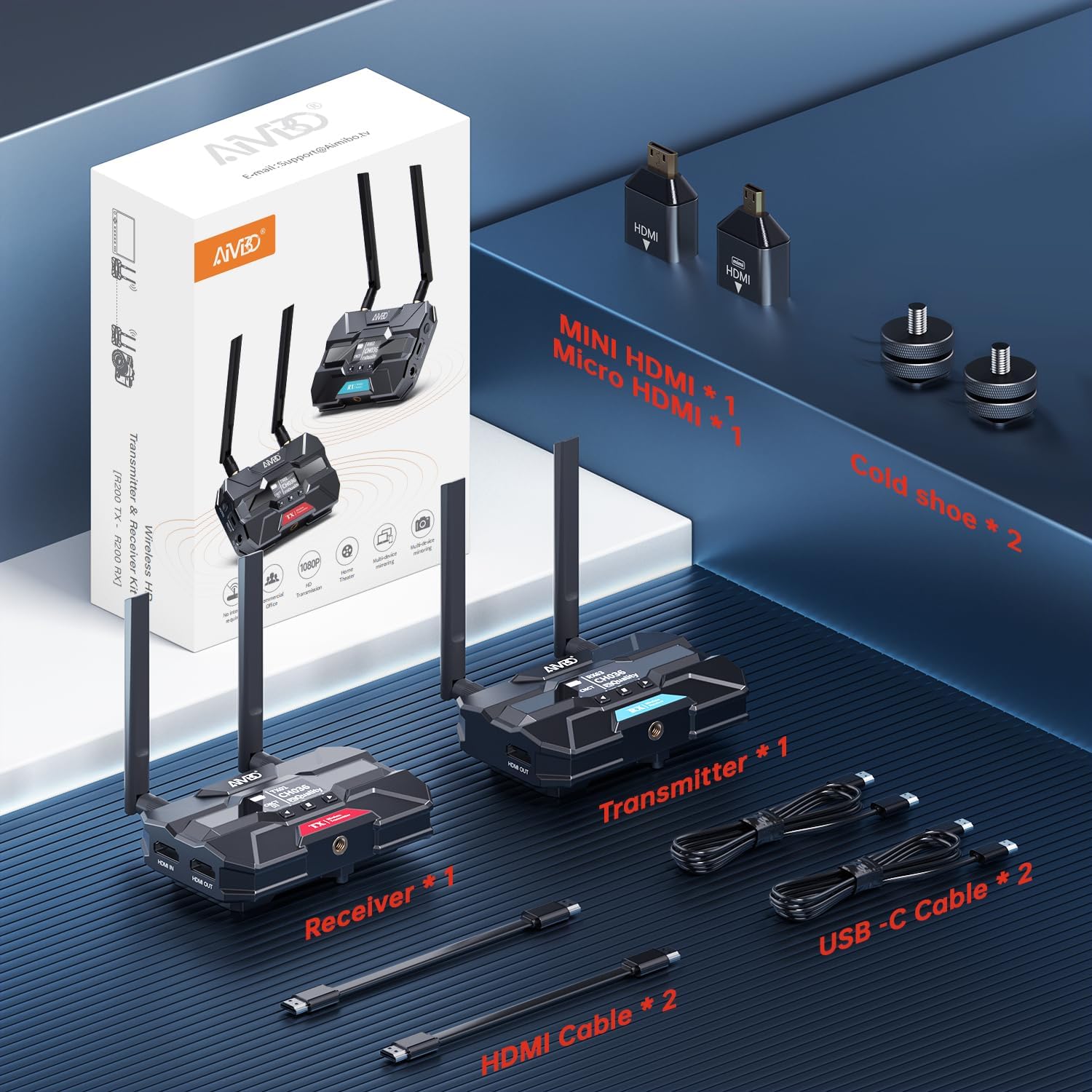
Image: Contents of the TIMBOOTECH Wireless HDMI system package, showing the transmitter, receiver, various cables (HDMI, USB-C), and adapters (Mini HDMI, Micro HDMI), along with cold shoe mounts.
3. 제품 오버view
The TIMBOOTECH Wireless HDMI system consists of a Transmitter (TX) and Receiver (RX) units, each equipped with essential features for reliable operation.
송신기(TX) 장치
- OLED 디스플레이: Shows current status, channel, and signal quality.
- 제어 버튼: For navigation and settings adjustment.
- HDMI 입력 포트: Connects to your video source (e.g., camera, laptop).
- HDMI OUT (Loop-Out) Port: Connects to a local monitor for simultaneous view주고받음.
- DC 12V 전원 입력: Primary power connection.
- USB-C 전원 입력: Alternative power connection.
- 냉각 팬: Prevents overheating during extended use.
- 안테나 : 무선 신호 전송용.
수신기(RX) 유닛
- OLED 디스플레이: Shows current status, channel, and signal quality.
- 제어 버튼: For navigation and settings adjustment.
- HDMI 출력 포트: Connects to your display device (e.g., TV, projector).
- DC 12V 전원 입력: Primary power connection.
- USB-C 전원 입력: Alternative power connection.
- 냉각 팬: Prevents overheating during extended use.
- 안테나 : 무선 신호 수신용입니다.

이미지: 클로즈업 view of the TIMBOOTECH Wireless HDMI Transmitter (red label) and Receiver (blue label) units, highlighting their OLED screens, control buttons, and antennas.

Image: A collage illustrating key features of the TIMBOOTECH Wireless HDMI system, including its triple power options, integrated OLED screen, 5.8G chip, cooling fan, and camera mount compatibility.
4. 설정 지침
Follow these steps to set up your TIMBOOTECH Wireless HDMI system:
- 송신기(TX) 연결:
- Connect your HDMI video source (e.g., camera, laptop, Blu-ray player) to the HDMI 입력 port on the Transmitter using an HDMI cable.
- (선택 과목) 원하신다면 view the source on a local display, connect an HDMI cable from the HDMI OUT (Loop-Out) port on the Transmitter to your local TV or monitor.
- 수신기(RX) 연결:
- HDMI 케이블을 연결하세요 HDMI 출력 port on each Receiver to your desired display device (e.g., TV, monitor, projector).
- Power On the Devices:
- Connect the provided DC 12V power adapters to the 직류 12V input ports on both the Transmitter and all Receiver units, then plug them into a power outlet. Alternatively, you can use the USB-C power cables for power. (Note: For optimal performance, especially over long distances, using the DC 12V power adapter is recommended.)
- Press the power button on each unit to turn them on.
- 연결 확인:
- Once powered on, the OLED screens on both the Transmitter and Receiver(s) will display their status. They should automatically pair. Look for indicators like "CNCT" (Connected) and matching channel numbers (e.g., TX CH036, RX CH036).
- If pairing does not occur automatically, refer to the "Operating Instructions" section for manual channel selection.

Image: A visual representation of the wireless HDMI setup, demonstrating how the Transmitter (TX) connects to a primary TV and TV Stick via loop-out, while a Receiver (RX) transmits the signal to a second TV in another room.
5. 사용 설명서
5.1 전원 켜기/끄기
- 전원을 켜려면 힘 button on each unit.
- 전원을 끄려면 힘 장치가 종료될 때까지 버튼을 누르십시오.
5.2 Monitoring Status via OLED Screen
The built-in OLED screen provides real-time information:
- TX/RX 표시기: Identifies the unit as Transmitter or Receiver.
- Channel Number (CH): Displays the current operating channel. Ensure TX and RX units are on the same channel for connection.
- Connection Status (CNCT): Indicates if the unit is connected to its counterpart.
- 신호 품질: Shows the strength and quality of the wireless signal.
5.3 채널 선택
If you experience interference or connection issues, you can manually change the operating channel:
- On both the Transmitter and Receiver units, use the control buttons (usually up/down or menu buttons) to navigate to the channel selection option.
- Select a new channel. Ensure both the TX and all RX units are set to the same channel for proper communication.
- The system will attempt to re-establish connection on the new channel.
5.4 Using HDMI Loop-Out
The Transmitter's HDMI OUT (Loop-Out) port allows you to connect a local display while simultaneously transmitting the signal wirelessly to one or more Receivers. This is useful for monitoring the source content directly at the transmission point.
5.5 다중 수신기 설정
The system supports connecting a single Transmitter to up to four Receivers simultaneously. To add more Receivers:
- Ensure the additional Receiver(s) are powered on.
- Verify that the channel displayed on the new Receiver matches the channel of the active Transmitter. If not, adjust the channel on the Receiver.
- The new Receiver should automatically connect to the Transmitter.

Image: A stadium setting with multiple screens, illustrating the capability of the TIMBOOTECH system to transmit to up to four receivers over a range of 1000 feet, ideal for large-scale events.
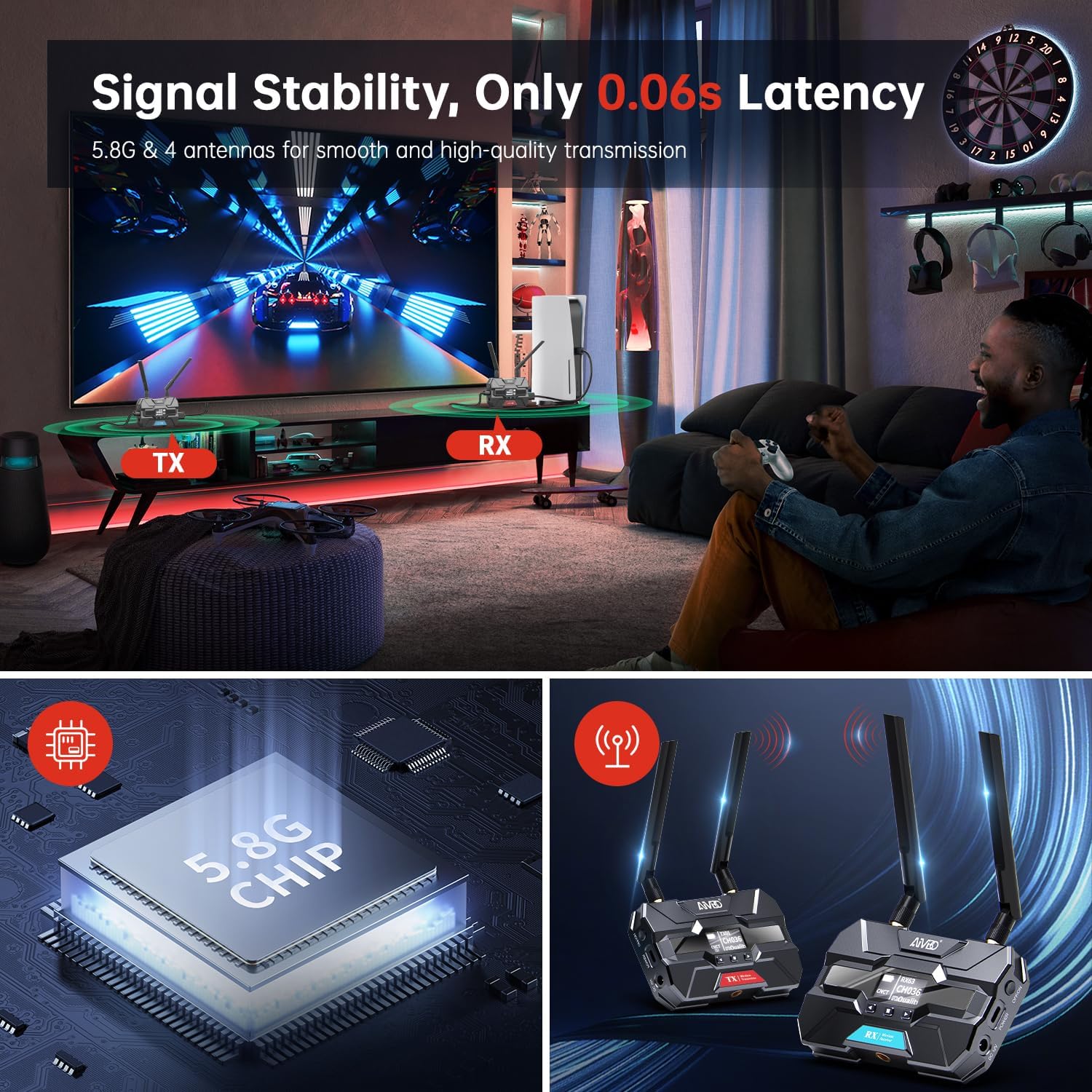
Image: A gaming environment demonstrating the TIMBOOTECH Wireless HDMI system's stable signal and ultra-low latency (0.06s), crucial for responsive gaming experiences.
6. 유지관리
- 청소: 부드럽고 마른 천을 사용하여 기기 외부를 닦으세요. 액체 세척제나 용제는 사용하지 마세요.
- 냉각 팬: The built-in cooling fan helps maintain optimal operating temperature. Ensure the fan vents are not obstructed to allow proper airflow.
- 저장: 장시간 사용하지 않을 경우, 직사광선과 극한의 온도를 피해 시원하고 건조한 곳에 보관하세요.
7. 문제 해결
If you encounter issues with your TIMBOOTECH Wireless HDMI system, please refer to the following troubleshooting tips:
| 문제 | 가능한 원인 | 해결책 |
|---|---|---|
| 디스플레이에 신호가 없습니다 |
|
|
| Poor signal quality, flickering, or dropped connection |
|
|
| 페어링되지 않은 유닛 |
|
|
| 과열 |
|
|
8. 사양
- 모델 번호: c6e2f051-b1a5-4eb1-920e-7e082da52f8c
- 전송 범위: 최대 1000피트(300m)
- 숨어 있음: 0.06초
- 무선 주파수: Dual-band 2.4GHz and 5.8GHz
- Maximum Receivers: 4 (one Transmitter to four Receivers)
- 연결 기술 : HDMI
- 커넥터 유형: HDMI
- 특징: Built-in Cooling Fan, OLED Display, HDMI Loop-Out
- 호환 장치: Televisions, Monitors, Projectors, Cameras, Laptops, Blu-ray players, Set-top boxes, PCs, DSLRs, Satellites, DVDs
- 전원 입력: DC 12V (recommended), USB-C
- 제조업체: 팀부테크
9. 보증 및 지원
For warranty information and technical support, please refer to the documentation provided with your purchase or contact TIMBOOTECH customer service through their official channels. Keep your purchase receipt for warranty claims.