
Denash Denashkfny6shdpu-12
Denash 12-Key Mechanical Gaming Macro Keypad User Manual
Model: Denashkfny6shdpu-12
소개
This manual provides instructions for the Denash 12-Key Mechanical Gaming Macro Keypad. Please read this manual thoroughly before using the product to ensure proper operation and to maximize its features.
The Denash 12-Key Mechanical Gaming Macro Keypad is a compact, wired mini keyboard designed for various applications including gaming, office work, and multimedia control. It features hot-swappable mechanical switches, customizable shortcuts, and RGB lighting.
패키지 내용
- 1 x Denash 12-Key Mini Mechanical Keyboard
- 1 x Type-C USB 케이블
- 1 x 키캡 풀러
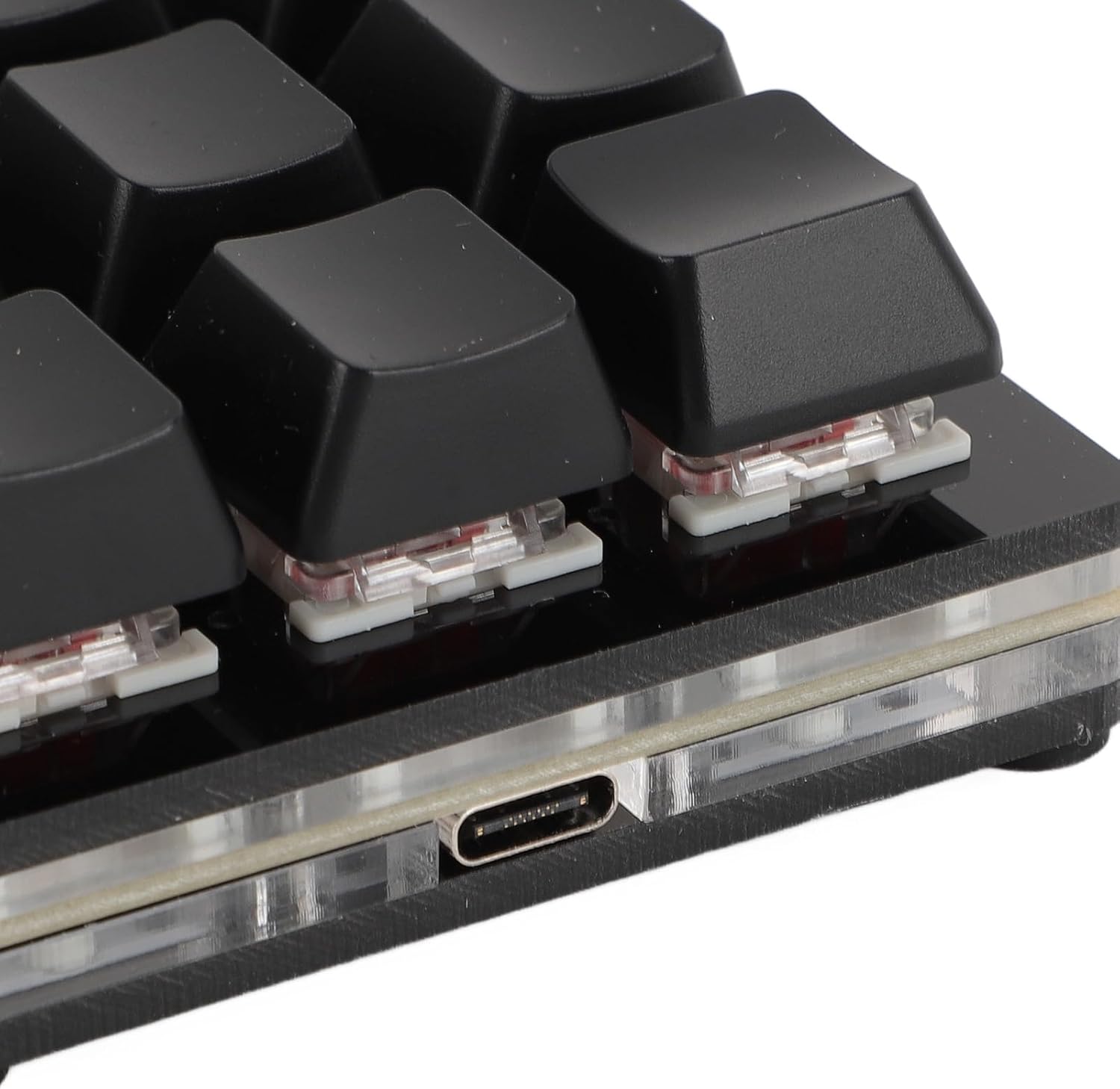
Image: The package includes the 12-key macro keypad, a Type-C USB cable, and a keycap puller tool.
설정
- 키패드를 연결하세요: Insert the Type-C end of the provided USB cable into the Type-C port on the back of the keypad.
- 컴퓨터에 연결: Insert the standard USB-A end of the cable into an available USB port on your computer.
- 플러그 앤 플레이: The keypad is plug-and-play. Your operating system (Windows, macOS, Linux, Raspberry Pi) should automatically detect and install the necessary drivers. No additional software installation is typically required for basic functionality.

Image: The Type-C USB interface on the keypad, ready for connection to a computer.
작동 지침
기본 기능
The keypad functions as a standard input device upon connection. Each of the 12 keys can be programmed for various functions.
Customizing Key Functions (Macro Programming)
The Denash 12-Key Macro Keypad supports customizable shortcuts and macro definitions. While specific software for programming is not detailed in the product description, macro keypads typically require dedicated software for advanced customization. Please refer to the manufacturer's website or included documentation for software download and programming instructions.
Common programmable functions include:
- 키보드 기능: 단일 키 또는 키 조합(예: Ctrl+C, Alt+Tab)을 할당할 수 있습니다.
- 마우스 기능: Assign mouse clicks (left, right, middle), scroll up/down, or specific mouse movements.
- 멀티미디어 기능: Control volume, play/pause, next/previous track.
- String Functions: Input predefined text strings.
- 게임 기능: Assign complex in-game commands or sequences.
- 매크로 정의: Record and assign a sequence of keystrokes and mouse actions.

Image: An illustration of the six main types of functions that can be assigned to the keypad's keys: Keyboard, Mouse, Multimedia, String, Game, and Macro Definition.
RGB 조명
The keypad features RGB lighting with adjustable modes. Specific instructions for changing lighting modes are typically found within the customization software or via specific key combinations (if hardware-controlled). Refer to the manufacturer's documentation for detailed instructions on RGB lighting customization.
유지
청소
- 청소하기 전에 키패드를 컴퓨터에서 분리하십시오.
- 부드럽고 마른 천으로 키패드 표면을 닦으십시오.
- 잘 지워지지 않는 더러움에는 가볍게 damp천에 물이나 순하고 연마성이 없는 세제를 묻혀 닦아주세요. 과도한 습기는 피하세요.
- 압축 공기를 사용하여 키캡 사이의 먼지와 이물질을 제거합니다.
핫스왑 가능 스위치
This keypad features hot-swappable mechanical switches, allowing you to change switches without soldering. This enables customization of typing feel and easy replacement of faulty switches.
- 키캡 제거: 제공된 키캡 풀러를 사용하여 원하는 키캡을 조심스럽게 제거하세요.
- 스위치 제거: Use a switch puller (not included, but often comes with replacement switches) to carefully pull the switch straight up from its socket.
- 새로운 스위치 설치: Align the pins of the new switch with the holes in the PCB. Gently press the switch down until it clicks into place. Ensure the pins are not bent.
- 키캡 교체: 키캡을 새로운 스위치 스템에 눌러 넣습니다.

이미지: 클로즈업 view of a mechanical switch with its keycap removed, illustrating the hot-swappable nature of the keypad's switches.
문제 해결
- Keypad not recognized by computer:
- USB 케이블이 키패드와 컴퓨터에 제대로 연결되어 있는지 확인하십시오.
- 키패드를 컴퓨터의 다른 USB 포트에 연결해 보세요.
- Test the keypad on another computer to rule out a computer-specific issue.
- 컴퓨터를 다시 시작하세요.
- 키가 응답하지 않음:
- 키캡 아래에 장애물이 있는지 확인하십시오.
- If the switch is hot-swappable, try reseating the switch or replacing it with a known working switch.
- Ensure no software conflicts are present if using custom macro software.
- RGB 조명이 작동하지 않거나 올바르지 않음:
- Verify that the keypad is properly connected and receiving power.
- If using customization software, ensure lighting settings are correctly configured.
- Consult the manufacturer's documentation for specific RGB control instructions.
명세서
| 품목 유형 | 미니 기계식 키보드 |
| 재료 | 아크릴 + ABS |
| 키 번호 | 12개의 키 |
| 스위치 유형 | Red Mechanical Switch (Hot-Swappable) |
| 연결 유형 | Type-C 유선 |
| 호환 가능 | Universal for computer (Windows, macOS, Linux, Raspberry Pi) |
| 모델 번호 | Denashkfny6shdpu-12 |
| 치수 | 7.09 x 5.12 x 1.57인치(패키지) |
| 품목 무게 | 5.9 온스 |
보증 및 지원
For warranty information and technical support, please refer to the documentation included with your product or visit the official Denash web대지. 보증 청구를 위해 구매 영수증을 보관하십시오.
제조업체: 데나쉬
Ask a question about this manual
Ask about setup, troubleshooting, compatibility, parts, safety, or missing instructions. Manuals+ will review the question and use this page’s manual context to help answer it.