
1. 서론
This manual provides detailed instructions for the proper use, setup, operation, and maintenance of your EBTOOLS Bluetooth Headset. Please read this manual thoroughly before using the product to ensure optimal performance and longevity.
2. 제품 오버view
2.1 주요 특징
- 회전식 마이크: Easily adjust the microphone to the optimal angle for clear voice capture.
- 블루투스 5.0 기술: Ensures faster, more efficient, and stable wireless connectivity with compatible devices.
- 편안한 디자인: Single-ear design with padded ear cushion and flexible headband for extended wear without discomfort.
- 긴 배터리 수명: Up to 17 hours of talk time and 200 hours of standby time on a 2-hour charge.
- 보편적 인 호환성 : Works with laptops, cell phones, PCs, tablets, and other Bluetooth-enabled devices. Ideal for office, home, remote work, call centers, VoIP, and Skype.
2.2 패키지 내용
패키지에 모든 품목이 들어 있는지 확인하세요.
- EBTOOLS Bluetooth Headset
- 충전베이스
- 마이크로 USB 충전 케이블
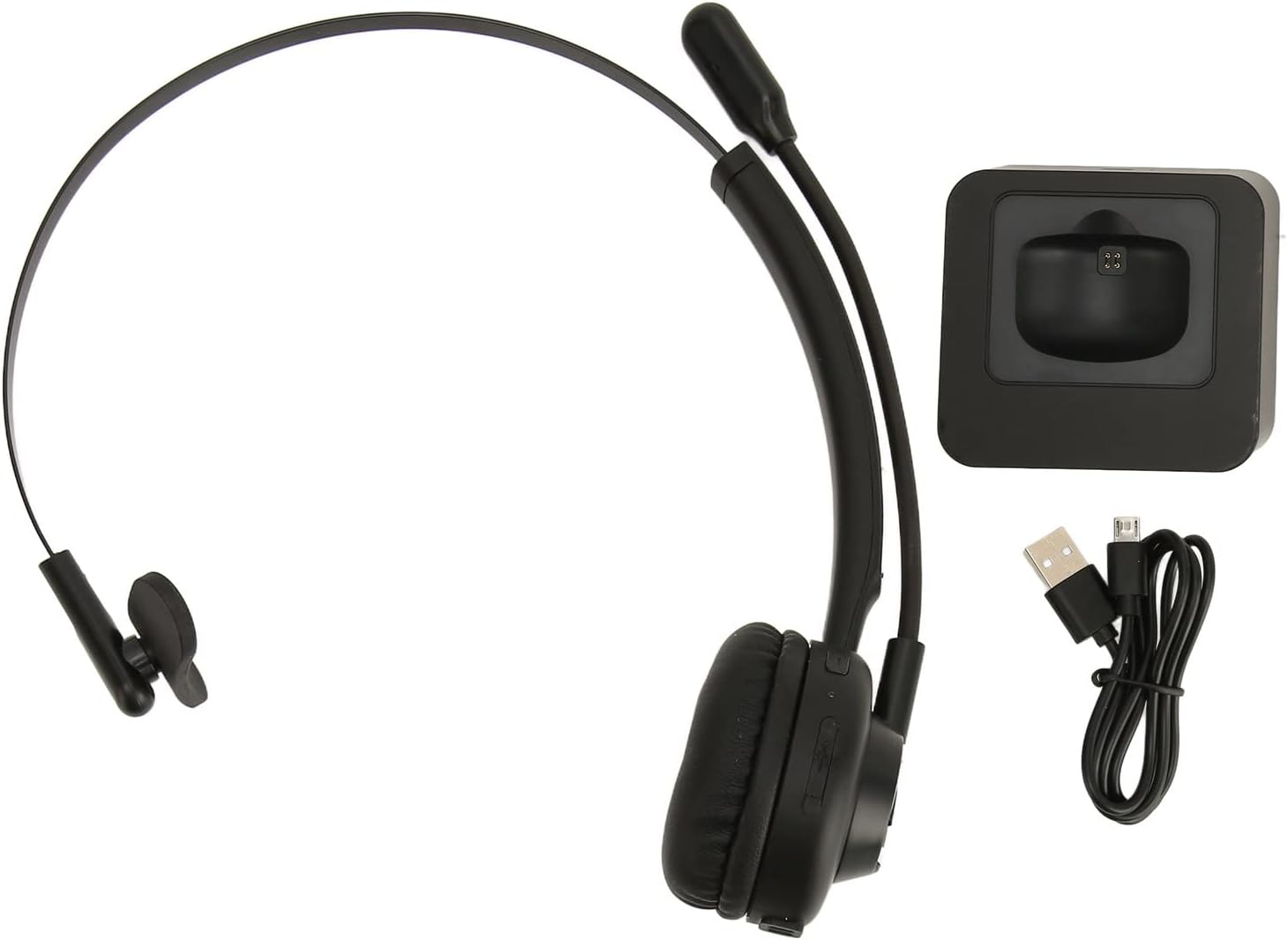
Image: The EBTOOLS Bluetooth Headset, its dedicated charging base, and a Micro USB charging cable, illustrating the complete package contents.
2.3 Headset Controls and Indicators

Image: A detailed diagram highlighting the Micro USB port, LED indicator, Volume Down button, Multifunctional button, and Volume Up button on the EBTOOLS Bluetooth Headset.
- 마이크로 USB 포트: For direct charging of the headset.
- LED 표시등: 전원, 충전, 페어링 상태를 표시합니다.
- 볼륨 - 버튼: 오디오 볼륨을 낮춥니다.
- 다기능 버튼: Controls power, pairing, call answer/end, and music playback.
- 볼륨 + 버튼: 오디오 볼륨을 높입니다.
3. 설정
3.1 헤드셋 충전
Before first use, fully charge the headset. You can charge it using the included charging base or directly via the Micro USB port.
- Connect the Micro USB cable to the charging base and a power source (e.g., computer USB port, USB wall adapter).
- Place the headset onto the charging base, ensuring the charging contacts align. The LED indicator on the headset will show charging status.
- Alternatively, connect the Micro USB cable directly to the headset's Micro USB port and a power source.
- A full charge typically takes approximately 2 hours. The LED indicator will change color or turn off once fully charged.

이미지: 클로즈업 view of the headset's earcup, showing the charging contacts designed to connect with the charging base.
3.2 블루투스 기기와 페어링
헤드셋을 장치에 연결하려면:
- 헤드셋이 꺼져 있는지 확인하십시오.
- 를 누르고 계세요 다기능 버튼 for approximately 5-7 seconds until the LED indicator flashes red and blue alternately, indicating pairing mode.
- On your device (phone, PC, tablet), enable Bluetooth and search for new devices.
- Select "EBTOOLS Headset" (or similar name) from the list of available devices.
- Once connected, the LED indicator on the headset will typically flash blue slowly or turn solid blue.
- 비밀번호를 입력하라는 메시지가 나타나면 "0000"을 입력하세요.
3.3 헤드셋 착용
The headset is designed for comfort and flexibility.
- Adjust the flexible headband to fit comfortably over your head.
- The single ear design allows you to remain aware of your surroundings.
- Rotate the microphone boom to position it close to your mouth for optimal voice clarity. The microphone can be rotated 180 degrees to be worn on either the left or right ear.

Image: A person wearing the EBTOOLS Bluetooth Headset, demonstrating the comfortable fit and the adjustable, rotatable microphone positioned for clear communication.
4. 사용 설명서
4.1 전원 켜기/끄기
- 전원 켜기: 를 누르고 계세요 다기능 버튼 for approximately 3 seconds until the LED indicator flashes blue.
- 전원 끄기 : 를 누르고 계세요 다기능 버튼 for approximately 3-5 seconds until the LED indicator flashes red and then turns off.
4.2 볼륨 조절
- 를 누르세요 볼륨 + 버튼 to increase the listening volume.
- 를 누르세요 볼륨 - 버튼 청취 볼륨을 줄입니다.
4.3 통화 관리
- 전화 받기: 짧게 누르세요 다기능 버튼 when an incoming call rings.
- 통화 종료: 짧게 누르세요 다기능 버튼 통화 중.
- 전화 거부: 를 누르고 계세요 다기능 버튼 for approximately 2 seconds when an incoming call rings.
- 마지막 번호 재다이얼: 두 번 누르세요 다기능 버튼 통화 중이 아닐 때.
4.4 Music Playback (if supported by device)
- 재생/일시 중지: 짧게 누르세요 다기능 버튼.
- 다음 트랙: 를 누르고 계세요 볼륨 + 버튼.
- 이전 트랙 : 를 누르고 계세요 볼륨 - 버튼.
4.5 마이크 사용
The rotatable microphone ensures your voice is captured clearly.
- Adjust the microphone boom to be approximately 1-2 inches from your mouth.
- The microphone can be rotated 180 degrees to allow wearing the headset on either the left or right ear.

이미지: 클로즈업 view of the EBTOOLS headset's flexible microphone boom, highlighting its design for optimal voice pickup.
5. 유지관리
5.1 청소
- 헤드셋을 부드럽고 마른 천이나 약간 젖은 천으로 닦으세요.amp 옷감.
- 독한 화학 물질, 세척 용제 또는 강한 세제를 사용하지 마십시오.
- 어떠한 구멍에도 습기가 들어가지 않도록 주의하세요.
5.2 배터리 관리
- 배터리 수명 유지를 위해 자주 사용하지 않더라도 헤드셋을 정기적으로 충전하십시오.
- 배터리를 자주 완전히 방전시키지 마세요.
- 헤드셋은 극한 온도 변화를 피해 서늘하고 건조한 곳에 보관하십시오.
6. 문제 해결
헤드셋 사용 중 문제가 발생하면 다음의 일반적인 해결 방법을 참조하십시오.
| 문제 | 가능한 해결책 |
|---|---|
| 헤드셋의 전원이 켜지지 않습니다. | Ensure the headset is charged. Connect it to the charging base or directly via USB. |
| 기기와 페어링할 수 없습니다. | Ensure the headset is in pairing mode (LED flashing red/blue). Turn off and on your device's Bluetooth. Delete previous pairings on your device and try again. Ensure the headset is within range (typically 10 meters). |
| 소리가 나지 않거나 볼륨이 작습니다. | Increase volume on both the headset and your connected device. Ensure the headset is selected as the audio output device on your computer or phone. Re-pair the headset. |
| 마이크가 작동하지 않습니다. | Ensure the microphone is positioned correctly. Check microphone settings on your connected device to ensure the headset is selected as the input device. |
| 연결이 간헐적입니다. | Move closer to your connected device. Avoid obstacles between the headset and device. Reduce interference from other wireless devices. |
7. 사양
| 특징 | 세부 사항 |
|---|---|
| 브랜드 이름 | 이비툴즈 |
| 모델 번호 | EBTOOLSrsgvuyg5fc |
| 연결 기술 | 블루투스 5.0 |
| 품목 무게 | 11.6 온스 |
| 패키지 크기 | 7.09 x 6.69 x 2.36 인치 |
| 통화 시간 | 최대 17시간 |
| 대기 시간 | 최대 200시간 |
| 충전 시간 | 약 2시간 |
8. 보증 및 지원
For warranty information or technical support, please refer to the documentation included with your purchase or contact EBTOOLS customer service through the retailer where the product was purchased. Keep your proof of purchase for warranty claims.