소개
The SenseFlow SF101S Smart Wi-Fi Waterless Ultrasonic Essential Oil Diffuser utilizes PureMist Patented Natural Health Fragrance Technology to atomize essential oils directly, preserving their natural scent without the need for water or heat. This diffuser is designed to provide a pure, long-lasting aroma experience, covering up to 1000 sq. ft. It offers smart control via a mobile application, allowing for customized scent intensity and scheduling.

Figure 1: SenseFlow SF101S Diffuser and App Interface. This image shows the compact white diffuser unit with a Bergamot essential oil bottle attached, alongside a smartphone screen demonstrating the intuitive control application.
중요한 안전 정보
본 제품을 사용하기 전에 모든 안전 지침을 읽고 이해하십시오. 지침을 따르지 않을 경우 감전, 화재 또는 심각한 부상이 발생할 수 있습니다.
- 희석되지 않은 에센셜 오일이 피부에 직접 닿지 않도록 하세요.
- Keep the device and essential oils out of reach of children and pets.
- 디퓨저를 사용하는 공간에 적절한 환기가 이루어지도록 하십시오.
- 장치를 물이나 다른 액체에 담그지 마십시오.
- Use only the specified essential oil refills designed for this diffuser.
- 사용하지 않을 때나 청소하기 전에는 기기의 플러그를 콘센트에서 뽑아 두세요.
패키지 내용
패키지에 모든 품목이 들어 있는지 확인하세요.
- SenseFlow SF101S Smart Wi-Fi Diffuser Unit
- 30ml Essential Oil Refill (Bergamot scent included with this model)
- 전원 어댑터(유선형)
- 사용 설명서 (본 문서)
설치 가이드
- 디퓨저 풀기: Carefully remove the diffuser unit and essential oil refill from the packaging.
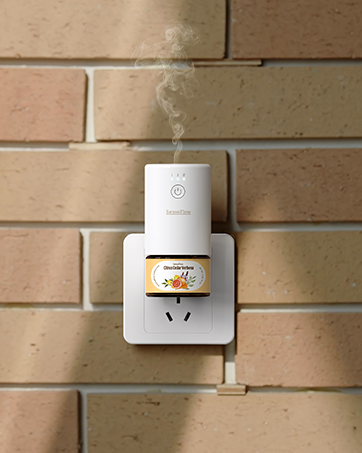
Figure 2: SenseFlow SF101S Diffuser Unit. This image displays the main diffuser unit, ready for essential oil insertion.
- Insert Essential Oil Refill: Unscrew the cap from the essential oil bottle. Gently screw the essential oil bottle into the bottom of the diffuser unit until secure. Do not overtighten.

Figure 3: Inserting Essential Oil. This image illustrates the process of attaching the essential oil refill bottle to the diffuser unit.
- Plug In the Diffuser: Connect the power adapter to the diffuser and then plug it into a standard electrical outlet. The device will power on automatically.

Figure 4: Diffuser Plugged In. The diffuser is shown connected to a wall outlet, ready for operation.
- Download the SenseFlow App: Scan the QR code provided in the packaging or search for "SenseFlow" in your mobile device's app store (iOS or Android).
- Wi-Fi에 연결: Follow the in-app instructions to connect your SenseFlow diffuser to your home Wi-Fi network. Ensure your Wi-Fi is 2.4GHz for optimal compatibility.
작동 지침
The SenseFlow SF101S offers both manual and app-controlled operation.
수동 조작
- Press the power button on the front of the diffuser to turn it on or off.
- Repeatedly press the power button to cycle through the four scent intensity levels (L1, L2, L3, L4). The indicator lights will show the current level.
- The diffuser also features a built-in ambient night light. Press the light button (if available, or long-press power button) to toggle it on/off.
앱 제어(권장)
The SenseFlow app provides comprehensive control over your diffuser's settings.
- 전원 켜기/끄기: Control the diffuser's power directly from the app.
- 향 강도 조절하기: Select from four adjustable scent intensity levels (L1-L4) to suit your preference and room size.

Figure 5: Scent Coverage and Intensity. This diagram illustrates how different scent intensity levels (L1-L4) correspond to various room sizes, from 100-250 sq. ft. to 650-1000 sq. ft., with recommended spray intervals.
- Set Spray Intervals: Customize spray intervals to 1, 2, 6, or 10 minutes for personalized fragrance delivery.
- 일정: Create custom schedules for the diffuser to operate automatically throughout the day or week. This allows for timed fragrance release, for example, to welcome you home or prepare for sleep.

Figure 6: Perfectly Timed Scents for Every Space. This image demonstrates the versatility of the SenseFlow diffuser across different environments, from bathrooms to retail stores, highlighting the app's scheduling feature for tailored ambiance.
- Ambient Night Light Control: Turn the integrated LED night light on or off via the app.

Figure 7: Natural & Safe for Any Space with Ambient Night Light. This image shows the diffuser in a bedroom setting, illustrating its discreet presence and the soft glow of its built-in ambient night light, enhancing relaxation.
공식 제품 영상
Video 1: SenseFlow Timed Aroma Diffuser. This video demonstrates the SenseFlow diffuser in action, highlighting its timed aroma release feature and ease of use in a home environment.
유지
Replacing Essential Oil Refill
The 30ml essential oil refill provides up to 120 days of continuous freshness, depending on usage intensity and frequency.
- 전원 콘센트에서 디퓨저를 뽑습니다.
- Gently unscrew the empty essential oil bottle from the bottom of the diffuser unit.
- 빈 병은 책임감 있게 처리하십시오.
- Unscrew the cap from a new SenseFlow 30ml essential oil refill.
- Screw the new bottle into the diffuser unit until secure. Do not overtighten.
- Plug the diffuser back into the power outlet.

Figure 8: Essential Oil Refill Collections. This image displays a variety of SenseFlow essential oil bottles and their packaging, highlighting the extensive range of pure, plant-based fragrances available for refill.
디퓨저 청소
The waterless design of the SenseFlow diffuser minimizes cleaning requirements. However, occasional cleaning of the exterior may be necessary.
- 청소하기 전에 디퓨저의 전원 플러그를 뽑으십시오.
- Wipe the exterior of the diffuser with a soft, dry, or slightly damp 옷감.
- 연마성 세척제, 용제를 사용하거나 제품을 물에 담그지 마십시오.
- Do not attempt to clean the internal atomization components.
문제 해결
| 문제 | 가능한 원인 | 해결책 |
|---|---|---|
| 디퓨저가 켜지지 않습니다. | 전원 플러그가 제대로 꽂혀 있지 않음; 전원 콘센트 문제; 기기 오작동. | Ensure the power adapter is securely plugged into both the diffuser and the wall outlet. Test the outlet with another device. If the issue persists, contact customer support. |
| 향이 없거나 아주 약한 향이 납니다. | Essential oil bottle empty; Incorrect scent intensity setting; Diffuser placed in too large an area. | Check if the essential oil bottle is empty and replace if necessary. Increase the scent intensity level via the app or manual button. Consider placing the diffuser in a smaller area or using multiple units for larger spaces. |
| App cannot connect to diffuser. | Incorrect Wi-Fi password; Diffuser out of Wi-Fi range; Router issue; App outdated. | Ensure correct Wi-Fi password. Move diffuser closer to the Wi-Fi router. Restart your router. Update the SenseFlow app to the latest version. Re-pair the device if necessary following in-app instructions. |
| Diffuser making unusual noise. | Loose essential oil bottle; Internal component issue. | Ensure the essential oil bottle is screwed in tightly. If the noise persists, unplug the device and contact customer support. |
명세서
| 특징 | 세부 사항 |
|---|---|
| 상표 | 센스플로우 |
| 모델명 | SF101S |
| 색상 | 하얀색 |
| Scent (Included) | 베르가못 |
| 추천 용도 | 집 |
| 재료 | 플라스틱 |
| 특별 기능 | 100% Plant-Based, Pet-Friendly, No Fillers, No Additives, Replaceable 30ml refill, 120 Days of Continuous Freshness, Up to 1000 sq. ft. Fragrance Coverage, PureMist™ Patented Fragrance Technology |
| 전원 | 코드식 전기 |
| 용량 | 30밀리리터 |
| 적용 범위 | 최대 1000제곱피트 |
| 제품 치수 | 3.93인치 길이 x 3.66인치 너비 x 1.96인치 높이 |
| 광원 유형 | 주도의 |
| 실행 시간 | 960 hours (approx. 40 days continuous, up to 120 days with intermittent use) |
| 왓tage | 10 와트 |
| 자동 차단 | 예 |
| 품목 무게 | 10.5 온스 |
| 원산지 | 중국 |
보증 및 지원
For warranty information, technical support, or any inquiries regarding your SenseFlow SF101S diffuser, please contact SenseFlow customer service directly. You can find contact details on the official SenseFlow web사이트나 구매 플랫폼을 통해서도 구매하실 수 있습니다.
Visit the official SenseFlow Store for more information and to explore additional products and essential oil refills: SenseFlow Amazon Store