
leapwell CD201W
리프웰 휴대용 CD 플레이어 사용 설명서
Model: CD201W
소개
Thank you for choosing the Leapwell Portable CD Player. This device is designed to provide a versatile and high-quality audio experience, supporting multiple playback modes and featuring a classic design. Please read this manual thoroughly to understand the product's functions and ensure proper operation and maintenance.
상자 안에 무엇이 들어있나요?
택배 내용물을 확인해 주세요. 누락된 품목이나 손상된 품목이 있을 경우 고객 지원 센터로 문의해 주세요.
- Leapwell Portable CD Player
- 원격 제어
- 이어폰
- 3.5mm AUX 케이블
- USB-C 충전 케이블
- 사용자 설명서

Image: The Leapwell Portable CD Player shown with its remote control, earphones, AUX cable, USB-C charging cable, and user manual, all neatly arranged next to its packaging box.
제품 끝view
The Leapwell Portable CD Player combines classic design with modern functionality. It features a top-loading CD mechanism with a translucent dust cover, integrated speakers, and a control panel with a rotary knob for volume and various buttons for mode selection and playback control.

Image: A white Leapwell Portable CD Player with its top lid open, revealing a CD. The front speakers are illuminated with a blue glow, and control buttons are visible on the right side.
주요 특징:
- Multi-Functional Playback: Supports CD Play, Bluetooth, FM Radio, USB, AUX, AB Repeat, and Optical Mode.
- 하이파이 스피커 시스템: Features independent sound cavity design and inner magnetic speaker unit for enhanced sound detail and bass.
- 충전식 배터리: Built-in USB-C fast rechargeable battery provides 4-5 hours of playback.
- 클래식 디자인 : Retro square design with an elegant volume knob and translucent CD dust cover.
- 다양한 연결성: Includes 3.5mm audio, USB, and optical interfaces for external connections.
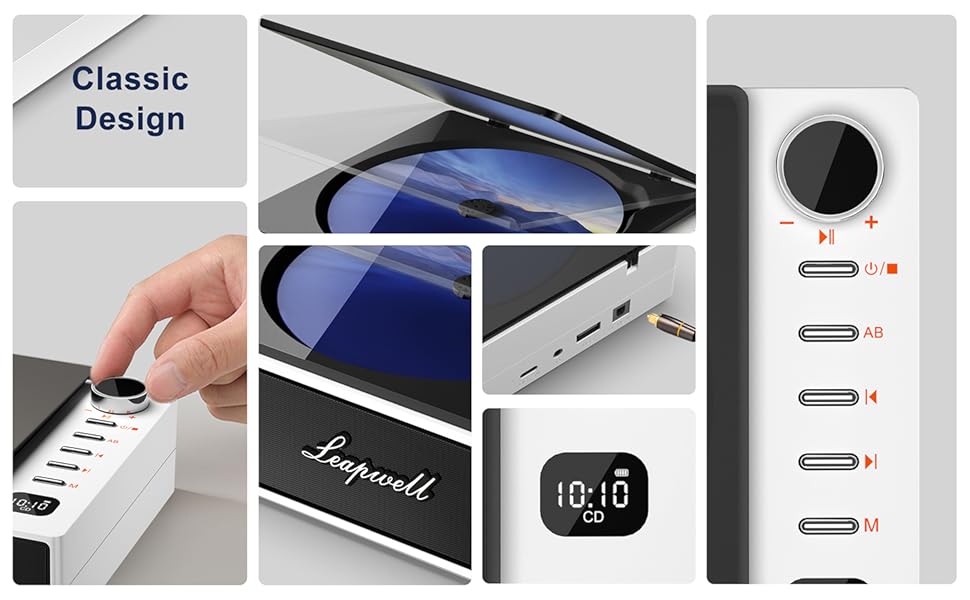
이미지: 콜라주 쇼asing various design elements and features of the CD player, including the volume knob, the open CD lid, the USB-C and optical ports, and the digital display.
설정
1. 장치 충전
Before first use, fully charge the CD player. Connect the provided USB-C charging cable to the USB-C port on the device and the other end to a 5V-2A power adapter (not included) or a computer's USB port. A blinking white light indicates charging. The light will become solid when fully charged. Charging typically takes 3.5 hours for 4-5 hours of playback.

Image: The portable CD player is shown outdoors, emphasizing its built-in rechargeable battery and portability, with icons indicating 4.5 hours playback and 3.5 hours charging time.
2. 전원 켜기 / 끄기
전원 버튼(일반적으로 전원 기호로 표시됨)을 길게 눌러 기기를 켜거나 끄세요.
작동 모드
The Leapwell CD Player supports multiple audio sources. Use the 'M' (Mode) button on the device or remote control to switch between modes.

Image: A circular diagram illustrating the six different operating modes of the CD player: CD Mode, BT Mode (Bluetooth), FM Mode, USB Mode, AB Repeat, and Optical Mode.
1. CD Play Mode
- Open the translucent dust cover on top of the player.
- CD를 스핀들에 조심스럽게 올려놓고 제대로 장착되었는지 확인하십시오.
- 먼지 덮개를 닫습니다.
- Select "CD" mode using the 'M' button. The CD will begin playing automatically.
- Use the play/pause, skip forward/backward buttons, and volume knob to control playback.

Image: The Leapwell Portable CD Player with its top lid open, ready for a CD to be inserted. The internal mechanism is visible.
2. 블루투스 모드
The CD player can connect to Bluetooth headphones or a mobile phone to play music.
- Switch the player to "BT" (Bluetooth) mode. The display will show "BT" and an indicator will blink, signifying pairing mode.
- On your Bluetooth device (e.g., smartphone, headphones), enable Bluetooth and search for "Leapwell CD Player".
- Select the device to pair. Once connected, the Bluetooth indicator on the CD player will stop blinking.
- You can now play audio from your connected device through the CD player's speakers or connected Bluetooth headphones.

Image: A person's hands are shown interacting with a smartphone and the CD player, illustrating the Bluetooth connection process. Bluetooth icons float between the devices.
3. FM 라디오 모드
- Switch the player to "FM" mode.
- Use the skip forward/backward buttons to scan for radio stations.
- Adjust the volume using the rotary knob.
4. USB 모드
- 오디오가 포함된 USB 플래시 드라이브를 삽입합니다. fileUSB 포트에 s.
- Switch the player to "USB" mode.
- 플레이어가 자동으로 오디오를 감지하고 재생을 시작합니다. fileUSB 드라이브에서.
5. AUX 모드
Connect external audio devices (e.g., smartphone, MP3 player) using the provided 3.5mm AUX cable.
- Connect one end of the 3.5mm AUX cable to the AUX-in port on the CD player.
- 다른 쪽 끝을 외부 장치의 헤드폰 잭이나 오디오 출력에 연결합니다.
- Switch the player to "AUX" mode.
- Play audio from your external device. The sound will be output through the CD player's speakers.
6. 광학 모드
For high-fidelity audio output, connect the CD player to an external decoder or speaker system via an optical cable (not included).
- Connect an optical cable to the optical output port on the CD player.
- Connect the other end to the optical input of your compatible audio system.
- Switch the player to "Optical" mode.
- Audio from the CD player will now be transmitted digitally to your external system.
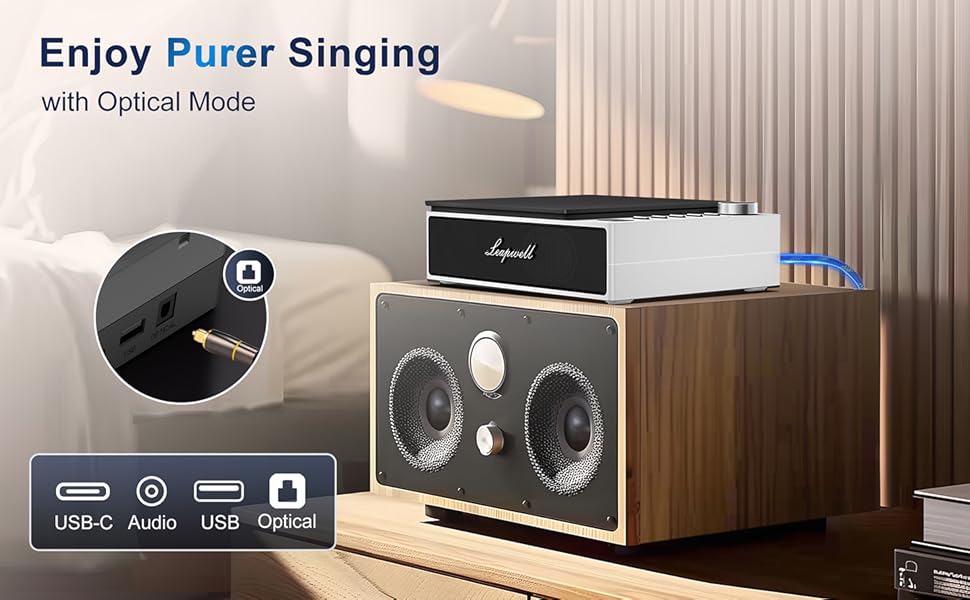
Image: The CD player is shown connected to a larger external speaker system using an optical cable, highlighting its capability for high-quality audio output.
7. AB Repeat Mode
This mode allows you to repeat a specific section of an audio track (CD or USB).
- During playback, press the "AB" button once to set the starting point (A).
- Press the "AB" button again to set the ending point (B). The section between A and B will now repeat.
- Press the "AB" button a third time to cancel the repeat function.
유지
- 청소: 플레이어 외부를 닦을 때는 부드럽고 마른 천을 사용하십시오. CD 렌즈는 CD 렌즈 전용 클리너를 사용하십시오. 연마성 세척제나 용제를 사용하지 마십시오.
- 먼지 커버: Keep the translucent dust cover closed when not in use to protect the optical drive from dust and debris.
- 저장: 플레이어를 직사광선과 극한의 온도를 피해 서늘하고 건조한 곳에 보관하세요.
- 배터리 관리 : 배터리 수명을 연장하려면 배터리를 자주 완전히 방전하지 마십시오. 계속 사용하지 않더라도 정기적으로 충전하십시오.
문제 해결
| 문제 | 가능한 원인 / 해결책 |
|---|---|
| 장치의 전원이 켜지지 않습니다. | Battery might be depleted. Connect to power adapter and charge. Ensure the power button is pressed and held sufficiently. |
| CD가 재생되지 않거나 끊깁니다. | CD might be dirty or scratched. Clean the CD. Ensure the CD is properly seated. The player has anti-shake protection, but excessive movement can still cause skips. |
| 스피커에서 소리가 나지 않습니다. | Volume might be too low. Increase volume using the knob. Ensure correct mode is selected. Check if external headphones or speakers are connected and functioning. |
| 블루투스 연결 문제. | Ensure the player is in Bluetooth pairing mode. Make sure the external Bluetooth device is discoverable and within range. Try unpairing and re-pairing the devices. |
| 리모컨이 작동하지 않습니다. | Check if the remote control's battery needs replacement. Ensure there are no obstructions between the remote and the player's IR receiver. |
| Slow charging via computer USB. | Charging via a computer's USB port will be slower. It is recommended to use a 5V-2A adapter for faster charging. |
명세서
| 특징 | 세부 사항 |
|---|---|
| 제품 치수 | 7.3 x 5.8 x 2.2인치(18.5 x 14.7 x 5.6cm) |
| 품목 무게 | 1.4파운드(0.63kg) |
| 모델 번호 | CD201W |
| 배터리 유형 | 1개의 리튬 이온 배터리(포함) |
| 재생 모드 | CD, Bluetooth, FM Radio, USB, AUX, AB Repeat, Optical |
| 연결 기술 | Auxiliary, Bluetooth, Optical, USB, USB-C |
| 특별 기능 | Anti-Skip Protection, Built-In Speaker, Portable, Rechargeable |
| 튜너 기술 | FM |
| 전원 | 배터리 구동 |
보증 및 지원
Leapwell CD Players come with lifelong technical support and 24/7 professional customer service. For any inquiries, issues, or warranty claims, please contact Leapwell customer support through the retailer's platform or the contact information provided in your product packaging.
Ask a question about this manual
Ask about setup, troubleshooting, compatibility, parts, safety, or missing instructions. Manuals+ will review the question and use this page’s manual context to help answer it.