
1. 서론
This user manual provides detailed instructions for the LongPlus Security Cameras Wireless Bundles, Model X83. It covers the installation, operation, and maintenance of your indoor and outdoor WiFi cameras, designed for home security with features such as AI motion detection, two-way talk, and flexible storage options. Please read this manual thoroughly before using the product to ensure proper setup and functionality.

Image 1.1: LongPlus Security Camera Bundle. This image displays the LongPlus security camera bundle, featuring one indoor pan-tilt camera and one outdoor bullet camera, along with their retail packaging and a smartphone screen showing live camera feed.
2. 상자 안에 무엇이 들어있나요?
패키지에 모든 구성품이 들어 있는지 확인하세요.
- 2 x Camera with Power Cable
- 2 x 장착 브래킷
- 2 x 나사 키트
- 1 x 사용자 설명서
3. 제품 오버view
The LongPlus Security Cameras offer advanced features for comprehensive home surveillance:
- 고화질 비디오: Capture clear 1080p video and images with a wide-angle view.
- 고급 야간 투시경: Choose between full-color night vision and infrared night vision, with visibility up to 33ft.
- Wire-Free and Rechargeable: Enjoy flexible placement with a rechargeable battery providing 1 to 5 months of use on a single charge.
- 비바람에 견디는 디자인: IP65 방수 등급은 다양한 기상 조건에서도 기능을 보장합니다.
- AI 동작 감지: Intelligent analysis and recognition of people, vehicles, pets, and packages, sending real-time notifications.
- 양방향 오디오 : Built-in microphone and speaker for real-time communication via the Vicohome app.
- Smart Siren & Light: Deter intruders with an integrated siren and flashing white light.
- 유연한 스토리지: Supports both SD card and cloud storage, including free 3-day cycled cloud storage.
- 스마트 홈 통합: Works with the Vicohome app and Alexa for convenient control and monitoring.

Image 3.1: LongPlus Security Cameras Features. This composite image shows an indoor camera monitoring a baby and an outdoor camera mounted on a wall overlooking a scenic view. Below, a row of icons highlights features like 1080P image quality, wireless networking, two-way audio, activity zones, night vision, phone monitoring, AI recognition, and event cloud storage.
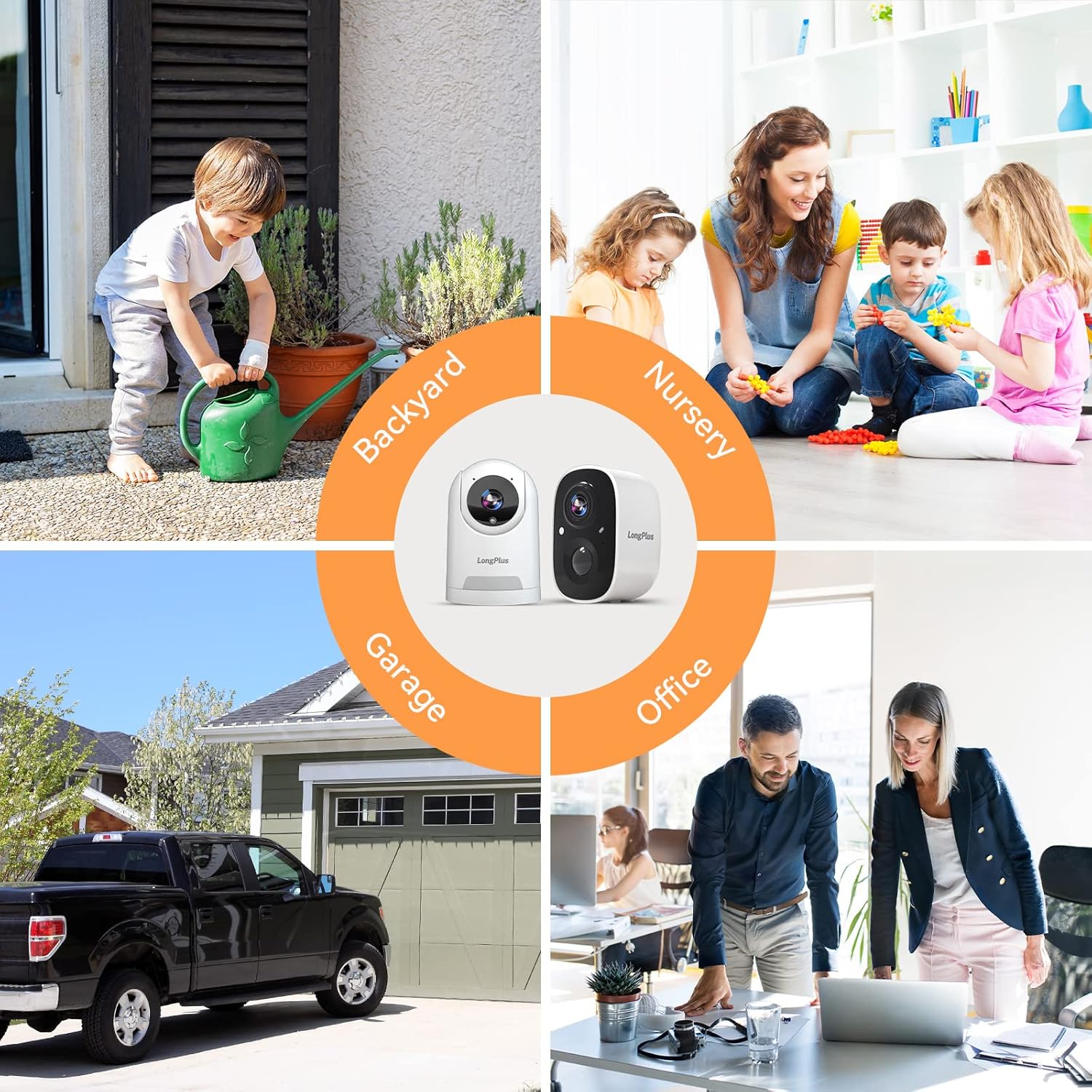
Image 3.2: Versatile Camera Placement. This image illustrates various application scenarios for the LongPlus security cameras, including backyard monitoring, nursery surveillance, garage security, and office monitoring, demonstrating their adaptability for different environments.
4. 설정 지침
Follow these steps to set up your LongPlus Security Cameras:
- Charge the Cameras: Before initial use, fully charge both cameras using the provided power cables.
- Download the Vicohome App: 검색 "Vicohome" in your smartphone's app store (iOS or Android) and download the application.
- 계정 생성: Open the Vicohome app and follow the on-screen instructions to create a new user account.
- 카메라 추가:
- 앱에서 "+" 아이콘을 탭하여 새로운 기기를 추가하세요.
- 목록에서 카메라 모델을 선택하세요.
- Follow the app's prompts to connect the camera to your 2.4GHz Wi-Fi network. Ensure your camera is close to your router during the pairing process.
- 안내에 따라 휴대폰 화면에 표시된 QR 코드를 카메라 렌즈로 스캔하세요.
- 카메라 장착:
- Choose a suitable location for each camera, considering Wi-Fi signal strength and desired view지역입니다.
- Use the provided mounting brackets and screw kits to securely attach the cameras to a wall or ceiling.
- 최적의 적용 범위를 위해 카메라 각도를 조정하세요.

Image 4.1: Stable WiFi Connection and Camera Sharing. This image highlights the stable WiFi connection and the ability to share camera access with family members, showing a smartphone displaying camera footage and icons representing shared users.
5. 사용 설명서
Once your cameras are set up, you can utilize their features through the Vicohome app:
- 살다 View: Open the Vicohome app and select a camera to view its live feed. You can pan and tilt the indoor camera directly from the app.
- 양방향 대화: 라이브 중 view, tap the microphone icon to speak through the camera's speaker and listen through its microphone.
- 모션 감지 경고: When motion is detected, you will receive instant notifications on your smartphone. Tap the notification to view the recorded event.
- 야간 투시 모드: In low-light conditions, the camera automatically switches to night vision. You can typically select between infrared (black and white) and full-color night vision in the app settings.
- Siren and Light Activation: In the app, you can manually trigger the siren and flashing white light to deter unwanted visitors.
- 활동 구역: 카메라의 특정 영역을 사용자 지정하세요 view 동작 감지를 위한 것입니다. 이는 관련 없는 영역에서 발생하는 오경보를 줄이는 데 도움이 됩니다.
- 동작 추적 : For cameras with this feature, enable motion tracking in the app to have the camera automatically follow detected movement.
- 액세스 공유: You can share camera access with family members or trusted individuals through the app's sharing settings.

Image 5.1: Two-Way Talking. This image depicts the two-way talking functionality, showing a child at a door and a person on a couch interacting via a smartphone app, with speech bubbles indicating communication.

Image 5.2: Human Detection and Tracking. This image demonstrates the human detection and tracking capabilities, showing a person in a balaclava being detected, with an indoor camera tracking movement and an outdoor camera activating a siren alarm.

Image 5.3: 1080P HD Video Quality. This image compares 720P and 1080P video quality, showcasing the superior clarity of 1080P from the LongPlus HD WiFi camera. It also shows a smartphone screen controlling camera pan and tilt.
6. 저장 옵션
Your LongPlus cameras support two primary storage methods for recorded footage:
- SD 카드 저장: Insert a compatible microSD card (not included) into the camera's designated slot for local storage of recordings. The camera will automatically overwrite older footag카드가 가득 찼을 때.
- 클라우드 스토리지: The cameras offer cloud storage options. This includes a free 3-day cycled cloud storage plan, where footage from the last three days is automatically saved and then overwritten. A 30-day free trial of advanced cloud features, including upgraded memory and AI recognition, is also available.

Image 6.1: Cloud and SD Card Storage. This image highlights the flexible storage options, showing icons for cloud and SD card storage, along with a smartphone displaying the LongPlus app download page. It mentions free 3-day rolling cloud storage.
7. 유지관리
To ensure optimal performance and longevity of your LongPlus Security Cameras, follow these maintenance guidelines:
- 배터리 충전: Regularly monitor the battery level via the Vicohome app and recharge the cameras as needed. A full charge can last 1 to 5 months depending on usage and settings.
- 청소: Periodically clean the camera lenses and housing with a soft, dry cloth to remove dust and smudges. Avoid using harsh chemicals or abrasive materials.
- 펌웨어 업데이트: Keep the Vicohome app and camera firmware updated to benefit from the latest features, security enhancements, and bug fixes. The app will usually notify you of available updates.
- 환경 보호: While the outdoor camera is IP65 waterproof, extreme weather conditions (e.g., prolonged heavy rain, snow, or direct sunlight) may still impact performance or battery life. Consider additional protective measures if necessary.
8. 문제 해결
If you encounter issues with your LongPlus Security Cameras, refer to the following common problems and solutions:
| 문제 | 가능한 해결책 |
|---|---|
| 카메라가 Wi-Fi에 연결되지 않음 |
|
| 비디오 품질이 좋지 않음 |
|
| 동작 감지가 작동하지 않거나 오경보가 너무 많습니다. |
|
| 배터리 수명이 짧음 |
|
| 양방향 오디오 문제 |
|

Image 8.1: Instant Mobile Alerts. This image depicts a home security scenario where a LongPlus camera detects an intruder, triggering an instant alert on a smartphone, emphasizing advanced sensor capabilities and immediate action.
9. 사양
Key technical specifications for the LongPlus Security Cameras (Model X83):
| 특징 | 세부 사항 |
|---|---|
| 실내/실외 사용 | 실내, 실외 |
| 호환 장치 | Smartphone (Vicohome App) |
| 전원 | Battery Powered (1 Lithium Ion battery included per camera) |
| 연결 프로토콜 | 와이파이(2.4GHz) |
| 컨트롤러 유형 | 비코홈 앱 |
| 장착 유형 | 벽걸이형 |
| 비디오 캡처 해상도 | 1080p |
| 색상 | 하얀색 |
| 항목 수 | 2개의 카메라 |
| 제품 치수 | (카메라 한 대당) 3 x 2 x 2인치 |
| 품목 무게 | 1.52 pounds (total for bundle) |
| 비디오 캡처 형식 | MP4 |
| 특징 | 2-Way Audio, AI Motion Detection, Night Vision, Wireless |
10. 보증 및 지원
LongPlus provides a 2-year warranty for this product, ensuring coverage against manufacturing defects. Additionally, lifetime technical support is available to assist you with any inquiries or issues you may encounter during the product's lifespan. For support, please contact LongPlus customer service through the contact information provided on the product packaging or the official LongPlus web대지.