
WONLINK WL-AP7202
WONLINK AC1200 Outdoor WiFi Extender User Manual
Model: WL-AP7202
1. 서론
The WONLINK AC1200 Outdoor WiFi Extender is designed to provide robust and stable wireless network coverage in outdoor environments. Featuring dual-band technology (2.4GHz and 5GHz) and Power over Ethernet (PoE) support, this device is ideal for extending Wi-Fi to gardens, yards, farms, parks, and other large outdoor areas. Its IP66-rated weather-resistant casing ensures reliable performance in various challenging conditions.
2. 상자 안에 무엇이 들어있나요?
- 1 * Outdoor Access Point
- 1 * 48V PoE Adapter
- 2 * Stainless Steel Ties
- 2 * 나사
- 2 * Silicone Gaskets
- 1 * Quick Installation Guide
3. 제품 특징
- 내후성 디자인: IP66-rated casing protects the device from harsh outdoor conditions, including extreme cold, heat, and continuous humidity. Key components are sealed with waterproof glue.
- High-Speed Dual-Band Network: Complies with IEEE 802.11ac/a/b/g/n standards, offering maximum dual-band speeds of up to 867Mbps on 5GHz and 300Mbps on 2.4GHz. Ideal for HD streaming and online gaming.
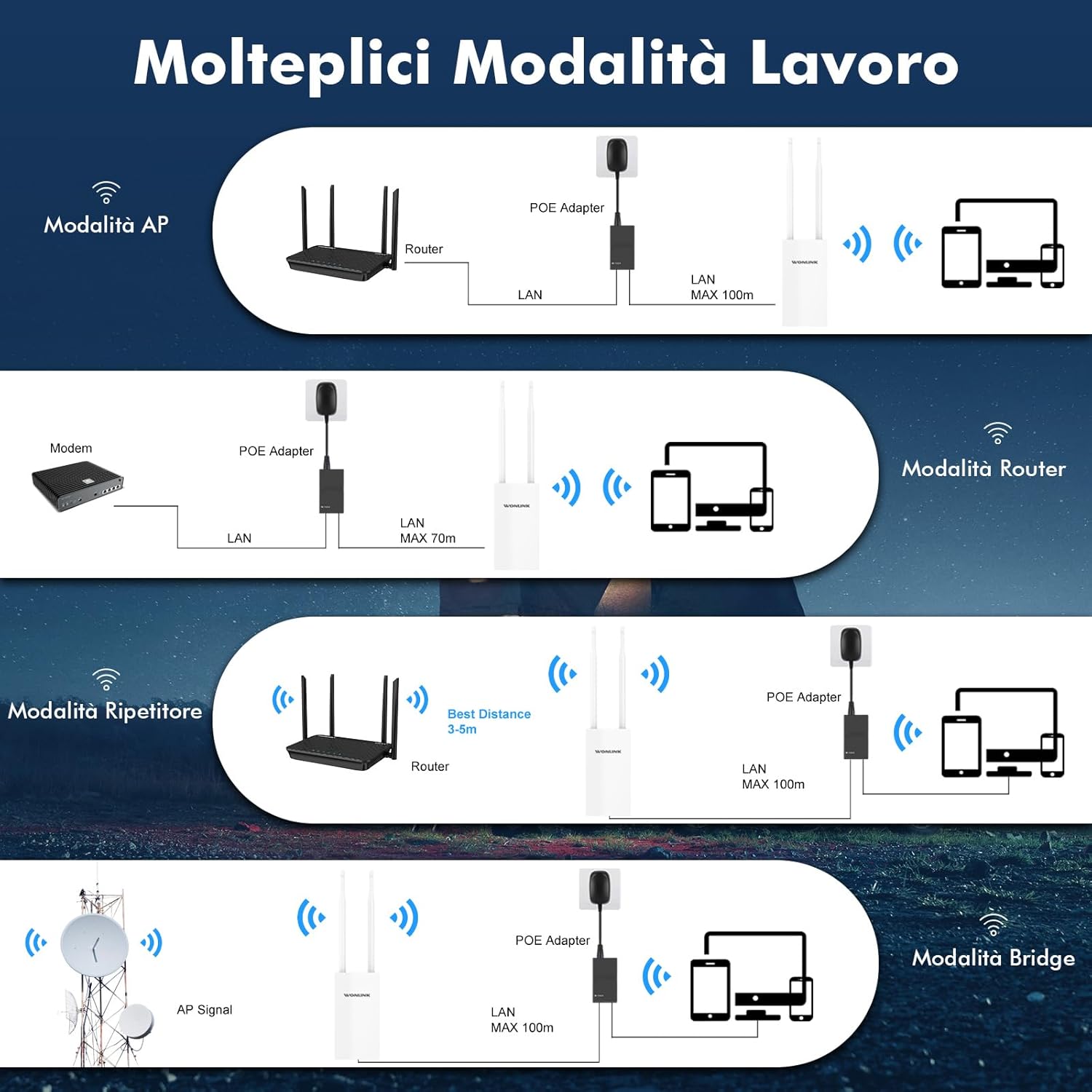
- 다양한 작동 모드: Supports Repeater, AP (Access Point), Router, and Bridge modes to suit various network environments.
- Power Over Ethernet (PoE) & Dual Gigabit Ports: Integrated PoE allows flexible installation in areas without power outlets. Features dual Gigabit Ethernet (1000Mbps) LAN/WAN ports for excellent network speed.
- Stable Long-Range WiFi Coverage: Equipped with 2 high-gain external antennas and high-power PA+LNA amplifiers to extend WiFi signals and eliminate dead zones.


4. 설정 가이드
This section provides a step-by-step guide for setting up your WONLINK AC1200 Outdoor WiFi Extender. For a visual walkthrough, please refer to the official setup video below.
4.1. AP Mode Configuration Steps
- 장치 연결: Ensure correct cable connection and wait for the indicator light to turn on. Connect the device to your computer via Ethernet.
- Connect to WONLINK WiFi: On your computer, connect to the WONLINK device's default WiFi signal (e.g., "WONLINK-XXXX-5G" or "WONLINK-XXXX-2G").
- 입장 Web 인터페이스: 열기 web 브라우저를 열고 기본 IP 주소를 입력하십시오. 192.168.10.1 주소창에.
- 로그인: Enter the default password "admin" to log in.
- AP 모드 선택: Navigate to "Wizard" and select "AP" mode.
- Configure LAN Settings: In "Lan Settings", enter a new IP address. (Note: The first three groups of numbers of the IP address should be the same as your router's IP, but the last digit must be different.)
- 무선 설정 구성: Set the SSID (network name) for Wireless 2.4G and Wireless 5G. Enter your desired password. (Note: The password should be the same as your router's password. The SSID can be customized as you prefer.)
- 마치다: Click "Finish" to apply settings. Reconnect to the new WiFi network using the password you set.
4.2. Repeater Mode Configuration Steps
- 장치 연결: Ensure correct cable connection and wait for the indicator light to turn on. Connect the device to your computer via Ethernet.
- Connect to WONLINK WiFi: On your computer, connect to the WONLINK device's default WiFi signal (e.g., "WONLINK-XXXX-5G" or "WONLINK-XXXX-2G").
- 입장 Web 인터페이스: 열기 web 브라우저를 열고 기본 IP 주소를 입력하십시오. 192.168.10.1 주소창에.
- 로그인: Enter the default password "admin" to log in.
- 리피터 모드를 선택하세요: Navigate to "Wizard" and select "Repeater" mode.
- 호스트 네트워크를 검색합니다: Select the 2.4G or 5.8G band, then click "Scan" to find your host router's WiFi signal. Select your network from the scan results.
- Enter Host Password: Enter the WiFi password of your host router. (Note: The password must be identical to your router's password.)
- 마치다: Click "Finish" to apply settings. Reconnect to the extended WiFi network using the password you set.
5. 작동 모드
The WONLINK AC1200 Outdoor WiFi Extender supports several operating modes to adapt to various networking needs:
- AP(액세스 포인트) 모드: Converts a wired internet connection into a wireless signal for expansion. Ideal for creating a new Wi-Fi hotspot.
- 라우터 모드 : Functions as a standard wireless router, connecting to a modem and providing independent network access.
- 리피터 모드: Extends the coverage of an existing Wi-Fi network by receiving and re-transmitting the signal.
- 브리지 모드: Similar to Repeater mode, but can form an independent SSID. Useful for connecting wired devices to a wireless network.
6. 유지관리
To ensure the longevity and optimal performance of your WONLINK AC1200 Outdoor WiFi Extender, follow these maintenance guidelines:
- 정기 청소: Periodically wipe the device's exterior with a soft, dry cloth to remove dust and debris. Avoid using harsh chemicals or abrasive materials.
- 연결 검사: Regularly check all cable connections (Ethernet, PoE) to ensure they are secure and free from damage.
- 펌웨어 업데이트: 제조사 확인해보세요 web해당 사이트에서 사용 가능한 펌웨어 업데이트를 확인하십시오. 펌웨어를 최신 상태로 유지하면 성능, 안정성 및 보안이 향상될 수 있습니다.
- 환경 고려 사항: Despite its IP66 rating, avoid placing the device in locations where it is constantly submerged in water or exposed to extreme physical impact. Ensure proper ventilation around the device.
7. 문제 해결
If you encounter issues with your WONLINK AC1200 Outdoor WiFi Extender, try the following troubleshooting steps:
- 전원 없음/표시등 꺼짐:
- PoE 어댑터가 전원 콘센트와 장치에 제대로 연결되어 있는지 확인하십시오.
- Check the Ethernet cable connecting the PoE adapter to the device.
- 접근할 수 없습니다 Web 인터페이스(192.168.10.1):
- Verify your computer is connected to the WONLINK device's default WiFi network or directly via Ethernet.
- 컴퓨터의 IP 설정이 DHCP를 통해 IP 주소를 자동으로 가져오도록 설정되어 있는지 확인하십시오.
- 브라우저 캐시를 지우거나 다른 브라우저를 사용해 보세요.
- 설치 후 인터넷에 접속할 수 없음:
- In Repeater mode, ensure you selected the correct host WiFi network and entered its password accurately.
- In AP mode, verify the new IP address set in "Lan Settings" is compatible with your main router's network (same first three octets, different last octet).
- Check the internet connection of your main router.
- Weak or Unstable Signal:
- Adjust the position of the extender to minimize obstacles between it and your main router or client devices.
- 안테나가 단단히 고정되어 있고 올바른 방향으로 설치되어 있는지 확인하십시오.
- Consider interference from other electronic devices or neighboring Wi-Fi networks.
For further assistance, please contact WONLINK customer support.
8. 사양
| 특징 | 세부 사항 |
|---|---|
| 상표 | 원링크 |
| 모델 | WL-AP7202 |
| 무선 표준 | 802.11a/b/g/n/ac |
| 데이터 전송 속도 | 1200 메가비트/초(Mbps) |
| 주파수 대역 클래스 | 듀얼 밴드(2.4GHz 및 5GHz) |
| 안테나 | 2 x 10dBi 고이득 안테나 |
| 이더넷 포트 | Dual Gigabit Ethernet (1000Mbps) |
| 전원 공급 장치 | 48V PoE Power |
| 내후성 | IP66 등급 |
| 호환 장치 | Smartphones, Tablets, Laptops, Computers, Smart TVs, Gaming Consoles, Printers, Security Cameras |
| 치수 | 22.5 x 19.5 x 5cm |
| 무게 | 520그램 |
9. 보증 및 지원
WONLINK is committed to providing high-quality products and excellent customer service.
- 제품 지원: If you encounter any issues with your product, please contact us. We aim to respond within 24 hours and provide satisfactory solutions.
- 반품 정책: 본 제품은 판매자의 반품 정책에 따라 구매일로부터 14일 이내에 환불 또는 교환이 가능합니다.
- 소프트웨어 업데이트: Information regarding guaranteed software updates is currently unknown. Please check the official WONLINK web최신 정보 사이트.
For more information or to contact support, visit the WONLINK Store on Amazon.