
NBCZBAZDA
Generic Scorpion Game Chair - Ergonomic Office and Gaming Cockpit Manual
Model: NBCZBAZDA
소개
This manual provides essential instructions for the assembly, operation, and maintenance of your Generic Scorpion Game Chair. Designed for both professional gaming and office use, this ergonomic cockpit offers a unique and immersive experience. Please read this manual thoroughly before use to ensure proper function and safety.

Image: The Generic Scorpion Game Chair, featuring its distinctive blue and black design, ready for use.
안전 정보
중요한 안전 경고:
경고: This chair has sharp edges and surfaces. Be cautious when handling. Always use the chair in the intended manner and follow the instructions for reclining and adjusting the position to prevent falls.
- 사용하기 전에 모든 구성 요소가 단단히 고정되어 있는지 확인하십시오.
- Do not allow children to operate the electronic adjustments unsupervised.
- Keep hands and clothing clear of moving parts during adjustment.
- Avoid placing excessive weight on any single part of the chair.
- Do not attempt to modify the chair's structure or electronic components.
제품 특징
The Scorpion Game Chair is engineered with advanced features for comfort and functionality:
- Scorpion-shaped Design: A unique computer cockpit suitable for professional gamers and office workers.
- 다중 모니터 지원: Capable of supporting a single screen up to 43 inches, a 49-inch ultra-wide screen, or up to three 32-inch monitors. Expandable to five 27-inch monitors.
- 인체공학적 조정: Electronically controlled adjustments for swing arm lifting/lowering, overall zero-gravity cockpit positioning, seat back, and pitching seat. Supports upright, half-lying, and fully reclined postures.
- 통합 RGB 조명: The overall frame is equipped with adjustable 16-color RGB light strips.
- Manual Entry/Exit: Armrest and keyboard tray can be manually opened and closed for convenient access.
- Spacious Keyboard Tray: An oversized 90x40 cm keyboard tray accommodates laptops and includes a hidden cup holder and headphone hanger.
- 내구성 있는 구조: Features an all-steel structure with an electroplating spraying process and high-quality PU leather for comfort and longevity.
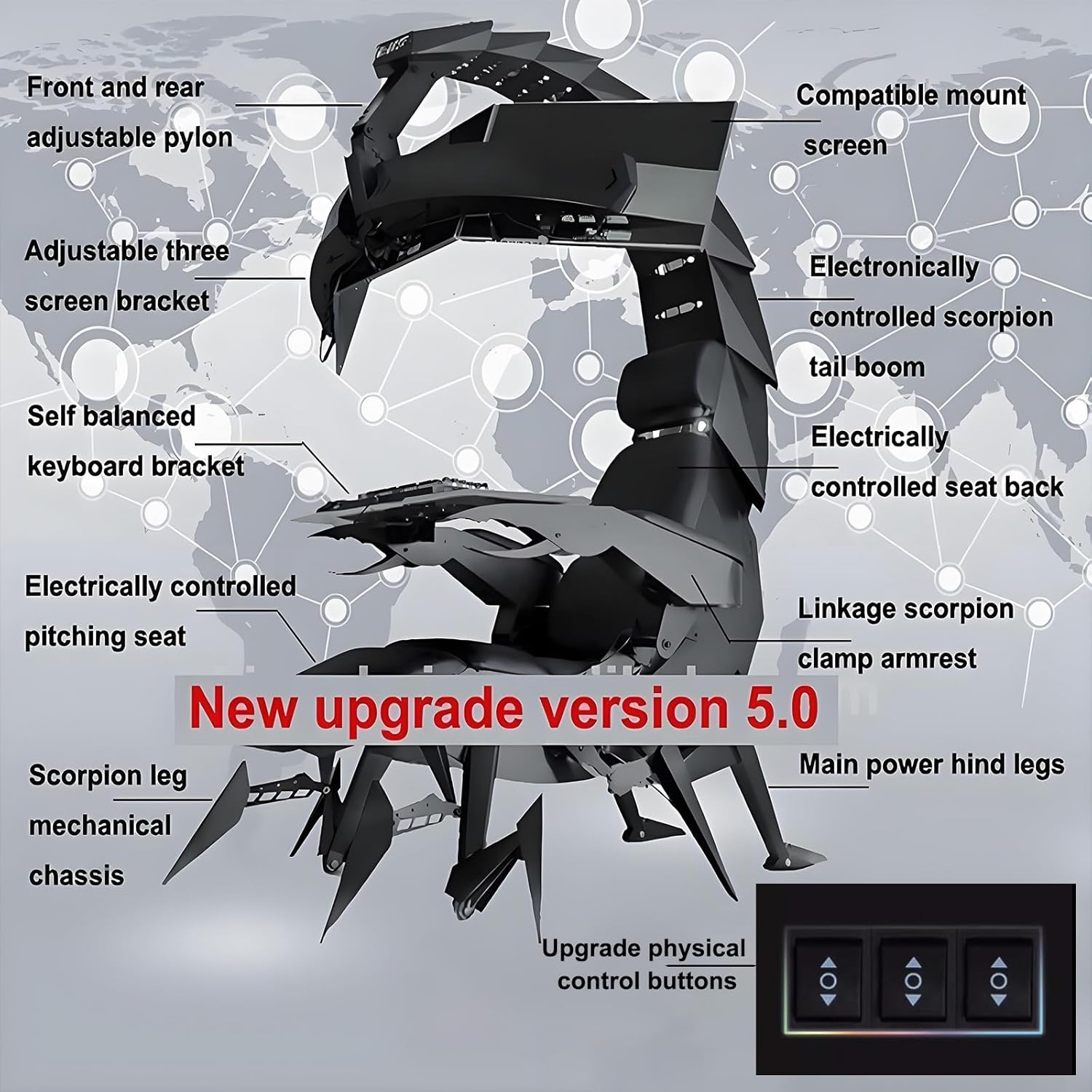
Image: Detailed diagram highlighting key components and their functions, including electronic controls for various adjustments.
설정 및 조립
The Scorpion Game Chair requires assembly. It is recommended to have at least two people for safe and efficient setup. Refer to the included assembly guide for detailed step-by-step instructions and hardware identification.
조립 전 고려 사항:
- 공간 요구 사항: Ensure adequate space for assembly and operation. The chair has significant dimensions when fully extended.
- Entry Dimensions: Verify that your entryways are wide enough to accommodate the packaged and assembled chair.

Image: Dimensional drawings of the chair in different positions and its shipping package, indicating overall size and footprint.
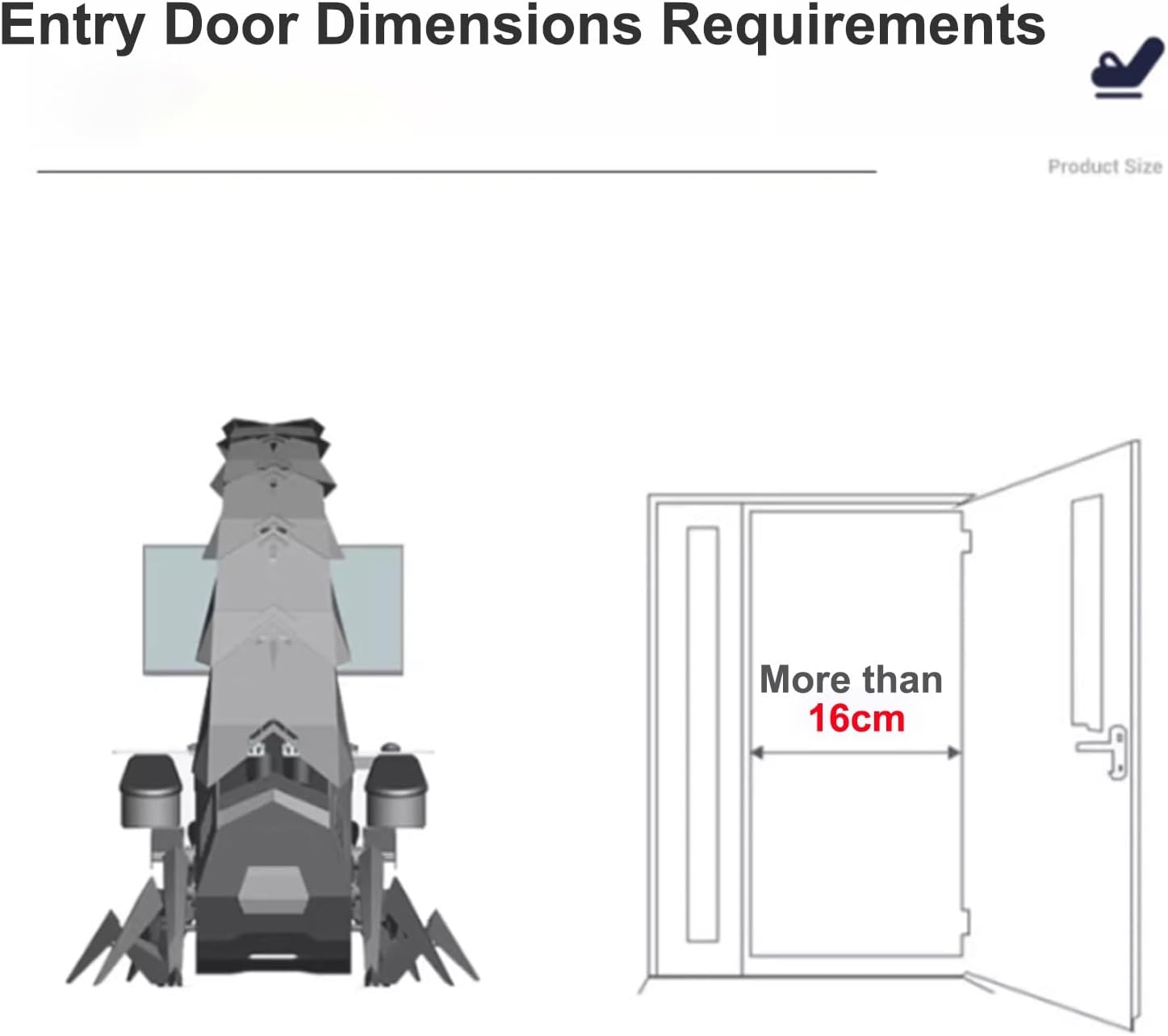
Image: Illustration detailing the minimum required door width for transporting the chair, indicating it must be greater than 16cm.
모니터 설치:
The chair supports various monitor configurations. Carefully attach your monitor(s) to the adjustable screen bracket using the provided hardware. Ensure monitors are securely mounted before operating the chair's electronic adjustments.
작동 지침
The Scorpion Game Chair features electronic controls for various adjustments. Locate the control panel, typically on the armrest, which includes buttons for movement.
Electronic Adjustments:
- 스윙 암: Use the designated buttons to raise or lower the monitor swing arm.
- Cockpit Zero Gravity: Adjust the overall tilt of the cockpit to achieve a zero-gravity posture.
- 등받이: Recline or incline the seat back to your desired angle.
- Pitching Seat: Adjust the forward or backward tilt of the seat base.
- RGB 조명: Cycle through 16 different color options for the integrated RGB light strips.
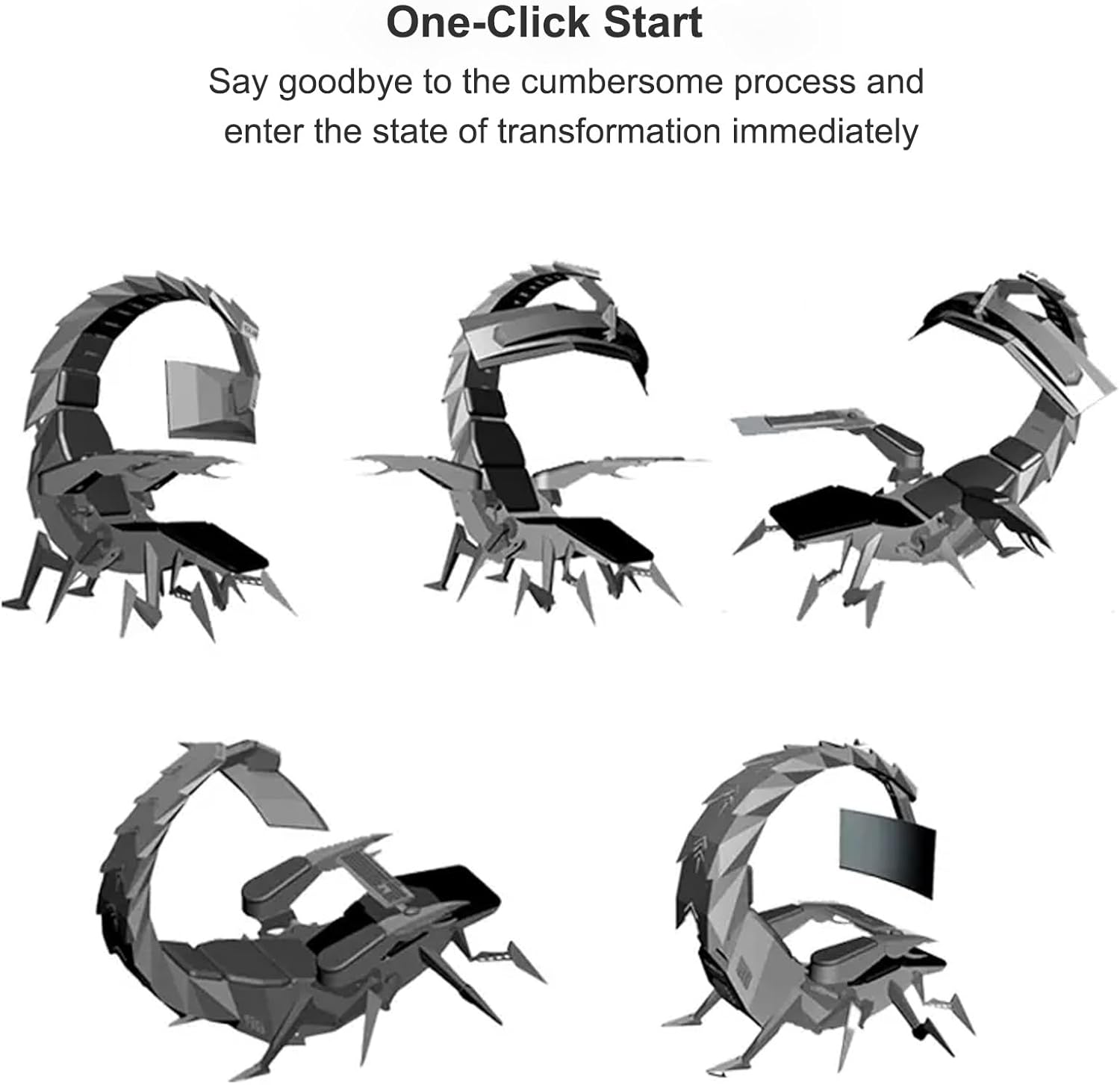
Image: Visual representation of the chair's "One-Click Start" feature, demonstrating its ability to transform into various ergonomic positions.
Keyboard Tray and Armrests:
The armrests and keyboard tray can be manually opened and closed. This allows for easy entry and exit from the cockpit. Ensure the tray is securely positioned when in use.

Image: A user engaged in an activity within the cockpit, showcasing the multi-monitor setup and ergonomic seating from a top perspective.

Image: A user operating the chair with multiple monitors, illustrating the ergonomic and immersive experience from a frontal view.

Image: The Scorpion Game Chair fully assembled with monitors, presented in a room setting from a side angle.
유지
Proper maintenance ensures the longevity and optimal performance of your Scorpion Game Chair.
- 청소: 광고로 깨끗이 닦아내세요amp cloth. Avoid harsh chemicals or abrasive cleaners that may damage the PU leather or finish.
- 점검: 모든 볼트와 고정 장치가 단단히 조여져 있는지 주기적으로 점검하십시오.
- 전자 부품: Keep electronic components dry and free from dust.
- 움직이는 부품: Do not lubricate moving parts unless specifically instructed by the manufacturer.
문제 해결
If you encounter issues with your Scorpion Game Chair, refer to the following common troubleshooting steps:
- 전원 문제: If electronic adjustments are not working, ensure the chair is properly plugged into a functional power outlet. Check all cable connections.
- 특이한 소음: If you hear creaking or grinding, inspect all visible connections for looseness. Tighten any loose bolts.
- Adjustment Malfunction: If a specific electronic adjustment is not responding, try cycling the power to the chair. If the issue persists, contact customer support.
- 안정성 문제: Ensure the chair is placed on a flat, stable surface. Verify all structural components are correctly assembled and tightened.
명세서
| 특징 | 세부 사항 |
|---|---|
| 상표 | 일반적인 |
| 모델명 | NBCZBAZDA |
| 색상 | 파란색 |
| 제품 크기(D x W x H) | 1.18인치 깊이 x 0.79인치 너비 x 0.39인치 높이 (Note: These dimensions appear to be for a component, not the full chair. Refer to dimensional images for full chair size.) |
| 품목 무게 | 33.1파운드 |
| 재료 | High-quality PU Leather, All-steel structure |
| 특징 | Ergonomic, Electronic Adjustments, RGB Lighting |
| 추천 용도 | 게임, 오피스 |
| 리클라이닝 포지션 | 4 (Upright, Half-lying, Reclined, Zero Gravity) |
| 모니터 지원 | Single up to 43", 49" ultrawide, or 3x32" (expandable to 5x27") |
| Keyboard Tray Size | 90x40cm |
Note: Product dimensions listed in specifications may refer to packaging or a specific component. Please consult the dimensional diagrams for the full chair's footprint and height.
보증 및 지원
보증 정보 또는 기술 지원이 필요하시면 구매 시 동봉된 설명서를 참조하시거나 판매점/제조업체에 직접 문의하십시오. 보증 청구를 위해서는 구매 증빙 자료를 보관해 두시기 바랍니다.
제조사: 일반
Ask a question about this manual
Ask about setup, troubleshooting, compatibility, parts, safety, or missing instructions. Manuals+ will review the question and use this page’s manual context to help answer it.