
1. 제품 오버view
The AKEEYO AKY-710S is a high-performance bike camera designed to capture your cycling adventures with exceptional clarity and reliability. Featuring a Starvis IMX335 sensor, it supports 4K video recording, a 142-degree wide-angle lens, and robust IP66 dustproof and waterproof capabilities. It includes advanced features such as loop recording, emergency recording, and parking monitoring, ensuring comprehensive coverage for your rides and parked bicycle. The camera offers wireless connectivity via Wi-Fi for seamless control and data transfer through a dedicated smartphone application.

Figure 1.1: The AKY-710S Bike Camera mounted on a bicycle, showcasing its compact design and integration with the bike's handlebars.
2. 패키지 내용
Before proceeding with installation, please verify that all items listed below are present in your package.
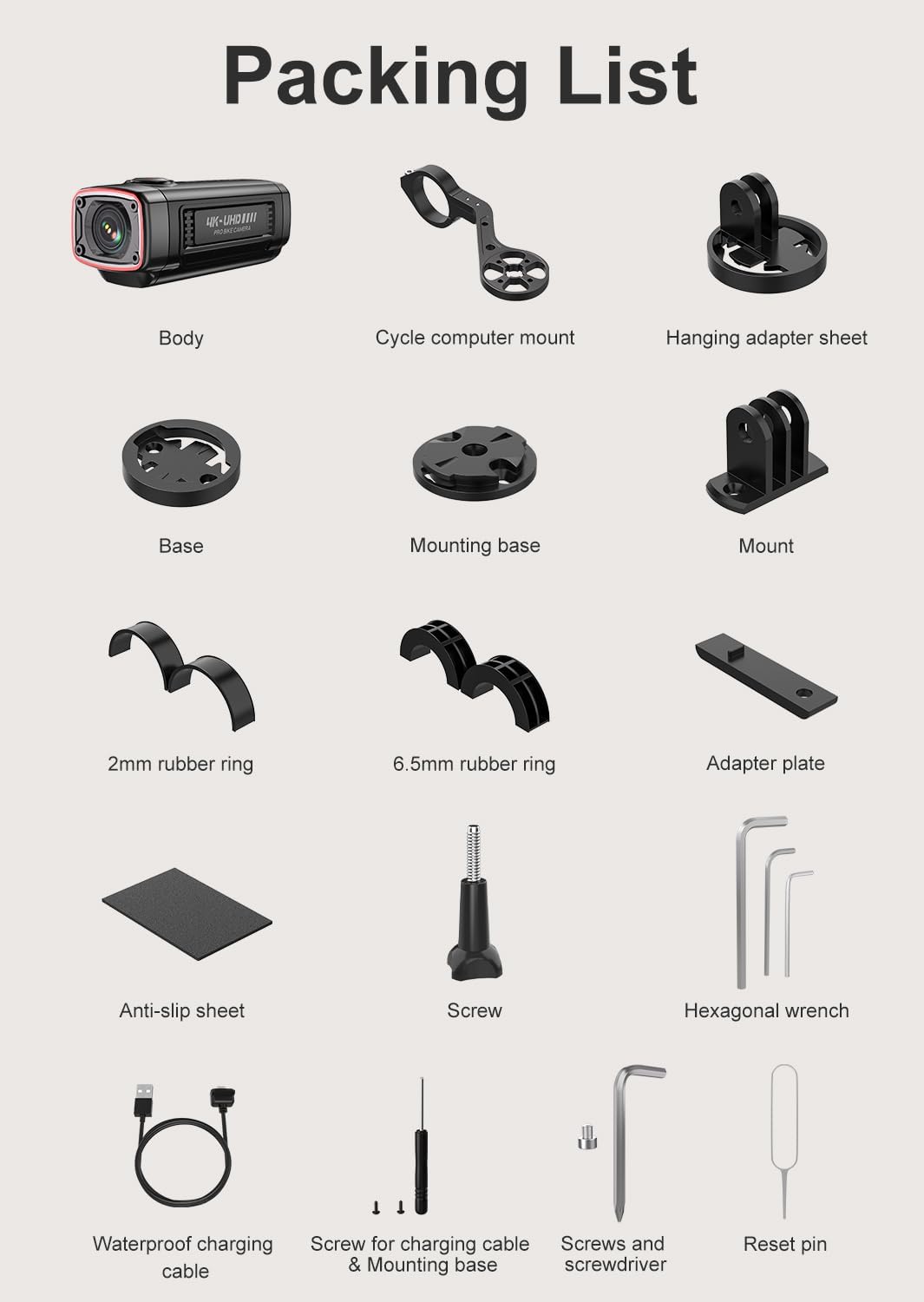
그림 2.1: 상세 view of all components included in the AKY-710S package. This includes the camera body, various mounts, cables, and tools.
- 카메라 바디
- Cycle Computer Mount
- Hanging Adapter Sheet
- 베이스
- 장착베이스
- 산
- 2mm Rubber Ring
- 6.5mm Rubber Ring
- 어댑터 플레이트
- Anti-slip Sheet
- 나사
- 육각 렌치
- Waterproof Charging Cable
- Screw for Charging Cable & Mounting Base
- 나사와 드라이버
- 핀 재설정
- 64GB 마이크로 SD 카드(사전 설치 또는 별도 포함)
3. 설정 및 설치
3.1 장치 충전
Before first use, fully charge the AKY-710S camera using the provided waterproof charging cable. Connect the cable to the camera's charging port and a standard USB power source (e.g., computer USB port, wall adapter, or power bank). A full charge provides over 5.5 hours of 1080P video recording.
3.2 마이크로 SD 카드 삽입
The AKY-710S comes with a 64GB high-performance Micro SD card. Locate the SD card slot on the camera, insert the card with the gold contacts facing down until it clicks into place. Ensure the card is properly seated before operation.
3.3 카메라 장착
The AKY-710S offers versatile mounting options for your bicycle. Use the included cycle computer mount and other accessories to secure the camera.
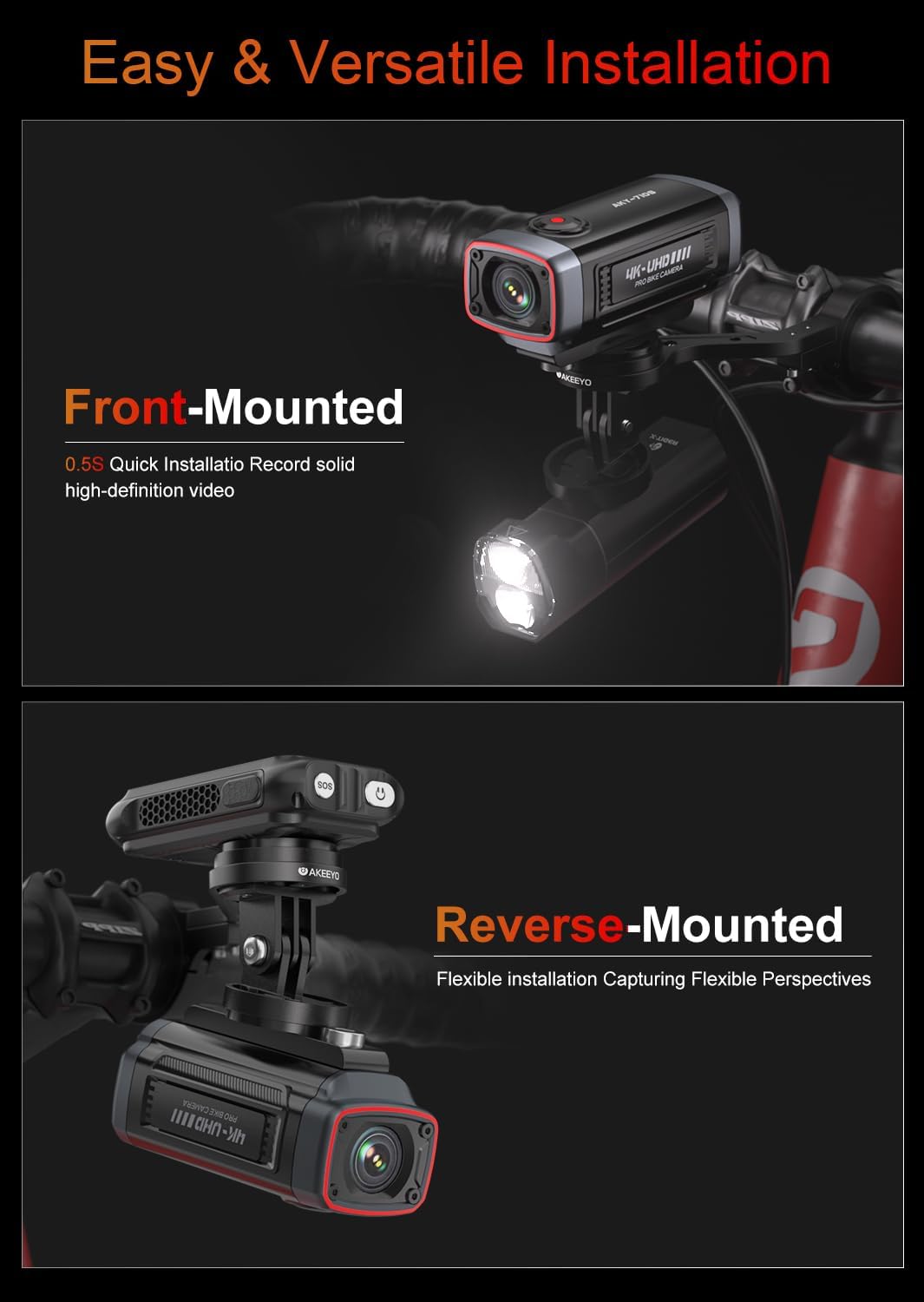
Figure 3.1: Illustration of front-mounted and reverse-mounted camera configurations on a bicycle handlebar. The camera can be quickly attached and detached.
- Front-Mounted: Attach the camera to the front of your handlebars for forward-facing recording. This setup is ideal for capturing the road ahead.
- Reverse-Mounted: The camera can also be mounted facing backward, allowing you to record activity behind your bicycle. Adjust the display orientation via the dedicated app if needed.
- Utilize the rubber rings and adapter plate to ensure a secure and stable fit on your bike.
4. 사용 설명서
4.1 전원 켜기/끄기
Press and hold the power button located on the camera to turn it on or off. An indicator light will confirm the power status.
4.2 녹음 모드
- 루프 녹음: The camera continuously records video in short segments. When the memory card is full, the oldest file기존 파일은 새 녹음을 위한 공간을 확보하기 위해 자동으로 덮어쓰여집니다.
- 비상 녹화(G-센서): 갑작스러운 충격이나 충돌이 발생할 경우, 내장된 G 센서가 자동으로 이를 감지하고 현재 영상 부분을 잠가 루프 녹화로 인해 덮어쓰이는 것을 방지합니다.
- 주차 모니터: When your bike is parked, the camera can detect motion or impact and automatically begin recording, providing 24-hour surveillance. This feature helps protect your bike from theft or damage.
4.3 Smartphone Connectivity and App Usage
The AKY-710S features 2.4GHz Wi-Fi connectivity, allowing you to connect the camera to your smartphone via a dedicated application. This app enables real-time previews, video playback, settings adjustments, and easy sharing of your recordings.

Figure 4.1: The AKEEYO smartphone application displaying a live view from the camera, along with options for settings and playback. The app supports OTA updates.
- Download the official AKEEYO app from the Google Play Store or Apple App Store.
- Turn on the camera's Wi-Fi.
- Connect your smartphone to the camera's Wi-Fi network (SSID and password usually found on the camera or in the manual).
- Launch the app to access camera functions.
- 중요한: During setup, ensure you check the "Privacy Consent" option to establish a successful Wi-Fi connection.
4.4 OTA 업데이트
The camera supports Over-The-Air (OTA) firmware updates via the smartphone app. This allows for convenient updates without needing to remove the SD card or connect to a computer.
4.5 GPS 기능
The AKY-710S supports GPS functionality for recording location data with your videos. Note that the GPS cable must be purchased separately.
5. 주요 특징

Figure 5.1: Visual representation of the AKY-710S's advanced imaging components, highlighting the Sony Starvis IMX335 sensor, F1.6 aperture, 142-degree wide-angle lens, and 4K recording capability.
- 고해상도 녹음: Records smooth 2K video at 55 frames per second (FPS), upgradable to 4K at 28 FPS.
- 고급 센서: Equipped with a Starvis IMX335 sensor for clear footage 저조도 환경에서도 마찬가지입니다.
- 광각 렌즈: 142도 광각 렌즈는 넓은 시야를 포착합니다. view.
- 내구성 있는 디자인: Rated IP66 for dustproof and waterproof performance, ensuring reliability in various weather conditions.
- 긴 배터리 수명: Features a robust 1800mAh battery, providing over 5.5 hours of 1080P video recording on a single charge.
- 소형 및 경량: Designed for portability and minimal impact on your bike's handling.

Figure 5.2: The AKY-710S camera operating in rainy conditions, illustrating its IP66 dustproof and waterproof capabilities for stable performance in harsh environments.

그림 5.3: 이상view of the AKY-710S's compact design and key functionalities, including its lightweight build, 1800mAh battery, G-sensor for emergency recording, GPS capability, Wi-Fi, and dedicated app support.
6. 유지관리
- 청소: 부드러운 d를 사용하세요amp cloth to clean the camera body and lens. Avoid abrasive cleaners or solvents. Ensure the charging port cover is securely closed before cleaning with water.
- 저장: 카메라를 사용하지 않을 때는 직사광선과 극한 온도 변화를 피해 서늘하고 건조한 곳에 보관하십시오.
- 배터리 관리 : 배터리 수명을 최적화하려면 배터리를 자주 완전히 방전시키지 마십시오. 장기간 보관할 경우 몇 달에 한 번씩 배터리를 약 50% 정도 충전하십시오.
- 펌웨어 업데이트: Regularly check for and install firmware updates via the dedicated app to ensure optimal performance and access to new features.
7. 문제 해결
- Wi-Fi에 연결할 수 없습니다: Ensure the "Privacy Consent" option is checked within the app during the setup process. If this option is not selected, the connection may fail. Restarting both the camera and your smartphone may also resolve connectivity issues.
- 카메라가 녹화되지 않음: Check if the Micro SD card is properly inserted and formatted. Ensure there is sufficient space on the card. If loop recording is enabled, older files를 덮어씁니다.
- 비디오 품질이 좋지 않음: Ensure the lens is clean and free from smudges. Check that the camera's resolution settings are configured as desired in the app.
- 배터리가 충전되지 않음: Ensure the charging cable is securely connected. If the issue persists, contact customer support.
8. 사양
| 특징 | 세부 사항 |
|---|---|
| 상표 | 아케요 |
| 모델명 | AKY-710S-BIKE 2 |
| 포토 센서 기술 | CMOS (Starvis IMX335) |
| 비디오 캡처 해상도 | 4096x2160 (4K), 3840x2160, 2560x1440 (2K), 2048x1080 |
| 플래시 메모리 유형 | 마이크로 SD 카드 (64GB 카드 포함) |
| 화면 크기 | 1 Centimeter (internal display, likely for status) |
| 연결 기술 | Wi-Fi (2.4GHz), USB, OTA updates |
| 특별 기능 | Bike Camera with Mount, Lightweight, Night Vision, App Control, IP66 Waterproof & Dustproof, Loop Recording, Emergency Recording (G-Sensor), Parking Monitor, Rechargeable, GPS (cable sold separately) |
| 캠코더 유형 | 액션 카메라 |
| 배터리 용량 | 1800mAh (up to 5.5 hours 1080P recording) |
| 와이드 앵글 | 142도 |
9. 보증 및 지원
9.1 제품 보증
The AKEEYO AKY-710S Bike Camera comes with a one-year warranty from the date of purchase. This warranty covers manufacturing defects and ensures peace of mind regarding product quality. Please retain your proof of purchase for warranty claims.
9.2 고객 지원
For further assistance, technical support, or warranty inquiries, please contact the AKEEYO support team. Refer to the product packaging or the official AKEEYO web최신 연락처 정보는 사이트에서 확인하세요.
Note: If you encounter issues with registration or passwords within the app, you may click "SKIP" in the upper right corner to access all app features without registration.