
1. 제품 오버view
The FEELWORLD S7 is a 7-inch camera field monitor designed for professional videography and photography. It features a high-brightness 1600nit touchscreen, 12G-SDI and HDMI 2.0 inputs/outputs, and supports 4K video monitoring. Key functionalities include HDMI and SDI cross-conversion, customizable 3D LUTs, DCI-P3 cinema color gamut, and a durable aluminum housing.

Image 1.1: The FEELWORLD S7 monitor showcasing its 1600 nit high-bright display, clearly visible in sunlight conditions.
2. 설정 및 설치
2.1 패키지 내용
패키지에 모든 품목이 들어 있는지 확인하세요.
- 필월드 S7 모니터
- 미니 HDMI 케이블
- HDMI 케이블
- Mini Hot Shoe Mount + Hex Wrench
- F970 Dual Battery Plate
- 사용자 설명서
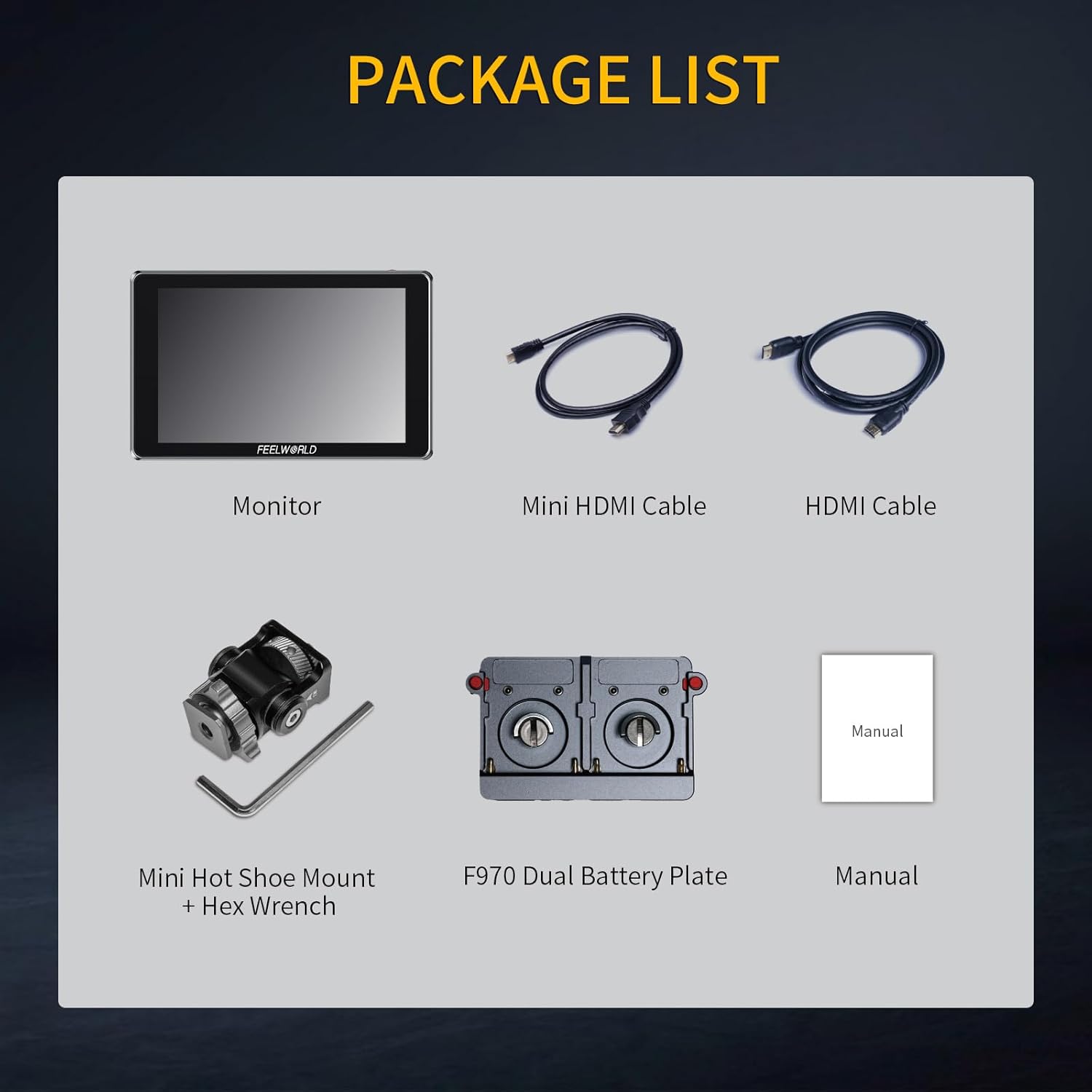
Image 2.1: All components included in the FEELWORLD S7 product package.
2.2 모니터 전원 켜기
The S7 monitor can be powered via a DC input or compatible NP-F series batteries. The F970 dual battery plate supports various NP-F battery models (F970, F960, F950, F930, F770, F750, F570, F550, F530). Batteries are not included and must be purchased separately.

이미지 2.2: 후면 view of the S7 monitor illustrating the dual NP-F battery plate and DC power input port.
2.3 카메라에 연결하기
Connect your camera or video source to the monitor using either the 12G-SDI or HDMI 2.0 input ports. The monitor also provides corresponding output ports for signal pass-through or cross-conversion.
- HDMI 입력/출력: Supports up to 4K 3840x2160P and 4K 4096x2160P resolutions.
- 12G-SDI Input/Output: Supports up to 12Gbps transmission rate, backward compatible with 6G-SDI, 3G-SDI, HD-SDI, and SD-SDI.

이미지 2.3: 상세 view of the S7 monitor's input and output ports, including 12G-SDI and HDMI connections.
3. 사용 설명서
3.1 터치스크린 조작
The S7 features a full touchscreen interface for intuitive control. Swipe gestures and taps allow for easy navigation through menus and quick adjustments to settings such as backlight brightness and zoom levels.

Image 3.1: The S7 monitor's touchscreen interface, illustrating how to freely zoom in and out on the image.
3.2 사용자 지정 3D LUT
The monitor supports loading up to 32 sets of custom 3D LUT files via an SD card. This allows users to apply specific color profiles directly on the monitor for real-time preview of different color effects.

Image 3.2: The S7 monitor's interface for loading custom 3D LUTs from an SD card, showing various LUT previews.
3.3 Monitoring Features and Image Analysis
The S7 includes a comprehensive suite of video assist functions to optimize image processing and ensure accurate focus and exposure:
- 파형 : 밝기 및 색도 수준을 표시합니다.
- 벡터스코프: Shows color saturation and hue.
- 히스토그램 : Visualizes the distribution of tones.
- 피킹 필터: Highlights sharp edges for focus assist.
- 거짓 색상 : Helps set proper exposure levels.
- 임베디드 오디오: 오디오 레벨을 모니터링합니다.
- Ratio Marker, Overscan, Anamorphic Mode, Exposure, Check Field, Nine Grid, Screen Marker, Pixel-to-Pixel, Image Flip, Image Freeze, Zoom-in: Additional tools for precise monitoring.

Image 3.3: The S7 monitor showcasing multiple video assist functions simultaneously, including Vectorscope, Brightness Histogram, YUV Parade, and Y Parade.
3.4 HDMI and SDI Cross Conversion
The S7 monitor features built-in signal cross-conversion capabilities. It can convert an HDMI signal to SDI, or an SDI signal back to HDMI, eliminating the need for external converters in various broadcast and live production environments.

Image 3.4: The S7 monitor facilitating SDI and HDMI cross-conversion between a camera and a larger display.
3.5 Color Gamut and HDR Monitoring
The S7 monitor covers 94.9% of the DCI-P3 cinema color gamut, ensuring accurate and vivid color reproduction. It also supports HDR monitoring with built-in HLG1, HLG2, and HLG3 types, providing enhanced dynamic range for visual effects.

Image 3.5: Comparison of a scene with HDR monitoring enabled versus disabled on the S7 monitor.
4. 유지관리
To ensure the longevity and optimal performance of your FEELWORLD S7 monitor, follow these maintenance guidelines:
- 화면 청소: Use a soft, lint-free cloth specifically designed for electronics screens. Gently wipe the screen to remove dust and fingerprints. Avoid using harsh chemicals or abrasive materials.
- 본체 청소: Wipe the aluminum housing with a soft, dry cloth. For stubborn dirt, a slightly damp cloth can be used, ensuring no moisture enters the ports or vents.
- 저장: When not in use, store the monitor in a dry, cool place away from direct sunlight and extreme temperatures. Use a protective case to prevent scratches and impacts.
- 포트 케어: Keep all input/output ports free from dust and debris. Avoid inserting incompatible connectors.
5. 문제 해결
If you encounter issues with your FEELWORLD S7 monitor, refer to the following common troubleshooting steps:
- 전원 없음:
- 전원 어댑터가 모니터와 작동하는 전원 콘센트에 제대로 연결되어 있는지 확인하십시오.
- If using batteries, check that they are fully charged and correctly inserted into the battery plate.
- 전원 버튼이 단단히 눌러져 있는지 확인하세요.
- 신호 없음 표시:
- Check that the HDMI or SDI cable is securely connected to both the camera/source and the monitor.
- Confirm that the camera/source is outputting a signal and is turned on.
- Ensure the monitor's input source is correctly selected (HDMI or SDI).
- 가능하다면 다른 케이블이나 다른 기기를 사용하여 테스트해 보세요.
- Image Display Issues (e.g., distorted, incorrect colors):
- Reset the monitor to factory settings via the menu.
- Check the resolution and frame rate settings on your camera/source to ensure compatibility with the monitor.
- 3D LUT를 사용 중이라면, 3D LUT를 비활성화하여 문제가 지속되는지 확인해 보세요.
- 터치스크린이 반응하지 않음:
- 모니터를 다시 시작합니다.
- 화면이 깨끗하고 장애물이 없는지 확인하십시오.
6. 사양
| 특징 | 사양 |
|---|---|
| 상표 | 느낌 |
| 모델 번호 | S7-LY-JP-US |
| 화면 크기 | 7 인치 |
| 디스플레이 유형 | IPS |
| 네이티브 해상도 | 1920 x 1200 |
| 명도 | 1600니트 |
| 대비율 | 1200시 1분 |
| 종횡비 | 16시 10분 |
| View잉 각도 | 80도 |
| 응답 시간 | 2밀리초 |
| 연결 기술 | SDI, HDMI |
| HDMI 포트 총 개수 | 2 |
| Number of Component Outputs | 2 |
| Picture Quality Enhancement | DCI-P3 Cinema Color Gamut, HDR Monitoring |
| 품목 무게 | 0.55 킬로그램 |
7. 보증 정보
The FEELWORLD S7 monitor comes with a 1년 보증 from the date of purchase. This warranty covers manufacturing defects and malfunctions under normal use. Please retain your proof of purchase for warranty claims. For specific terms and conditions, refer to the warranty card included in your package or contact customer support.
8. 고객 지원
For technical assistance, product inquiries, or warranty claims, please contact FEELWORLD customer support. Refer to the official FEELWORLD web최신 지원 채널은 해당 사이트나 제품 포장에 제공된 연락처 정보를 참조하세요.