
소개
This manual provides comprehensive instructions for the setup, operation, maintenance, and troubleshooting of your BPXX D463B Bluetooth Thermal Label Printer. Please read this manual thoroughly before using the printer to ensure proper function and longevity of the device.
안전 정보
- Use only the original power adapter provided with the printer.
- 프린터를 물이나 과도한 습기에 노출시키지 마십시오.
- 프린터를 직사광선이나 열원 근처에 두지 마십시오.
- Keep the printer away from dust and debris to prevent internal damage.
- 프린터를 직접 분해하거나 수리하려고 하지 마십시오. 도움이 필요하시면 고객 지원팀에 문의하십시오.
- 프린터가 작동하는 동안 주변이 적절히 환기되도록 하세요.
패키지 내용
아래 나열된 모든 품목이 패키지에 포함되어 있는지 확인하세요.
- BPXX D463B USB & Bluetooth Printer
- USB 케이블
- 전원 어댑터
- 전원 코드
- U Disk (USB flash drive with drivers and guide)
- OTG 어댑터
- 레이블(samp롤(roll)
- 빠른 시작 가이드

Image: Contents of the BPXX D463B Thermal Label Printer package.
제품 끝view
The BPXX D463B is a compact and efficient thermal label printer designed for various labeling needs, including shipping labels, product labels, and more. It features both Bluetooth and USB connectivity for versatile use across different operating systems.

이미지: 앞면 view of the BPXX D463B Thermal Label Printer in operation.
주요 특징:
- 고품질 인쇄: 203dpi resolution for clear images, text, and barcodes.
- 이중 연결: Supports Bluetooth for iOS, Android, and Windows, and USB for Windows, Mac OS, Linux, and ChromeOS.
- 폭넓은 호환성: Works with major e-commerce and shipping platforms like Amazon, Shopify, eBay, UPS, USPS, FedEx, and more.
- 빠른 인쇄 속도: Up to 152mm/s (72 sheets of 4x6 labels per minute).
- 자동 라벨 감지: Automatically identifies label size for ease of use.
- 내구성이 뛰어난 프린트 헤드: Features an aluminum alloy print head with smart temperature control for prolonged service life.
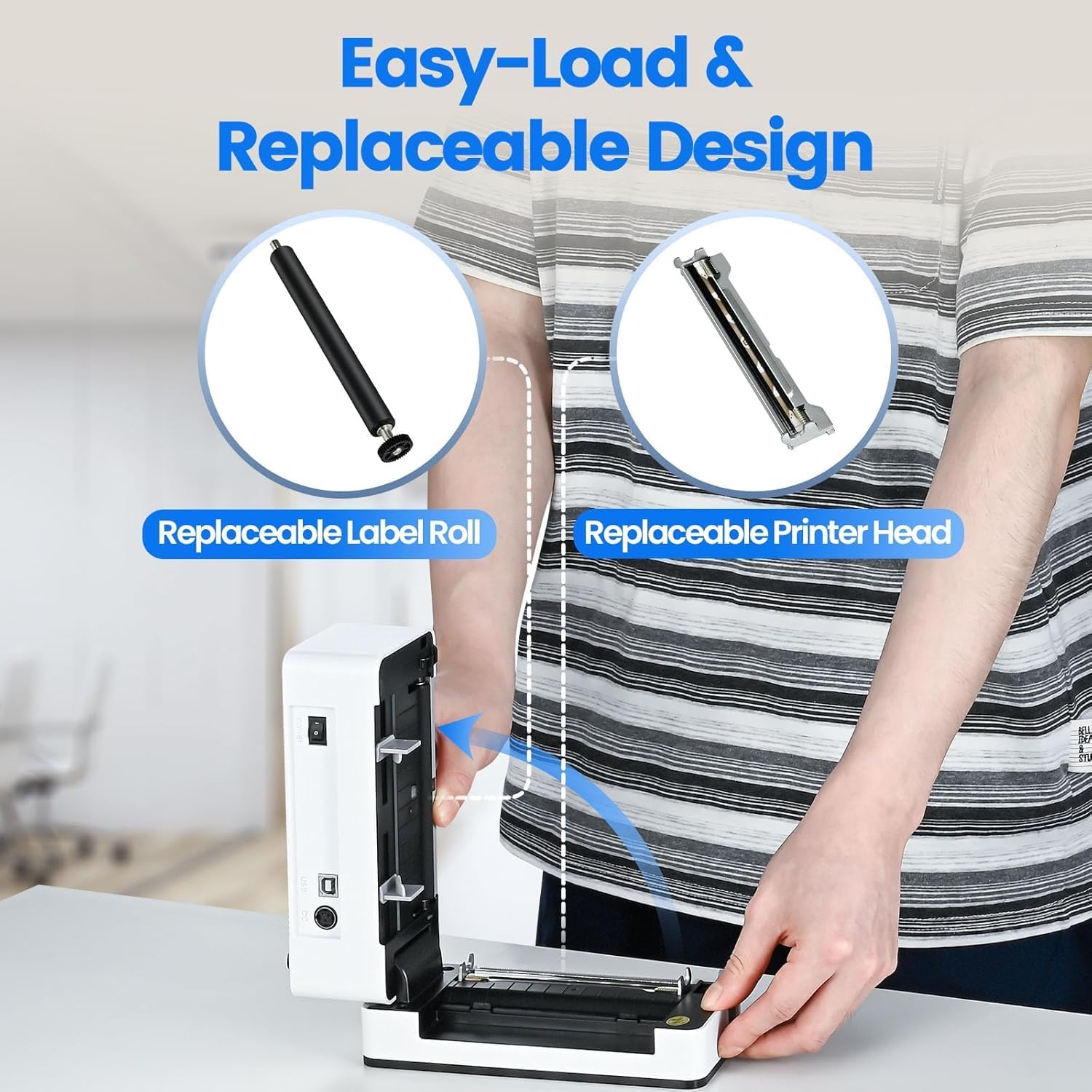
Image: The printer's aluminum alloy print head, designed for durability and extended service life.
설정
1. 로딩 레이블
- 프린터의 상단 덮개를 엽니다.
- Insert the thermal labels into the label compartment, ensuring the printable side is facing up.
- 라벨 가이드를 라벨 너비에 맞게 조절하여 꼭 맞게 부착하세요.
- Close the top cover. The printer will automatically detect the label size and feed a few labels to calibrate.

Image: Illustration of the easy-load label mechanism.
2. 기기에 연결하기
The D463B printer offers both Bluetooth and USB connectivity.

Image: Connectivity options for the BPXX D463B printer.
Bluetooth Connection (iOS, Android, Windows):
- Ensure the printer is powered on. The indicator light should be blue.
- Download the "4Barcode" APP from your device's app store (iOS/Android) or install the driver for Windows from the provided U Disk.
- 모바일 기기 또는 컴퓨터에서 블루투스를 활성화하세요.
- Open the "4Barcode" APP or the printer driver software.
- 검색 available Bluetooth devices and select "D463B" or a similar name.
- Pair the device. Once paired, you can begin printing wirelessly.
USB Connection (Windows, Mac OS, Linux, ChromeOS):
- Connect one end of the USB cable to the printer and the other end to your computer.
- 제공된 USB 메모리를 컴퓨터에 삽입하십시오.
- Follow the instructions on the U Disk to install the appropriate printer drivers for your operating system. A detailed installation guide video is included on the U Disk.
- Once drivers are installed, the printer will be recognized by your computer and ready for use.
프린터 작동
인쇄 과정
After successful setup and connection, you can print labels from various applications and platforms.

Image: Demonstrating the printer's high-speed and high-definition printing capabilities.
- 문서 또는 레이블을 엽니다. file 인쇄하려는 파일(예: 배송 라벨 PDF)을 입력하세요.
- 애플리케이션 내에서 인쇄 옵션을 선택하세요.
- Choose the "BPXX D463B" printer from the list of available printers.
- Ensure the correct label size is selected in the print settings (e.g., 4x6 inches). The printer supports various label sizes up to 4.1 inches in width.
- 인쇄 설정을 확인하고 인쇄를 시작하세요.

Image: The printer's maximum 4.1-inch label width capability and auto-detection feature.
플랫폼 호환성
The BPXX D463B is compatible with a wide range of e-commerce and shipping platforms, streamlining your workflow:
- 아마존
- 쇼피파이
- 이베이
- 쇼피
- UPS
- 우체국
- 싯포
- 페덱스
- 에시
- 쉽스테이션
- 페이팔
- 그리고 훨씬 더 많습니다.

Image: The printer's compatibility with major e-commerce and shipping platforms.
유지
프린터 청소
Regular cleaning ensures optimal print quality and extends the life of your printer.
- 청소하기 전에 프린터 전원을 끄고 전원 콘센트에서 플러그를 뽑으세요.
- 부드럽고 보풀이 없는 천을 살짝 사용하십시오. dampened with isopropyl alcohol to clean the print head. Allow it to dry completely before use.
- Wipe down the exterior of the printer with a dry, soft cloth.
- 라벨 부착 부위에서 먼지나 라벨 조각을 제거하십시오.
구성 요소 교체
The BPXX D463B is designed for easy replacement of key components to maximize its lifespan.
Image: Easy-load and replaceable design for label roll and printer head.
Replacing the Label Roll:
Follow the "Loading Labels" instructions in the Setup section to replace an empty label roll.
Replacing the Printer Head:
While the aluminum alloy print head is designed for durability, it is replaceable if needed. Refer to the detailed instructions provided on the U Disk or contact customer support for guidance on replacing the print head.
문제 해결
| 문제 | 가능한 원인 | 해결책 |
|---|---|---|
| 프린터 전원이 켜지지 않습니다. | 전원 케이블이 연결되지 않았습니다. 전원 콘센트 문제입니다. | 전원 케이블이 제대로 연결되어 있는지 확인하세요. 다른 콘센트에 연결해 보세요. |
| Bluetooth를 통해 연결할 수 없습니다. | Bluetooth not enabled; incorrect app/driver; printer not discoverable. | Ensure Bluetooth is on. Use the "4Barcode" APP. Restart printer and device. |
| Poor print quality (faded, unclear). | Print head dirty; incorrect label type; low-quality labels. | Clean the print head. Ensure you are using thermal labels. Try new labels. |
| 라벨이 제대로 공급되지 않습니다. | Labels improperly loaded; label guides not adjusted. | Reload labels, ensuring they are straight and guides are snug. |
| 컴퓨터(USB)에서 프린터를 인식하지 못합니다. | Drivers not installed; faulty USB cable/port. | Install drivers from the U Disk. Try a different USB cable or port. |
명세서
| 특징 | 세부 사항 |
|---|---|
| 모델명 | D463B |
| 인쇄 기술 | 열의 |
| 연결 기술 | 블루투스, USB |
| 인쇄 해상도 | 203DPI(인치당 도트 수) |
| 최대 인쇄 속도(흑백) | 152mm/s (72 sheets 4x6 labels/min) |
| 최대 라벨 너비 | 4.1인치 |
| Compatible Label Sizes | 4"x6", 3"x2", 3"x1", 2"x1", 2-5/16" x 4" inches |
| 호환 장치 | 노트북, PC, 태블릿, 스마트폰 |
| 지원되는 OS | iOS, Android, Windows, Mac OS, Linux, ChromeOS |
| 제품 치수 | 3.35인치 깊이 x 3.35인치 너비 x 7.28인치 높이 |
| 품목 무게 | 3.12파운드 |
| 전원 | AC 어댑터(포함) |

Image: The compact size of the BPXX D463B printer.
보증
The BPXX D463B Thermal Label Printer comes with a 1년 보증 구매일로부터 적용됩니다. 이 보증은 정상적인 사용 조건에서 발생하는 제조상의 결함 및 오작동에 적용됩니다. 단, 오용, 사고, 무단 수리 또는 자연재해로 인한 손상은 보증 대상에서 제외됩니다.
보증 청구를 위해 구매 증명서를 보관하십시오.
고객 지원
For any questions, technical assistance, or warranty claims, please contact BPXX customer support through the following channels:
- 이메일: Refer to the contact information provided in your product packaging or on the official BPXX web대지.
- 온라인 지원: Visit the BPXX official webFAQ, 드라이버, 지원 리소스를 제공하는 사이트입니다.
When contacting support, please have your printer model (D463B) and purchase information ready.