
소개
This manual provides instructions for the safe and effective use of your Ashfly Portable Handheld Kids Microscope. Please read this manual thoroughly before operating the device and retain it for future reference.
The Ashfly Portable Handheld Kids Microscope is designed to introduce young scientists to the microscopic world. Featuring a 2-inch LCD screen and 200x magnification, it allows for real-time observation of small objects.
패키지 내용
아래 나열된 모든 품목이 패키지에 들어 있는지 확인하세요.
- Ashfly Portable Handheld Kids Microscope
- USB 충전 케이블
- 랜야드/손목 스트랩
- 사용 설명서 (본 문서)

Image: Contents of the Ashfly Portable Handheld Kids Microscope package, including the microscope, USB cable, and wrist strap.
설정
1. 장치 충전
- Locate the USB charging port on the microscope.
- Connect the provided USB charging cable to the microscope and a compatible USB power source (e.g., computer, wall adapter).
- 충전 표시등이 켜집니다. 완전 충전에는 약 2~3시간이 소요됩니다.
- 완전히 충전되면 충전 케이블을 분리하세요.
2. Attaching the Lanyard/Wrist Strap
Thread the lanyard or wrist strap through the designated loop on the microscope to prevent accidental drops during use.
작동 지침
1. 전원 켜기/끄기
- To power on, press and hold the power button (usually marked with a power symbol) for a few seconds until the screen illuminates.
- 전원을 끄려면 화면이 꺼질 때까지 전원 버튼을 다시 길게 누르세요.
2. 사물 관찰
- Place the object you wish to observe on a flat surface.
- Position the microscope's lens directly over the object.
- Adjust the focus wheel (if present) or move the microscope closer/further from the object until a clear image appears on the 2-inch LCD screen.
- Use the zoom adjustment button (4x zoom) to further magnify the image up to 200x.

Image: A child holding the Ashfly microscope, observing a small object on a surface, demonstrating its handheld operation.
3. 사진 및 비디오 촬영
The microscope supports photo and video functions. It comes with built-in memory for storing observations.
- To take a photo: Press the designated photo capture button (refer to device markings).
- To record a video: Press the designated video record button to start recording, and press it again to stop.

Image: The Ashfly microscope's screen displaying a magnified image of an insect, illustrating its digital imaging capability.
4. Dual-Lens Design
This microscope features a dual-lens design. One side is the digital microscope for recording observations, and the other side is a physical magnifier for quick view물건을 옮기는 것.
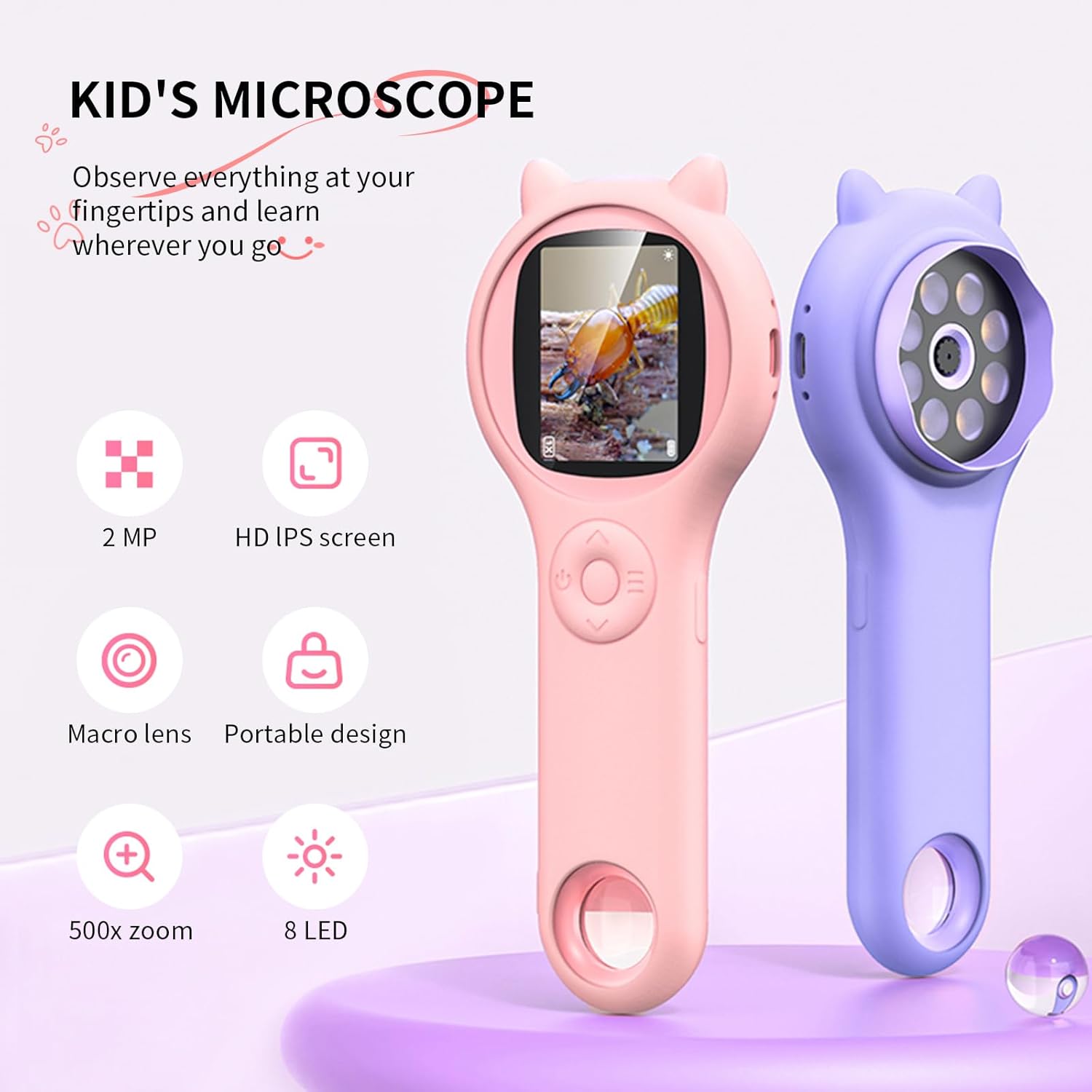
Image: Two Ashfly Kids Microscopes, one pink and one purple, illustrating the compact design and the different lenses/screens on each side.
유지
- 청소: Use a soft, dry cloth to clean the exterior of the microscope. For the lens and screen, use a specialized lens cleaning cloth. Do not use abrasive cleaners or solvents.
- 저장: 현미경은 직사광선과 극한 온도 변화를 피해 서늘하고 건조한 곳에 보관하십시오.
- 배터리 관리 : 배터리 수명을 연장하려면 배터리를 자주 완전히 방전하지 마십시오. 장시간 사용하지 않더라도 정기적으로 충전하십시오.
문제 해결
| 문제 | 가능한 원인 | 해결책 |
|---|---|---|
| 장치의 전원이 켜지지 않습니다. | 배터리가 방전되었습니다. | 제공된 USB 케이블을 사용하여 장치를 충전하십시오. |
| 화면 이미지가 흐릿합니다. | Incorrect focus or distance from object. | Adjust the microscope's distance from the object or use the focus wheel (if applicable) until the image is clear. |
| 사진/동영상 촬영이 불가능합니다. | 내부 메모리가 가득 찼습니다. | Transfer existing photos/videos to a computer to free up space. |
명세서
| 특징 | 세부 사항 |
|---|---|
| 모델 | ASIN B0DBVB3RGT |
| 상표 | 물푸레나무 |
| 확대 | Up to 200x (with 4x zoom adjustment) |
| 화면 | 2-inch LCD, 1080P HD digital imaging |
| 광원 | 주도의 |
| 재료 | 플라스틱 |
| 색상 | 보라 |
| 전원 | 배터리 구동 |
| 대물렌즈 | 무채색 |
보증 정보
Ashfly products are designed for quality and durability. For specific warranty details, please refer to the warranty card included with your product or visit the official Ashfly web사이트. 보증 청구를 위해 구매 증빙 자료로 구매 영수증을 보관하세요.
고객 지원
If you encounter any issues or have questions regarding your Ashfly Portable Handheld Kids Microscope, please contact our customer support team:
- 온라인 지원: 방문하세요 Ashfly Store on Amazon FAQ 및 연락처 옵션은 여기에서 확인하세요.
- 이메일: 제품 포장이나 공식 설명서를 참조하세요. web직접 이메일 지원을 위한 사이트입니다.