
1. 서론
This user manual provides comprehensive instructions for the setup, operation, and maintenance of your Pro-Ject Debut EVO 2 Audiophile Turntable. The Debut EVO 2 represents the next generation of Pro-Ject's best-selling audiophile turntables, featuring a carbon fiber tonearm, electronic speed selection, and a pre-mounted Pick it MM EVO cartridge. Designed for longevity, this turntable offers premium vinyl listening experience.
2. 안전 지침
Please read these safety instructions carefully before operating your turntable. Keep this manual for future reference.
- 전원 공급 장치: 제품과 함께 제공된 전원 어댑터만 사용하십시오. 볼륨이 적절한지 확인하십시오.tage는 귀하의 지역 전원 공급 장치와 일치합니다.
- 물과 습기: Do not expose the turntable to rain or moisture. Do not place objects filled with liquids, such as vases, on the apparatus.
- 열원: Do not place the turntable near heat sources such as radiators, heat registers, stoves, or other apparatus (including amp열을 생성하는 발전기.
- 통풍: 적절한 환기를 유지하세요. 환기구를 막지 마세요.
- 청소: 마른 천으로만 닦으십시오. 액체 또는 스프레이형 세척제 사용은 피하십시오.
- 서비스: Do not attempt to service the turntable yourself. Refer all servicing to qualified service personnel. Servicing is required when the apparatus has been damaged in any way, such as power-supply cord or plug is damaged, liquid has been spilled or objects have fallen into the apparatus, the apparatus has been exposed to rain or moisture, does not operate normally, or has been dropped.
- 어린이들: 어린이의 손이 닿지 않는 곳에 보관하세요. 작은 부품은 질식 위험을 초래할 수 있습니다.
3. 상자 안에 무엇이 들어있나요?
Carefully unpack all items from the packaging. Please ensure all components listed below are present:
- Pro-Ject Debut EVO 2 Turntable Unit
- Transparent Dustcover
- Connection Cable (RCA)
- 전원 어댑터
- 정렬 각도기
- Single Adapter (for 45 RPM records with large center hole)
- 플래터
- 안전 벨트
- 균형추
- 안티 스케이트 무게
4. 설정 가이드
Follow these steps to set up your Pro-Ject Debut EVO 2 turntable for optimal performance.
4.1. 배치 및 수평 맞추기
Place the turntable on a stable, level surface away from vibrations and direct sunlight. Use a spirit level to ensure the turntable is perfectly horizontal. The adjustable feet can be used for fine-tuning the level.

Image: The Pro-Ject Debut EVO 2 turntable in Satin Steel Blue, showcasing its sleek design and stable base. Proper placement on a level surface is crucial for optimal sound quality.
4.2. 플래터 및 드라이브 벨트 설치
- Carefully place the heavy die-cast aluminum platter onto the spindle.
- Locate the drive belt. Gently stretch the belt around the sub-platter and the motor pulley. Ensure the belt is not twisted.

이미지: 자세한 view of the turntable's platter and the drive belt mechanism. The belt connects the motor pulley to the sub-platter, ensuring consistent rotation.
4.3. Tonearm Balancing and Tracking Force Adjustment
The Debut EVO 2 comes with a pre-mounted Pick it MM EVO cartridge. Follow these steps to balance the tonearm and set the tracking force:
- 카트리지에서 스타일러스 보호 덮개를 제거하세요.
- Lower the tonearm lift.
- Carefully rotate the counterweight on the rear of the tonearm until the tonearm floats freely and is perfectly balanced horizontally.
- Once balanced, hold the counterweight steady and rotate the tracking force dial (the numbered ring on the front of the counterweight) to '0'.
- Rotate the entire counterweight (including the dial) counter-clockwise until the dial shows the recommended tracking force for the Pick it MM EVO cartridge, which is typically 1.8 grams. Refer to the cartridge specifications for precise values.

Image: A close-up of the tonearm assembly, showing the counterweight and the anti-skate mechanism. Proper adjustment of these components is vital for accurate tracking and sound reproduction.
4.4. 안티 스케이트 조정
The anti-skate mechanism prevents the tonearm from being pulled towards the center of the record. The Debut EVO 2 uses a weight-on-string anti-skate system.
- Locate the small anti-skate weight and the anti-skate stub on the tonearm.
- Hang the loop of the anti-skate weight's string over the second groove of the anti-skate stub. This setting is generally suitable for the pre-mounted cartridge.
4.5. 연결 Amp리퍼
Connect the supplied RCA cable from the turntable's output jacks (L and R) to the PHONO input on your amp리파이어 또는 포노 프리amplifier. Ensure the ground wire is connected from the turntable to the ground terminal on your amp리퍼/프리amp험 노이즈를 최소화하기 위한 증폭기.
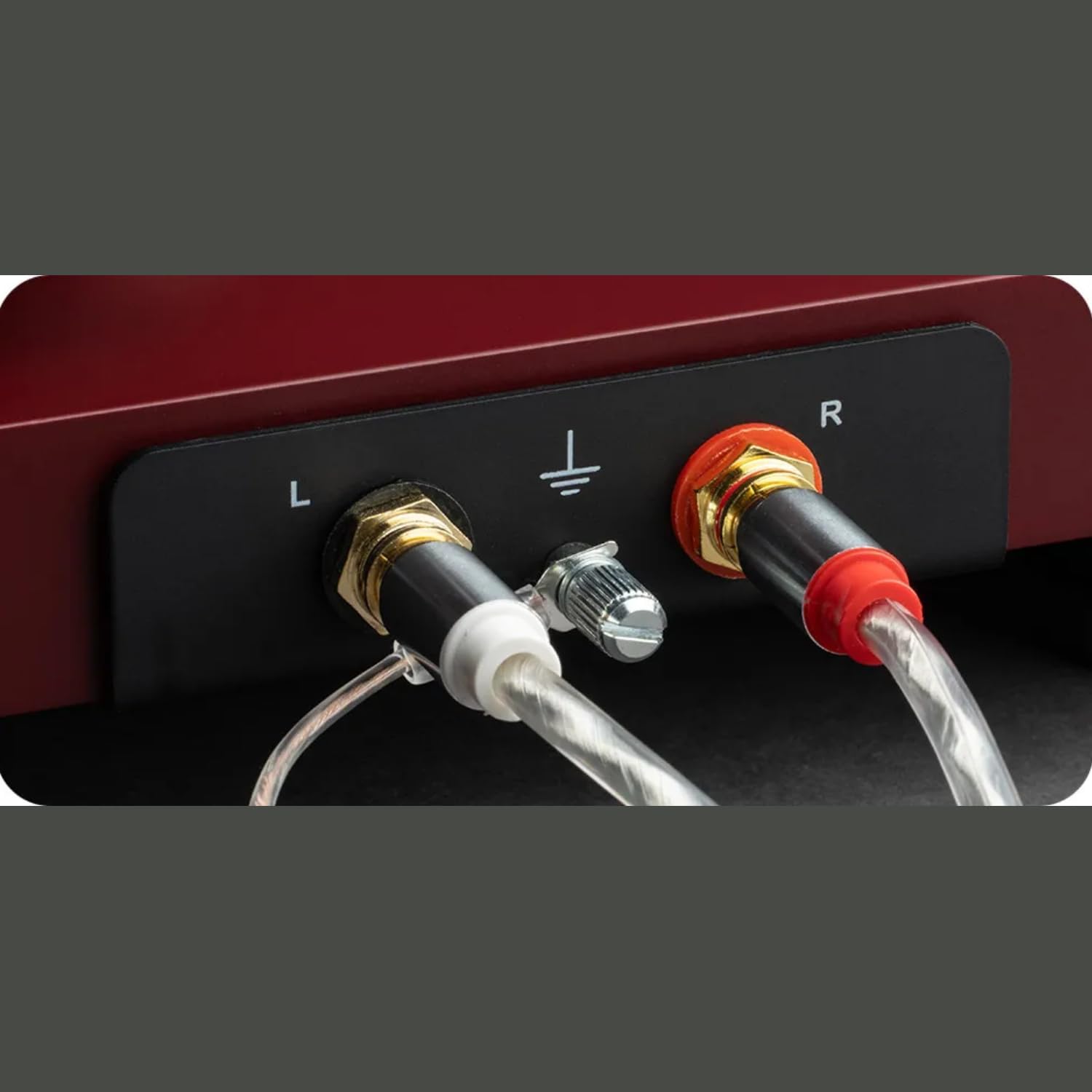
이미지: 자세한 view of the turntable's rear panel, showing the left (L) and right (R) RCA output jacks, along with the ground terminal. These connections are essential for transmitting the audio signal to an amp리퍼.
4.6. 전원 연결
턴테이블의 DC 입력 단자에 전원 어댑터를 연결한 다음 벽면 콘센트에 꽂으세요.
4.7. Dustcover Installation
Carefully insert the hinges of the transparent dustcover into the receptacles at the rear of the turntable plinth.
5. 사용 설명서
5.1. 전원 켜기 / 끄기
The turntable is powered on when the power adapter is connected. There is no separate power switch. To turn off, disconnect the power adapter.
5.2. 속도 선택
The Debut EVO 2 features electronic speed selection. Use the switch located on the plinth to select between 33 ⅓ RPM and 45 RPM. For 78 RPM records, a special belt and stylus are required (sold separately), and the speed switch can be set to 78 RPM after installing the appropriate belt.
5.3. 레코드 재생
- 플래터에 레코드를 놓습니다.
- Select the correct playback speed (33 ⅓ or 45 RPM).
- 톤암 리프트 레버를 사용하여 톤암을 들어 올리십시오.
- Carefully position the stylus over the lead-in groove of the record.
- Gently lower the tonearm using the tonearm lift lever. The stylus will descend onto the record and playback will begin.
5.4. 재생 중지
- At the end of a record, the tonearm will remain in the run-out groove.
- 톤암 리프트 레버를 사용하여 톤암을 들어 올리십시오.
- Return the tonearm to its rest and secure it with the tonearm clamp.
- 턴테이블에서 레코드를 꺼내세요.
6. 유지관리
Regular maintenance will ensure the longevity and optimal performance of your turntable.
6.1. 턴테이블 청소
- Always disconnect the turntable from the power outlet before cleaning.
- Use a soft, lint-free cloth to wipe down the plinth and platter. Avoid abrasive cleaners or solvents.
- The dustcover can be cleaned with a soft, damp cloth. Avoid harsh chemicals that may scratch or cloud the acrylic.
6.2. 스타일러스 청소
- Use a dedicated stylus cleaning brush or fluid.
- Always brush the stylus from back to front (from the pivot point towards the tip) to avoid damaging the cantilever.
- Clean the stylus regularly to remove dust and debris that can degrade sound quality and damage records.

이미지: 클로즈업 view of the pre-mounted Pick it MM EVO cartridge on the carbon fiber tonearm. Regular cleaning of the stylus is important for maintaining audio fidelity.
7. 문제 해결
If you encounter issues with your turntable, refer to the following common problems and solutions.
| 문제 | 가능한 원인 | 해결책 |
|---|---|---|
| No power / No rotation | Power adapter not connected; Power outlet faulty; Drive belt dislodged or broken. | Check power connections; Try a different outlet; Re-seat or replace drive belt. |
| 한쪽 또는 양쪽 채널에서 소리가 나지 않습니다. | Cable connection issues; Cartridge wiring loose; Amp증폭기 입력이 잘못되었습니다. | Check RCA and ground connections; Verify cartridge wires are secure; Ensure amplifier is set to PHONO input. |
| 윙윙거리는 소리 | Ground wire not connected; Nearby electronic interference; Faulty cable. | Connect ground wire; Move turntable away from other electronics; Try a different RCA cable. |
| Distorted or skipping sound | Incorrect tracking force; Incorrect anti-skate; Dirty stylus; Damaged record. | Re-adjust tracking force and anti-skate; Clean stylus; Inspect record for damage. |
| 재생 속도가 잘못되었습니다 | Wrong speed selected; Drive belt issue. | Ensure correct speed (33/45 RPM) is selected; Check drive belt for proper seating. |
If the problem persists after attempting these solutions, please contact Pro-Ject customer support or your authorized dealer for assistance.
8. 사양
| 특징 | 세부 사항 |
|---|---|
| 모델명 | EVO 2 데뷔 |
| 상표 | 프로젝트 |
| 제품 치수 | 16.4 x 12.6 x 4.5 인치 |
| 품목 무게 | 13.2파운드(6킬로그램) |
| 재료 | Carbon Fiber (tonearm) |
| 색상 | Satin Steel Blue (as per current product) |
| 모터 유형 | 벨트 구동 |
| 연결 기술 | Auxiliary (RCA output) |
| 포함된 구성 요소 | Turntable, transparent dustcover, connection cable, power adapter, alignment protractor, single adapter |
| 탄약통 | Pre-mounted Pick it MM EVO |
| 플래터 | 1.7kg anti-magnetic die-cast aluminum |
9. 보증 및 지원
Pro-Ject Audio Systems stands behind the quality of its products. The Pro-Ject Debut EVO 2 turntable is designed for longevity and comes with a 25-year spare parts availability guarantee, ensuring that your turntable can be maintained for a lifetime.
For technical support, warranty claims, or further assistance, please contact your authorized Pro-Ject dealer or visit the official Pro-Ject Audio Systems web해당 사이트에서 구매하세요. 보증을 위해 구매 영수증을 구매 증빙 자료로 보관하십시오.
자세한 정보와 지원 리소스는 다음에서 찾을 수 있습니다. Pro-Ject Store on Amazon.