
OnePlus OnePlus Buds Pro 3
OnePlus Buds Pro 3 Wireless Earbuds User Manual
Brand: OnePlus | Model: OnePlus Buds Pro 3
소개
Welcome to the comprehensive user manual for your OnePlus Buds Pro 3 Wireless Earbuds. These earbuds are designed to deliver an exceptional audio experience with advanced features such as dual drivers, adaptive noise cancellation, and high-resolution audio support. This guide will help you set up, operate, maintain, and troubleshoot your earbuds to ensure optimal performance and longevity.

Image: OnePlus Buds Pro 3 earbuds and their charging case in Midnight Opus color.
상자 안에 무엇이 들어있나요?
- OnePlus Buds Pro 3 Earbuds
- 충전 케이스
- USB-C 충전 케이블
- Eartips (XS, S, M, L sizes)
- 사용자 설명서
설정
1. 초기 페어링
- 이어폰이 충전되어 있는지 확인하세요.
- Open the charging case. The earbuds will automatically enter pairing mode (indicated by a flashing white light).
- On your smartphone or device, go to Bluetooth settings and select "OnePlus Buds Pro 3" from the list of available devices.
- 화면의 지시에 따라 페어링 과정을 완료하세요.
2. Ear Tip Selection
For optimal sound quality and comfort, choose the ear tips that provide a good seal with your ear canals. The OnePlus Buds Pro 3 come with four sizes (XS, S, M, L) of rounded ear tips.

Image: OnePlus Buds Pro 3 earbuds shown with various ear tip sizes (XS, S, M, L) for a customized fit.
3. App Installation (HeyMelody)
Download the HeyMelody app from your device's app store (Google Play Store for Android or App Store for iOS). This app allows for firmware updates, personalized sound settings, and custom controls for your earbuds.
운영
1. 터치 컨트롤
The earbuds feature intuitive touch controls on their stems:
- Quick Squeeze: 음악을 재생/일시 중지합니다.
- 더블 스퀴즈: 다음 트랙.
- 트리플 스퀴즈: Previous track or Voice Assistant activation.
- Squeeze and Hold: Toggle between Noise Cancellation and Transparency modes.
- 위/아래로 슬라이드하세요: 볼륨을 조절하세요.
2. Noise Cancellation & Transparency Mode
The earbuds offer up to 50dB adaptive noise cancellation to minimize external distractions. Use Transparency mode to hear your surroundings without removing the earbuds.

Image: Diagram illustrating the 50dB adaptive noise cancellation feature of the OnePlus Buds Pro 3.
3. 오디오 품질
Equipped with dual drivers (11mm woofer and 6mm tweeter) and dual DACs, the earbuds deliver rich, detailed sound. They support LHDC 5.0 for high-resolution audio. Customize your sound profile using Dynaudio EQs and BassWave™ for enhanced bass.

이미지: 폭발 view of OnePlus Buds Pro 3 showing 11mm woofer and 6mm tweeter with dual DACs.
4. 통화 품질
Enjoy crystal-clear calls thanks to three microphones and a bone conduction microphone (VPU) that effectively suppress background noise.
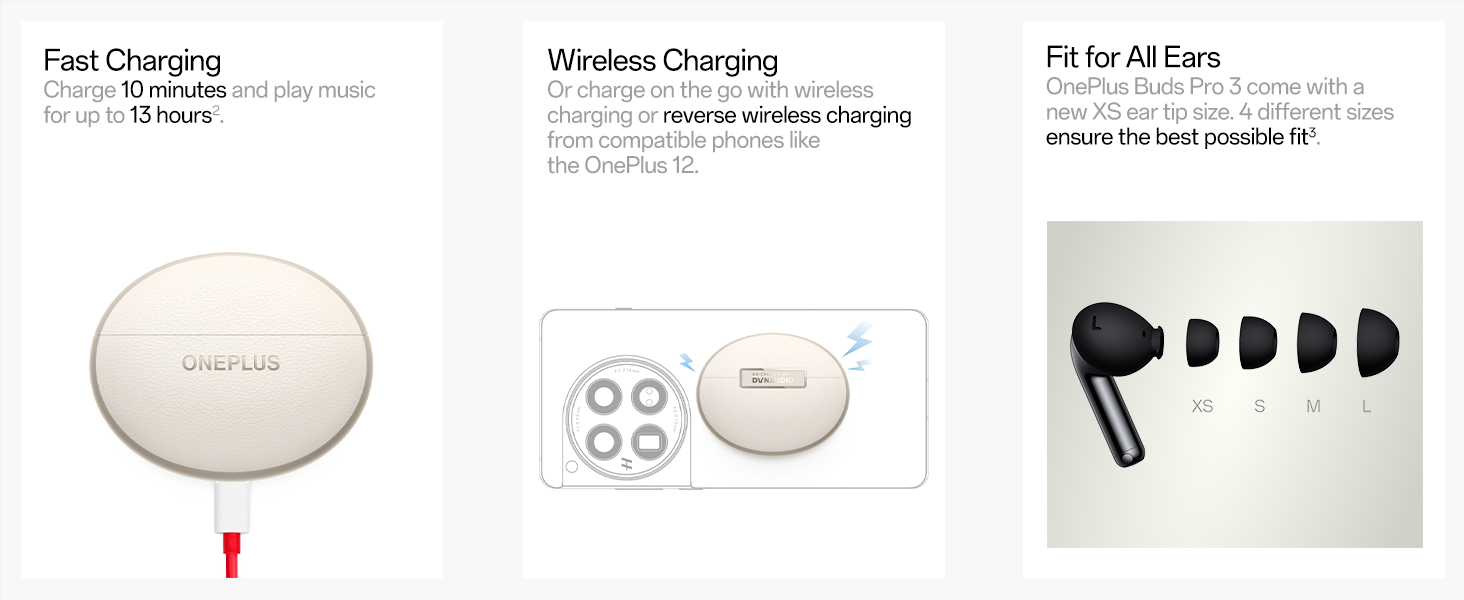
Image: Internal diagram of OnePlus Buds Pro 3 highlighting the microphone placement for call clarity.
5. Spatial Audio & Head Tracking
Experience immersive 3D sound with proprietary on-device spatial audio rendering, compatible with any Android or iOS device. Head tracking ensures the sound remains fixed in space relative to your head movements.

Image: Visual representation of spatial audio with head tracking on OnePlus Buds Pro 3.
6. 게임 모드
Activate Game Mode for ultra-low latency (94ms) to ensure a seamless and responsive gaming experience.

Image: OnePlus Buds Pro 3 in Game Mode with 94ms ultra-low latency for gaming.
7. Find My Earbuds
If you misplace your earbuds, use the "Find My Earbuds" feature in the HeyMelody app to make them emit sounds until you locate them.

Image: Screenshot of the HeyMelody app showing the "Find My Earbuds" feature.
8. Neck Health & Zen Mode Air
Integrated IMU sensors monitor your activity and provide timely posture alerts for improved neck health. Zen Mode Air offers spatial soundscapes for focus, calm, or complete escape.

Image: Visuals depicting Neck Health monitoring and various Zen Mode Air soundscapes.
충전 및 배터리
The earbuds offer up to 43 hours of total battery life with the charging case (ANC off). A quick 10-minute charge provides over 5 hours of music playback.

Image: Detailed battery life breakdown and fast charging capabilities of OnePlus Buds Pro 3.
충전 방법
- USB-C 충전: 제공된 USB-C 케이블을 충전 케이스와 전원에 연결하세요.
- 무선 충전: 충전 케이스를 호환되는 무선 충전 패드에 놓으세요.
유지
The earbuds have an IP55 rating, making them resistant to dust and splashes. To maintain performance, regularly clean the ear tips and charging contacts with a soft, dry cloth. Avoid exposing them to extreme temperatures or harsh chemicals.
문제 해결
일반적인 문제 및 해결책:
- 소리가 나지 않거나 연결 문제가 있습니다. Ensure earbuds are charged, Bluetooth is enabled on your device, and they are within range. Try unpairing and re-pairing the earbuds.
- 나쁜 음질: Check ear tip fit for a proper seal. Ensure earbuds and device are updated to the latest firmware via the HeyMelody app.
- 충전 문제: Clean charging contacts on earbuds and case. Ensure the charging cable/pad is working correctly.
- 이어폰이 반응하지 않음: Place earbuds back in the case, close the lid for 10 seconds, then open to reset.
명세서
| 상표 | 원플러스 |
| 모델명 | 원플러스 버즈 프로 3 |
| 연결 기술 | 무선(블루투스 5.4) |
| 오디오 드라이버 유형 | Dual Drivers (11mm woofer + 6mm tweeter) |
| 소음 제어 | 능동 소음 제거(최대 50dB) |
| 배터리 수명 | Up to 43 hours (with charging case, ANC off) |
| 충전 시간 | 10 mins charge for 5+ hours playback |
| 방수 레벨 | IP55(방진 및 방수) |
| 품목 무게 | 0.002 온스 |
| 제품 치수 | 2.76 x 2.36 x 1.18 인치 |
보증 및 지원
Your OnePlus Buds Pro 3 are covered by a standard manufacturer's warranty. For detailed warranty information, technical support, or service requests, please visit the official OnePlus support web사이트를 방문하거나 고객 서비스에 문의하세요.
공식 제품 영상
영상: 공식 제품 영상 쇼asing the OnePlus Buds Pro 3 Wireless Earbuds. This video provides an overview of the earbuds' design and key features.
관련 문서 - 원플러스 버즈 프로 3
 |
원플러스 버즈 Z2: 재출시view사용자 가이드 및 사양 OnePlus Buds Z2의 다양한 기능을 살펴보세요. 40dB 액티브 노이즈 캔슬링, Dolby Atmos를 적용한 고품질 사운드, 세련된 디자인, 방수 기능, 최대 38시간 사용 가능한 배터리, 원활한 연결성, 그리고 상세한 사양까지 모두 확인하실 수 있습니다. |
 |
OnePlus Buds Z2 사용자 가이드: 설정, 기능 및 제어 방법 OnePlus Buds Z2 사용을 시작해 보세요. 이 가이드에서는 최적의 오디오 경험을 위해 페어링, 노이즈 캔슬링, 재생 설정, 이어팁 착용 방법 및 충전 방법을 안내합니다. |
 |
OnePlus Nord Buds 2 무선 이어폰: 사용 설명서, 안전 정보 및 보증 원플러스 노드 버즈 2 무선 이어버드(모델 E508A)의 공식 사용자 가이드 및 안전 정보입니다. 설정, 페어링, 제어, 충전, 배터리 상태, 안전 주의 사항, 환경 규정 준수 및 제한 보증에 대한 내용을 다룹니다. |
 |
원플러스 버즈 3 사용 설명서: 기능, 안전 및 보증 원플러스 버즈 3의 기능, 페어링, 조작법, 충전, 안전 주의사항 및 보증 정보를 모두 담은 종합 사용자 가이드입니다. 다양한 언어로 제공됩니다. |
 |
OnePlus Buds Z2 User Guide: Features, Controls, and Setup Comprehensive user guide for OnePlus Buds Z2 true wireless earbuds, covering setup, pairing, noise control, call management, charging, and app integration with HeyMelody. |
 |
원플러스 버즈 프로 2 사용 설명서: 기능, 안전 및 보증 원플러스 버즈 프로 2 무선 이어폰의 설정, 조작법, 노이즈 캔슬링, 안전 지침, 보증 정보 및 재활용 방법에 대한 자세한 내용을 담은 종합 사용 설명서입니다. |
Ask a question about this manual
Ask about setup, troubleshooting, compatibility, parts, safety, or missing instructions. Manuals+ will review the question and use this page’s manual context to help answer it.