
1. 서론
Thank you for choosing the Minisopuru 8-in-1 Mac mini Dock & Stand. This device is designed to enhance your Mac mini experience by expanding storage capabilities and providing a versatile array of connectivity options. It also serves as a stylish and functional stand, optimizing desktop space and promoting efficient heat dissipation.

Image: The Minisopuru 8-in-1 Mac mini Dock & Stand, showcasin세련된 디자인과 기능성을 갖추고 있습니다.
2. 제품 오버view 및 특징
The Minisopuru 8-in-1 Mac mini Dock & Stand integrates multiple functionalities into a single, compact unit:
- M.2 NVMe SSD 외장 케이스: Supports up to 10Gbps M.2 PCIe NVMe SSDs (M, B+M Key size 2230/2242/2260/2280) for convenient internal storage expansion up to 2TB. (SSD not included)
- 고속 USB 포트:
- 1 x 10Gbps USB-C 3.2 Gen2 port
- 1 x 10Gbps USB-A 3.2 Gen2 port
- 2 x USB-A 2.0 ports (for peripherals like mouse/keyboard)
Note: USB-C/A ports support data transmission only, not video output or charging.
- 카드 리더: 1 x SD/TF card slot (UHS-I 104MB/S) for fast data transfer and backup.
- 오디오 연결: 1 x Headphone Jack port.
- 일체형 스탠드 디자인: Improves desktop organization, ensures efficient heat dissipation for the Mac mini, and features non-slip, scratch-resistant silicone pads.
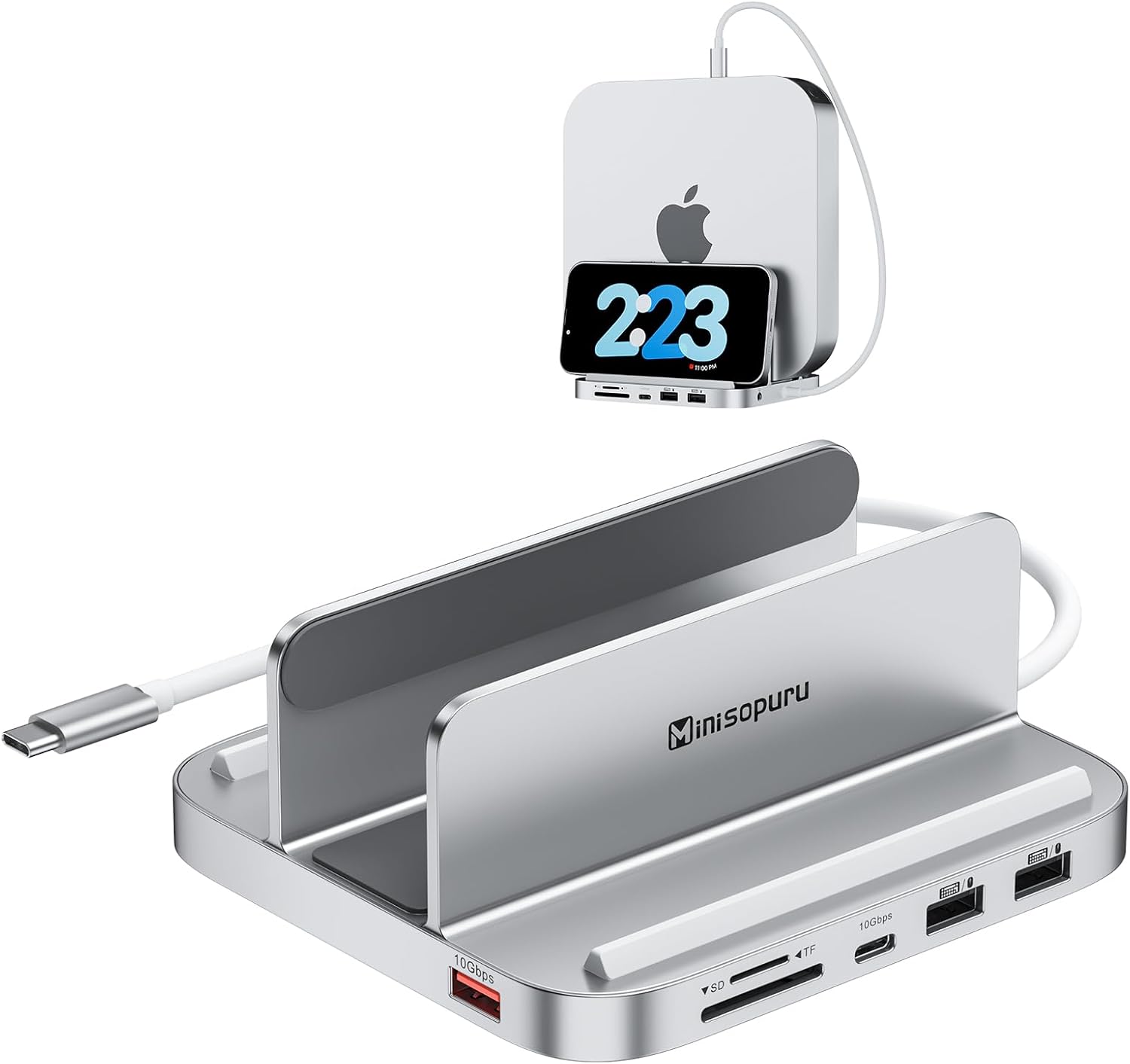
이미지: 앞면 view of the Minisopuru Mac mini Dock, highlighting its various ports and sleek design.
비디오: 간략하게 살펴보기view of the Minisopuru MH218B Mac Mini Dock, demonstrating its features and compact form factor.
3. 호환성
This Mac mini USB hub is designed for broad compatibility with modern Apple devices:
- Mac mini Models: Perfectly fits Mac mini 2018 or newer models, including:
- 2018 Mac mini
- 2020 Mac mini M1
- 2023 Mac mini M2 or M2 Pro
Note: Mac mini models from 2017 and earlier are not supported. This device is not compatible with Mac mini M4.
- 다른 장치들: Also supports all laptops with Type-C Thunderbolt ports (e.g., MacBook Pro/Air) and iPad Pro.

Image: Visual representation of compatible devices including Mac mini M1/M2, MacBooks, and iPads.
4. 설정
4.1. M.2 NVMe SSD 설치
The dock features an M.2 NVMe SSD enclosure for expanding your Mac mini's storage. Follow these steps to install an SSD (SSD not included):
- 하단 덮개를 제거하세요: Use the provided screwdriver to remove the screws securing the bottom cover of the dock.
- SSD 삽입: Gently insert your M.2 NVMe SSD into the slot at a 45-degree angle.
- 보안 SSD: Press the SSD down and fix it with the provided rubber cap.
- 써멀 패드를 부착하세요: Place the thermal pad (included) onto the SSD for heat dissipation.
- 덮개 닫기: 아랫덮개를 다시 부착하고 나사로 고정하십시오.

Image: Detailed steps for installing an M.2 NVMe SSD into the Minisopuru dock.
4.2. 도킹 스테이션을 맥 미니에 연결하기
Place your compatible Mac mini into the stand. Connect the integrated USB-C cable from the dock to a Thunderbolt/USB-C port on your Mac mini. This single connection enables all the dock's features.

Image: A Mac mini securely positioned in the vertical stand of the Minisopuru Dock.
4.3. SSD 초기화
After installing the SSD and connecting the dock, you may need to initialize and format the new SSD for use with your Mac mini:
- Connect the dock to your Mac mini.
- 열려 있는 디스크 유틸리티 on your Mac mini (Applications > Utilities > Disk Utility).
- Locate your new SSD in the sidebar. It may appear as an uninitialized drive.
- Select the SSD and click 지우다.
- Choose a name, format (e.g., APFS for macOS), and scheme (e.g., GUID Partition Map).
- 딸깍 하는 소리 지우다 again to confirm. The SSD will now be ready for use.
5. 운영
Once set up, the Minisopuru dock provides easy access to its expanded ports:
- USB-C 3.2 Gen2 (10Gbps): Connect high-speed peripherals like external SSDs or other USB-C devices for rapid data transfer.
- USB-A 3.2 Gen2 (10Gbps): Ideal for connecting fast USB-A devices.
- USB-A 2.0 (480Mbps): Use for standard peripherals such as keyboards, mice, printers, or USB flash drives.
- SD/TF 카드 슬롯: Insert SD or TF (MicroSD) cards for quick photo and video transfers (UHS-I 104MB/S).
- 오디오 잭 : 오디오 출력을 위해 헤드폰이나 외부 스피커를 연결하세요.

Image: Illustration emphasizing the 10Gbps data transfer capabilities of the USB-C and USB-A 3.2 Gen2 ports.

Image: Close-up of the TF and SD card slots, highlighting their use for fast data backup.
6. 유지관리
- 청소: Use a soft, dry cloth to clean the exterior of the dock. Avoid liquid cleaners.
- 열 발산: The integrated stand design is optimized for heat dissipation. Ensure the Mac mini and dock are placed in a well-ventilated area to prevent overheating.
- 케이블 관리 : Keep cables organized to prevent strain on ports and maintain desktop neatness.
- 미끄럼 방지 패드: The silicone pads on the stand help stabilize the Mac mini and protect its surface. Ensure they are clean and intact.

이미지: 밑면 view of the dock, showing the anti-slip silicone rings for stability.
7. 문제 해결
- SSD가 인식되지 않습니다:
- SSD가 올바르게 설치되었고 외장 케이스에 단단히 고정되었는지 확인하십시오.
- Check Disk Utility to see if the SSD is detected but uninitialized. Follow initialization steps if necessary.
- Verify the USB-C connection between the dock and Mac mini is secure.
- 주변 장치가 작동하지 않음:
- Ensure the peripheral is properly connected to the correct port on the dock.
- Try connecting the peripheral directly to your Mac mini to rule out a device issue.
- 맥 미니를 재시작하세요.
- 느린 데이터 전송:
- Ensure you are using the 10Gbps USB-C or USB-A 3.2 Gen2 ports for high-speed devices.
- Check the specifications of your peripheral and cable to ensure they support the desired speeds.
- Dock Disconnects:
- Ensure the USB-C cable connecting the dock to the Mac mini is not loose or damaged.
- Avoid moving the Mac mini or dock excessively during operation.
8. 사양
| 특징 | 세부 사항 |
|---|---|
| 제품 치수 | 5.1 x 4.7 x 2.3 인치 |
| 품목 무게 | 15.7 온스 |
| 포트 수 | 8 |
| 총 USB 포트 | 5 |
| 하드웨어 인터페이스 | MicroSD, USB, USB Type C |
| M.2 SSD 지원 | Up to 2TB M.2 PCIe NVMe SSDs (M, B+M Key size 2230/2242/2260/2280) |
| SD/TF 카드 속도 | UHS-I 104MB/S |
| USB 데이터 전송 속도 | 10Gbps (USB-C 3.2 Gen2, USB-A 3.2 Gen2), 480Mbps (USB-A 2.0) |
| Compatible Mac mini Models | 2018, 2020 M1, 2023 M2/M2 Pro |
9. 보증 및 지원
The Minisopuru Mac mini dock includes a 12-month customer service guarantee. For any issues or inquiries, 24/7 고객 서비스 is available to provide timely and quick solutions. Please refer to the contact information provided in your product packaging or visit the official Minisopuru web지원 사이트입니다.