
1. 서론
Thank you for choosing the Rraycom BW6 Wireless Security Camera. This 2K outdoor security camera is designed to provide reliable surveillance with features such as full-color night vision, AI motion detection, two-way audio, and weatherproof construction. This manual will guide you through the setup, operation, and maintenance of your camera to ensure optimal performance and security.
2. 상자 안에 무엇이 들어있나요?
포장 내용물을 꼼꼼히 확인해 주세요. 누락되었거나 손상된 품목이 있는 경우 고객 지원팀에 문의하세요.
- BW6 Rechargeable Battery Security Camera
- 금속 마운트
- 나사 세트
- USB 케이블
- 사용 설명서 (본 문서)
3. 제품 특징
The Rraycom BW6 camera offers a range of advanced features for comprehensive home security.

그림 3.1: 위에view of Rraycom BW6 Camera Features.
3.1 고해상도 비디오
선명하고 자세한 음식 사진을 촬영하세요.tage with 2K QHD resolution and a wide 130-degree view시야각을 넓혀 사각지대를 최소화합니다.

그림 3.2: 2K Resolution and 130-degree Wide Angle View.
3.2 고급 야간 투시경
The camera supports both full-color night vision and infrared mode, ensuring clear visibility even in low-light conditions.

그림 3.3: Full Color Night Vision vs. Infrared Mode.
3.3 지능형 모션 감지
Equipped with AI motion detection, the camera can distinguish between humans and other moving objects, reducing false alarms. You can also customize specific motion detection zones to focus on critical areas.

그림 3.4: AI Motion Detection Capabilities.

그림 3.5: Customizable Motion Detection Zones.
3.4 양방향 오디오
내장 마이크와 스피커를 사용하여 방문객과 직접 소통하거나 침입자를 저지할 수 있습니다.

그림 3.6: Two-Way Audio Communication.
3.5 방수 설계
With an IP65 weatherproof rating, the camera is designed to withstand various outdoor conditions, including rain, sun, and snow.

그림 3.7: IP65 Weatherproof Rating.
3.6 다양한 저장 옵션
레코드 푸tage to a Micro SD card (up to 256GB, not included) or utilize cloud storage services for secure data backup and access.

그림 3.8: Cloud and Micro SD Storage Options.
3.7 스마트 홈 통합
The camera is compatible with Amazon Alexa, allowing for convenient voice control and integration into your smart home ecosystem.
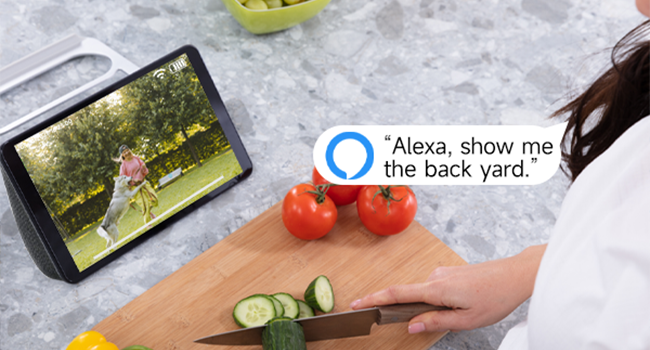
그림 3.9: Amazon Alexa Integration.
4. 설정 가이드
4.1 카메라 충전하기
Before initial use, fully charge the camera using the provided USB cable. Connect the USB cable to the camera's charging port and a standard USB power adapter (not included). The charging indicator light will show the charging status.
4.2 앱 설치 및 계정 생성
- Download the official Rraycom app from your smartphone's app store (available for Android and iOS).
- 앱을 열고 화면의 지시에 따라 새 계정을 만들거나 이미 계정이 있는 경우 로그인하세요.
4.3 카메라 페어링
- Ensure your camera is powered on and your smartphone is connected to a 2.4GHz Wi-Fi network.
- In the Rraycom app, tap the "Add Device" or "+" icon.
- 목록에서 카메라 모델을 선택하세요.
- The app will prompt you to scan a QR code displayed on your camera or generate a QR code on your phone for the camera to scan. Follow the specific instructions in the app.
- Once the camera successfully connects, you will hear a confirmation sound, and the camera will appear in your app's device list.
4.4 카메라 장착
카메라를 설치할 적절한 위치를 선택하고, 카메라가 잘 보이는지 확인하세요. view of the area you wish to monitor and good Wi-Fi signal strength. Use the provided metal mount and screws to securely attach the camera to a wall or other stable surface. Adjust the camera's angle for optimal coverage.
5. 사용 설명서
5.1 라이브 View 입장
Open the Rraycom app and select your camera from the device list to access the live video feed. You can view the 2K resolution footag실시간으로 e.
5.2 동작 감지 설정
Navigate to the camera settings in the app to configure motion detection. You can:
- Enable/disable AI Human Detection.
- Set up custom motion detection zones to monitor specific areas.
- Adjust motion sensitivity levels.
- Configure alert notifications (push notifications, siren alarm).
5.3 양방향 커뮤니케이션
라이브 중 view, tap the microphone icon in the app to speak through the camera's speaker. Tap the speaker icon to listen to audio from the camera's microphone.
5.4 녹음 및 재생
The camera automatically records when motion is detected. You can access recorded footage through the app:
- 클라우드 스토리지: View recordings stored in the cloud (subscription may be required).
- SD 카드 저장: Access recordings saved on the Micro SD card inserted into the camera.
5.5 야간 투시 모드
The camera automatically switches between day and night vision modes. In night vision settings, you can typically choose between:
- 풀 컬러 야간 투시경: Utilizes built-in spotlights to provide color images in low light.
- 적외선 나이트 비전: Provides black and white images using infrared LEDs.
5.6 Alexa 음성 명령
To integrate with Amazon Alexa, enable the Rraycom skill in the Alexa app. Once linked, you can use voice commands such as "Alexa, show me the [camera name]" to view the live feed on compatible Alexa devices.
6. 유지관리
6.1 배터리 관리
The BW6 camera is battery-powered. Monitor the battery level in the app and recharge the camera using the USB cable when the battery is low. Battery life varies based on usage, motion detection frequency, and environmental factors.
6.2 청소
카메라 렌즈와 하우징을 부드러운 천으로 주기적으로 청소하십시오.amp cloth to remove dust and dirt. Avoid using harsh chemicals that could damage the camera's finish or lens.
6.3 펌웨어 업데이트
Ensure your camera's firmware is up to date. The Rraycom app will typically notify you of available updates. Follow the in-app instructions to perform firmware updates, which can improve performance and add new features.
7. 문제 해결
If you encounter issues with your Rraycom BW6 camera, refer to the following common problems and solutions:
| 문제 | 가능한 해결책 |
|---|---|
| 카메라가 Wi-Fi에 연결되지 않음 |
|
| Motion detection is delayed or misses events |
|
| 빈번한 허위 경보 |
|
| Static noise in recordings |
|
| 배터리 수명이 짧음 |
|
8. 사양
Technical details of the Rraycom BW6 Wireless Security Camera:
| 특징 | 세부 사항 |
|---|---|
| 상표 | Rraycom |
| 모델명 | BW6 |
| 연결 기술 | 무선(Wi-Fi) |
| 특징 | Motion Sensor, Full Color Night Vision, Two-Way Talk |
| 실내/실외 사용 | 실내, 실외 |
| 호환 장치 | Android & iOS, Amazon Alexa |
| 마운트 유형 | 벽걸이형 |
| 방수 등급 | IP65 |
| 전원 | 배터리 구동 |
| 배터리 용량 | 5200mAh |
| 분야의 View | 130도 |
| 비디오 캡처 해상도 | 2K |
| 비디오 캡처 형식 | MP4 |
| 스토리지 지원 | 마이크로 SD 카드(최대 256GB), 클라우드 스토리지 |
| 품목 치수 | 1 x 1 x 1 인치(대략) |
9. 보증 및 지원
For warranty information, please refer to the product packaging or contact Rraycom customer service directly. If you have any questions, technical issues, or require assistance with your Rraycom BW6 camera, please contact our support team:
Please provide your product model (BW6) and a detailed description of your issue when contacting support for faster assistance.