
SwitchBot Lock Pro zilver
SwitchBot 스마트락 프로 사용자 설명서
Model: Lock Pro zilver | Brand: SwitchBot
1. 제품 오버view
The SwitchBot Smart Lock Pro is a keyless entry door lock designed to convert your existing deadbolt into a smart lock without requiring complex DIY modifications. It features an aluminum alloy casing for durability and offers wide compatibility with mainstream North American deadbolts.
When paired with the SwitchBot Hub 2 (sold separately), the Lock Pro supports Matter, enabling integration with Apple Home and Siri. It is also compatible with third-party platforms such as Alexa and Google for voice command unlocking.

Image 1: SwitchBot Smart Lock Pro and its accompanying mobile application interface.
2. 설정 및 설치
The Lock Pro is designed for simple and quick installation onto your existing door lock without damaging old parts, making it suitable for tenants and apartment residents. It is a retrofit solution.
2.1 호환성 검사
Ensure your existing deadbolt is compatible with the Lock Pro. It is compatible with mainstream North American door lock deadbolts. For Jimmy Proof and Mortise locks, additional adhesive accessories may be required. Please consult the customer support team before purchasing if you have these lock types.

Image 2: Lock compatibility diagram, illustrating supported deadbolt types.
2.2 물리적 설치
The internal side of your existing deadbolt is removed and replaced with the Lock Pro. The package includes necessary screws and a small screwdriver for installation. The main lock unit slides onto a backplate which is secured to the door.
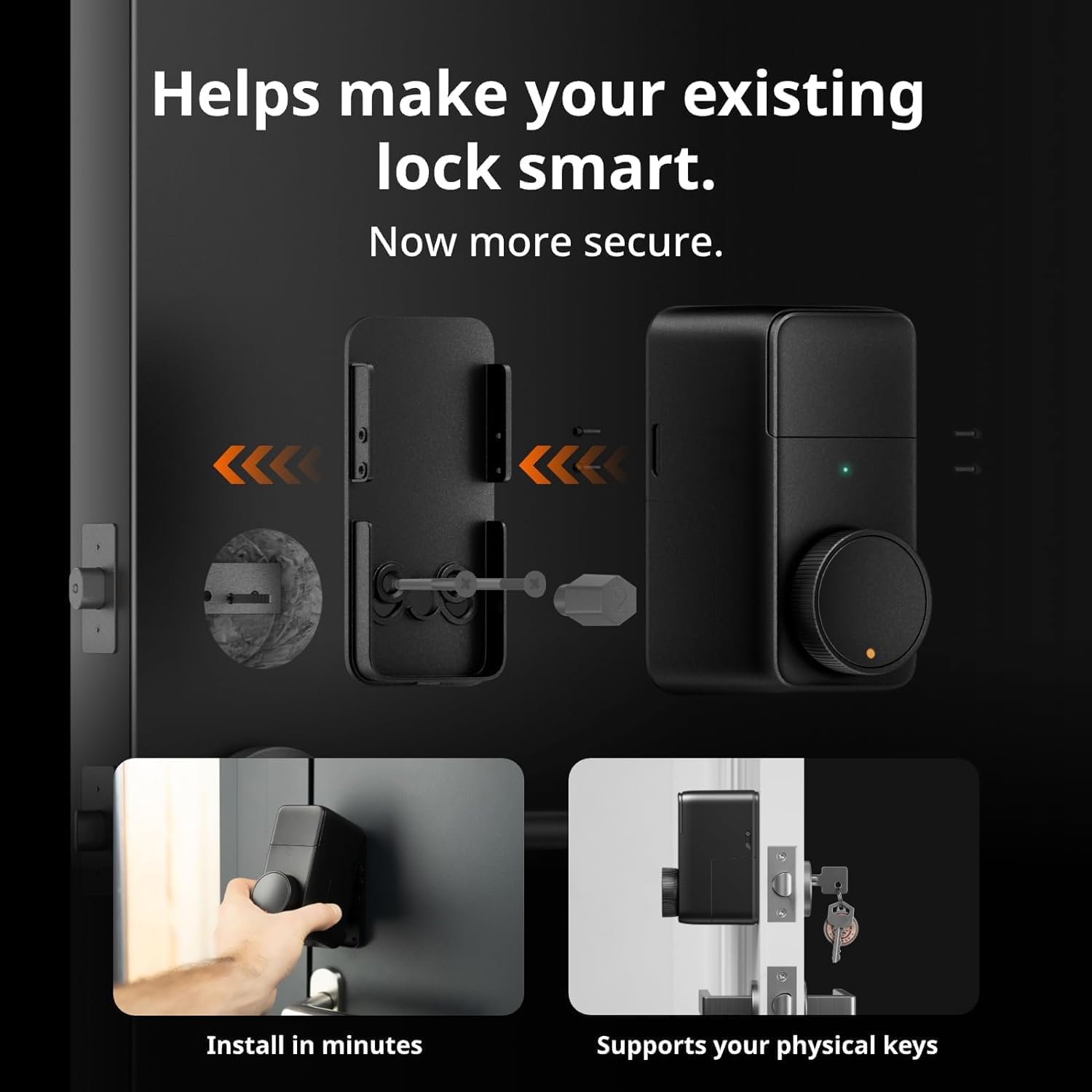
Image 3: Visual guide for installing the Lock Pro onto an existing deadbolt.
2.3 Initial Pairing and App Setup
Download the SwitchBot app to pair your Lock Pro. For Matter support and advanced features like remote unlocking and voice commands, the SwitchBot Hub 2 (sold separately) is required. Follow the in-app instructions for pairing and initial setup.

Image 4: Remote unlocking via the SwitchBot app on a smartphone.
3. Operating the Lock Pro
3.1 잠금 해제 방법
The Lock Pro offers multiple ways to unlock your door:
- 블루투스: Unlock directly via the SwitchBot app when within Bluetooth range.
- 원격 잠금 해제: Requires SwitchBot Hub. Unlock from anywhere using the app.
- 홈쉐어링: Share access with family and friends through the app.
- 음성 제어: Compatible with Alexa, Google Assistant, and Siri (with Hub 2).
- Widget Unlock: Quick access from your smartphone's home screen.
- 애플 워치: Unlock directly from your Apple Watch (with Hub 2).
- SwitchBot 리모컨: (Sold separately) A dedicated remote for quick unlocking.
- 물리적 키: Your existing physical key remains functional.
- 근거리 무선 통신 Tag: (Sold separately) Tap an NFC tag 잠금해제.

이미지 5: 이상view of the nine different unlocking methods available with the Lock Pro.
3.2 자동 잠금 기능
The Auto-Lock feature automatically locks your door immediately after closing, ensuring security when you leave or enter your home. This function uses geomagnetism for detection.

Image 6: Illustration of the automatic locking mechanism upon door closure.
3.3 실시간 알림
When connected to a SwitchBot Hub, the Lock Pro can send real-time notifications to your smartphone regarding the door lock status (locked/unlocked) and overall door status (open/closed).

이미지 7: Example of real-time notifications received on a smartphone about door status.
4. 유지관리
4.1 배터리 수명 및 교체
The Lock Pro is powered by 4 x AA 1.5V batteries (included), providing a battery life of up to 6-9 months depending on usage. Low battery notifications will be sent to your app when replacement is needed.
For extended battery life (9-12 months), the SwitchBot Dual Power Pack (sold separately) can be used. This accessory ensures continuous power by automatically switching between battery sources.

Image 8: Comparison of battery life using standard AA batteries versus the optional Dual Power Pack.
5. 문제 해결
5.1 Low Battery Situations
If the battery runs low, the Lock Pro can still be unlocked using passive power supply. However, it is recommended to replace batteries promptly upon receiving low battery notifications to ensure optimal performance.

Image 9: Comparison of Lock Pro's ability to unlock during low battery versus other smart locks.
5.2 연결 문제
If you experience issues with connectivity or remote access, ensure your SwitchBot Hub (if used) is properly connected to your Wi-Fi network and within range of the Lock Pro. Check the SwitchBot app for device status and network diagnostics.
5.3 Physical Key Not Working
The Lock Pro is designed to allow continued use of your physical key. If your physical key is not working, ensure the lock mechanism is not obstructed and that the Lock Pro is correctly installed and aligned with your deadbolt.
6. 사양
| 특징 | 세부 사항 |
|---|---|
| 상표 | 스위치봇 |
| 모델명 | 스위치봇 스마트 락 프로 |
| 잠금 유형 | 데드 볼트 |
| 재료 | 알류미늄 |
| 색상 | Lock Pro Silver |
| 품목 치수(L x W x H) | 2.32 x 3.3 x 4.72 인치 |
| 품목 무게 | 15.9온스(450그램) |
| 전원 | 4 x AA 배터리(포함) |
| 연결 프로토콜 | Wi-Fi (with Hub), Bluetooth |
| 컨트롤러 유형 | IFTTT, Siri, Amazon Alexa (with Hub) |
| 한국어: | 810150541564 |
7. 보증 및 지원
보증 정보 및 기술 지원에 대해서는 SwitchBot 공식 웹사이트를 참조하십시오. website or contact their customer service directly. You can also find additional resources and FAQs on the SwitchBot support page.
공식 사용자 매뉴얼(PDF): PDF 다운로드
8. 공식 제품 영상
Below are official product videos from the seller, providing visual guides and demonstrations of the SwitchBot Smart Lock Pro.
No official seller videos found in the provided data that meet the embedding criteria.
Ask a question about this manual
Ask about setup, troubleshooting, compatibility, parts, safety, or missing instructions. Manuals+ will review the question and use this page’s manual context to help answer it.