
로지텍 920-012670
Logitech G915 X Lightspeed 무선 기계식 게이밍 키보드 사용 설명서
모델: 920-012670 | 브랜드: Logitech
소개
This manual provides comprehensive instructions for the setup, operation, maintenance, and troubleshooting of your Logitech G915 X Lightspeed Wireless Mechanical Gaming Keyboard. Designed for high-performance gaming and versatile connectivity, this keyboard features LIGHTSPEED wireless technology, GL mechanical switches, customizable G-keys, and LIGHTSYNC RGB lighting. Please read this manual thoroughly to ensure optimal use and longevity of your device.

이미지: 위에서 아래로 view of the Logitech G915 X Lightspeed Wireless Mechanical Gaming Keyboard, showcasin전체 레이아웃과 RGB 백라이트를 갖추고 있습니다.
상자 안에 무엇이 들어있나요?
Upon unboxing your Logitech G915 X Lightspeed keyboard, verify that all the following components are present:
- Logitech G915 X Lightspeed Wireless Mechanical Gaming Keyboard
- 라이트스피드 USB 수신기
- USB Extender에
- USB-C Data/Charging Cable
- 사용자 문서(이 매뉴얼)

Image: All components included in the Logitech G915 X keyboard packaging, including the keyboard, USB-A to USB-C cable, USB extender, and USB wireless receiver.
설정
초기 충전
Before first use, it is recommended to fully charge the keyboard.
- Connect the supplied USB-C data/charging cable to the USB-C port on the keyboard (located on the top edge).
- Connect the other end of the cable (USB-A) to a powered USB port on your computer or a USB wall adapter.
- The battery indicator light on the keyboard will show charging status. A full charge typically takes approximately 4 hours.
키보드 연결
The G915 X offers three connectivity options: LIGHTSPEED Wireless, Bluetooth, and Wired USB.

Image: Close-up of the Logitech G915 X keyboard's connectivity buttons (LIGHTSPEED, Bluetooth, Wired) located above the F5-F8 keys.
LIGHTSPEED Wireless (Recommended for Gaming)
- Locate the LIGHTSPEED USB receiver. For optimal signal, use the USB extender to position the receiver closer to the keyboard.
- Plug the LIGHTSPEED USB receiver into an available USB-A port on your computer.
- On the keyboard, slide the power switch to the ON position (located on the top right).
- Press the LIGHTSPEED button (indicated by a wireless signal icon) on the keyboard. The indicator light above the button will turn solid cyan when connected.
블루투스 연결
- 키보드의 전원이 켜져 있는지 확인하세요.
- Press and hold the Bluetooth button (indicated by a Bluetooth icon) on the keyboard until the indicator light above it starts blinking blue rapidly. This indicates pairing mode.
- On your computer or device, navigate to Bluetooth settings and select "G915 X" from the list of available devices.
- 페어링이 성공적으로 완료되면 표시등이 파란색으로 계속 켜집니다.
유선 USB 모드
- Connect the USB-C data/charging cable to the keyboard and the USB-A end to your computer.
- 키보드는 자동으로 유선 모드로 전환되어 충전을 시작합니다.
작동 지침
주요 기능 이상view
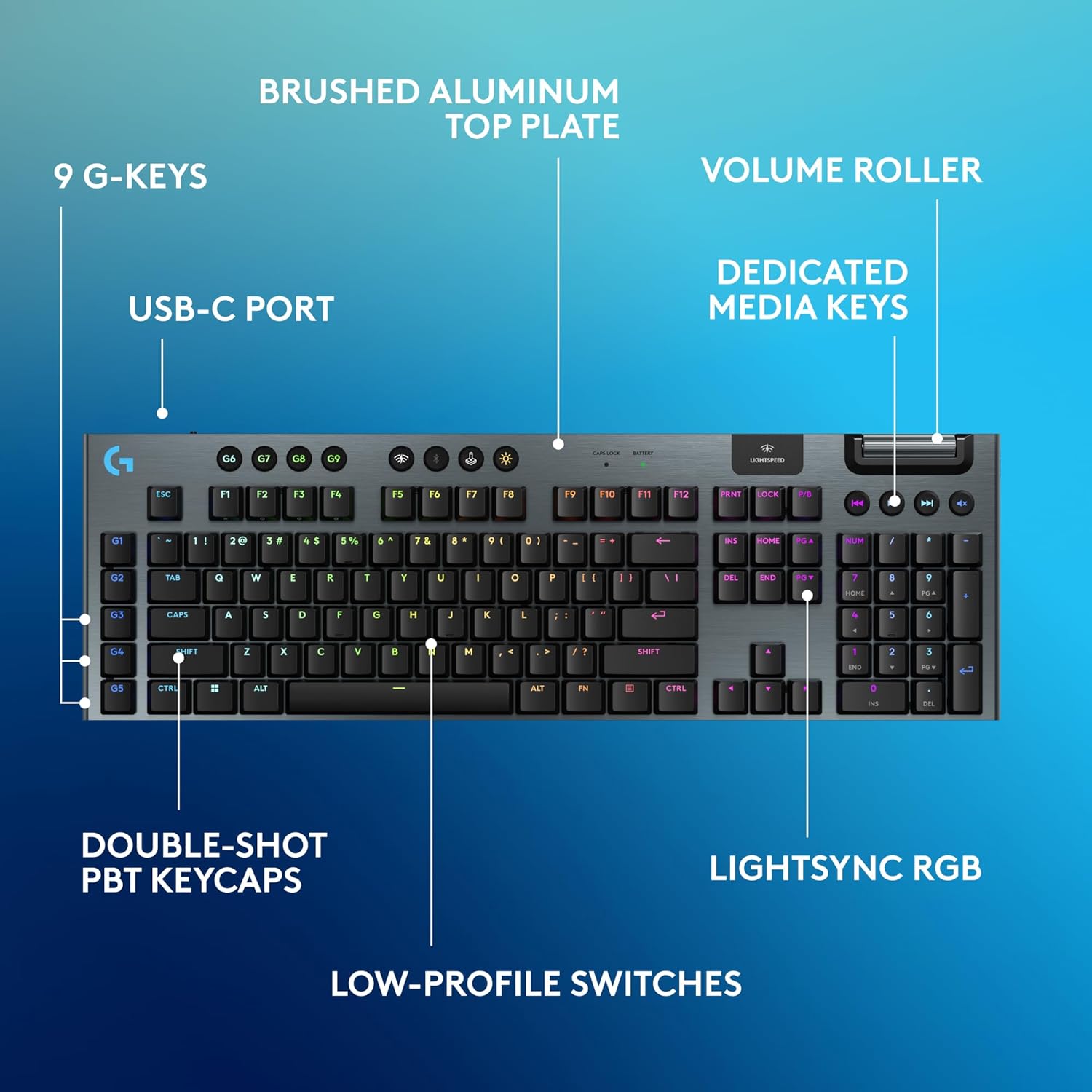
Image: Diagram highlighting key features of the Logitech G915 X keyboard, including G-keys, USB-C port, double-shot PBT keycaps, low-profile switches, brushed aluminum top plate, volume roller, dedicated media keys, and LIGHTSYNC RGB.
- GL Mechanical Switches: 로우프로file switches designed for speed, precision, and comfort with a 1.3mm actuation point.
- 라이트스피드 무선: Pro-grade wireless technology for ultra-fast and reliable connection.
- 블루투스: For connecting to other devices that support Bluetooth.
- 전용 미디어 키: Control audio and video playback with ease.
- 볼륨 롤러: Smoothly adjust audio volume.
- LIGHTSYNC RGB: Customizable per-key RGB lighting with approximately 16.8 million colors.
- G-Keys (G1-G5): Five dedicated programmable macro keys on the left side of the keyboard.
- 더블샷 PBT 키캡: Durable keycaps resistant to wear and shine.
Customizing with G HUB Software
To unlock the full potential of your G915 X keyboard, download and install the Logitech G HUB software from the official Logitech website. G HUB allows for extensive customization.
- G-Key Programming: Assign custom macros, commands, or system functions to the G1-G5 keys. You can create multiple profile다양한 게임이나 애플리케이션에 사용 가능.
- LIGHTSYNC RGB Customization: Personalize lighting effects, colors, and animations. Sync lighting with other Logitech G devices.
- 게임 모드: Disable specific keys (e.g., Windows key) during gaming to prevent accidental interruptions.
- KEYCONTROL: Set up to 15 functions per key for advanced control.

Image: Screenshot of the Logitech G HUB software interface showing options for customizing commands and assigning functions to G-keys on the G915 X keyboard.
Media Controls and Volume
Dedicated media controls and a volume roller are located on the top right of the keyboard for quick access.
- 볼륨 롤러: Roll up to increase volume, roll down to decrease.
- 미디어 버튼:
- 이전 트랙
- 재생/일시정지
- 다음 트랙
- 무음
배터리 관리
The Logitech G915 X keyboard provides up to 36 hours of continuous battery life with lighting enabled. Battery life may vary based on usage and lighting intensity.
- 배터리 표시기: A dedicated battery indicator light is located near the LIGHTSPEED logo on the top right. It changes color to indicate battery level.
- 충전 중: Connect the USB-C cable to the keyboard and a powered USB port. You can continue to use the keyboard in wired mode while it charges.
- 절전: The keyboard will enter a low-power state after a period of inactivity to conserve battery.
유지
적절한 유지관리는 키보드의 수명과 성능을 보장합니다.
- 키캡 청소: 부드럽고 털이 없는 천을 살짝 사용하세요.amp물이나 순한 세척액으로 세척하세요. 강한 화학 물질은 피하세요.
- Removing Dust/Debris: Use compressed air to clear dust and debris from between the keycaps and switches.
- 표면 청소: Wipe the aluminum top plate with a soft, dry cloth.
- 저장: 장시간 사용하지 않을 경우 키보드를 직사광선을 피해 건조하고 서늘한 곳에 보관하세요.
문제 해결
If you encounter issues with your Logitech G915 X keyboard, refer to the following common troubleshooting steps.
| 문제 | 가능한 해결책 |
|---|---|
| 키보드가 응답하지 않음(무선) |
|
| 블루투스 연결 문제 |
|
| 키가 등록되지 않거나 두 번 입력됨 |
|
| RGB 조명이 작동하지 않거나 올바르지 않습니다. |
|
| G-keys or macros not working |
|
명세서
| 특징 | 세부 사항 |
|---|---|
| 모델 번호 | 920-012670 |
| 연결성 | LIGHTSPEED Wireless (2.4 GHz RF), Bluetooth, Wired USB-C |
| 스위치 유형 | GL Tactile Mechanical Switches (Low-Profile) |
| 작동 점 | 1.3mm (XNUMXmm) |
| 총 이동 거리 | 3.2mm (XNUMXmm) |
| 키캡 | 더블샷 PBT |
| 조명 | LIGHTSYNC RGB(키별 사용자 정의 가능) |
| 프로그래밍 가능한 키 | 5 dedicated G-keys, up to 15 functions per key via KEYCONTROL |
| 배터리 수명 | Up to 36 hours (with lighting) |
| 충전 시간 | 약 4시간 |
| 치수(길이x너비x높이) | 18.7 x 5.91 x 0.87인치(47.5 x 15 x 2.2cm) |
| 무게 | 2.38파운드(1.08kg) |
| 재료 | 알루미늄 상판 |
| 운영 체제 호환성 | PC, Mac OS |
보증 및 지원
Logitech products are designed for durability and performance. For information regarding warranty coverage, technical support, and frequently asked questions, please visit the official Logitech support web대지.
Logitech 지원 Web대지: https://support.logi.com/
추가적인 보호를 위해 구매를 고려해 보세요.asing an extended protection plan available at the time of purchase.