
1. 서론
The Eufy SmartTrack Link is a compact item tracker designed to help you locate your belongings quickly and efficiently. This device integrates with Google's 'Find Hub' network for Android devices and offers two-way finding capabilities, allowing you to locate both your items and your smartphone. Its small size and integrated hole make it easy to attach to various items like keys, bags, or luggage.
패키지 내용:
- Eufy SmartTrack Link
- 빠른 시작 가이드
- 안전 매뉴얼
- 고객 지원 정보

The Eufy SmartTrack Link can be easily attached to various personal items.
2. 설정
2.1 Installing the Eufy App
- Download the 'Eufy Security' app from the Google Play Store on your Android device.
- 앱을 열고 화면의 지시에 따라 계정을 만들거나 로그인하세요.
2.2 Pairing Your SmartTrack Link
- Android 기기에서 Bluetooth가 활성화되어 있는지 확인하세요.
- In the Eufy Security app, tap the '+' icon to add a new device.
- Select 'SmartTrack Link' from the list of devices.
- Follow the app's instructions to complete the pairing process. This usually involves pressing a button on the SmartTrack Link.
2.3 Granting Location Permissions
For optimal functionality, especially for location tracking and lost mode features, you must grant the Eufy Security app 'Always' access to your device's location services. This ensures the SmartTrack Link can be located even when the app is not actively in use.

The Eufy Security app interface on an Android smartphone.
3. Operating the SmartTrack Link
3.1 Finding Lost Items (Using Your Phone)
If you've misplaced an item with the SmartTrack Link attached, use the Eufy Security app to make the tracker ring:
- Open the Eufy Security app on your Android device.
- Select the SmartTrack Link you wish to locate.
- Tap the 'Ring' button in the app. The SmartTrack Link will emit an audible sound, helping you pinpoint its location within Bluetooth range (approximately 15 meters).
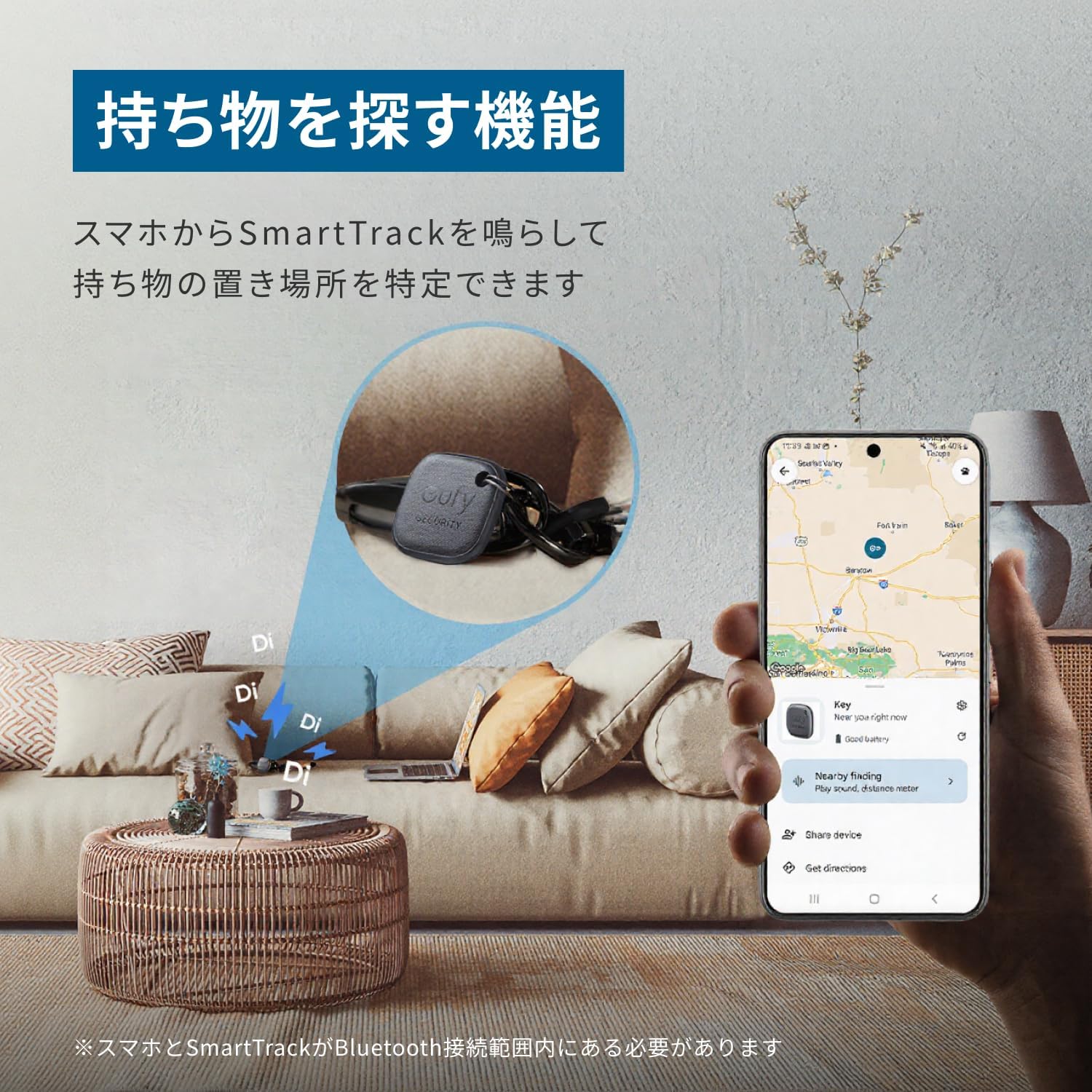
Use the Eufy app to make your SmartTrack Link ring and find your items.
3.2 Finding Your Phone (Using SmartTrack Link)
If you've misplaced your Android smartphone, you can use the SmartTrack Link to make your phone ring:
- Double-press the button on your Eufy SmartTrack Link.
- Your paired smartphone will ring, even if it's on silent mode (this feature is specific to the Eufy app).

Double-press the SmartTrack Link to make your smartphone ring.
3.3 Google 'Find Hub' Network Integration
The SmartTrack Link is compatible with Google's 'Find Hub' network, allowing you to leverage a wider network of Android devices to locate your lost items. This feature helps pinpoint the location of your SmartTrack Link even when it's outside your personal Bluetooth range.

Locate your SmartTrack Link using the Google 'Find Hub' network on your Android device.
3.4 Lost Mode and QR Code
If your SmartTrack Link is lost, you can enable 'Lost Mode' in the Eufy Security app. The back of the SmartTrack Link features a QR code. If someone finds your lost item and scans the QR code, they can contact you directly using the information you've provided in the app. Ensure your contact details are up-to-date in the Eufy app for this feature to work effectively.

The QR code on the back allows finders to contact you when Lost Mode is active.
3.5 Feature Comparison: Eufy App vs. Google Find Hub
The table below outlines the features available when using the Eufy app versus the Google Find Hub network:
| 특징 | Eufy App | 구글 파인드 허브 |
|---|---|---|
| Register SmartTrack | 예 | 예 |
| Find Lost Items (Ring SmartTrack) | 예 | 예 |
| Locate Current Position (Outside Bluetooth Range) | 아니요 | 예 |
| 손실 방지 Tag (Alerts) | 예 | 예 |
| Find Your Phone (Ring Phone from SmartTrack) | 예 | 아니요 |
| Left-Behind Notification | 예 | 아니요 |
| Device Sharing (Multiple Accounts) | 최대 6개 | 최대 2개 |
Note: Information is current as of April 2025. Some features may vary depending on device or app version.
4. 유지관리
4.1 배터리 교체
The Eufy SmartTrack Link uses a replaceable CR2032 lithium metal coin cell battery, which typically lasts for about 1 year. When the battery is low, the app will notify you. To replace the battery:
- Locate the small notch or opening on the side of the SmartTrack Link.
- Use a small tool (like a coin or the included pin) to gently pry open the device casing.
- 기존 CR2032 배터리를 제거하세요.
- 새 CR2032 배터리를 양극(+)이 위를 향하게 하여 삽입하세요.
- Carefully snap the device casin다시 조립하여 단단히 닫혔는지 확인하십시오.

The SmartTrack Link uses a replaceable CR2032 battery.
4.2 청소
To clean your SmartTrack Link, wipe it gently with a soft, dry cloth. Avoid using harsh chemicals or abrasive materials, as these can damage the device. The device is not waterproof, so avoid exposing it to water or excessive moisture.
5. 문제 해결
5.1 SmartTrack Link Not Ringing
- 배터리 확인: Ensure the CR2032 battery is not depleted. Replace if necessary.
- 블루투스 연결 : Verify that your smartphone's Bluetooth is on and the SmartTrack Link is within range (approx. 15 meters).
- 앱 상태: Confirm the Eufy Security app is running and the SmartTrack Link is connected.
- 재설정 및 재수리: If issues persist, try resetting the SmartTrack Link and re-pairing it with your device through the Eufy app.
5.2 Phone Not Ringing from SmartTrack Link
- 앱 권한: Ensure the Eufy Security app has the necessary permissions to play sounds and override silent mode.
- 블루투스 연결 : Confirm the SmartTrack Link is connected via Bluetooth to your phone.
- 앱 실행 중: The Eufy app needs to be running in the background for this feature to work.
5.3 Inaccurate Location Information
- 위치 서비스: Ensure your phone's location services are set to 'Always' for the Eufy Security app.
- 네트워크 범위: Location accuracy relies on the density of the Google Find Hub network. In areas with fewer Android devices, accuracy may be lower.
- 환경적 요인: Obstacles like walls or dense foliage can affect signal strength and location accuracy.
5.4 페어링 문제
- 장치 재시작: Restart both your smartphone and the SmartTrack Link (by removing and reinserting the battery).
- 캐시 지우기: Clear the cache for the Eufy Security app in your phone's settings.
- 앱/펌웨어 업데이트: Ensure both the Eufy app and the SmartTrack Link's firmware are up to date.
6. 사양
| 상표 | 유피 |
| 모델 번호 | T87B4 |
| 치수(길이 x 너비 x 높이) | 37mm x 37mm x 7mm |
| 무게 | 10그램 |
| 배터리 유형 | 리튬 금속 배터리 1개(CR2032) 포함 |
| 평균 배터리 수명 | 1년 |
| 연결성 | 블루투스 |
| 제어 방법 | 앱, 푸시 버튼 |
| 범위 | 최대 15미터(블루투스) |
| 호환 장치 | 스마트폰(안드로이드) |
| 한국어: | 194644207076 |
7. 보증 및 지원
7.1 제품 보증
The Eufy SmartTrack Link comes with a standard 18-month warranty from the date of purchase. If any defects or malfunctions occur during this period, the product will be exchanged or repaired as deemed appropriate by the manufacturer. Additionally, registered Anker members receive an extended 6-month warranty, totaling 24 months of support.

Standard 18-month warranty with an additional 6 months for registered Anker members.
7.2 고객 지원
For any inquiries, technical assistance, or warranty claims, please refer to the customer support information provided in your product's Quick Start Guide or Safety Manual. You can also visit the official Eufy webFAQ 및 연락처 정보는 사이트를 참조하세요.


