
Shimbol M7
Shimbol M7 7-inch 2000 Nits Camera Monitor User Manual
모델: M7
1. 서론
Thank you for choosing the Shimbol M7 7-inch 2000 Nits Camera Monitor. This professional on-camera field monitor is designed to enhance your filmmaking and photography experience with its high-brightness touchscreen, 1920x1080 IPS display, and comprehensive monitoring tools. This manual provides essential information for the proper setup, operation, and maintenance of your device.

Image 1.1: The Shimbol M7 7-inch 2000 Nits Camera Monitor.
2. 안전 정보
Please read all safety instructions carefully before using the Shimbol M7 monitor to prevent damage to the product or injury to yourself. Keep this manual for future reference.
- 모니터를 비, 습기 또는 극한의 온도에 노출시키지 마세요.
- 모니터를 떨어뜨리거나 강한 충격을 가하지 마십시오.
- Do not disassemble the monitor. Repairs should only be performed by authorized personnel.
- Use only approved power sources and accessories.
- 부드럽고 마른 천으로 화면을 닦으세요. 강한 화학 물질은 사용하지 마세요.
- Ensure proper ventilation when operating the monitor.
3. 패키지 내용
아래 나열된 모든 품목이 패키지에 포함되어 있는지 확인하세요. 품목이 누락되었거나 손상된 경우 판매점에 문의하세요.

Image 3.1: Shimbol M7 monitor and included accessories.
- Shimbol M7 Camera Monitor
- SDI 케이블
- HDMI 케이블
- 핫슈 마운트
- Tempered Screen Protector
- Dusting Cloth
- 사용자 설명서
- 색상 상자
- 운반 케이스
- SD 카드 (32GB)
4. 제품 오버view
The Shimbol M7 is a high-performance 7-inch camera monitor designed for professional use. It features a robust aluminum body and a bright, clear display with advanced monitoring capabilities.
4.1 주요 특징
- 2000니트의 높은 밝기: Ensures clear visibility for outdoor shooting, even in strong sunlight.
- 1920x1080 IPS Display: Provides sharp images and rich colors with a DCI-P3 display.
- 터치스크린 인터페이스: For easy and intuitive navigation of menus and functions.
- 4K HDMI & 3G-SDI Support: Versatile connectivity for various camera setups.
- Custom 3D LUTs: Allows for quick application of desired shooting effects.
- 전문 모니터링 도구: Includes False Color, Waveform, Focus Peaking, Histogram, Vectorscope, RGB adjustments, and more.
- Dual Battery Slots: Extends operating time for prolonged shooting sessions (batteries not included).
- 항공용 알루미늄 바디: Durable, lightweight, and meticulously crafted using CNC process.

이미지 4.1: 이상view of Shimbol M7 features including 2000 Nits, 4K HDMI, 3G-SDI, 3D LUT, and IPS display.
4.2 포트 및 제어
Familiarize yourself with the various ports and controls on your Shimbol M7 monitor.

이미지 4.2: 후면 view of the Shimbol M7 showing HDMI and SDI dual interfaces and battery plate.
- HDMI 입력/출력: Connects to cameras or other video sources and outputs to other displays.
- SDI Input/Output: Professional video input/output for high-quality signals.
- DC 전원 입력: 외부 전원 공급용.
- Dual Battery Plate: Accommodates two NP-F style batteries for extended power.
- 전원 버튼: 모니터를 켜거나 끕니다.
- 기능 버튼: Customizable buttons for quick access to frequently used features.
5. 설정
Follow these steps for initial setup of your Shimbol M7 monitor.
- 모니터 장착: Attach the monitor to your camera rig or hot shoe using the provided hot shoe mount. Ensure it is securely fastened.
- 모니터 전원 켜기:
- 배터리 전원: Insert one or two compatible NP-F style batteries into the dual battery slots on the rear of the monitor.
- DC 전원 : Connect an external DC power adapter (not included) to the DC power input port.
- Connecting to a Camera:
- HDMI 연결: Use the provided HDMI cable to connect your camera's HDMI output to the monitor's HDMI input.
- SDI 연결: Use the provided SDI cable to connect your camera's SDI output to the monitor's SDI input.
- 전원 켜기: 화면이 켜질 때까지 전원 버튼을 길게 누르세요.
6. 사용 설명서
The Shimbol M7 features an intuitive touchscreen interface and a range of professional monitoring tools.
6.1 기본 작업
- 터치스크린 탐색: Tap icons to select functions, swipe to navigate menus, and pinch-to-zoom (if supported by specific functions).
- 메뉴 접근: Tap the menu icon on the screen to access the main settings and tools.
- 입력 선택: Select the appropriate input source (HDMI or SDI) from the menu or quick access icons.

Image 6.1: The Shimbol M7's new UI design for easy and smooth operation.
6.2 전문 모니터링 도구
The M7 monitor includes a suite of tools to assist with accurate exposure and focus.
- 포커스 피킹: Highlights in-focus areas with a selectable color.
- 거짓 색상 : Displays exposure levels using a spectrum of colors, helping to identify over/underexposed areas.
- 파형 : Provides a graphical representation of video signal luminance levels.
- 벡터스코프: Shows the color information of the video signal.
- 히스토그램 : 이미지의 톤 분포를 보여줍니다.
- 3D LUT: Apply custom Look Up Tables for real-time color grading and monitoring.
- Anamorphic Ratio: 아나모픽 푸를 압축 해제합니다tage 적절한 view주고받음.
- 마스크: Applies various aspect ratio masks.

이미지 6.2: Examples of professional monitoring tools including False Color, Mask, RGB Custom Settings, and High Precision Oscillogram.

Image 6.3: The Shimbol M7 supporting custom 3D LUTs for quick visual effects.
6.3 색상 보정
The M7 monitor features professional color calibration to ensure accurate color reproduction.
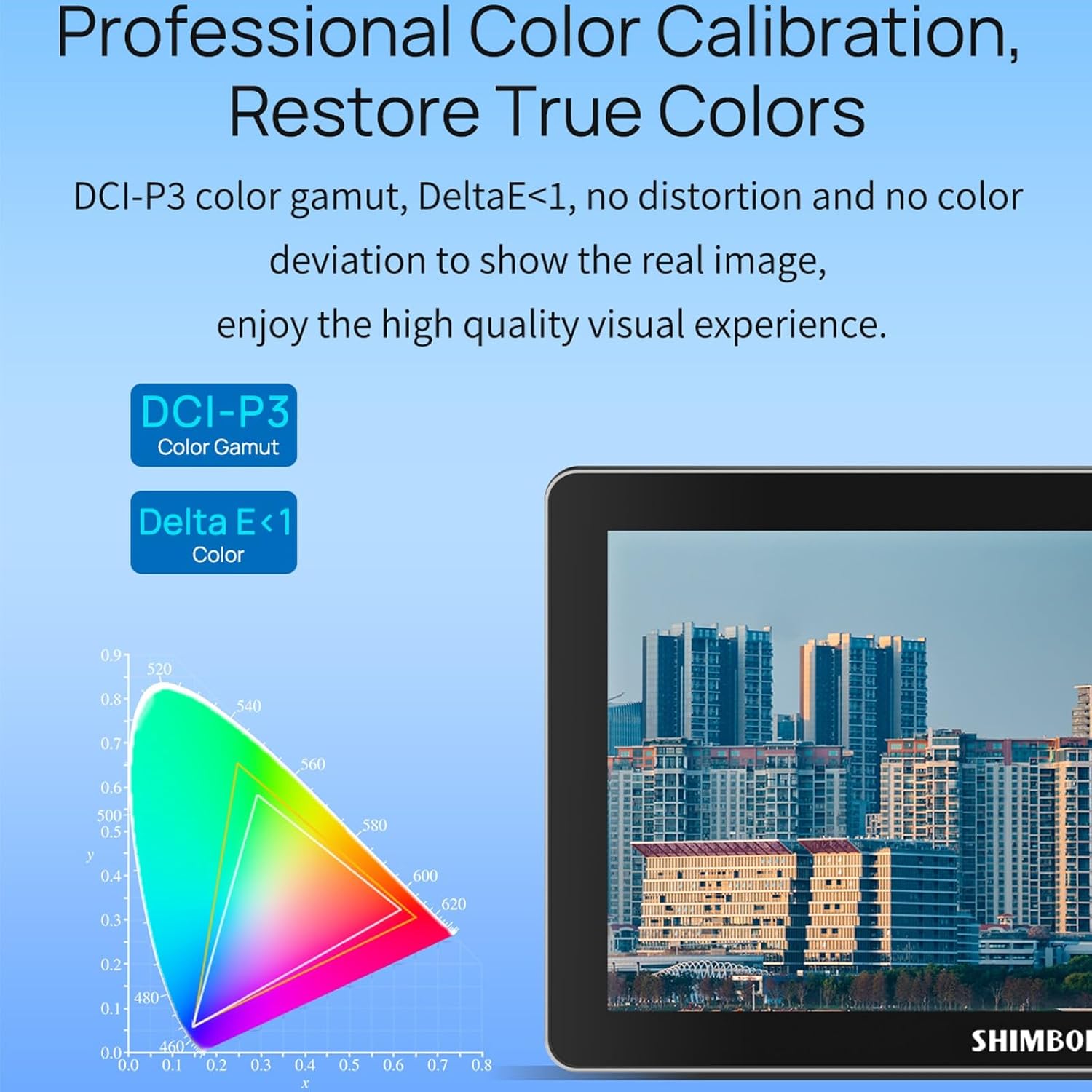
Image 6.4: Professional color calibration on the Shimbol M7, showing DCI-P3 color gamut and Delta E < 1.
7. 유지관리
Proper care and maintenance will ensure the longevity and optimal performance of your Shimbol M7 monitor.
- 화면 청소: Use the provided dusting cloth or a soft, lint-free microfiber cloth to gently wipe the screen. For stubborn smudges, slightly damp천에 물이나 화면에 안전한 세척액을 묻혀 닦으세요. 화면에 직접 액체를 뿌리지 마세요.
- 본체 청소: Wipe the monitor's aluminum body with a soft, dry cloth.
- 저장: When not in use, store the monitor in its carry case in a cool, dry place away from direct sunlight and extreme temperatures.
- 배터리 관리 : If using batteries, remove them if the monitor will not be used for an extended period.
8. 문제 해결
If you encounter issues with your Shimbol M7 monitor, refer to the following common problems and solutions.
| 문제 | 가능한 원인 | 해결책 |
|---|---|---|
| 모니터 전원이 켜지지 않습니다. | No power, low battery, faulty power cable. | Ensure batteries are charged and correctly inserted, or connect to a working DC power source. Check power cable connections. |
| 비디오 신호가 없습니다. | Incorrect input selected, faulty cable, camera output issue. | Verify the correct input (HDMI/SDI) is selected on the monitor. Check cable connections. Ensure camera video output is active. Try a different cable. |
| 화면이 너무 어둡거나 밝습니다. | 밝기 설정. | Adjust the brightness setting in the monitor's menu. |
| 터치스크린이 응답하지 않습니다. | Temporary software glitch, screen protector issue. | Restart the monitor. Ensure the screen protector is applied correctly and not interfering with touch. |
If the problem persists after attempting these solutions, please contact Shimbol customer support.
9. 사양
Detailed technical specifications for the Shimbol M7 Camera Monitor.
| 특징 | 사양 |
|---|---|
| 상표 | 심벌 |
| 모델 번호 | M7 |
| 화면 크기 | 7 인치 |
| 네이티브 해상도 | 1920x1080(FHD 1080p) |
| 디스플레이 해상도 최대 | 1920 x 1080 |
| 명도 | 2000니트 |
| 대비율 | 1800시 1분 |
| View잉 각도 | 170도 |
| 종횡비 | 16시 9분 |
| 디스플레이 유형 | LED IPS |
| 화면 표면 설명 | 매트 |
| 연결 기술 | HDMI, SDI, Wi-Fi |
| HDMI 포트 총 개수 | 1 |
| Number of Component Outputs | 2 |
| 품목 무게 | 0.8 킬로그램 |
| 색상 | 검은색 |
| 호환 장치 | Camera, Camcorder, Certain Multimedia Devices |
| 추가 기능 | 가지고 다닐 수 있는 |
10. 보증 및 지원
The Shimbol M7 Camera Monitor comes with a standard manufacturer's warranty. Please refer to the warranty card included in your package for specific terms and conditions. For technical support, troubleshooting assistance, or warranty claims, please contact Shimbol customer service through their official web사이트 또는 구매처.
보증을 위해 구매 증빙서류로 구매 영수증을 보관하세요.
Ask a question about this manual
Ask about setup, troubleshooting, compatibility, parts, safety, or missing instructions. Manuals+ will review the question and use this page’s manual context to help answer it.