
1. 서론
구매해주셔서 감사합니다asing the Xiaomi Cordless Vacuum Cleaner G20 Lite. This manual provides essential information for the safe and efficient use, maintenance, and troubleshooting of your new vacuum cleaner. Please read this manual thoroughly before first use and keep it for future reference.
2. 안전 지침
화재, 감전 또는 부상의 위험을 줄이려면 진공청소기를 사용할 때 항상 기본적인 안전 수칙을 준수하십시오.
- 기기를 사용하기 전에 모든 지침을 읽으세요.
- 옥외나 젖은 표면에서는 사용하지 마십시오.
- 장난감으로 사용하지 마십시오. 어린이가 사용하거나 근처에서 사용할 때는 세심한 주의가 필요합니다.
- 이 설명서에 설명된 대로만 사용하십시오. 제조업체에서 권장하는 부착물만 사용하십시오.
- 손상된 코드나 플러그와 함께 사용하지 마십시오. 기기가 제대로 작동하지 않거나, 떨어뜨리거나, 손상되었거나, 실외에 두었거나, 물에 빠진 경우 서비스 센터로 반환하십시오.
- 코드를 잡아당기거나 운반하지 말고, 코드를 손잡이로 사용하거나, 코드를 코드로 문을 닫거나, 날카로운 모서리나 모서리를 따라 코드를 잡아당기지 마십시오. 기기를 코드 위로 돌리지 마십시오. 코드를 가열된 표면에서 멀리 두십시오.
- 코드를 잡아당겨서 플러그를 뽑지 마십시오. 플러그를 뽑으려면 코드가 아닌 플러그를 잡으십시오.
- 젖은 손으로 플러그나 기기를 만지지 마세요.
- 개구부에 어떤 물건도 넣지 마십시오. 개구부가 막힌 상태에서 사용하지 마십시오. 먼지, 보푸라기, 머리카락 및 공기 흐름을 감소시킬 수 있는 모든 것이 없도록 하십시오.
- 머리카락, 느슨한 옷, 손가락 및 신체의 모든 부분을 구멍이나 움직이는 부품에서 멀리 두십시오.
- 담배, 성냥, 뜨거운 재 등 타고 있거나 연기가 나는 물건은 집어 올리지 마세요.
- 가솔린 등 가연성 또는 연소성 액체를 흡입하거나, 가연성 또는 연소성 액체가 있는 곳에서 사용하지 마십시오.
- 염소계 표백제, 암모니아, 배수구 세척제 등 독성 물질을 흡입하지 마세요.
- 먼지 컵 및/또는 필터가 제자리에 있지 않은 상태에서 사용하지 마십시오.
- 플러그를 뽑기 전에 모든 제어 장치를 끄세요.
- 계단을 청소할 때는 특별히 주의하세요.
- 기기를 실내에 보관하십시오.
- 실외에서 기기를 충전하지 마세요.
- 제조업체가 지정한 충전기만 사용하세요.
3. 제품 오버view
The Xiaomi Cordless Vacuum Cleaner G20 Lite is designed for efficient cleaning with its powerful suction and versatile attachments. Key features include:
- Maximum 18,000Pa suction power for thorough cleaning.
- Integrated white LED light on the brush head to illuminate dark areas.
- 고급 5초tage powerful filter system to prevent secondary pollution.
- Large capacity 2200mAh battery providing up to 45 minutes of runtime.
- One-touch dust disposal for easy and hygienic emptying.
- 2-way brush nozzle and extension rod for versatile cleaning.
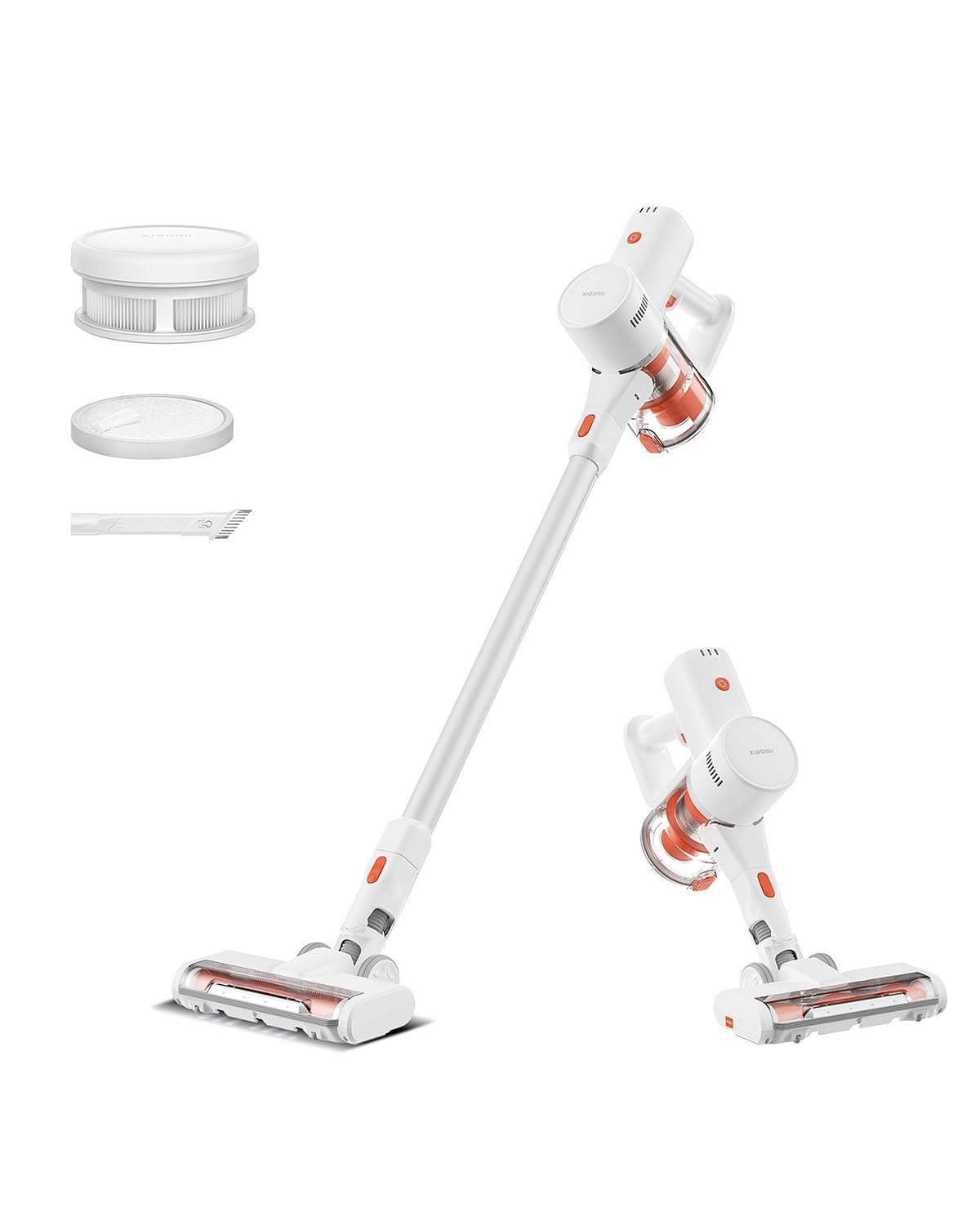
Image: Xiaomi Cordless Vacuum Cleaner G20 Lite, showing the full product assembly.

Image: Illustration of the vacuum cleaner's internal motor, highlighting its 18,000Pa suction power.
이미지: 투명 view of the vacuum cleaner's handle, showing the internal large-capacity battery cells.
4. 설정
진공 청소기를 조립하려면 다음 단계를 따르세요.
- 구성 요소 풀기: Carefully remove all parts from the packaging. Ensure all accessories (main unit, extension rod, motorized brush head, 2-way brush nozzle, crevice nozzle, adapter) are present.
- 연장봉을 부착하세요: Connect the extension rod to the main unit until it clicks into place.
- 브러시 헤드 부착: Connect the desired brush head (motorized brush or 2-way brush nozzle) to the other end of the extension rod. For handheld use, attach the 2-way brush nozzle or crevice nozzle directly to the main unit.
- 충전 배터리: Before first use, fully charge the vacuum cleaner. Connect the adapter to the charging port on the main unit and plug it into a power outlet. The power indicator lights will show the charging status.

Image: The vacuum cleaner being stored on a wall-mounted charging dock, illustrating convenient storage and charging.
5. 사용 설명서
Your Xiaomi Cordless Vacuum Cleaner G20 Lite offers versatile cleaning options:
전원 켜기/끄기 및 흡입 모드
Press the power button to turn the vacuum on. Press the mode button to cycle through different suction power levels (Standard, Turbo). The power indicator lights will show the current mode and battery level.
Video: A short demonstration of turning the vacuum cleaner on and cycling through its suction modes using the power and mode buttons.
첨부 파일 사용
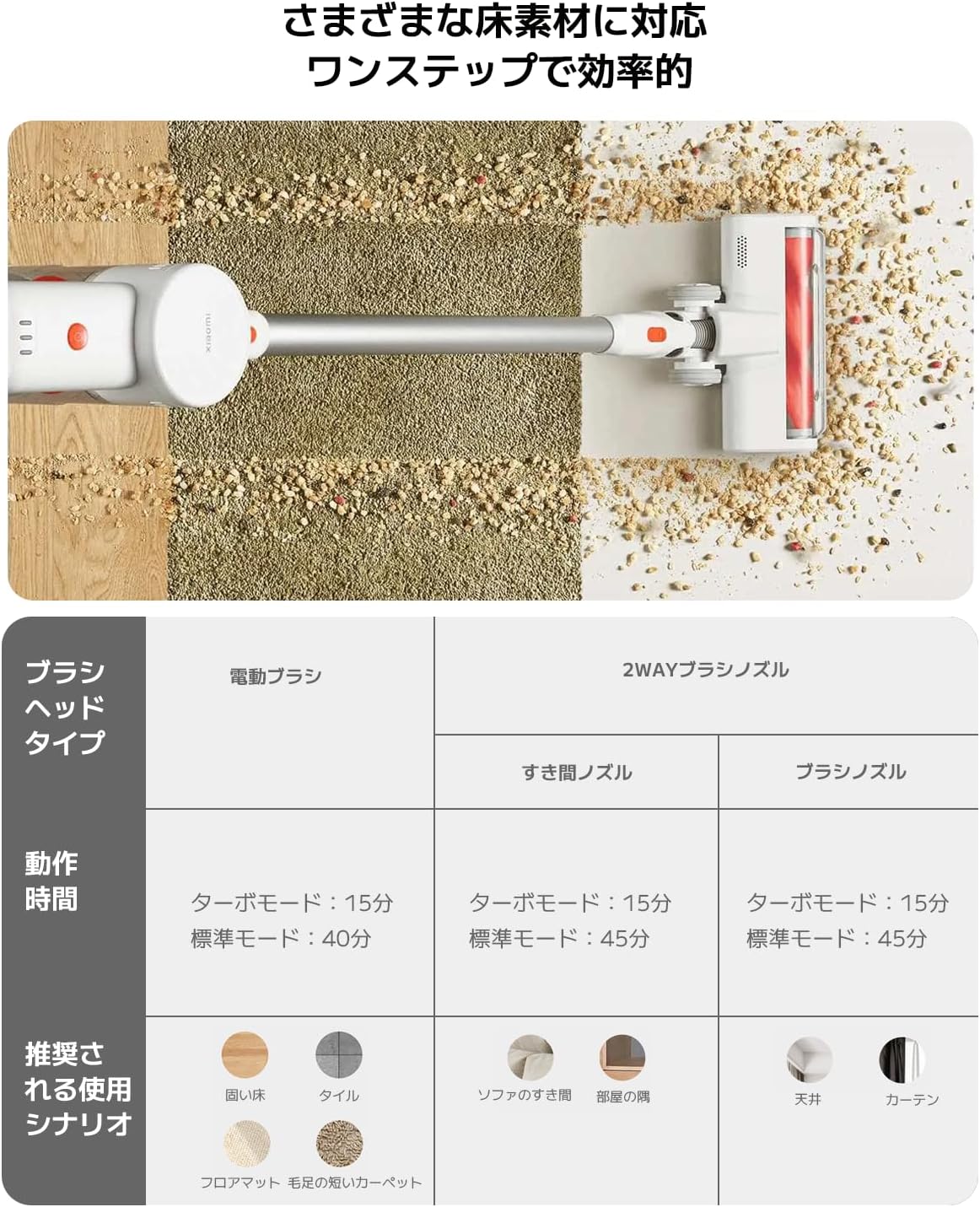
청소 작업에 맞는 브러시 헤드를 선택하세요.
| 브러시 헤드 유형 | Operating Time (Standard/Turbo) | Recommended Use Scenario |
|---|---|---|
| 전동 브러시 | 40 최소 / 분 15 | Hard Floor, Tile, Floor Mat, Short Pile Carpet |
| 2-Way Brush Nozzle (Crevice) | 45 최소 / 분 15 | Sofa Crevices, Room Corners |
| 2-Way Brush Nozzle (Brush) | 45 최소 / 분 15 | Ceiling, Curtains |

Image: Close-up of the vacuum cleaner's motorized brush head, showing the integrated white LED lights illuminating the floor.

Image: A person using the vacuum cleaner with the extension rod to clean high areas, and with a specialized nozzle for narrow gaps and desk surfaces.
6. 유지관리
정기적인 유지관리를 통해 진공청소기의 성능을 최적화하고 수명을 연장할 수 있습니다.
쓰레기통 비우기
The vacuum cleaner features a one-touch dust disposal system. Simply press the release button on the dustbin to open the bottom flap and empty collected debris directly into a trash can. Empty the dustbin regularly to maintain suction power.

Image: A hand demonstrating the one-touch dust disposal mechanism, showing debris falling from the dustbin. Also visible is the power indicator light on the handle.
필터 청소
5초tage powerful filter system requires periodic cleaning. Refer to the diagram below for filter components. Remove the dustbin and separate the filter components. Tap off loose dirt and rinse washable parts under running water. Ensure all filter components are completely dry before reassembling them into the vacuum cleaner.

이미지: 폭발 view of the vacuum cleaner's main unit, illustrating the components of the 5-stag필터 시스템.
Cleaning Brush Heads
Periodically check brush heads for tangled hair or debris. Use scissors to cut away any tangled hair and remove any obstructions to ensure smooth operation.
7. 문제 해결
진공 청소기에 문제가 발생하면 다음의 일반적인 문제와 해결 방법을 참조하세요.
- 전원 없음:
- 배터리가 충전되어 있는지 확인하세요. 필요하면 충전하세요.
- 전원 버튼을 확실하게 눌렀는지 확인하세요.
- 흡입력이 낮음:
- 쓰레기통을 비우십시오.
- Clean the filters. Ensure they are dry before reinstallation.
- Check for blockages in the brush head, extension rod, or main unit.
- 브러시 헤드가 회전하지 않음:
- Check for tangled hair or debris obstructing the brush roll.
- Ensure the brush head is correctly attached.
- 비정상적인 소음:
- Check for any foreign objects caught in the brush head or suction path.
- 모든 부품이 안전하게 조립되었는지 확인하십시오.
문제가 지속되면 고객 지원팀에 문의하세요.
8. 사양
| 사양 | 세부 사항 |
|---|---|
| 상표 | 샤오미 |
| 모델 번호 | BHR8232US |
| 제품 유형 | 스틱 클리너 |
| 특징 | 무선 |
| 필터 유형 | HEPA 필터 |
| 권장 사용 | Carpet, Hard Floors, Sofa, Curtains, Beds, Tiles, Blankets |
| 전원 | Battery Powered (Charges via power cord) |
| 용량 | 0.55리터 |
| 색상 | 하얀색 |
| 가지고 다닐 수 있는 | 예 |
| 실내/실외 사용 | 실내 |
| 운영 볼륨tage | 21.6 볼트 |
| 배터리 용량 | 215 Watt-hours (2200mAh) |
| 컨트롤러 유형 | 핸드 컨트롤 |
| 연결성 | Bluetooth (for potential smart features) |
| 포함된 구성 요소 | Accessory kit, Adapter |
| 원산지 | 중국 |
| 제품 무게 | 2.4 킬로그램 |
| 품목 치수(L x W x H) | 66.2cm x 32cm x 13.2cm |
9. 보증 및 지원
Xiaomi products are designed with quality and reliability in mind. For warranty information and customer support, please refer to the details below:
보증 정보
This product comes with a standard manufacturer's warranty. Please retain your proof of purchase for warranty claims. For specific warranty terms and conditions, refer to the documentation included with your product or visit the official Xiaomi web대지.
고객 지원
For technical assistance, troubleshooting, or service inquiries, please contact the Xiaomi Customer Service Center:
- 핸드폰: 0120-767-378 (Reception hours: 9:00 - 18:00, excluding year-end and New Year holidays)
- 이메일: service.jp@support.mi.com
Xiaomi Service Center (Akihabara Store)
For in-person support or repairs, you may visit our service center:
- 주소: 4-6-7 Kanda Sakumacho, Chiyoda-ku, Tokyo
- 영업 시간: 10:00 - 19:00
- 닫은: 수요일
- Last Reception: 18시 00분