
1. 서론
This manual provides detailed instructions for the installation, operation, and maintenance of your BOTSLAB G980H 4K Dual Dash Cam and G300H 2.5K Front Dash Cam. Please read this manual thoroughly before using the device to ensure proper functionality and safety. Keep this manual for future reference.
2. 패키지 내용
아래 나열된 모든 품목이 패키지에 포함되어 있는지 확인하세요.
- BOTSLAB G980H 4K Dual Dash Cam Unit
- BOTSLAB G300H 2.5K Front Dash Cam Unit
- Hardwire Kit (Included as per product specifications)
- 전원 케이블
- Rear Camera Cable (for G980H)
- 장착 브래킷
- 사용 설명서(본 문서)
3. 제품 오버view
The BOTSLAB G980H and G300H dash cams are designed to provide high-quality video recording for vehicle safety and security. The G980H offers true 4K resolution for the front camera and 1080P for the rear, while the G300H provides 2.5K front recording. Both models incorporate advanced features for an enhanced driving experience.
주요 특징:
- True 4K Front Recording (G980H): Utilizes a Sony IMX 415 sensor for superior clarity.
- 2.5K Front Recording (G300H): Provides enhanced clarity at 30 frames per second.
- 첨단 운전자 보조 시스템(ADAS): Powered by a 1.5TOPS AI NPU chip, offering real-time alerts for pedestrian collisions, vehicle movement ahead, lane departure, and headway monitoring.
- 내장 GPS: Records journey details including speed and location, viewable on Google Maps via your phone.
- 24시간 연중무휴 주차 모드: Provides theft and vandalism protection when the vehicle is off (requires dedicated hardwire kit, ASIN: B0D3QK86TQ).
- G-센서: 동영상 콘텐츠를 자동으로 잠급니다tage during collisions or sudden movements to prevent overwriting.
- 야간 투시경: 저조도 환경에서의 선명도 향상.
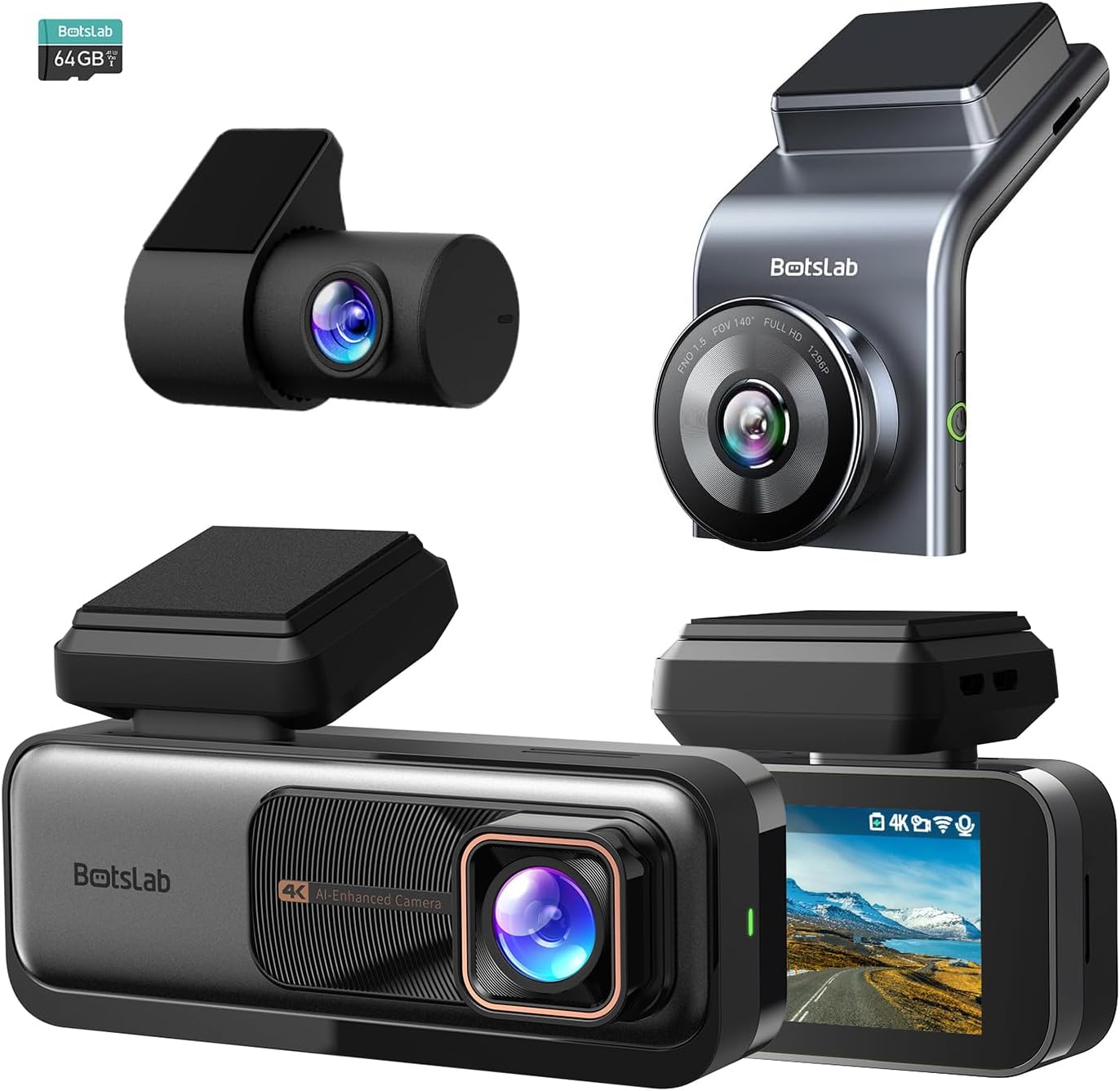
그림 3.1: 이상view of the BOTSLAB G980H and G300H dash cam units.

Figure 3.2: Illustration of the Sony IMX 415 sensor and the 6-layer lens with F1.5 aperture for enhanced clarity.
4. 설정 및 설치
Proper installation is crucial for optimal performance of your dash cam. Follow these steps carefully:
4.1 설치 준비
- 위치를 선택하세요: 앞 유리창에서 시야를 가리지 않는 지점을 선택하세요. view, 일반적으로 뒤쪽 뒤에view 거울.
- 앞 유리창 청소: Ensure the mounting area is clean and dry for secure adhesion.
- SD 카드 삽입: Insert a compatible microSD card (not included, unless specified) into the dash cam's card slot. Ensure the card is formatted before first use (refer to Section 6.1).
4.2 대시캠 장착
- Attach the mounting bracket to the dash cam unit.
- 브래킷의 접착 패드에서 보호 필름을 제거하십시오.
- Firmly press the dash cam with the bracket onto the chosen windshield location for at least 30 seconds.
- For the G980H, install the rear camera on the rear windshield, ensuring a clear view.
4.3 전원 연결
- Connect the power cable to the dash cam's power input port.
- Route the power cable along the edge of the windshield and dashboard to the vehicle's 12V power outlet (cigarette lighter socket) or fuse box.
- For 24/7 Parking Mode functionality, connect the included hardwire kit to your vehicle's fuse box according to the hardwire kit's specific instructions. This allows the dash cam to receive continuous power even when the vehicle is off.
- Connect the rear camera cable to the G980H main unit and route it to the rear camera.

Figure 4.1: Recommended installation position for a wide, unobstructed view (170°).
5. 사용 설명서
5.1 기본 작업
- 전원 켜기/끄기: The dash cam will automatically power on and begin recording when the vehicle's ignition is turned on. It will power off automatically when the ignition is turned off (unless hardwired for parking mode).
- 녹음: Loop recording is enabled by default. Older files will be overwritten by new ones when the memory card is full.
- 비상 녹화(G-센서): In the event of a collision or sudden braking, the built-in G-Sensor will automatically detect the event and lock the current video segment, preventing it from being overwritten.
5.2 첨단 운전자 보조 시스템(ADAS)
The dash cam features an AI NPU chip that provides real-time ADAS alerts to enhance driving safety:
- 보행자 충돌 경고: Alerts you to potential pedestrian collisions.
- Vehicle Movement Ahead: 앞차가 움직이기 시작하면 알려줍니다.
- 차선 이탈 경고: Alerts you if you unintentionally drift out of your lane.
- Headway Monitoring: Helps maintain a safe distance from the vehicle ahead.
- Driver Fatigue Alerts: Provides alerts every 2 hours to remind you to take a break.

Figure 5.1: Visual representation of ADAS alerts and the AI NPU chip.

그림 5.2: 예ample of a timely alert for front vehicle departure.

그림 5.3: 예ample of pedestrian recognition with voice reminders.
5.3 Built-in GPS Functionality
The integrated GPS module records your driving data, including speed and location. This data can be viewed on Google Maps via a connected smartphone application, ensuring your travel data remains private and secure.

Figure 5.4: Visualization of GPS route recording and data display.
5.4 주차 모드
When connected with the dedicated hardwire kit (ASIN: B0D3QK86TQ), the dash cam can continue to monitor your vehicle even when it is turned off. This mode provides protection against theft and vandalism by recording events while parked.
5.5 Night Vision and Clarity
Both dash cam models are equipped with advanced sensors and optics (like the Sony IMX 415 in G980H) to ensure clear video capture even in low-light conditions or at night, without relying on streetlights.

그림 5.5: 예ample of clear video capture in dark road conditions.

Figure 5.6: Comparison showing enhanced clarity with the G300H's 2.5K resolution.
6. 유지관리
6.1 SD 카드 관리
- 서식: It is recommended to format the microSD card regularly (e.g., once a month) to prevent data corruption and ensure optimal recording performance. This can usually be done through the dash cam's settings menu.
- 카드 교체: MicroSD cards have a limited lifespan. If you experience frequent recording errors or corrupted files, consider replacing the card.
6.2 장치 청소
- Use a soft, dry cloth to clean the dash cam's lens and body.
- 화학 세척제나 용제를 사용하지 마십시오. 기기가 손상될 수 있습니다.
7. 문제 해결
블랙박스에 문제가 발생하면 다음의 일반적인 문제 및 해결 방법을 참조하십시오.
| 문제 | 가능한 원인 / 해결책 |
|---|---|
| 대시캠 전원이 켜지지 않습니다. |
|
| 녹음이 중단되거나 file손상되었습니다. |
|
| GPS 신호가 약하거나 감지되지 않았습니다. |
|
| ADAS alerts are not functioning. |
|
8. 사양
| 특징 | 설명 |
|---|---|
| 모델명 | G980H (Dual), G300H (Front) |
| 상표 | 봇슬랩 |
| 비디오 캡처 해상도 | 4K (G980H Front), 1080P (G980H Rear), 2.5K (G300H Front) |
| 특별 기능 | Built-In GPS, ADAS, G-Sensor, 24/7 Parking Mode (with hardwire kit) |
| 연결 기술 | USB, Wireless (Wi-Fi for app connectivity) |
| 색상 | 검은색 |
| 정위 | Front and Inside (G980H), Front (G300H) |
| 포함된 구성 요소 | 하드 와이어 키트 |
| 제조업체 | 봇슬랩 |
9. 보증 및 지원
For warranty information and technical support, please contact BOTSLAB customer service directly. Details can typically be found on the official BOTSLAB website or through the contact information provided with your purchase documentation.