
1. 서론
The Bosch Professional Detector GMS 120-27 is designed for quick and accurate location of various materials within walls, ceilings, and floors. This device assists in identifying metal (magnetic and non-magnetic), live electrical cables, and wooden substructures, ensuring safer drilling and construction activities. Its user-friendly interface and robust design make it suitable for professional use on construction sites.
2. 안전 정보
Always read and understand all safety warnings and instructions before operating the device.
- 기기가 지정된 작동 조건 내에서 사용되도록 하십시오.
- 장치를 개조하지 마십시오.
- 기기를 습기와 극한 온도에 두지 마세요.
- Always verify detection results with other information sources if possible, especially before drilling.
3. 패키지 내용
패키지에 모든 품목이 들어 있는지 확인하세요.
- Bosch Professional Detector GMS 120-27
- 보호 케이스
- AA 알카라인 배터리 2 개
- 마커펜
4. 제품 오버view
The GMS 120-27 detector features a robust design with a shock-absorbing rubber housing, providing durability and an IP54 rating for protection against dust and splashing water. Key components include a simplified mode selection interface, a central display, and an LED ring for clear object indication.
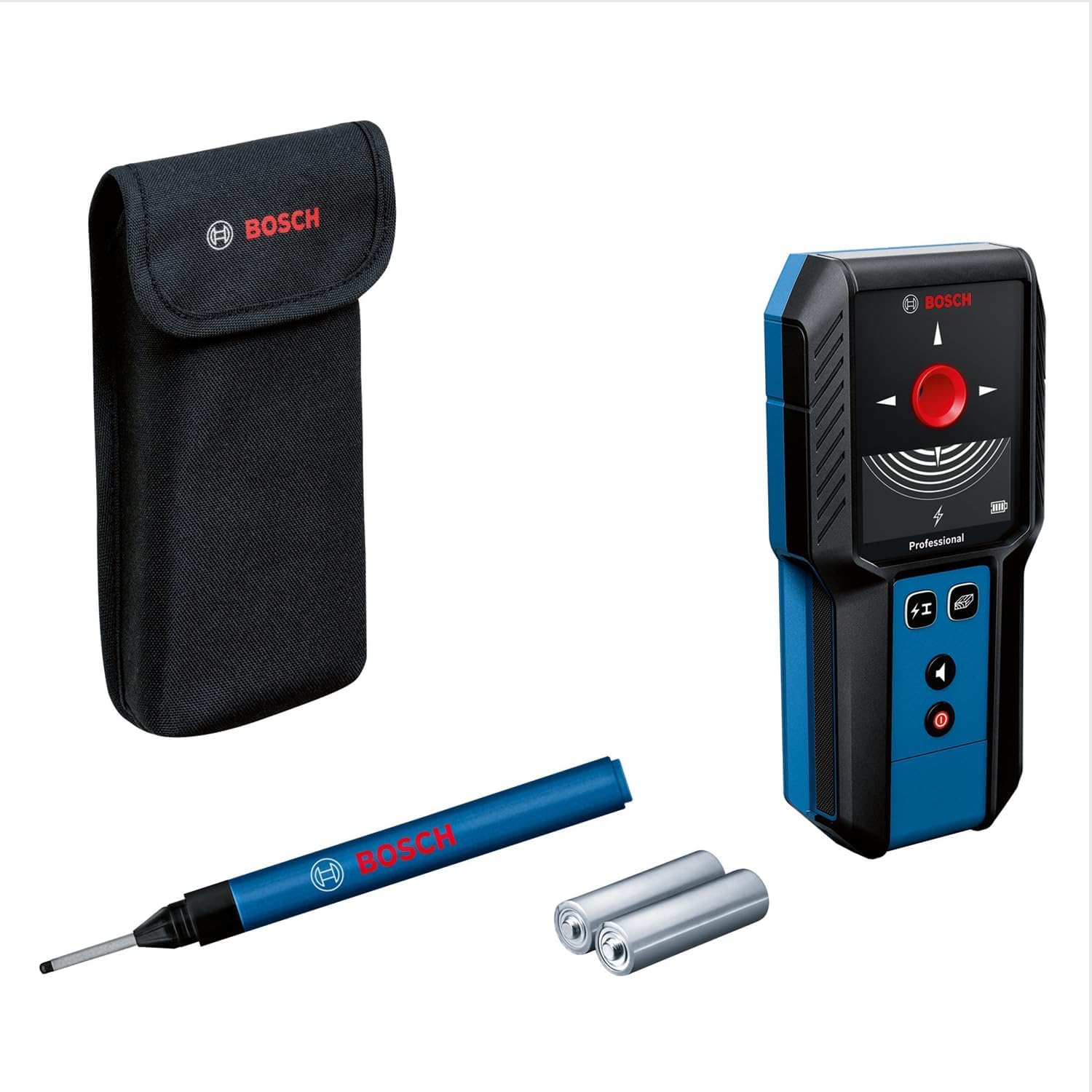
Image showing the Bosch Professional Detector GMS 120-27, highlighting its compact design and display.
주요 특징:
- Tri-colour LED Ring: Indicates detection status (red for object detected, yellow for approaching object, green for no object).
- 재료 식별: Distinguishes between magnetic metal, non-magnetic metal, live lines, and non-metallic materials.
- Simplified Mode Selection: Easy switching between detection modes.
- 견고한 하우징: Shock-absorbing rubber housing with IP54 protection.
5. 설정
5.1 배터리 설치
- 장치 뒷면에서 배터리함을 찾으세요.
- 배터리 덮개를 엽니다.
- AA 알칼리 건전지 두 개를 넣을 때, 극성(+/-)을 정확히 맞춰주세요.
- 배터리 덮개를 단단히 닫으세요.
5.2 전원 켜기/끄기
- 전원 버튼을 눌러 장치를 켭니다.
- 전원 버튼을 길게 눌러 기기를 끕니다.
6. 사용 설명서
6.1 모드 선택
The GMS 120-27 offers simplified mode selection for different detection tasks. Refer to the device's display for current mode indication.
6.2 Detection Process
- Select the appropriate detection mode for the material you are searching for.
- Place the detector flat against the surface to be scanned.
- Move the device slowly and steadily across the surface.
- Observe the LED ring and central display for indications.
- When an object is detected, the LED ring will glow yellow as you approach it, and red when directly over it. The display will also provide information on the type of material detected.
- Use the included marker pen to mark the detected location if necessary.
6.3 Detection Depths
The maximum detection depths are as follows:
- Non-magnetic Metal: 120 mm
- Magnetic Metal: 100 mm
- 권tage-conducting Wires: 50 mm
- 목재 : 30mm
7. 유지관리
7.1 청소
- 부드러운 천으로 장치를 청소하십시오.amp 천. 연마성 세척제나 용매를 사용하지 마십시오.
- Ensure the detection surface is free from dirt and debris for accurate readings.
7.2 보관
- 사용하지 않을 때는 기기를 보호 케이스에 보관하세요.
- 장기간 기기를 사용하지 않을 경우 배터리 누출을 방지하기 위해 배터리를 제거하세요.
- 직사광선과 극한 온도 변화를 피해 건조하고 먼지 없는 곳에 보관하십시오.
8. 문제 해결
기기가 예상대로 작동하지 않는 경우 다음 사항을 고려하십시오.
| 문제 | 가능한 원인 | 해결책 |
|---|---|---|
| 장치의 전원이 켜지지 않습니다. | 배터리가 부족하거나 방전됨, 배터리가 잘못 설치됨. | Replace batteries with new AA alkaline batteries; ensure correct polarity. |
| Inaccurate detection. | Surface not clean; rapid movement; interference from other devices. | Clean the scanning surface; move the device slowly and steadily; avoid strong electromagnetic fields. |
| LED ring not responding. | No objects detected; device malfunction. | Ensure you are scanning an area with potential objects; if problem persists, contact customer support. |
9. 사양
| 상표 | 보쉬 프로페셔널 |
| 모델 번호 | 0601081702 |
| 탐지 깊이 (비자성 금속) | 120mm (XNUMXmm) |
| 탐지 깊이(자성 금속) | 100mm (XNUMXmm) |
| Detection Depth (Voltage-conducting Wires) | 50mm (XNUMXmm) |
| 탐지 깊이(목재) | 30mm (XNUMXmm) |
| 전원 | 배터리 구동 |
| 배터리 유형 | AA 알카라인 배터리 2 개 |
| 디스플레이 유형 | 주도의 |
| 품목 무게 | 0.24 킬로그램 |
| 재료 | 플라스틱 |
| 보호 등급 | IP54 |
| 권장 사용 | Construction site location |
10. 보증 및 지원
For warranty information and customer support, please refer to the documentation provided with your purchase or visit the official Bosch Professional web대지.