
1. 서론
This manual provides essential instructions for the installation, setup, and operation of your TONGOU Wi-Fi Smart Switch 1P+N DIN Rail DIY with Power Monitoring. This device allows you to transform traditional household appliances into smart, connected devices, offering remote control, voice control, and energy consumption monitoring through the Smart Life or Tuya application.

Image 1.1: TONGOU Wi-Fi Smart Switch integrated into a smart home system, showing app control and Wi-Fi connectivity.
2. 안전 정보
WARNING: Electrical installation should only be performed by qualified personnel. Incorrect installation can lead to electric shock, fire, or property damage.
- 설치 또는 유지보수를 하기 전에 항상 주 회로 차단기에서 전원을 차단하십시오.
- 장치가 습기와 극한 온도를 피해 건조한 환경에 설치되었는지 확인하세요.
- 볼륨을 확인하세요tage and current ratings of the switch match your electrical system requirements.
- Do not exceed the maximum current rating of 6A for this model.
- 모든 배선 연결이 안전하고 적절하게 절연되었는지 확인하십시오.
3. 패키지 내용
패키지에 모든 품목이 들어 있는지 확인하세요.
- 1 x TONGOU Wi-Fi Smart Switch (Model: With Power Monitoring 6A)
- 1 x 사용자 설명서
4. 사양
| 특징 | 사양 |
|---|---|
| 상표 | TONGOU |
| 모델 번호 | With Power Monitoring 6A |
| 운영 볼륨tage | AC 90 - 240 V, 50/60 Hz |
| 무선형 | Wi-Fi 2.4 GHz (5/4 GHz not supported) |
| 현재 평가 | 6아 |
| 최대 배선 용량 | 10 mm² (Power side and Load side) |
| 장착 유형 | DIN 레일 마운팅 |
| 치수(길이 x 너비 x 높이) | 9 x 2 x 8cm |
| 무게 | 120그램 |
| 접촉 재료 | Silver-plated relay contacts |
| 작동 모드 | 켜기/끄기 |
| 인증 | CE |
| 작동 온도 | 최대 섭씨 80도 |
5. 설치
The TONGOU Wi-Fi Smart Switch is designed for DIN rail mounting. Follow these steps for proper installation:
- 전원 차단: 전기 작업을 시작하기 전에 회로 차단기에서 해당 회로의 주 전원을 차단했는지 확인하십시오.
- 설치: Mount the smart switch onto a standard 35mm DIN rail. The device occupies one position (18mm width).
- 배선: Connect the power input (N for Neutral, L for Live) to the top terminals labeled 'Power'. Connect the load output (N for Neutral, L for Live) to the bottom terminals labeled 'Load'. The maximum wiring capacity is 10 mm² for both power and load sides. Ensure correct polarity.
- 회로 보호 : It is recommended to install an upstream residual current circuit breaker (RCBO/A type, 30mA/10kA) to protect the circuit.
- 보안 연결: Use a screwdriver to securely tighten all wire connections.

Image 5.1: Wiring diagram illustrating the connection of the TONGOU Wi-Fi Smart Switch to a circuit with an upstream circuit breaker and a light bulb as a load.
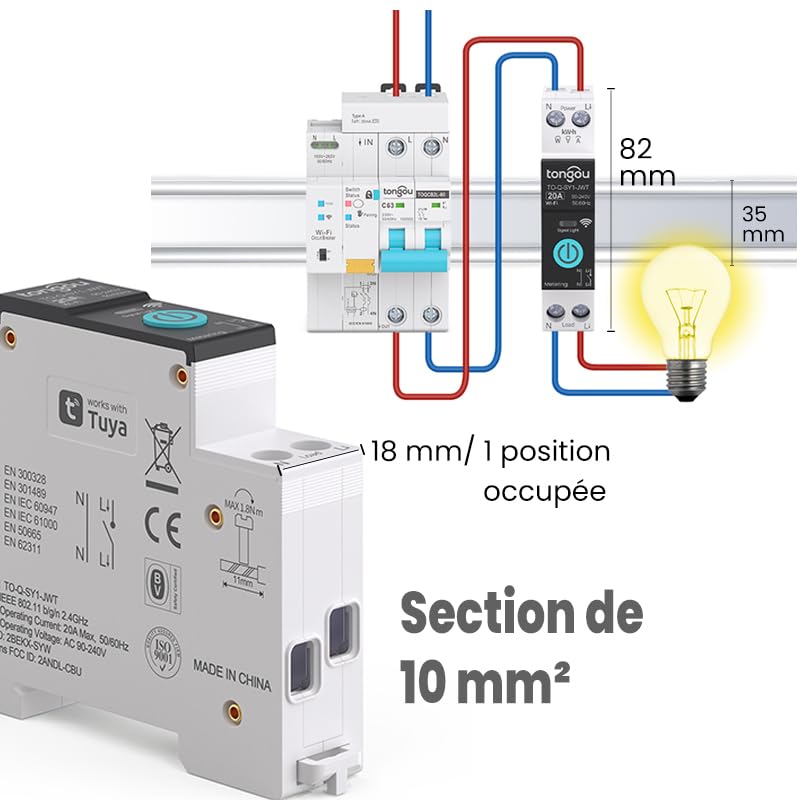
Image 5.2: Close-up of the smart switch showing its dimensions (82mm height, 35mm depth, 18mm width) and indicating a 10 mm² wiring section capacity.
6. 설정
To enable smart functionalities, connect your TONGOU Wi-Fi Smart Switch to the Smart Life or Tuya application.
- 앱 다운로드: Download the "Smart Life" or "Tuya Smart" application from the App Store (iOS) or Google Play Store (Android).
- 등록/로그인: 앱을 열고 새 계정을 등록하거나 기존 계정으로 로그인하세요.
- 페어링 모드 시작: After restoring power to the switch, press and hold the main button on the device for 5 to 10 seconds until the signal light blinks rapidly in blue. This indicates the device is in pairing mode.
- 앱에 장치 추가: In the Smart Life/Tuya app, tap the "+" icon (usually in the top right corner) to add a new device. The app should automatically discover the switch. If not, manually select "Electrical" > "Circuit Breaker (Wi-Fi)" or similar.
- Wi-Fi에 연결: Follow the in-app instructions to connect the device to your 2.4 GHz Wi-Fi network. 메모: The device only supports 2.4 GHz Wi-Fi; 5 GHz networks are not compatible.
- 장치 이름 바꾸기: Once connected, you can rename the device for easier identification (e.g., "Living Room Light").

Image 6.1: Visual guide showing how to press and hold the button for 5-10 seconds until the blue indicator light blinks rapidly, signifying pairing mode.

Image 6.2: Screenshot of the Smart Life/Tuya app showing the login/register screen, a Wi-Fi router, and the process of adding a discovered "WiFi Din Rail Switch" device.
7. 운영
Once the smart switch is successfully paired, you can control it and monitor energy usage through the app or voice commands.
7.1. 앱을 통한 원격 제어
Open the Smart Life or Tuya app. Select your TONGOU Smart Switch from the device list. You can:
- Turn the connected appliance On or Off remotely from anywhere.
- Set up various timer modes:
- 타이밍 모드 : Schedule specific on/off times for daily or weekly routines.
- 카운트다운 모드: 기기가 지정된 시간 후에 자동으로 꺼지도록 카운트다운 타이머를 설정하세요.
- Cyclic Timing Mode: 반복적인 켜짐/꺼짐 주기를 구성합니다.
- Astronomical Timing Mode: Automate based on sunrise and sunset times.
7.2. 음성 제어
The TONGOU Smart Switch is compatible with Amazon Alexa and Google Assistant. To enable voice control:
- Link your Smart Life/Tuya account to Amazon Alexa or Google Home app.
- 새로운 장치를 발견하세요.
- 다음과 같은 음성 명령을 사용하세요.
- "알렉사, [기기 이름] 켜줘"
- "Hey Google, [기기 이름] 꺼줘"

Image 7.1: An Amazon Echo device displaying a voice waveform, indicating it is processing a command to turn off a lamp.
7.3. 전력 모니터링
The smart switch provides real-time and historical energy consumption data:
- View real-time current, voltage, and power consumption of the connected load.
- Access historical data (hourly, daily, monthly, yearly) to track energy usage patterns.
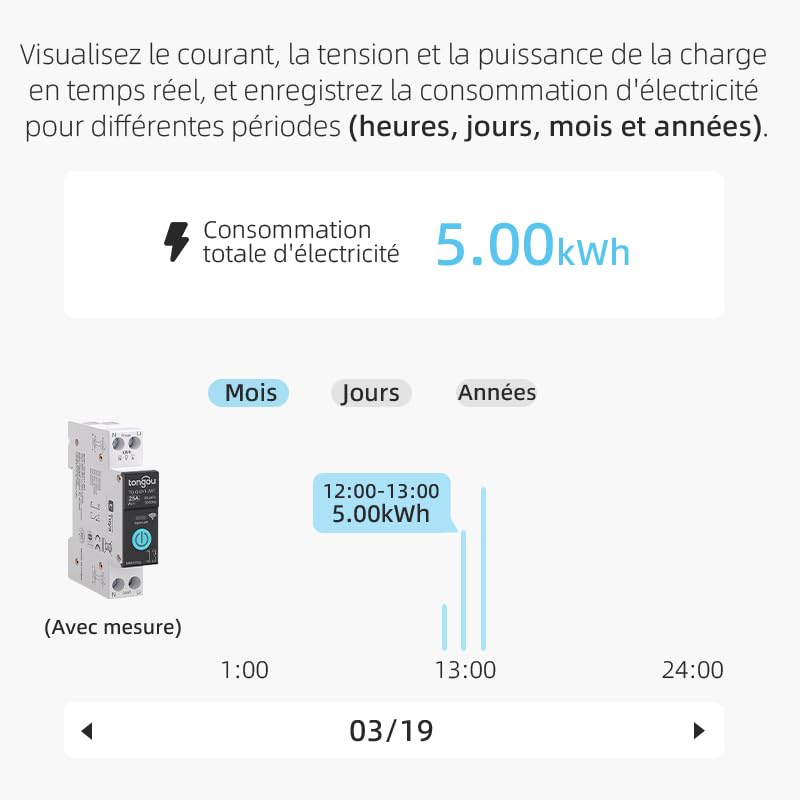
Image 7.2: A graphical representation within the app showing total electricity consumption (5.00 kWh) and a bar chart illustrating hourly consumption data for a specific date.
8. 유지관리
To ensure optimal performance and longevity of your TONGOU Wi-Fi Smart Switch:
- 기기를 깨끗하고 먼지가 없는 상태로 유지하세요. 청소 시에는 부드럽고 마른 천을 사용하세요.
- 액체 세척제나 용제를 사용하지 마세요.
- 기기의 과열을 방지하기 위해 기기 주변에 적절한 환기가 이루어지도록 하십시오.
- 특히 초기 설치 후에는 배선 연결부가 단단히 고정되었는지 정기적으로 확인하십시오.
9. 문제 해결
If you encounter issues with your TONGOU Wi-Fi Smart Switch, refer to the following common problems and solutions:
| 문제 | 가능한 원인 | 해결책 |
|---|---|---|
| 장치가 Wi-Fi에 연결되지 않음 | Incorrect Wi-Fi band (5GHz), weak signal, incorrect password, device not in pairing mode. | Ensure your Wi-Fi is 2.4 GHz. Move the device closer to the router. Re-enter Wi-Fi password carefully. Put the device back into pairing mode (rapid blue blinking). |
| 앱에서 기기가 오프라인 상태입니다. | Wi-Fi disconnected, power outage, router issues. | Check your Wi-Fi router and internet connection. Verify the device has power. Re-pair if necessary. |
| 음성 제어가 작동하지 않음 | Account not linked, device not discovered, incorrect commands. | Ensure Smart Life/Tuya account is linked to Alexa/Google Home. Discover devices in the voice assistant app. Use the exact device name. |
| Power monitoring data is inaccurate or missing | 잘못된 배선, 장치 오작동. | Double-check wiring according to the installation diagram. Contact support if the issue persists. |
| Device not responding to manual button press | 전원이 들어오지 않습니다. 내부 오류입니다. | Check power supply to the device. If power is present and the device is unresponsive, contact support. |
10. 보증 및 지원
For warranty information and technical support, please refer to the documentation provided with your purchase or contact TONGOU customer service through their official channels. Keep your purchase receipt as proof of purchase.