
1. 서론
This manual provides detailed instructions for the installation, operation, and maintenance of your Reobiux D20-1P 2K Outdoor Surveillance Camera. Please read this manual thoroughly before using the product to ensure proper functionality and safety.
2. 패키지 내용
아래 나열된 모든 품목이 패키지에 포함되어 있는지 확인하세요. 품목이 누락되었거나 손상된 경우 고객 지원팀에 문의하세요.
- 1x Reobiux D20-1P Solar PTZ Camera
- 1x Solar Collector
- 1x 사용자 설명서
- 1x 마운팅 베이스
- 1x Power Supply (for initial charging)
- 나사 1봉지 (설치용)
- 1x Type-C Charging Line
3. 제품 오버view
The Reobiux D20-1P is a 2K outdoor surveillance camera designed for comprehensive home security. It features dual lenses, 360° Pan-Tilt-Zoom (PTZ) capabilities, and operates wirelessly via Wi-Fi. Key features include PIR motion detection, color night vision, two-way audio, and an IP66 weatherproof rating, powered by a solar panel and rechargeable battery.
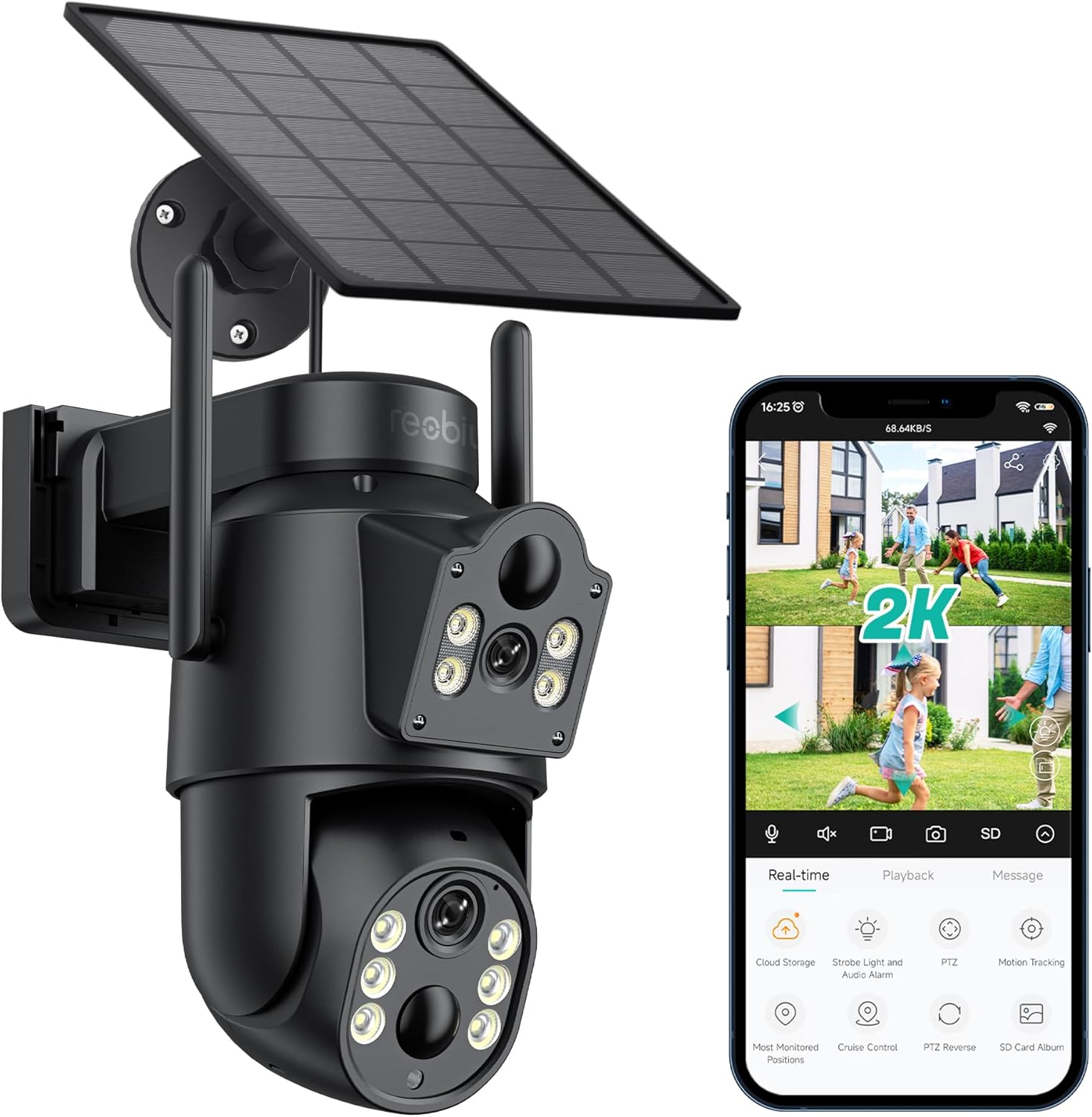
그림 3.1: Reobiux D20-1P Solar PTZ Camera and its mobile application interface showing real-time monitoring, playback, and various control options.
주요 특징:
- 2K QHD 고해상도: 선명하고 자세한 비디오 제공tage.
- 듀얼 렌즈 디자인: Combines a fixed lens with a rotating lens for comprehensive coverage.
- 360° PTZ 기능: Allows remote control of pan, tilt, and zoom for flexible view각도를 나타냅니다.
- Solar Powered with Rechargeable Battery: 최소한의 수동 충전으로 지속적인 작동을 보장합니다.
- PIR 모션 감지: Intelligently detects human movement to reduce false alarms.
- 컬러 나이트 비전: Offers full-color video even in low-light conditions, alongside infrared night vision.
- 양방향 오디오 : Enables communication with visitors or deterrence of intruders.
- IP66 방수: 다양한 야외 기상 조건을 견딜 수 있도록 설계되었습니다.
- 무선 Wi-Fi 연결: Easy setup and remote access via smartphone.
4. 설정 가이드
4.1 초기 충전
Before first use, fully charge the camera's internal battery using the provided Type-C charging line and power supply. This ensures the camera has sufficient power for initial setup and operation, especially if solar charging conditions are not optimal immediately after installation.
4.2 앱 설치 및 계정 생성
- 다운로드 아이씨씨 스마트폰의 앱 스토어(iOS 앱 스토어 또는 구글 플레이 스토어)에서 앱을 다운로드하세요.
- 앱을 설치하고 엽니다.
- 화면의 안내에 따라 새 계정을 만들거나 이미 계정이 있는 경우 로그인하세요.
4.3 Camera Connection to Wi-Fi
- 카메라 전원이 켜져 있는지 확인하십시오.
- iCSee 앱에서 "+" 아이콘을 탭하여 새 장치를 추가하세요.
- Select the option for "Wi-Fi Camera" or "Add Device by AP Hotspot" (refer to app for exact wording).
- Follow the app's instructions to connect the camera to your 2.4GHz Wi-Fi network. You may need to scan a QR code displayed on your phone with the camera, or listen for a sound prompt.
- 연결이 완료되면 카메라 이름을 지정하고 모니터링을 시작할 수 있습니다.
4.4 카메라 장착
Choose a location that provides optimal surveillance coverage and receives direct sunlight for the solar panel. Ensure the camera is within range of your Wi-Fi network.
- 위치 선택: Identify a suitable wall or surface for mounting. Consider the camera's viewing angle (355° pan, 90° tilt) and the solar panel's exposure to sunlight.
- 드릴링 지점 표시: Use the mounting base as a template to mark the screw holes on the wall.
- 드릴 구멍: Drill pilot holes at the marked positions. Insert wall anchors if necessary.
- 장착 받침대를 부착하세요: 제공된 나사를 사용하여 장착 받침대를 벽에 고정하십시오.
- 카메라 부착: Mount the camera onto the secured base.
- 태양광 패널 조정: Position the solar panel to maximize sunlight exposure throughout the day.

그림 4.1: Illustration of the camera mounted with its solar panel, highlighting the fixed and rotating lenses and the benefit of continuous solar power.
5. 사용 설명서
5.1 라이브 View 및 재생
Open the iCSee app and select your camera to access the live view. 여기에서 다음을 수행할 수 있습니다.
- 실시간 모니터링: View 라이브 비디오 피드.
- PTZ 제어 : Use the on-screen joystick to pan (355°) and tilt (90°) the camera.
- 디지털 줌: Pinch to zoom on the live feed.
- 재생: 기록된 foo에 액세스tage stored on the SD card or cloud storage.

그림 5.1: Demonstrates the superior clarity of 2K QHD resolution compared to 1080P, providing more details for monitoring.
5.2 동작 감지 및 알림
The camera utilizes PIR (Passive Infrared) intelligent detection to identify human movement, minimizing false alarms from pets or swaying branches.
- 활성화/비활성화: Activate or deactivate motion detection in the app settings.
- 감도 조정 : Adjust the PIR sensor's sensitivity to suit your environment.
- 알람 알림: 움직임이 감지되면 스마트폰으로 즉시 푸시 알림을 받으세요.
- 소리와 빛 알람: Configure the camera to trigger a strobe light and audible alarm upon detection.

그림 5.2: The camera's PIR intelligent detection distinguishes human movement from other objects, reducing unnecessary alerts.

그림 5.3: When motion is detected, the camera can send real-time push notifications and activate a sound and light alarm to deter intruders.
5.3 야간 투시 모드
The camera offers two night vision modes for clear visibility in the dark:
- Spotlight Full Color Night Vision: Utilizes built-in spotlights to provide full-color video in low-light conditions.
- Spotlight Infrared Night Vision: Uses infrared LEDs for black-and-white video in complete darkness, with a range of up to 30 meters.
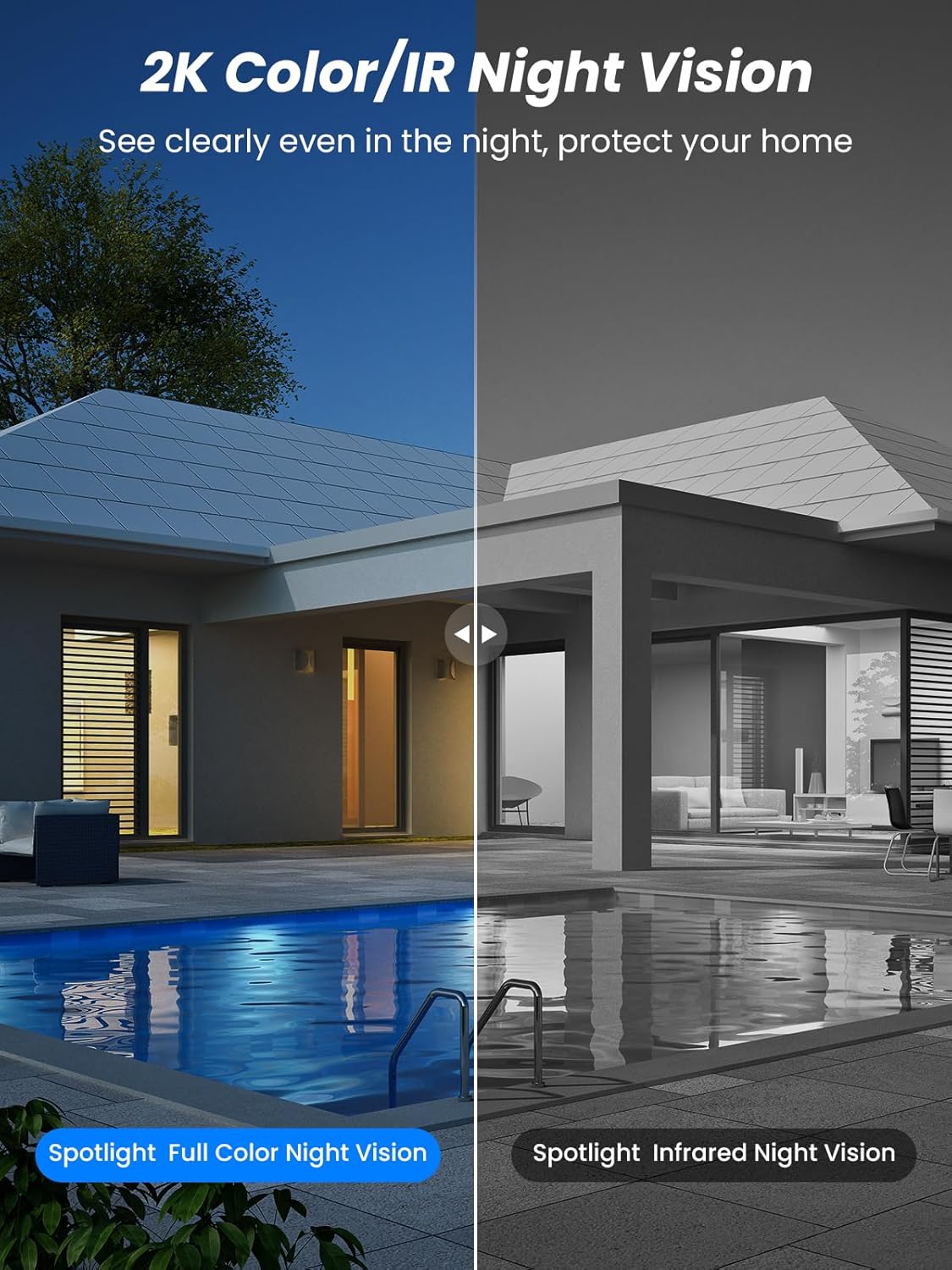
그림 5.4: Illustrates the difference between full-color night vision, enabled by spotlights, and traditional infrared night vision.
5.4 양방향 오디오
The integrated microphone and speaker allow for two-way communication.
- 말하다: 앱에서 마이크 아이콘을 탭하면 카메라 스피커를 통해 말할 수 있습니다.
- 듣다: The camera's microphone captures audio from its surroundings.

그림 5.5: The two-way audio function allows for direct communication through the camera, useful for interacting with visitors or delivery personnel.
6. 유지관리
- 청소: 카메라 렌즈와 태양 전지 패널을 부드러운 천으로 주기적으로 청소하십시오.amp cloth to ensure optimal performance and clear image quality. Avoid abrasive cleaners.
- 배터리 상태: While solar-powered, extreme weather or prolonged periods of low sunlight may require manual charging. Monitor battery levels via the app.
- 펌웨어 업데이트: Check the iCSee app regularly for available firmware updates to ensure your camera has the latest features and security enhancements.
- 날씨 보호: The camera is IP66 weatherproof, designed to withstand rain, snow, and sun. However, ensure all connections are secure to maintain water resistance.

그림 6.1: The IP66 rating ensures the camera's durability and functionality in various outdoor weather conditions, including snow, rain, and direct sunlight.
7. 문제 해결
- 카메라가 Wi-Fi에 연결되지 않음:
- Ensure the camera is within range of your 2.4GHz Wi-Fi network. 5GHz networks are not supported.
- Wi-Fi 비밀번호가 올바른지 확인하세요.
- 라우터와 카메라를 다시 시작하세요.
- If issues persist, try resetting the camera (refer to app or product for reset button location).
- Battery not charging or draining quickly:
- Ensure the solar panel is clean and receives direct sunlight for several hours daily.
- 태양광 패널과 카메라의 연결 상태를 확인하십시오.
- If in a low-light environment, manually charge the camera using the Type-C cable.
- 잦은 동작 감지 이벤트 또는 실시간 view streaming can consume battery faster. Adjust settings if needed.
- False motion detection alarms:
- Adjust the PIR motion detection sensitivity in the iCSee app.
- Ensure the camera is not pointed at areas with constant movement (e.g., busy roads, swaying trees) if not intended for monitoring.
- 이미지 품질이 좋지 않음:
- 카메라 렌즈를 청소하세요.
- 특히 야간에는 최적의 이미지 촬영을 위해 충분한 조명을 확보하십시오.
- Wi-Fi 신호 강도를 확인하세요. 신호가 약하면 비디오 스트리밍 품질에 영향을 줄 수 있습니다.
8. 사양
| 특징 | 세부 사항 |
|---|---|
| 모델명 | D20-1P |
| 비디오 캡처 해상도 | 2.5K |
| 효과적인 비디오 해상도 | 2K QHD |
| 무선 통신 기술 | 와이파이(2.4GHz) |
| 폼 팩터 | 둥근 천장 |
| View잉 각도 | 355도(좌우 회전), 90도(좌우 기울기) |
| 설치 유형 | 벽걸이형 |
| 나이트 비전 범위 | 30 미터 |
| 프레임 속도 | 25fps |
| 재료 | 플라스틱 |
| 권tage | 12볼트(DC) |
| 왓tage | 5 와트 |
| 전원 | 배터리 구동, 태양열 구동 |
| 배터리 | 리튬 이온 배터리 3개(포함) |
| 연결 프로토콜 | 와이파이 |
| 컨트롤러 유형 | iCSee 앱 |
| 특별 기능 | Night Vision (Color/IR), PIR Motion Detection, Two-Way Audio, IP66 Weatherproof |
| 품목 무게 | 1.06kg |
| 소포 크기 | 21.7 x 19.5 x 13.8cm |
9. 보증 및 지원
Reobiux offers a 1년 보증 for this product. For any issues or inquiries, please do not hesitate to reach out to our customer service. We provide 20 hours of online service to assist you.
For support, please refer to the contact information provided with your purchase or within the iCSee application.