
GN HEARING TV Streamer +
Resound TV Streamer+ 사용 설명서
Model: TV Streamer +
1. 서론
The Resound TV Streamer+ is an innovative device designed to enhance your television viewing experience by wirelessly transmitting audio directly to your compatible Resound Nexia hearing aids. This allows for exceptional voice clarity and personalized volume control, ensuring you can fully enjoy your favorite programs and movies.
주요 특징은 다음과 같습니다.
- Only compatible with Resound Nexia hearing aids.
- Instant voice clarity for better understanding.
- Auracast compatibility for improved sound quality.
- Audio streaming up to 7 meters away.
- Wireless audio streaming from TV to compatible hearing aids.
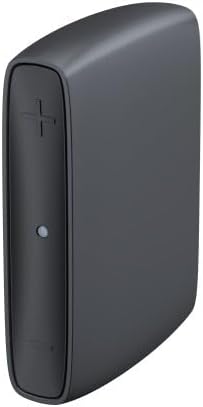
Image 1: The Resound TV Streamer+ device, a compact black unit with a plus sign button and an indicator light on the front.

Image 2: The Resound TV Streamer+ packaging, showing the device on a white background with "TV-Streamer+" text.
2. 설정
Follow these steps to set up your Resound TV Streamer+:
- 장치 포장 풀기: Carefully remove the TV Streamer+ and all accessories from its packaging.
- 전원에 연결: Plug the power adapter into the TV Streamer+ and then into a wall outlet. The indicator light on the device should illuminate.
- Connect to TV Audio Output:
- 광 케이블(권장): Connect one end of the optical cable to the optical audio output port on your TV and the other end to the optical input port on the TV Streamer+.
- RCA Cables (if optical is not available): Connect the red and white RCA cables to the corresponding audio output ports on your TV and the other ends to the RCA input ports on the TV Streamer+.
- 보청기와 함께 사용하세요:
- Ensure your Resound Nexia hearing aids are turned on and within range (within 7 meters) of the TV Streamer+.
- Press and hold the pairing button on the TV Streamer+ (refer to the device diagram for exact location, usually a small button on the back or side) until the indicator light starts blinking rapidly.
- Open and close the battery doors of your hearing aids (or turn them off and on if rechargeable) to put them into pairing mode.
- The hearing aids should automatically connect to the TV Streamer+. The indicator light on the streamer will turn solid blue or green when connected.
- 테스트 연결: Play audio on your TV and confirm that the sound is streaming to your hearing aids. Adjust the TV volume as needed.
3. 사용 설명서
Once connected, the Resound TV Streamer+ provides a seamless audio experience:
- 자동 스트리밍: When the TV Streamer+ is on and connected to your TV, and your hearing aids are within range, audio will automatically stream to your hearing aids.
- 볼륨 조절: You can adjust the volume of the streamed audio directly through your hearing aid controls or via the Resound Smart 3D app on your smartphone. The TV's volume control will typically not affect the streamed audio volume to your hearing aids.
- Switching Programs: If you wish to switch between streamed audio and your hearing aids' regular microphone input, you can usually do so via your hearing aid program button or the Resound Smart 3D app.
- Auracast 호환성: The device leverages Auracast technology for enhanced sound quality and a stable wireless connection, allowing for a richer audio experience.
4. 유지관리
To ensure the longevity and optimal performance of your Resound TV Streamer+, follow these maintenance guidelines:
- 청소: Wipe the device regularly with a soft, dry cloth. Do not use liquid cleaners, sprays, or abrasive materials.
- 저장: 본 기기는 직사광선과 극한의 온도를 피해 시원하고 건조한 곳에 보관하세요.
- 습기를 피하세요: 장치를 물과 높은 습도에서 멀리 두십시오.
- 조심스럽게 다루십시오: 장치를 떨어뜨리거나 강한 충격을 가하지 마십시오.
5. 문제 해결
If you encounter issues with your Resound TV Streamer+, try the following solutions:
| 문제 | 가능한 원인 | 해결책 |
|---|---|---|
| 보청기로 오디오 스트리밍이 되지 않습니다. |
|
|
| 오디오 품질이 좋지 않습니다. |
|
|
| Cannot pair hearing aids. |
|
|
문제가 지속되면 고객 지원팀에 문의하세요.
6. 사양
| 특징 | 세부 사항 |
|---|---|
| 상표 | GN HEARING |
| 제조업체 | GN HEARING |
| 모델명 | TV Streamer + |
| 부품 번호 | 22926500 |
| 연결 기술 | 블루투스 |
| 폼 팩터 | TV 스틱 |
| 색상 | 숯 회색 |
| 비디오 코덱 | H.264, H.265/HEVC |
| 국제 무역 품목 번호(GTIN) | 05708296321216 |
| 첫 번째 가능한 날짜 | 2년 2024월 XNUMX일 |
7. 보증 및 지원
For warranty information, please refer to the documentation included with your purchase or contact your point of sale. GN HEARING provides support for its products.
If you require technical assistance, have questions about your device, or need to report a problem, please contact GN HEARING customer support through their official web사이트 또는 제품과 함께 제공된 연락처 정보.
Please have your model name (TV Streamer +) and part number (22926500) ready when contacting support.
Ask a question about this manual
Ask about setup, troubleshooting, compatibility, parts, safety, or missing instructions. Manuals+ will review the question and use this page’s manual context to help answer it.