
소개
This manual provides comprehensive instructions for the FTTMWTAG T45S Smart Watch. It covers setup, operation, maintenance, and troubleshooting to ensure optimal use of your device. The T45S Smart Watch is a 1.85-inch waterproof fitness tracker designed for both men and women, featuring Bluetooth call functionality, 24-hour health monitoring (blood pressure, heart rate, SpO2, sleep), and compatibility with iPhone and Android devices.
상자 안에 무엇이 들어있나요?
Upon unboxing your FTTMWTAG T45S Smart Watch, you should find the following items:
- FTTMWTAG T45S 스마트 워치
- 충전 케이블
- 사용자 설명서

Image: The FTTMWTAG T45S Smart Watch, its charging cable, and the user manual as typically found in the product packaging.
설치 가이드
1. 초기 충전
Before first use, fully charge the smart watch. Use the provided 5V charger and charging cable. Connect the magnetic end of the cable to the charging points on the back of the watch. A full charge typically takes approximately 2 hours.

Image: The smart watch connected to its charging cable, illustrating the charging process.
2. 앱 설치 및 페어링
To unlock the full features of your T45S Smart Watch, download and install the "Da Fit" application on your smartphone (compatible with both Android and iPhone).
- 블루투스 활성화: 스마트폰에서 Bluetooth가 활성화되어 있는지 확인하세요.
- 앱 다운로드 : 검색 "Da Fit" in your phone's app store (Google Play Store for Android, Apple App Store for iPhone) and install it.
- 앱을 열고 기기를 추가하세요. Open the "Da Fit" app. Navigate to the device section and tap on "Add a Device".
- 시계를 선택하세요: The app will scan for nearby devices. Select "T45S" from the list of available devices.
- 페어링 확인: Your phone will request Bluetooth pairing. Confirm the pairing on both your phone and the smart watch.

Image: Visual instructions demonstrating the Bluetooth pairing process between the smart watch and a smartphone via the Da Fit app.
작동 지침
1. 기본 탐색
- 터치 스크린: The 1.85" HD TFT full-touch color screen allows for intuitive navigation.
- 스와이프 제스처: Swipe left, right, up, or down to access different functions and menus.
- Wake/Lock Screen: The screen can be woken by raising your wrist or by pressing the side button.
- 밝기 조정: Screen brightness can be adjusted through the watch settings or the "Da Fit" app.
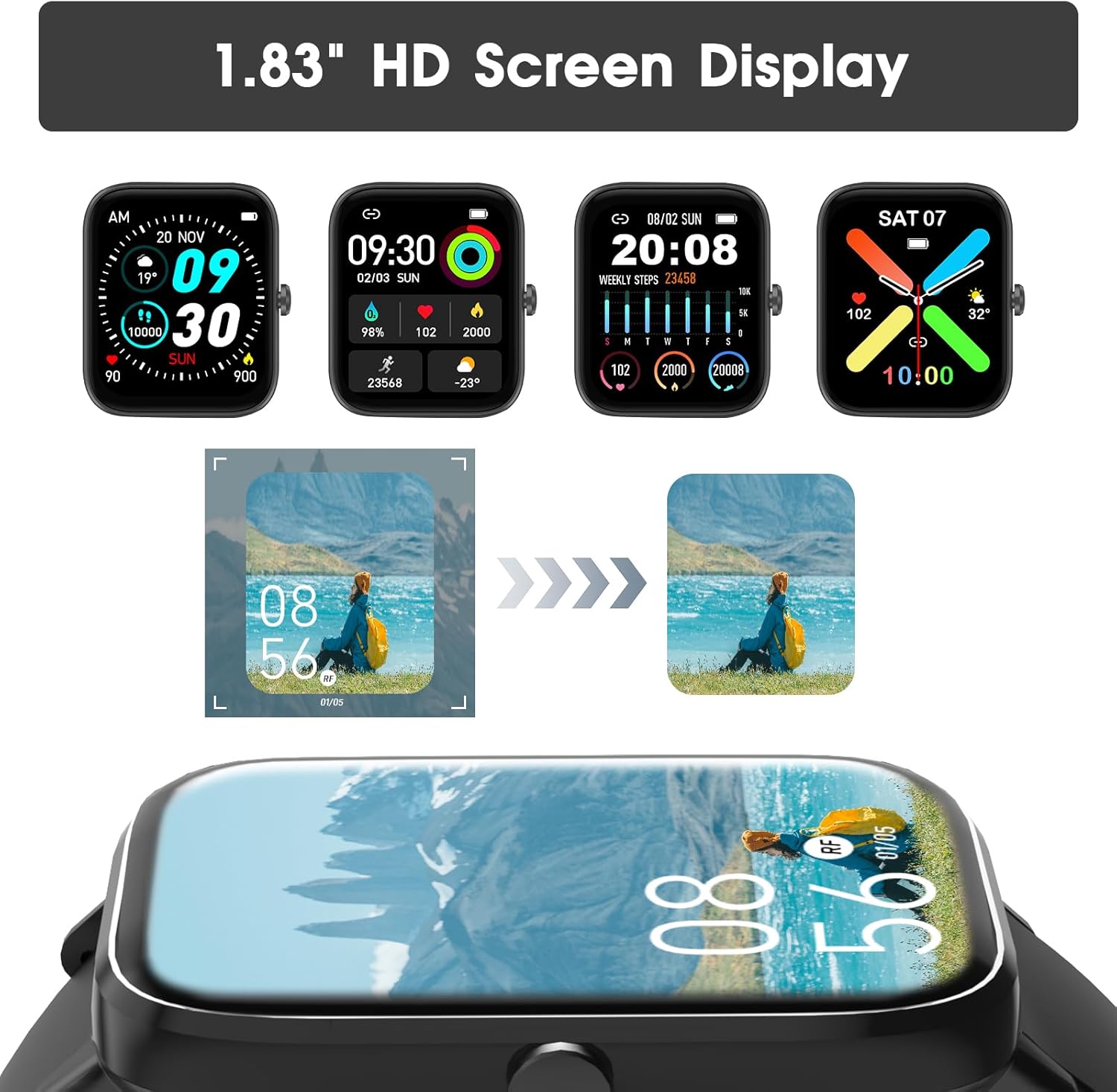
Image: The smart watch screen showing different customizable watch faces and data displays.
2. Bluetooth Call and Message Alerts
Once connected via Bluetooth, the T45S Smart Watch allows for direct communication and notifications.
- 전화 받기/걸기: Use the integrated HD speaker and microphone to answer incoming calls or dial out directly from your watch.
- 통화 내역 및 연락처: View recent call history and access stored contacts directly on the watch.
- 메시지 알림: Receive notifications for social media messages (WhatsApp, Twitter, Facebook, Instagram, etc.) directly on your wrist. Ensure notifications are enabled in the "Da Fit" app.

Image: A user interacting with the smart watch to answer a call, and displays of message notifications and AI assistant features.
Video: An official product video demonstrating the FTTMWTAG Smart Watch's features, including Bluetooth calling and various app functionalities.
3. 건강 및 피트니스 추적
The T45S Smart Watch is equipped with high-performance sensors to monitor various health metrics.
- 심박수 모니터링 : 하루 종일 지속적으로 심박수를 추적합니다.
- 혈압 모니터링 : 혈압 측정값을 제공합니다.
- SpO2 모니터링: 혈중 산소 포화도를 측정합니다.
- 수면 품질 추적: Monitors your sleep patterns, including deep sleep, light sleep, and awake times, providing insights for better rest.
- 활동 추적: 걸음 수, 이동 거리, 소모 칼로리를 기록합니다.
- 스트레스 수준: Monitors stress levels to help you manage daily well-being.

Image: The smart watch screen showing real-time health data for heart rate, stress, and blood pressure.

Image: The smart watch screen showing sleep tracking details, including sleep duration and profile.
4. 스포츠 모드
이 스마트워치는 100가지 이상의 스포츠 모드를 지원하여 운동을 정확하게 추적합니다.
- 사용 가능한 모드: Includes walking, running, cycling, skipping, badminton, basketball, football, swimming, climbing, tennis, rugby, golf, yoga, and many more.
- 운동 데이터: Tracks duration, steps, calories, average heart rate, and distance for each activity.

Image: The smart watch screen showing a summary of a workout session, including steps, calories, heart rate, and distance.

Image: The smart watch interface displaying a selection of over 100 available sports tracking modes.
5. Multifunctionality
The T45S Smart Watch offers a range of practical daily functions:
- 일기 예보: 실시간 날씨 업데이트를 받아보세요.
- 음악 제어: 시계에서 바로 스마트폰의 음악 재생을 제어하세요.
- 앉아서 보내는 시간 상기시키기: 일정 시간 동안 활동이 없으면 이동하라는 알림을 받습니다.
- 스톱워치 및 타이머: Built-in stopwatch and timer functions.
- 알람 시계: 알림을 위해 알람을 설정하세요.
- Tracking Female Cycle: Dedicated feature for tracking the female physiological cycle.
- Screen-Light Duration: 화면이 켜져 있는 시간을 조정하세요.
- 전화번호 찾기: Locate your paired smartphone using the watch.
- 카메라 셔터 제어: Remotely control your phone's camera shutter.

Image: A user operating their smartphone camera remotely using the smart watch as a shutter control.

Image: The smart watch interface showing icons for weather, music control, alarm clock, stopwatch, games, breathing training, and camera control.
유지
1. 방수성
The FTTMWTAG T45S Smart Watch has an IP67 rating, meaning it can withstand water splashes and brief immersion. It is suitable for daily use such as washing hands or light rain.
중요한: 시계는 아니다 suitable for swimming, diving, bathing, or exposure to hot water/steam, as this may damage the device.
Image: The smart watch being splashed with water, indicating its IP67 water resistance for daily activities.
2. 청소
시계의 외관과 기능을 유지하려면 부드럽고 마른 천으로 화면과 스트랩을 정기적으로 닦으세요. 필요한 경우,amp cloth can be used for the strap, ensuring it is dried thoroughly afterward.
3. 배터리 관리
To prolong battery life, avoid extreme temperatures and fully discharge the battery only occasionally. Regular charging before the battery is completely depleted is recommended.
문제 해결
| 문제 | 가능한 해결책 |
|---|---|
| 시계가 켜지지 않음 | 시계가 완전히 충전되었는지 확인하세요. 충전기에 최소 30분 동안 연결해 두세요. |
| 휴대폰과 페어링이 불가능합니다 |
|
| 부정확한 건강 데이터 |
|
| 알림이 나타나지 않습니다 |
|
| 배터리 수명이 짧음 |
|
명세서
| 특징 | 세부 사항 |
|---|---|
| 모델 번호 | T45S |
| 화면 크기 | 1.85 인치 |
| 디스플레이 유형 | HD TFT Full Touch Color Screen |
| 연결성 | 블루투스 |
| 운영 체제 호환성 | 안드로이드와 iOS |
| 배터리 용량 | 290밀리amp 시간(mAh) |
| 충전 시간 | 약 2시간 |
| 일반적인 사용 시간 | 3-6일 |
| 대기 시간 | 최대 30일 |
| 방수 등급 | IP67 (Splash-proof, not for swimming/diving) |
| 건강 모니터링 | Heart Rate, Blood Pressure, SpO2, Sleep, Stress Levels |
| 활동 추적 | 걸음 수, 거리, 칼로리, 100가지 이상의 스포츠 모드 |
| 기타 기능 | Bluetooth Call, Message Alerts, Weather, Music Control, Sedentary Reminder, Stopwatch, Alarm Clock, Timer, Female Cycle Tracking, Find Phone, Camera Shutter Control |
| 제품 치수 | 1 x 1 x 1 인치 |
| 품목 무게 | 4.2온스(0.12킬로그램) |
| 제조업체 | FTTMWTAG |

Image: Diagram showing the dimensions of the smart watch and details about its 290mAh battery capacity.
보증 및 지원
For warranty information, technical support, or customer service inquiries, please refer to the contact details provided with your purchase or visit the official FTTMWTAG web사이트. 보증 청구에 대비해 구매 증빙 자료로 구매 영수증을 보관하세요.
The product is verified by Transparency, with each item having a unique code for authenticity verification.