
EZQuest USB-C Slim Gen 2 Hub Adapter 6-in-1
EZQuest USB-C 슬림 2세대 허브 어댑터 6-in-1 사용 설명서
Model: USB-C Slim Gen 2 Hub Adapter 6-in-1
브랜드: EZQuest
소개
The EZQuest USB-C Slim Gen 2 Hub Adapter 6-in-1 is a versatile connectivity solution designed to expand the capabilities of your USB-C enabled devices. This compact hub provides essential ports for video output, high-speed data transfer, and power delivery, enhancing your productivity and connectivity options.
주요 특징
- One USB-C 4K 60Hz Video Output: Connect to an external display for crisp 4K resolution at 60Hz.
- Four USB-C Gen 2 10Gbps Ports: Experience ultra-fast data transfer speeds up to 10Gbps. The total shared data bandwidth across these four ports is 10Gbps.
- USB-C Power Delivery 3.0 (100W): Charge your host device with up to 80W pass-through charging, supporting Fast Role Swap (FRS) technology.
- Individual Port Power Output: Each USB-C data port provides 5V/1.5A (7.5W) power output, with a total shared power output of 15W when all ports are used simultaneously.
- Removable 19.6-inch (50 cm) Nylon Braided Cable: Offers flexibility and durability, allowing the hub to lay flat on your desk.
- 폭넓은 호환성: Compatible with all computers, smartphones, and tablets featuring USB-C/Thunderbolt ports and OTG support.
패키지 내용
패키지에 모든 품목이 들어 있는지 확인하세요.
- EZQuest USB-C Slim Gen 2 Hub Adapter 6-in-1
- Integrated USB-C Host Cable (19.6 inches / 50 cm)
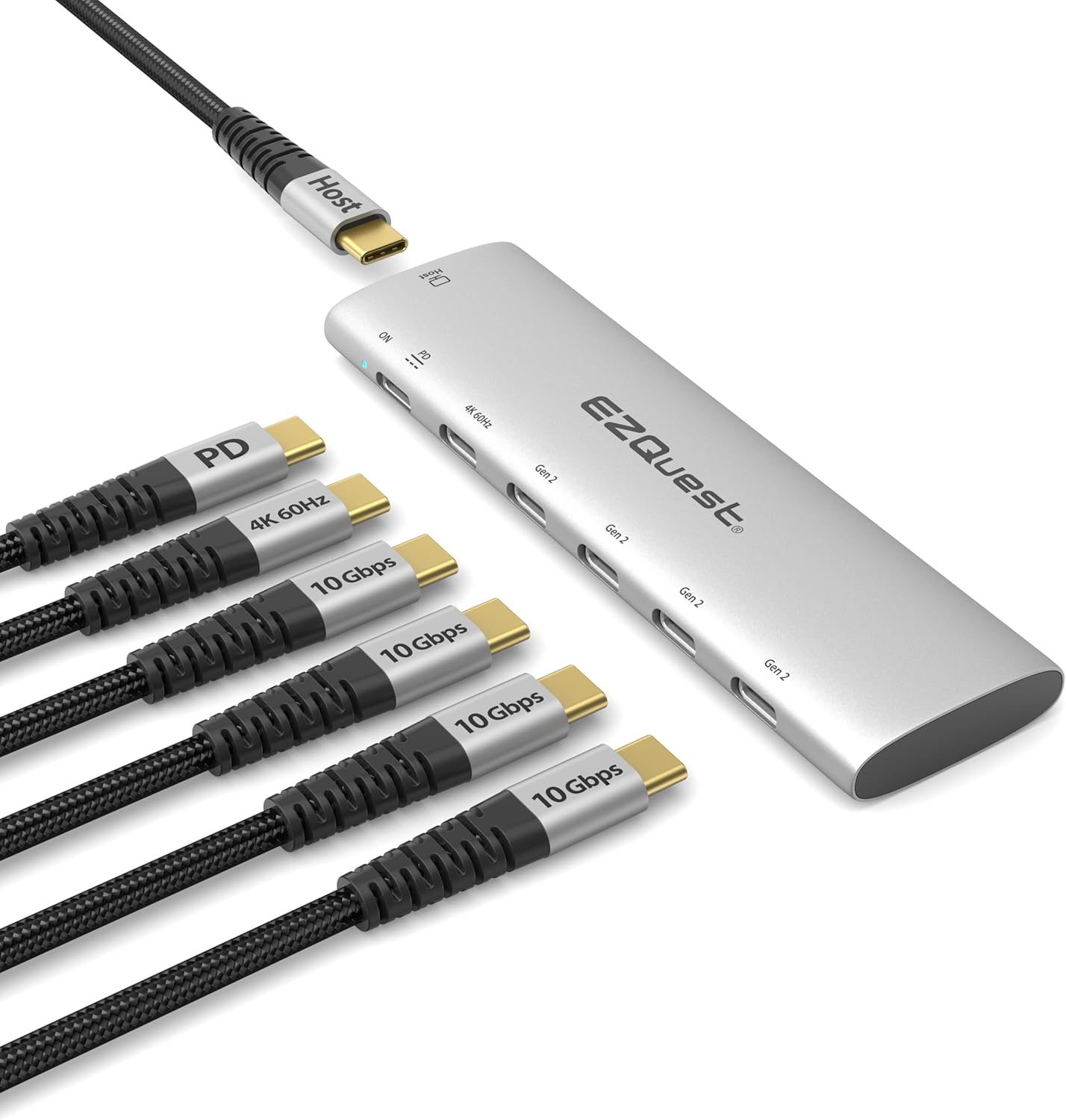
Image: The EZQuest USB-C Slim Gen 2 Hub Adapter 6-in-1, showcasing its compact design and multiple USB-C ports, including one for power delivery and one for 4K 60Hz video output. Various cables are shown connected to illustrate its functionality.
설치 지침
허브를 호스트 장치에 연결하세요.
Plug the integrated USB-C host cable from the EZQuest hub into an available USB-C or Thunderbolt port on your computer, laptop, tablet, or smartphone.

Image: The EZQuest hub connected to a laptop via its USB-C host cable, illustrating the primary connection point.
주변기기 연결:
Connect your USB-C devices (e.g., external SSDs, flash drives, or other USB-C accessories) to the four USB-C Gen 2 10Gbps data ports on the hub.

Image: A diagram illustrating the shared data and power capabilities of the hub, showing 10Gbps total shared data and 15W total shared power across the four USB-C data ports, along with the 100W Power Delivery port and 4K 60Hz video output.
외부 디스플레이 연결 (선택 사항):
If you wish to extend or mirror your display, connect a USB-C to USB-C video cable from your monitor to the dedicated USB-C 4K 60Hz video output port on the hub. Ensure your device's USB-C port supports display output.

Image: A laptop connected to an external monitor through the EZQuest hub, demonstrating the extended display functionality. A note reminds users to ensure their device's USB-C port supports display output.
Connect Power Adapter (Optional for Charging Host Device):
For pass-through charging of your host device, connect your USB-C power adapter to the USB-C Power Delivery 3.0 port on the hub. The hub supports up to 100W input with up to 80W output to the host device.

Image: The EZQuest hub connected to a laptop and an external SSD, with arrows indicating 100W power input to the hub and 80W power output to the laptop, demonstrating power delivery functionality.
작동 지침
데이터 전송
The four USB-C Gen 2 ports support data transfer speeds up to 10Gbps. When transferring large files, ensure your connected devices also support USB 3.2 Gen 2 for optimal performance. The total shared data bandwidth across these ports is 10Gbps.

Image: A person using a laptop with the EZQuest hub connected, illustrating high-speed file transfer to an external SSD. The image highlights 10Gbps USB 3.2 Gen 2 speed compared to 5Gbps USB 3.0.
비디오 출력
The dedicated USB-C 4K 60Hz video output port allows you to connect an external display. This port supports resolutions up to 4K (3840x2160) at a refresh rate of 60Hz. For best results, use a high-quality USB-C to USB-C video cable and ensure your display supports 4K 60Hz via USB-C.
전력 공급
The USB-C Power Delivery 3.0 port enables pass-through charging for your host device. Connect your original USB-C power adapter to this port. The hub can accept up to 100W input and deliver up to 80W to your connected laptop or device. This port also features Fast Role Swap (FRS) technology, which helps prevent data loss during power fluctuations.
호환성
The EZQuest USB-C Slim Gen 2 Hub Adapter is broadly compatible with devices featuring a USB-C or Thunderbolt port that supports data, video, and power delivery functionalities.
- Computers with USB-C/Thunderbolt ports (e.g., MacBook Pro/Air, Windows PCs, Chromebooks).
- USB-C smartphones and tablets with OTG (On-The-Go) support (e.g., iPad Pro, Samsung Galaxy, Google Pixel).
중요 참고 사항: For video output functionality, your device's USB-C port must support DisplayPort Alternate Mode (Alt Mode).

Image: The EZQuest hub connected to an iPad, a smartphone, and a tablet, demonstrating its compatibility with various USB-C enabled mobile devices that support OTG.
명세서
| 특징 | 세부 사항 |
|---|---|
| 모델명 | USB-C Slim Gen 2 Hub Adapter 6-in-1 |
| 비디오 출력 | 1 x USB-C 4K 60Hz |
| 데이터 포트 | 4 x USB-C Gen 2 (10Gbps, shared total) |
| Data Port Power Output | 5V/1.5A (7.5W) per port, 15W total shared |
| 전원 공급 포트 | 1 x USB-C PD 3.0 (100W input, 80W output) |
| 케이블 길이 | 19.6 inches (50 cm) removable nylon braided |
| 색상 | 은 |
| 품목 무게 | 4.2 온스 |
| 치수 | 8.82 x 4.02 x 1.46인치(패키지) |
| 하드웨어 인터페이스 | USB 타입 C |
문제 해결
- 비디오 출력 없음:
- 호스트 장치의 USB-C 포트가 DisplayPort Alternate Mode(Alt Mode)를 지원하는지 확인하십시오.
- Verify the USB-C to USB-C video cable is functioning correctly and is connected to the correct port on the hub and monitor.
- Check display settings on your host device to ensure the external monitor is detected and configured correctly (e.g., extended or mirrored).
- 데이터 전송 속도가 느림:
- Ensure both the host device and the connected peripheral support USB 3.2 Gen 2 (10Gbps).
- Note that the 10Gbps data bandwidth is shared across all four USB-C data ports. Simultaneous high-bandwidth transfers may reduce individual port speeds.
- Try connecting the peripheral directly to the host device to isolate if the issue is with the hub or the peripheral.
- 호스트 기기가 충전되지 않거나 충전 속도가 느립니다.
- Ensure your power adapter is connected to the dedicated USB-C PD port on the hub.
- 전원 어댑터가 충분한 전력을 제공하는지 확인하세요.tage (e.g., 60W or 100W) for your host device and the hub's pass-through charging capabilities.
- The hub provides up to 80W output to the host device. If your device requires more, it may charge slower or not at all.
- 허브를 인식할 수 없습니다:
- Ensure the integrated USB-C host cable is fully inserted into your device's USB-C/Thunderbolt port.
- Try connecting the hub to a different USB-C/Thunderbolt port on your device.
- 호스트 장치를 다시 시작합니다.
관리 및 유지 보수
- Keep the hub away from liquids, extreme temperatures, and direct sunlight.
- Clean the hub with a soft, dry cloth. Do not use abrasive cleaners or solvents.
- 허브를 떨어뜨리거나 강한 충격을 가하지 마십시오.
- 사용하지 않을 때는 허브를 서늘하고 건조한 곳에 보관하십시오.
보증 및 지원
EZQuest products are designed for reliability and performance. For warranty information and technical support, please visit the official EZQuest web사이트를 방문하거나 고객 서비스에 문의하세요.
더 많은 정보와 지원은 다음에서 찾을 수 있습니다. EZQuest Amazon Store.
Ask a question about this manual
Ask about setup, troubleshooting, compatibility, parts, safety, or missing instructions. Manuals+ will review the question and use this page’s manual context to help answer it.