
Ebitcam 8311
Ebitcam 보안 카메라 사용 설명서
Model: 8311 | Brand: Ebitcam
1. 서론
Thank you for choosing the Ebitcam Security Camera. This manual provides detailed instructions on how to set up, operate, and maintain your camera. This 3-megapixel camera offers robust security features, including IP66 weather resistance for both indoor and outdoor environments, two-way audio, and advanced AI-powered detection capabilities. Enjoy peace of mind with 24-hour monitoring and remote access from your smartphone.

The Ebitcam security camera provides high-resolution monitoring for various environments.
2. 패키지 내용
다음 품목이 패키지에 포함되어 있는지 확인하세요.
- Ebitcam Security Camera (Model 8311)
- 전원 어댑터
- 장착 나사 및 벽면 플러그
- 사용자 설명서
3. 제품 오버view
Familiarize yourself with the components of your Ebitcam security camera:

The camera features a lens, status LED, microphone, and a durable IP66-rated casing.
- 렌즈: 동영상 foo를 캡처합니다.tage.
- 상태 LED : 카메라 상태(예: 전원, 연결 상태)를 나타냅니다.
- 마이크로폰: 음성 입력 및 양방향 통신용입니다.
- 스피커: 오디오 출력 및 양방향 통신용입니다.
- SD 카드 슬롯: Supports up to 512GB microSD card for local storage. Located under the lens.
- 재설정 버튼: Used to reset the camera to factory settings. Located under the lens.
- 전원 포트: 전원 어댑터에 연결합니다.
- 장착베이스: Integrated base for various installation options.
4. 설정
4.1 초기 전원 켜기
- 전원 어댑터를 카메라의 전원 포트에 연결하고 전원 콘센트에 꽂습니다.
- Wait for the camera's status LED to indicate it is ready for setup (refer to app instructions for specific LED behavior).
4.2 앱 다운로드 및 계정 등록
- Download the "Ebitcam" app from your smartphone's app store (available for iPhone and Android).
- 앱을 열고 화면의 지시에 따라 새 계정을 등록하거나 이미 계정이 있는 경우 로그인하세요.
- Add your camera by scanning the QR code located on the camera body using the app.
4.3 Wi-Fi 연결
- The camera supports 2.4GHz Wi-Fi networks only. Ensure your smartphone is connected to a 2.4GHz Wi-Fi network during setup.
- Follow the app's prompts to connect the camera to your Wi-Fi network.
- For optimal performance, choose an installation location with a strong Wi-Fi signal.
4.4 물리적 설치
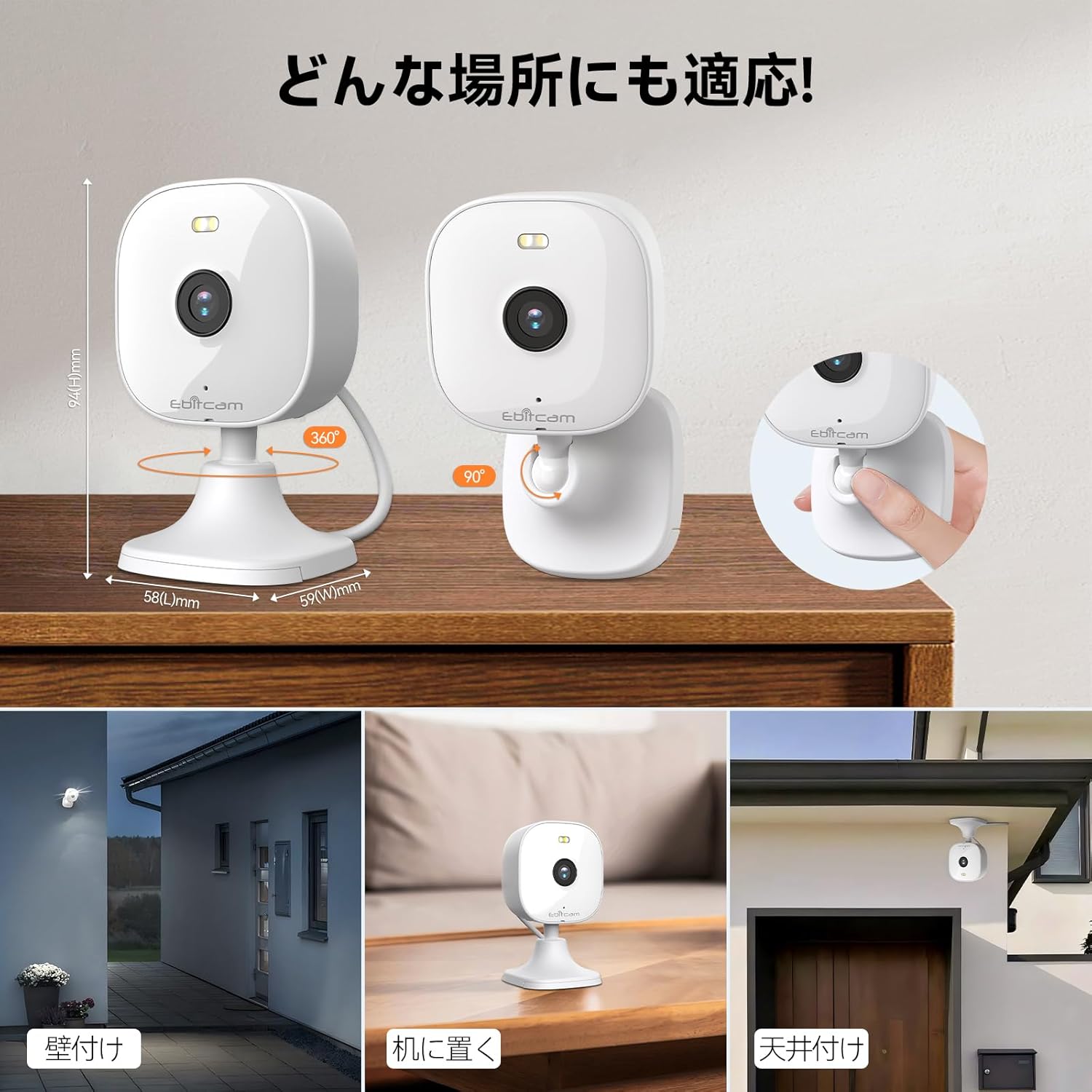
카메라는 다양한 장착 옵션을 제공합니다.

The camera can be mounted on walls, ceilings, or placed on a tabletop.
- 탁상 배치: Simply place the camera on a flat surface. The integrated base allows for stable positioning.
- 벽/천장 마운트: The camera's base can be detached by gently pulling the camera from its base. Use the included mounting screws and wall plugs to secure the base to your desired wall or ceiling location. Then, reattach the camera to the mounted base.
Note: The product package includes matching screw mounting tools for installation.
5. 사용 설명서
5.1 라이브 View 그리고 녹음
Access the live video feed and manage recordings through the Ebitcam app.

The camera supports 2K (1296p) resolution for clear video capture.
- 생방송: 앱을 열고 카메라를 선택하세요 view 실시간 비디오 스트림.
- 연속 녹화 : SD 카드가 삽입되었거나 클라우드 저장소가 활성화된 경우, 카메라는 24시간 내내 연속 녹화가 가능합니다.
- 이벤트 트리거 녹화: Configure settings to automatically start recording when motion, sound, or human presence is detected.
5.2 양방향 오디오
Communicate with people or pets on the camera's side using the built-in microphone and speaker.
Engage in real-time conversations through the camera's two-way audio feature.
- Tap the microphone icon in the app to speak. Your voice will be transmitted through the camera's speaker.
- The camera's high-sensitivity microphone captures audio from the environment.
5.3 Motion, Sound, and Human Detection & Alerts
The camera utilizes advanced AI to detect specific events and notify you.

AI detection accurately distinguishes between humans and other moving objects.
- AI 감지: The camera can differentiate between human movement, general motion, and sound events.
- Mobile Alerts: Receive instant push notifications on your smartphone when an event is detected.
- Automatic Lighting/Alarm: Configure settings to trigger automatic white light illumination or an audible alarm to deter unwanted visitors upon detection.
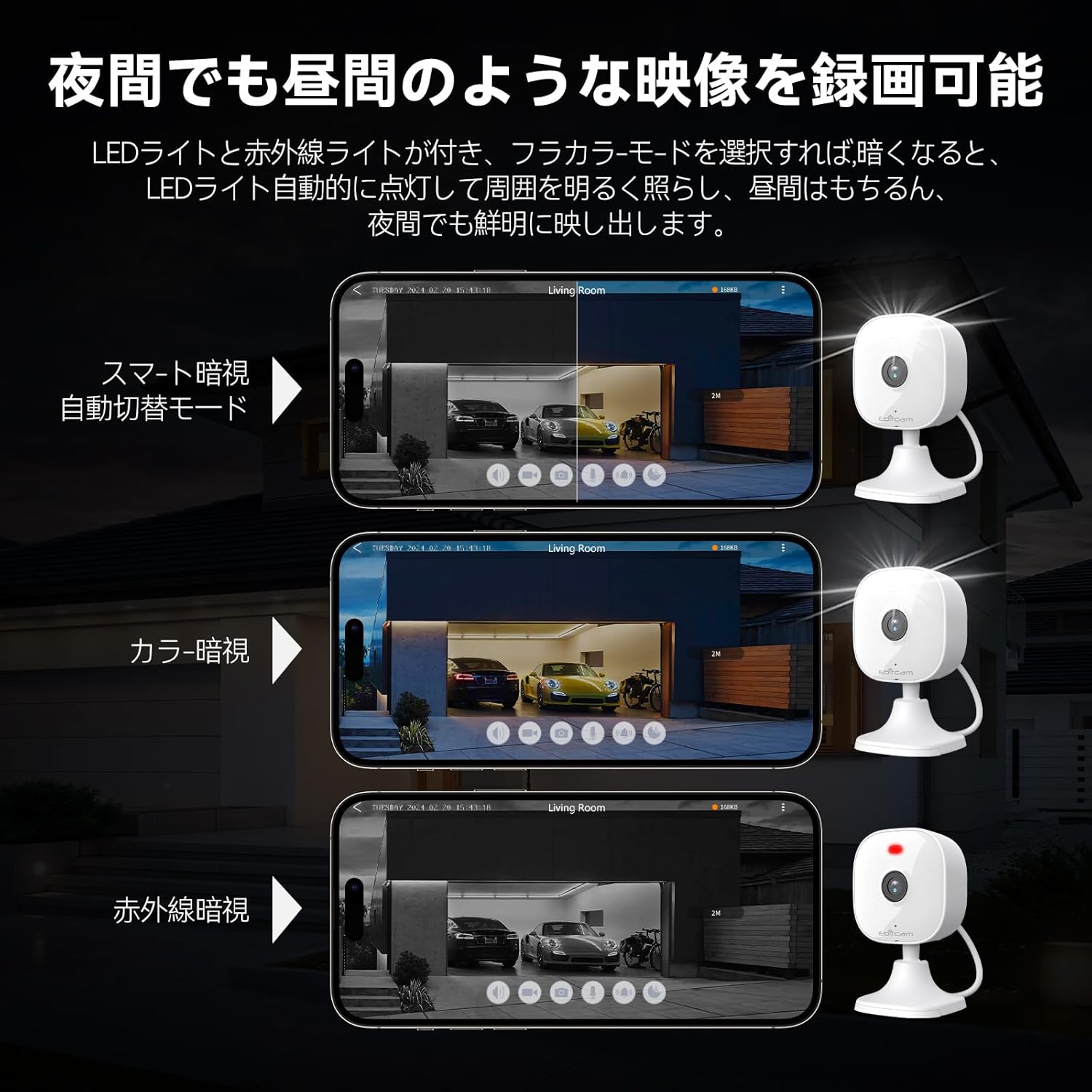
5.4 야간 투시 모드
The camera provides clear visibility even in low-light or dark conditions.

Choose from various night vision modes for optimal clarity.
- 풀컬러 야간 투시경: Utilizes built-in white lights to provide color video footage in darkness (requires settings).
- 적외선 나이트 비전: 적외선 LED를 사용하여 완전한 어둠 속에서도 선명한 흑백 영상을 제공합니다.
- 자동 스위칭: The camera can automatically switch between day and night modes based on ambient light.
5.5 디지털 줌
라이브 방송의 세부 사항을 확대해 보세요 view 또는 기록된 음식tage.

이 카메라는 최대 8배 디지털 줌을 지원합니다.
- Use the pinch-to-zoom gesture on your smartphone screen within the app to digitally zoom in or out.
5.6 알렉사 통합
Control your Ebitcam camera using voice commands with Amazon Alexa.
Integrate your camera with Alexa for convenient voice control.
- Enable the Ebitcam skill in your Alexa app.
- "알렉사, [카메라 이름]을 보여줘"와 같은 명령어를 사용하세요. view the live feed on compatible Alexa devices.
5.7 가족 공유
Share access to your camera with family members or trusted friends.
- Within the Ebitcam app, navigate to the sharing settings for your camera.
- You can share access by generating a QR code for others to scan, allowing them to view 카메라 피드.
6. 유지관리
6.1 SD 카드 관리
The camera supports up to a 512GB microSD card for local video storage.

Insert a microSD card for local video storage.
- 삽입: Gently insert the microSD card into the slot located under the camera lens until it clicks into place.
- 서식: It is recommended to format the SD card through the camera settings in the app before first use.
- 제거: Push the SD card gently to release it, then pull it out.
6.2 청소
- Wipe the camera lens with a soft, clean cloth to ensure clear image quality.
- 카메라 본체를 광고로 청소하세요amp 옷감. 강한 화학 물질이나 연마성 세제를 사용하지 마십시오.
6.3 펌웨어 업데이트
- Periodically check for firmware updates through the Ebitcam app. Updates can improve performance, add new features, and enhance security.
- Follow the app's instructions carefully when performing a firmware update.
7. 문제 해결
일반적으로 발생할 수 있는 문제에 대한 해결책은 다음과 같습니다.
- Unstable SD Card Performance: If you experience issues with recording or playback, an unstable SD card may be the cause. Please replace your SD card with a reliable, high-quality one and try again.
- App Not Functioning Correctly / Unstable Network: If the app does not function correctly, it might be due to an unstable network environment. Please ensure you have a stable 2.4GHz Wi-Fi connection.
- Camera Offline / Connection Issues: Ensure the camera is powered on and within range of your 2.4GHz Wi-Fi router. Check your Wi-Fi password in the app.
- Forgetting Login Password / Changing Network Environment: If you change your network environment or forget your login password, you can reset the camera. The camera's restart button is located under the lens. Press and hold it for a few seconds until the camera resets.
- False Alarms from Motion Detection: Adjust the motion detection sensitivity settings within the app. Consider setting specific detection zones to reduce unwanted alerts from areas like busy streets or swaying trees.
8. 사양
| 특징 | 사양 |
|---|---|
| 제품 모델 번호 | 8311 |
| 항목 수 | 1 |
| 무선 통신 기술 | 와이파이 |
| 장착 유형 | Freestanding, Wall Mount, Ceiling Mount, Tabletop Mount, Door Mount |
| 나이트 비전 범위 | 10 미터 |
| 프레임 속도 | 25fps |
| 제품 크기(LxWxH) | 10 x 5 x 5cm |
| 방수 수준 | IP66 방수 |
| 제품 무게 | 190g |
| 추천 용도 | Interior, Home, Living Room, Bedroom, Pet, Shop |
| 연결 기술 | 와이파이 |
| 실내/실외 사용 | 실내, 실외 |
| 호환 장치 | iPhone, TV, Tablet, Desktop, Smartphone |
| 전원 | 코드식 전기 |
| 연결 프로토콜 | 와이파이 |
| 비디오 캡처 해상도 | 1296p(2K) |
9. 보증 및 지원
Ebitcam provides the following warranty and support for your product:
- 보증: A 2-year warranty is provided from the original purchase date.
- 온라인 지원: Online support is available Monday to Friday, from 8 AM to 5 PM (local time). Please refer to the Ebitcam app or official web연락처 정보 사이트.
Ask a question about this manual
Ask about setup, troubleshooting, compatibility, parts, safety, or missing instructions. Manuals+ will review the question and use this page’s manual context to help answer it.