
1. 서론
This manual provides essential information for the assembly, operation, maintenance, and troubleshooting of your AODK 66-inch Reversible L-Shaped Desk. Please read these instructions carefully before assembly and use to ensure proper function and longevity of your product.
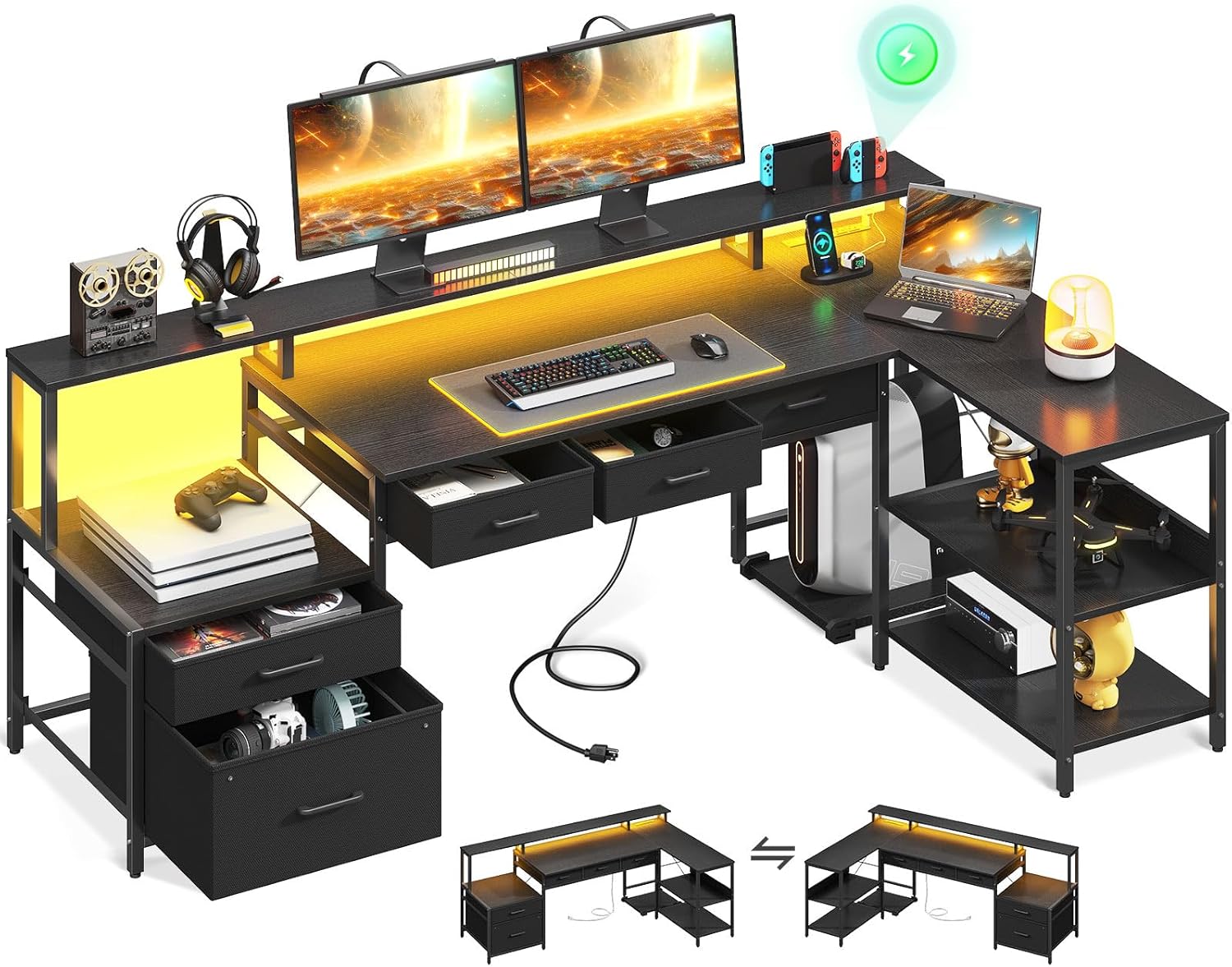
이미지 1.1: 이상view of the AODK 66-inch L-Shaped Desk, showcasing its design with integrated LED lighting, monitor shelf, and various storage options including file drawers and under-desk fabric drawers.
2. 안전 정보
다음 안전 지침을 준수하십시오.
- 모든 조립 지침을 정확하게 따르세요. 잘못 조립하면 불안정해지고 부상을 입을 수 있습니다.
- 책상이 평평하고 안정적인 표면에 놓여 있는지 확인하십시오.
- If the total loaded weight exceeds 66.14 pounds (30 kg), ensure proper anchoring to prevent tipping.
- Do not overload shelves or drawers beyond their stated capacity.
- Keep electrical components (power outlet, LED strip) away from liquids.
3. 패키지 내용
Verify that all components listed in your product's packing list are present before beginning assembly. The desk includes various panels, metal frames, hardware, LED strip, and power outlet unit. A movable CPU stand is also included.

Image 3.1: Dimensional diagram of the AODK L-Shaped Desk, illustrating the measurements of the main desktop, monitor stand, storage shelves, and individual drawer components.
4. 설치 및 조립
Assembly is required for this product. It is recommended to have two people for assembly. Please refer to the detailed assembly instructions provided in your product packaging for step-by-step guidance.
4.1 가역적 디자인
The AODK L-Shaped Desk features a reversible design, allowing you to configure the longer side of the 'L' to either the left or right, depending on your space requirements. Carefully follow the specific instructions in your assembly manual for your desired orientation.
4.2 주요 조립 팁
- 모든 구성품을 풀어서 부품 목록과 비교해보세요.
- 작업을 시작하기 전에 모든 하드웨어를 펼쳐놓고 각 부품의 위치를 확인하세요.
- Do not overtighten screws during initial assembly; tighten fully once the section is complete.
- Pay close attention to the orientation of panels and frames as indicated in the assembly diagrams.

Image 4.1: Illustration detailing the simple folding and assembly process for the under-desk fabric drawers, which are designed for easy setup and storage.
5. 사용 설명서
5.1 LED 조명 시스템
The integrated LED strip offers customizable lighting options:
- 그림 물감: 7가지의 다양한 색상 중에서 선택하세요.
- 모드: Select from 13 lighting modes.
- 명도: Adjust between 8 levels of brightness.
- 깜박임 주파수: Set from 9 different flicker frequencies.
- 메모리 기능: The system retains the last selected mode and settings when powered off and on.
Control the LED lights using the inline remote control attached to the LED strip cable. Connect the LED strip's USB plug to a compatible USB power source (e.g., a USB port on your computer or a USB wall adapter).

Image 5.1: The AODK L-Shaped Desk illuminated by its RGB LED lighting system, demonstrating various color options and how they enhance the desk's aesthetic and user experience.
5.2 Built-in Power Outlet
The desk includes a recessed power outlet for convenient charging and power access:
- AC 콘센트: 3 standard 125V/12A AC outlets.
- USB 포트: 1 USB-A and 1 USB-C port (5V/2A total).
- 전원 코드: The integrated power cord is 78 inches long.
To use, plug the desk's main power cord into a standard wall outlet. Ensure the total power draw of connected devices does not exceed the outlet's maximum capacity.

이미지 5.2: 자세한 view of the built-in charging station on the AODK desk, featuring three AC outlets, one USB-A port, and one USB-C port for convenient device charging.
5.3 Movable CPU Stand
The desk includes a movable CPU stand on wheels, allowing you to position your computer tower conveniently under the desk or in an accessible location. Simply place your CPU on the stand.

Image 5.3: The movable CPU stand, designed to keep your computer tower off the floor and easily accessible, with wheels for convenient repositioning.
6. 유지관리
정기적인 관리는 책상의 외관과 기능을 유지하는 데 도움이 됩니다.
- 청소: 부드러운 d로 표면을 닦으십시오.amp 천으로 닦으세요. 마감재를 손상시킬 수 있는 강한 화학 물질이나 연마성 세제는 사용하지 마세요.
- 유출: 얼룩이 생기거나 가공 목재 표면이 손상되는 것을 방지하기 위해 액체를 쏟았을 경우 즉시 닦아내십시오.
- 하드웨어: 안정성을 확보하기 위해 주기적으로 모든 나사와 고정 장치를 점검하고 조여주십시오.
- 전기 부품: Ensure the power outlet and LED strip are free from dust and debris. Do not attempt to repair electrical components yourself.
7. 문제 해결
If you encounter issues with your AODK L-Shaped Desk, refer to the following common troubleshooting steps:
- 책상 불안정성: Check that all screws are securely tightened. Ensure the desk is on a level surface; use the adjustable foot pads to compensate for uneven floors.
- LED 조명이 작동하지 않음: Verify the USB plug for the LED strip is securely connected to a working power source. Check the inline remote for power and mode settings.
- 전원 콘센트가 작동하지 않습니다: Ensure the desk's main power cord is fully plugged into a live wall outlet. Test the outlet with another device to confirm power supply. Avoid overloading the outlets.
- 서랍이 부드럽게 미끄러지지 않음: Check for any obstructions in the drawer glides. Ensure the drawer components were assembled correctly according to the instructions.
이러한 단계를 거쳐도 문제가 해결되지 않으면 고객 지원팀에 문의하세요.
8. 사양
| 상표 | AODK |
| 모델 번호 | B02022401004UUN9VDJKC1779 |
| 제품 크기(D x W x H) | 46인치 깊이 x 35.31인치 너비 x 34.25인치 높이 |
| 크기 | 66 인치 |
| 색상 | 검은색 |
| 재료 | 공학목재(상판), 합금강(하단/프레임) |
| 품목 무게 | 66.14 파운드 |
| 서랍 수 | 5 (2 file, 3 under-desk fabric) |
| 선반 수 | 2 |
| 특징 | Reversible, Built-in Power Outlet, LED Strip, Monitor Shelf, Movable CPU Stand |
| 전원 콘센트 | 3 AC Outlets, 1 USB-A, 1 USB-C (5V/2A) |
9. 보증 및 지원
For information regarding product warranty, please refer to the documentation included with your purchase or contact AODK customer support directly. If you require assistance with assembly, parts, or troubleshooting, please reach out to the manufacturer's customer service team.
연락처 정보: Refer to your purchase receipt or the AODK official web최신 고객 지원 연락처 정보는 사이트에서 확인하세요.