
1. 서론
Thank you for choosing the OREiN Motion Sensor Outdoor Lights. This manual provides detailed instructions for the safe installation, operation, and maintenance of your new floodlights. These lights are designed to provide bright, energy-efficient security lighting for various outdoor applications, featuring advanced motion sensing and multiple operating modes.
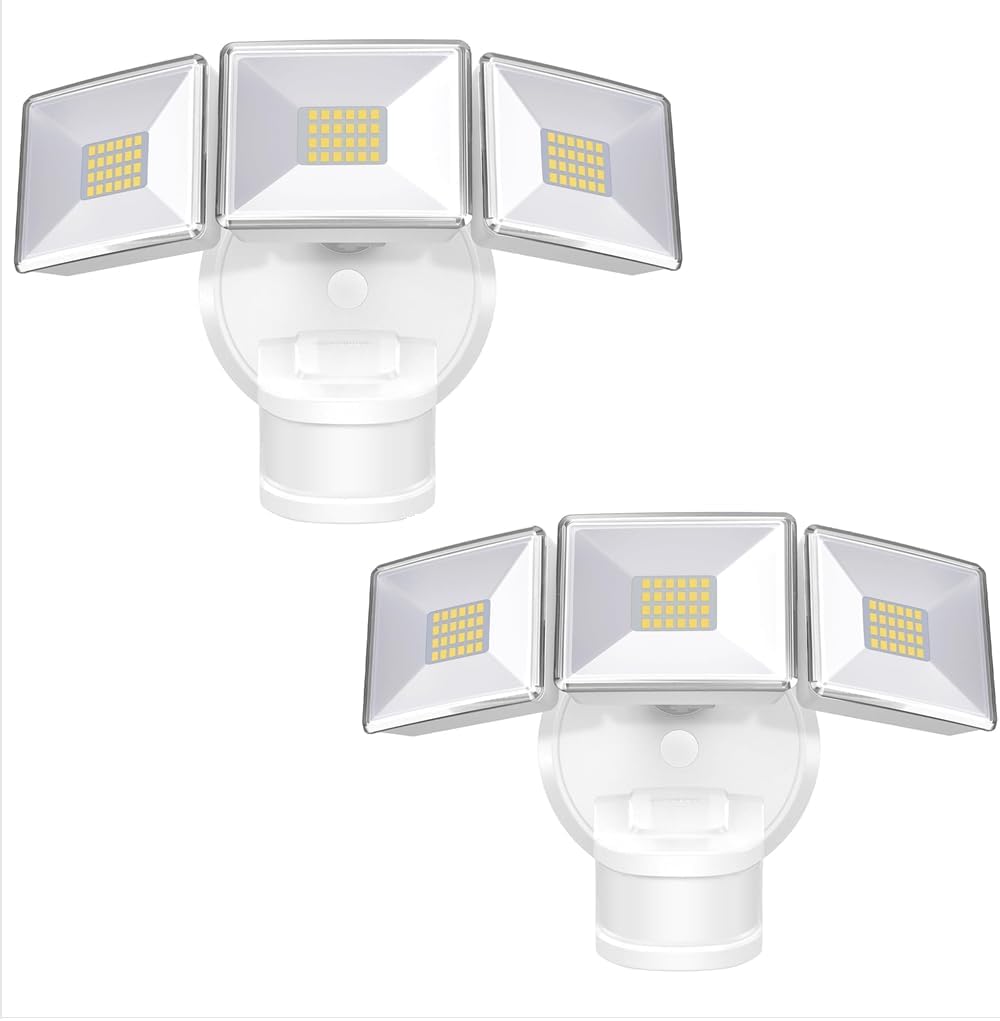
Image: Two OREiN Motion Sensor Outdoor Lights, showcasing their design and dual-pack offering.
2. 안전 정보
설치 및 작동 전에 모든 안전 지침을 주의 깊게 읽으십시오. 지침을 따르지 않으면 감전, 화재 또는 기타 위험이 발생할 수 있습니다.
- 경고: 감전의 위험이 있습니다. 설치 또는 수리하기 전에 퓨즈 또는 회로 차단기의 전원을 차단하십시오.
- 본 제품은 해당 설치 규정에 따라 제품의 구조, 작동 및 관련 위험을 잘 아는 사람이 설치해야 합니다.
- Use only UL-listed wire connectors suitable for the size, type, and number of conductors.
- 가연성 물질 근처에 설치하지 마십시오.
- 조명기구가 접속함에 단단히 고정되었는지 확인하십시오.
- Do not look directly into the LED light source when the light is on.
3. 패키지 내용
설치를 시작하기 전에 모든 구성 요소가 있는지 확인하세요.
- 2 Pack 4500LM Flood Lights
- 장착 브래킷
- 나사
- 사용 설명서
- 와이어 너트
4. 사양
| 특징 | 사양 |
|---|---|
| 상표 | 오레인 |
| 모델명 | OL3600354 |
| 색상 | 하얀색 |
| 재료 | 아크릴로니트릴 부타디엔 스티렌, 알루미늄 |
| 전등 형태 | 투광 조명 |
| 객실 유형 | Garden, Garage, Yard, Front Door, Patio |
| 제품 치수 | 11.61인치 길이 x 8.98인치 너비 x 6.5인치 높이 |
| 실내/실외 사용 | 집 밖의 |
| 전원 | 유선 전기(AC) |
| 설치 유형 | Wall Mount and Soffit Mount |
| 광원 유형 | 주도의 |
| 광원의 수 | 144 |
| 권tage | 220 볼트 |
| 밝은 색상 | 하얀색 |
| 품목 무게 | 3.31 파운드 |
| 왓tage | 30 와트 |
| 방수 레벨 | IP65 방수 |
| 명도 | 4500루멘 |
| 능률 | 와트당 150루멘 |
| 색온도 | 5000 켈빈 |

Image: Detailed specifications comparing different OREiN 3-head floodlight models, including lumen output, wattage, sensor features, and lighting area range.
5. 설치
The OREiN Motion Sensor Outdoor Lights are hardwired and designed for easy installation on a junction box. They support both wall mounting and soffit mounting.
설치 단계:
- 장착 브래킷 고정: Attach the mounting bracket to the junction box using the provided screws. Ensure it is firmly secured.
- 전선 연결: Connect the household wiring to the light fixture's wires using the provided wire nuts. Follow standard electrical wiring practices (e.g., black to black, white to white).
- 빛을 확보하세요: 조명 기구를 장착 브래킷에 맞춰 정렬한 후 제자리에 고정하십시오.
- Insert the Waterproof Plug: Ensure the waterproof plug is properly inserted to maintain the IP65 rating.
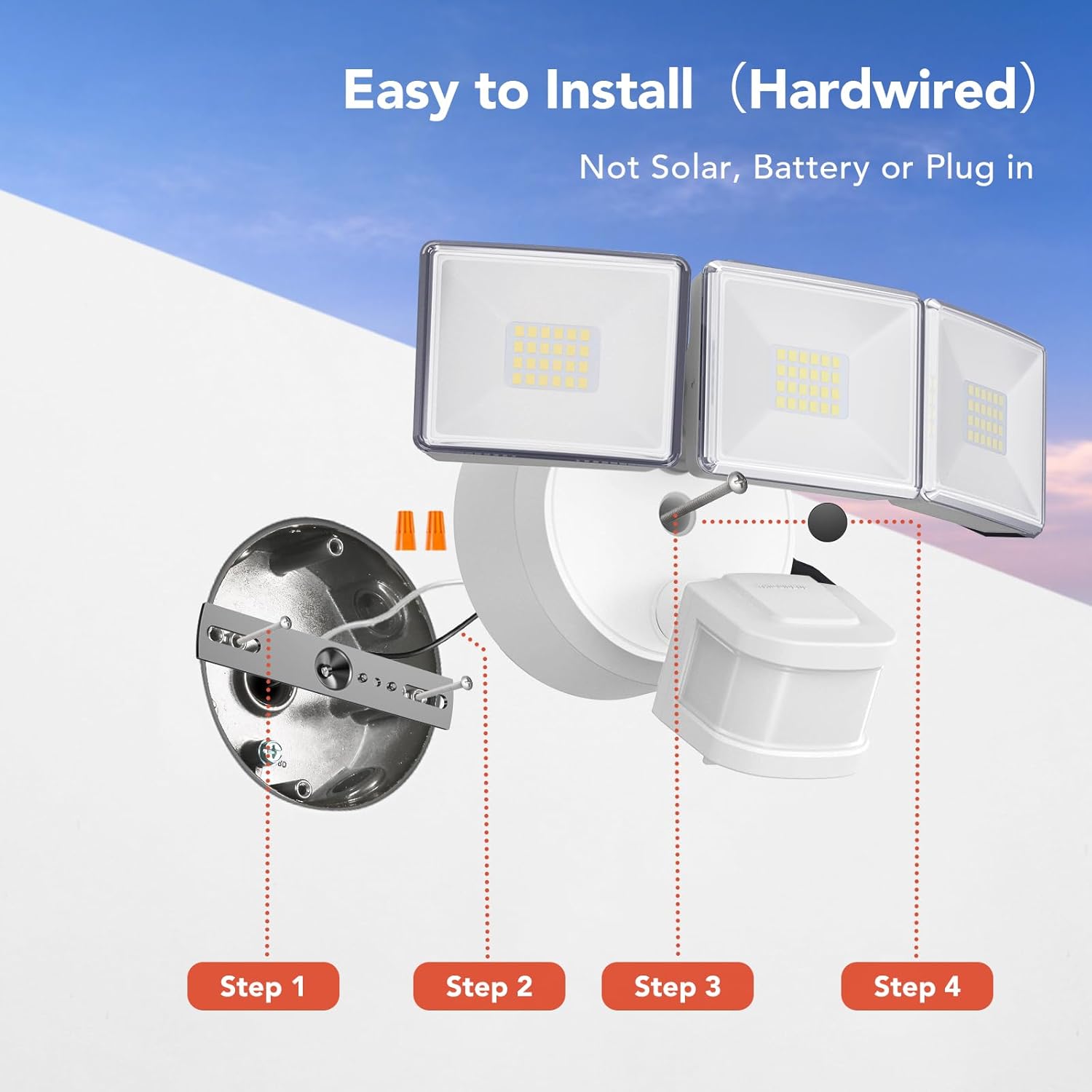
Image: Step-by-step diagram illustrating the hardwired installation process, from securing the mounting bracket to inserting the waterproof plug.

Image: Visual representation of the two installation methods: wall-mounted and soffit-mounted, demonstrating versatility.

Image: Diagram illustrating the flexible adjustment angles of the three light heads (up to 340° horizontal, 90° vertical) and the motion sensor (up to 270° horizontal, 120° vertical).
Video: An official product video demonstrating the features and installation process of the OREiN motion sensor outdoor lights, including motion detection, adjustable settings, and waterproof capabilities.
6. 작동 모드
The OREiN Motion Sensor Outdoor Lights offer three distinct operating modes, selectable via a dial on the sensor unit:
- 테스트 모드: The light turns on for 5 seconds when motion is detected, regardless of ambient light conditions (day or night). This mode is ideal for testing the sensor's range and light coverage during installation.
- 자동 모드: The light activates only at night when motion is detected. The illumination duration can be adjusted (1, 5, or 10 minutes) and the sensing distance can be set (10ft-40ft).
- D2D Mode (Dusk to Dawn): The light automatically turns on at dusk and turns off at dawn. In this mode, the motion sensing function is inactive, providing continuous ambient lighting throughout the night.
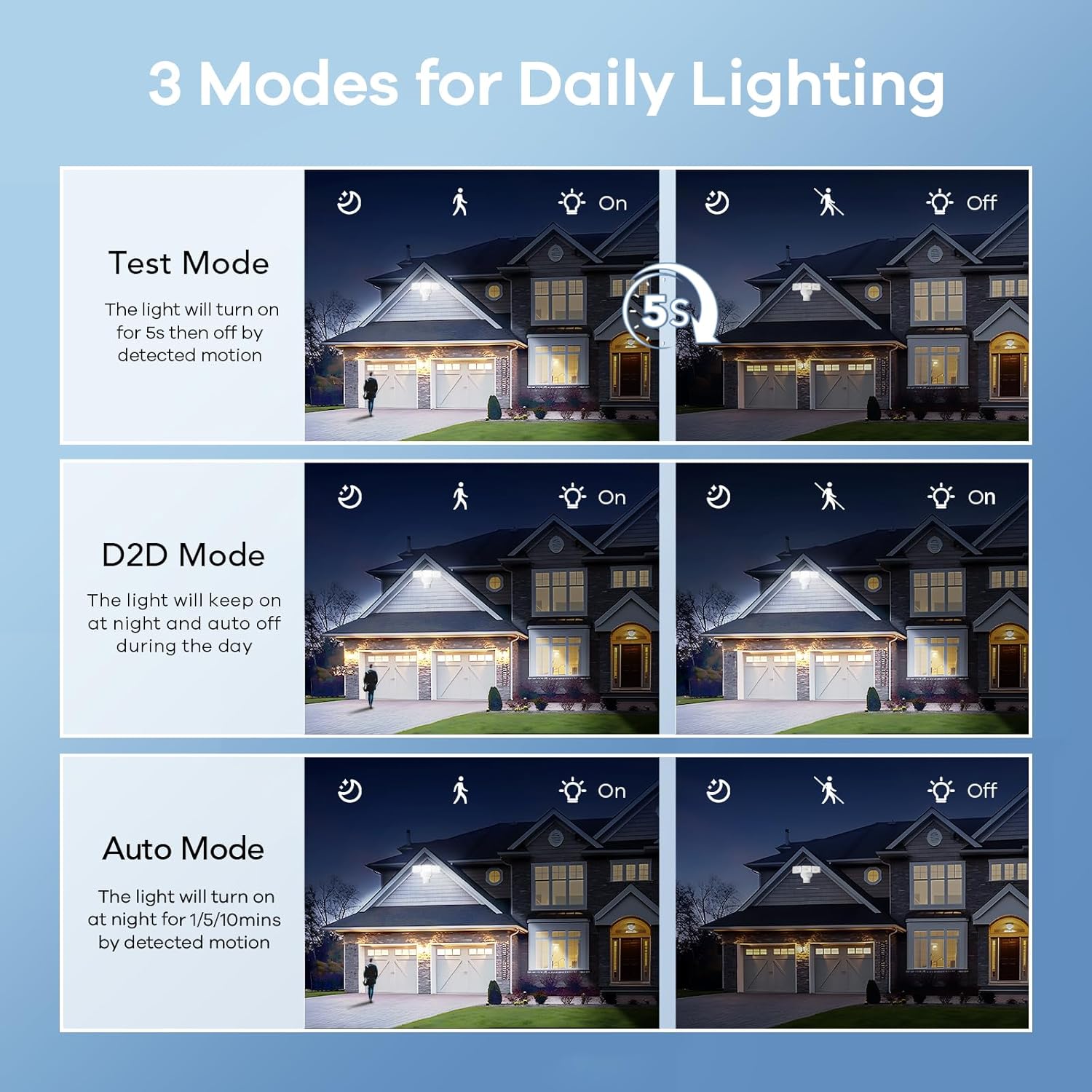
Image: Visual explanation of the three daily lighting modes: Test Mode (5s on), D2D Mode (dusk to dawn), and Auto Mode (motion-activated at night).

Image: Depiction of the Dusk to Dawn mode, where the light automatically illuminates when surroundings are dark and turns off when bright.

Image: A comprehensive visual comparison of D2D, TEST, and AUTO modes, showing how the light behaves in different scenarios and light conditions.
7. 모션 센서 조정
The integrated motion sensor offers a wide 180° detection angle and an adjustable sensing distance up to 50 feet, providing comprehensive coverage for your security needs.
Adjusting Time and Sensitivity:
The sensor unit features two dials for customization:
- TIMER MINUTES: Adjusts the duration the light stays on after motion is detected in AUTO mode (1, 5, or 10 minutes).
- 감광도: Adjusts the motion detection range (10ft, 20ft, 30ft, 50ft). A longer detection distance corresponds to higher sensor sensitivity.

Image: Illustration highlighting the 180-degree wide-angle motion sensor and its 50-foot detection range, capable of sensing people, cars, and dogs.

이미지: 상세 view of the adjustable motion sensor, showing the 'TIME' dial (1, 5, 10 minutes) and 'SENSITIVITY' dial (10, 20, 30, 50 feet) for precise control.

이미지: 항공 사진 view demonstrating the wide detection area (240° sensing angle, max 40 ft) provided by the floodlight, enhancing house security.
8. 제품 특징
- 높은 밝기와 에너지 효율: The 4500LM floodlight provides powerful illumination while consuming only 30W, achieving 150LM/W efficiency. This significantly reduces electricity consumption compared to standard bulbs.
- IP65 방수 설계 : Built to withstand various weather conditions, the IP65 rating ensures protection against rain, dust, and snow, making it suitable for year-round outdoor use.
- 뛰어난 방열성: Constructed with polycarbonate material, the fixture offers superior heat dissipation, high-temperature resistance, and frost resistance, contributing to a long lifespan of 50,000 hours.

Image: Visual representation of the light's key performance metrics: 4500 Lumens brightness, 5000 Kelvin color temperature, and 30 Watts power consumption.

Image: Diagram illustrating the high efficiency of 150 lumens per watt and the potential for 83% electricity bill savings due to the 30W power consumption supporting 4500 lumens.

Image: The floodlight shown under simulated rain, emphasizing its IP65 waterproof capability against rain, frost, and wind.

Image: A cutaway diagram illustrating the internal heat dissipation mechanism of the floodlight, showing airflow for cooling.
9. 유지관리
To ensure optimal performance and longevity of your OREiN Motion Sensor Outdoor Lights, follow these simple maintenance guidelines:
- 청소: 조명기구와 센서 렌즈를 주기적으로 부드러운 천으로 닦아주세요.amp cloth to remove dust, dirt, or debris. Do not use abrasive cleaners or solvents.
- 점검: Regularly check the wiring and mounting for any signs of wear, damage, or loosening. Ensure the waterproof plug is securely in place.
- 장애물 제거: Keep the area around the motion sensor clear of any obstructions (e.g., overgrown plants, hanging decorations) that might interfere with its detection capabilities.
10. 문제 해결
If you experience issues with your OREiN Motion Sensor Outdoor Lights, refer to the following common problems and solutions:
| 문제 | 가능한 원인 및 해결책 |
|---|---|
| 밤에는 불이 켜지지 않습니다. |
|
| 표시등이 계속 켜져 있습니다. |
|
| Light turns on too frequently or for no apparent reason. |
|
| 불이 너무 빨리 꺼져요. |
|
11. 보증 및 지원
OREiN provides a 24개월 보증 for the motion sensor outdoor lights. For any usage issues, technical assistance, or warranty claims, please contact our customer support team:
- 전화 지원: 1-844-506-1530 (available during working hours)
- 온라인 도움말: 7 days a week, 24 hours a day. Please refer to the product listing or the OREiN brand store on Amazon for contact details.

Image: A customer service representative ready to assist, symbolizing OREiN's commitment to support.


