
1. 서론
구매해주셔서 감사합니다asing the Edifier R990BT Bluetooth Computer Speakers. These 2.0 active bookshelf speakers are designed to provide high-quality audio for your PC, smartphone, tablet, and other compatible devices. Featuring Bluetooth V5.4 connectivity and dual RCA inputs, the R990BT offers versatile audio options in a classic MDF enclosure. Please read this manual thoroughly to ensure proper setup and optimal performance of your speakers.
2. 패키지 내용
패키지에 모든 품목이 들어 있는지 확인하세요.
- Edifier R990BT Active Bookshelf Speakers (1 Pair)
- 스피커 연결 케이블
- RCA-RCA 오디오 케이블
- 3.5mm - RCA 오디오 케이블
- 전원 케이블
- 빠른 시작 가이드
3. 설정
3.1 스피커 배치
Place the speakers on a stable, flat surface such as a desk or shelf. For optimal stereo imaging, position the speakers equidistant from your listening position, forming an equilateral triangle. Ensure there is adequate space behind the speakers for cable connections and ventilation.

Image: Edifier R990BT speakers positioned on a desk, demonstrating typical placement for computer use.
3.2 스피커 연결
- 수동 스피커를 연결하세요: Use the included speaker connection cable to link the active speaker (with controls) to the passive speaker. Ensure the correct polarity (+ to + and - to -) for proper sound reproduction.
- 전원에 연결: Plug the power cable into the active speaker's power input and then into a wall outlet.
3.3 오디오 소스 연결
The R990BT speakers support both wired (RCA) and wireless (Bluetooth) connections.
유선 연결(RCA)
The speakers feature two sets of RCA input ports (Line In 1 and Line In 2) for connecting two different wired audio devices simultaneously.
- Use the RCA to RCA cable to connect devices with RCA outputs (e.g., CD player, turntable with pre-amp).
- Use the 3.5mm to RCA cable to connect devices with a 3.5mm audio jack (e.g., computer, smartphone, tablet).

Image: Close-up of the rear panel of the active speaker, highlighting the dual RCA input ports (Line In 1 and Line In 2) and the power input.
블루투스 연결
The R990BT features Bluetooth V5.4 for wireless audio streaming.
- 스피커를 켜세요.
- Press the volume/input knob on the rear panel to select the Bluetooth input. The indicator light will flash blue.
- 오디오 기기(스마트폰, 태블릿, 컴퓨터)에서 블루투스를 활성화하고 사용 가능한 기기를 검색하세요.
- Select "EDIFIER R990BT" from the list to pair. The indicator light will turn solid blue once connected.

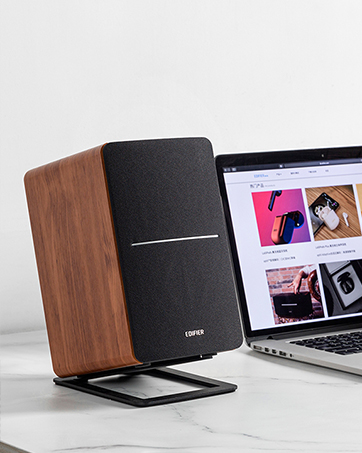
Image: A single Edifier R990BT speaker on a desk next to a laptop, symbolizing the ease of Bluetooth connectivity.
4. 사용 설명서
4.1 전원 켜기/끄기
The power switch is located on the rear panel of the active speaker. Flip the switch to the 'ON' position to power on the speakers. Flip to 'OFF' to power off.
4.2 볼륨 조절
The large knob on the rear panel of the active speaker controls the master volume. Rotate clockwise to increase volume and counter-clockwise to decrease volume.
이미지: 상세 view of the multi-function control knob on the rear of the speaker, used for volume adjustment and input selection.
4.3 입력 선택
Press the volume/input knob on the rear panel to cycle through the available audio inputs: Line In 1, Line In 2, and Bluetooth. The indicator light will change color or flash to indicate the selected input mode.
- Line In 1 / Line In 2: Solid green or red indicator (depending on model/firmware).
- 블루투스: Flashing blue (pairing mode) or solid blue (connected).
4.4 Using the Edifier ConneX App
For enhanced control and customization, download the Edifier ConneX mobile application. The app allows you to adjust equalization settings and access additional features for your R990BT speakers.
- Download the Edifier ConneX app from your device's app store.
- Ensure your speakers are powered on and connected via Bluetooth to your mobile device.
- Open the app and follow the on-screen instructions to connect to your R990BT speakers.

Image: The official logo for the Edifier ConneX mobile application.
5. 유지관리
5.1 청소
스피커의 외관과 성능을 유지하려면:
- Wipe the speaker cabinets with a soft, dry cloth.
- Do not use liquid cleaners, aerosols, or abrasive chemicals, as these may damage the finish or internal components.
- Gently brush dust from the speaker grilles using a soft brush or vacuum cleaner with a brush attachment.
5.2 보관
If storing the speakers for an extended period, ensure they are powered off and disconnected from the power source. Store them in a cool, dry place away from direct sunlight and extreme temperatures.
6. 문제 해결
If you encounter any issues with your Edifier R990BT speakers, please refer to the following common problems and solutions:
| 문제 | 가능한 원인 | 해결책 |
|---|---|---|
| 소리가 나지 않습니다 |
|
|
| 왜곡된 소리 |
|
|
| Bluetooth not connecting/disconnecting |
|
|
| Difficulty switching inputs |
|
|
7. 사양
Edifier R990BT 스피커의 상세 기술 사양:
- 모델 이름: R990BT
- 스피커 유형: 책꽂이
- 장착 유형: Shelf Mount/Tabletop Mount
- 재료: MDF(중밀도섬유판)
- 연결 기술 : Bluetooth V5.4, Wired (Dual RCA)
- 오디오 출력 모드: 스테레오(2.0)
- 스피커 최대 출력: 24와트(RMS)
- 우퍼 직경: 4 인치
- 트위터 직경: 1 인치
- 주파수 응답: 18 KHz (Upper limit, typical for compact speakers)
- 신호 대 잡음비 : 85데시벨
- 제어 방법: Touch (via rear knob)
- 전원: Corded Electric (100-240V ~ 50/60Hz)
- 제품 크기: 크기: 11.5인치(깊이) x 7.5인치(너비) x 17인치(높이) (스피커 1개당, 대략적인 크기)
- 품목 무게: 7.94파운드 (스피커당, 대략적인 무게)
- 색상: 검은색
- 호환 장치: Devices with Bluetooth technology, devices with RCA or 3.5mm audio output.
8. 보증 및 지원
8.1 보증 정보
The Edifier R990BT speakers come with a Limited Warranty. Please refer to the warranty card included in your package or visit the official Edifier web제품 보증 범위에 관한 자세한 약관은 해당 사이트를 참조하십시오.
8.2 고객 지원
For technical assistance, troubleshooting, or general inquiries, please contact Edifier customer support. Contact details can typically be found on the official Edifier web웹사이트 또는 제품의 빠른 시작 가이드를 참조하십시오.
온라인 지원: 방문하다 www.edifier.com FAQ, 지원 리소스 및 연락처 정보를 확인하세요.


