
소개
The Shokz OpenSwim Pro is a versatile bone conduction headphone designed for both land and water activities. It seamlessly integrates two distinct modes: Bluetooth and MP3, allowing you to choose your listening experience based on your environment. Engineered with PremiumPitch 2.0+ bone conduction technology, these headphones deliver clear audio, powerful volume, and rich bass. Its open-ear design prioritizes safety by keeping your ears open to ambient sounds, making it ideal for outdoor sports and activities.
The OpenSwim Pro boasts an IP68 waterproof rating, ensuring durability and performance in various conditions, including submersion up to 2 meters for 2 hours. Physical buttons are optimized for easy control during intense workouts or while wet, preventing accidental touches. Enjoy your favorite music and stay connected without compromise.
상자 안에 무엇이 들어있나요?
- Shokz OpenSwim Pro Headphones
- 4-pin Magnetic Charging Cable
- 수영용 귀마개
- 실리콘 고무 운반 케이스
- 사용자 매뉴얼
- 보증 카드
제품 끝view
OpenSwim Pro 헤드폰의 구성 요소를 숙지하십시오.
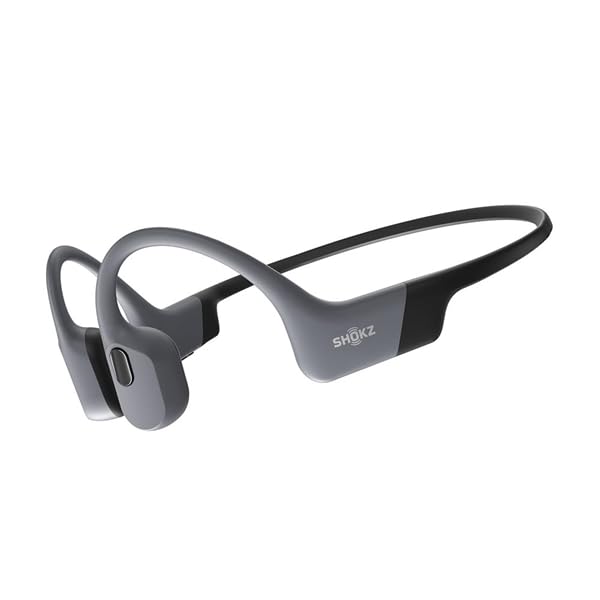
Figure 1: Shokz OpenSwim Pro Headphones (Grey)

Figure 2: Control Buttons and Charging Port
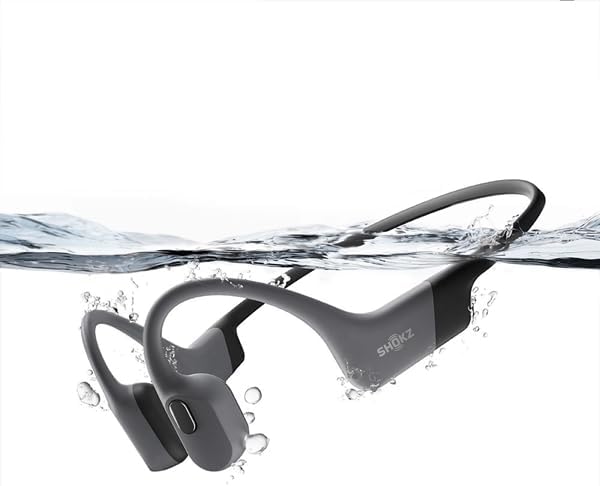
그림 3: 방수 설계
설정
1. 헤드폰 충전하기
처음 사용하기 전에 OpenSwim Pro 헤드폰을 완전히 충전하십시오.
- Connect the 4-pin magnetic charging cable to the charging port on your headphones.
- 케이블의 USB 끝을 USB 전원 어댑터(포함되지 않음)나 컴퓨터의 USB 포트에 연결합니다.
- LED 표시등은 충전 상태를 표시합니다. 완전히 충전하는 데는 일반적으로 약 1.5시간이 걸립니다.
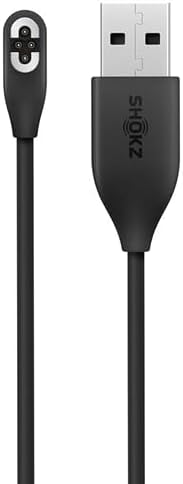
Figure 4: Magnetic Charging Cable
2. 음악 전송 (MP3 모드)
The OpenSwim Pro has internal storage for music playback without a connected device. It supports various audio formats including MP3, FLAC, WAV, AAC, M4A, APE, and WMA. You can store approximately 4,000 high-quality songs.
- Connect your OpenSwim Pro to a computer using the magnetic charging cable. The headphones will appear as a removable disk drive.
- 원하는 오디오를 드래그 앤 드롭하세요 files 파일을 헤드폰의 저장 폴더에 넣으세요.
- Safely eject the device from your computer once the transfer is complete.
3. 블루투스 페어링
To use the OpenSwim Pro with your smartphone or other Bluetooth-enabled devices:
- 헤드폰의 전원이 꺼져 있는지 확인하십시오.
- Press and hold the Power/Mode button until the LED indicator flashes red and blue, indicating pairing mode.
- On your device, go to Bluetooth settings and select "OpenSwim Pro" from the list of available devices.
- Once connected, the LED will flash blue, and you will hear a voice prompt.
작동 지침
전원 켜기/끄기
- 전원 켜기: 전원/모드 버튼을 2초 동안 길게 누르세요.
- 전원 끄기 : 전원/모드 버튼을 3초 동안 길게 누르세요.
Switching Between Bluetooth and MP3 Modes
The OpenSwim Pro allows for easy switching between its two modes:
- Press and hold the Mode button (often integrated with the Power button) for 2 seconds while the device is on to switch between Bluetooth and MP3 modes. A voice prompt will confirm the current mode.
음악 재생 컨트롤
- 재생/일시 중지: 다기능 버튼을 한 번 누릅니다.
- 다음 트랙: 볼륨 + 버튼을 2초간 길게 누릅니다.
- 이전 트랙 : 볼륨 - 버튼을 2초간 길게 누릅니다.
- 볼륨 업: 볼륨 + 버튼을 누릅니다.
- 볼륨 작게 : 볼륨 - 버튼을 누르세요.
Call Controls (Bluetooth Mode Only)
- 전화 받기/종료: 다기능 버튼을 한 번 누릅니다.
- 전화 거부: 다기능 버튼을 2초 동안 길게 누릅니다.
수영에 사용
When swimming, it is recommended to use the MP3 mode for optimal performance as Bluetooth signals do not transmit well through water. Insert the included swimming earplugs to enhance sound quality underwater.
- 물에 들어가기 전에 MP3 모드로 전환하세요.
- Insert the swimming earplugs into your ears.
- Ensure the headphones are securely fitted.
유지
Proper care ensures the longevity and performance of your OpenSwim Pro headphones.
- 청소: After use, especially after swimming or heavy sweating, rinse the headphones with clean fresh water. Wipe them dry with a soft cloth. Ensure the charging port is completely dry before charging.
- 저장: Store the headphones in the silicone rubber carrying case in a cool, dry place away from direct sunlight and extreme temperatures.
- 충전 중: Only use the provided magnetic charging cable. Avoid using damaged cables or chargers.
- 물 노출: While IP68 rated, avoid prolonged submersion beyond specified limits (2 meters for 2 hours). Do not expose to saltwater or chemicals without immediate rinsing.
문제 해결
If you encounter issues with your OpenSwim Pro, refer to the following common solutions:
| 문제 | 가능한 해결책 |
|---|---|
| 소리가 나지 않습니다 | Check volume levels. Ensure headphones are powered on and in the correct mode (Bluetooth or MP3). If in Bluetooth mode, ensure it's paired and connected to your device. If in MP3 mode, ensure music files가 로드되었습니다. |
| 블루투스로 페어링이 불가능합니다 | Ensure headphones are in pairing mode (red and blue flashing LED). Turn off and on your device's Bluetooth. Move closer to your device. Clear previous pairings on your device and try again. |
| 헤드폰이 충전되지 않음 | Ensure the charging cable is securely connected to both the headphones and the power source. Check if the charging port is clean and dry. Try a different USB port or power adapter. |
| Sound quality issues underwater | Ensure you are in MP3 mode. Use the included swimming earplugs to improve sound clarity underwater. |
| 버튼이 반응하지 않음 | Ensure the headphones are not locked. If wet, dry the buttons thoroughly. Try restarting the headphones. |
If the issue persists, please refer to the official Shokz support web사이트를 방문하거나 고객 서비스에 문의하세요.
명세서
| 특징 | 세부 사항 |
|---|---|
| 상표 | 쇼츠 |
| 모델명 | OpenSwim Pro (S710) |
| 색상 | 회색 |
| 귀 위치 | Open-Ear (Bone Conduction) |
| 헤드폰 폼 팩터 | 트루 와이어리스 |
| 소음 제어 | 없음 |
| 연결 기술 | 무선(블루투스) |
| 방수 등급 | IP68 (수심 2미터에서 2시간 동안 방수 가능) |
| 내부 저장소 | Supports approximately 4,000 high-quality songs |
| 지원되는 오디오 형식 | MP3, FLAC, WAV, AAC, M4A, APE, WMA |
| 마이크로폰 | 포함됨 |
보증 및 지원
보증 정보
The Shokz OpenSwim Pro comes with a 2년 제조사 보증. 본 보증은 정상적인 사용 환경에서 발생하는 재료 및 제조상의 결함에 적용됩니다. 보증 청구를 위해 구매 증빙 서류를 보관해 주십시오.
고객 지원
For further assistance, technical support, or warranty claims, please visit the official Shokz website or contact their customer service department. Contact details can typically be found on the Shokz web해당 사이트 또는 제품에 포함된 보증 카드에서 확인하세요.