
LETIANPAI 1
레티안파이 36m LED 네온 로프 조명 사용 설명서
모델: 1
1. 서론
Thank you for choosing the LETIANPAI 36m LED Neon Rope Lights. This product is designed to provide versatile and vibrant lighting for various indoor and outdoor applications. Featuring RGB color options, app and remote control, music synchronization, and a timer function, these lights offer a customizable lighting experience. Please read this manual thoroughly before installation and use to ensure proper operation and safety.
2. 안전 정보
제품 손상이나 부상을 방지하기 위해 다음 안전 수칙을 준수해 주십시오.
- 전원 공급 장치 볼륨을 확인하십시오.tag연결하기 전에 제품의 요구 사항을 충족하는지 확인합니다.
- Do not cut the LED rope lights while connected to power.
- The controller unit is 방수가 안됨. Protect it from moisture and direct water exposure.
- While the LED rope itself is rated IP65 for outdoor use, ensure all connections and the power adapter are protected from water if used outdoors. Exercise caution and ensure proper protection for all non-IP65 rated components.
- 제품을 수리하거나 개조하지 마십시오. 도움이 필요하면 고객 지원 센터에 문의하세요.
- 어린이의 손이 닿지 않는 곳에 보관하세요.
- Avoid prolonged direct eye exposure to the LED light.
- Install using only the provided clips; the rope light does not have adhesive backing.
3. 패키지 내용
패키지에 모든 품목이 들어 있는지 확인하세요.
- 36m LED Neon Rope Light (2 rolls)
- 전원 어댑터
- 원격 제어
- 장착 클립 및 나사
- 사용 설명서 (본 문서)
4. 사양
| 특징 | 사양 |
|---|---|
| 상표 | LETIANPAI |
| 모델 번호 | 1 |
| 길이 | 36미터(120피트) |
| 색상 | RGB(다색) |
| 광원 유형 | 주도의 |
| 색온도 | 6500 켈빈 |
| Ingress Protection (Rope) | IP65 (Waterproof for the rope light itself) |
| 제어 방법 | Remote Control, Mobile Application ("Lotus Lantern") |
| 특별 기능 | Music Synchronization, Timer Function, Brightness/Speed Adjustment |
| 전원 | 코드식 전기 |
| 에너지 효율 등급 | A (EPREL Database Link) |
| 품목 무게 | 2.65 킬로그램 |
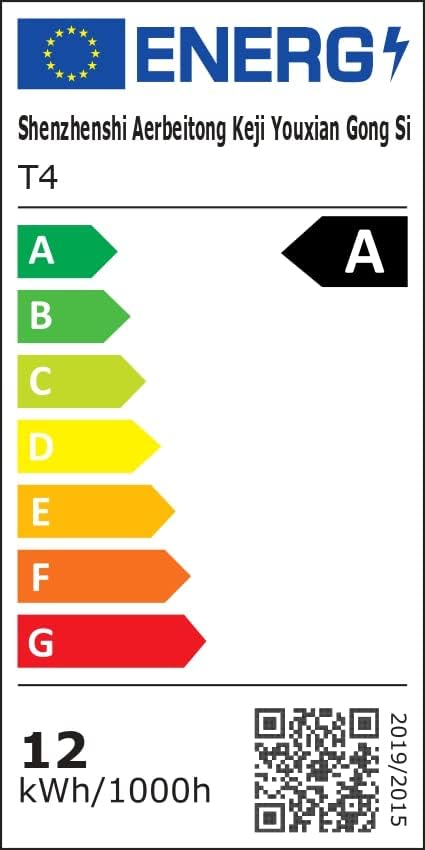 Image: Energy Efficiency Label showing class A for the LED Neon Rope Lights.
5. 설정 및 설치
Follow these steps to install your LED Neon Rope Lights:
- 디자인 계획: Before mounting, gently lay out the neon rope light to visualize your desired pattern or path on the wall or surface.
 Image: Step 1 - Planning the path for the neon rope light.
 - Install Fixing Clips: Secure the provided fixing clips to the wall or surface along your planned path using screws. Ensure the clips are spaced appropriately to hold the rope light firmly.
 Image: Step 2 - Installing fixing clips onto the wall.
 - Insert Rope Light into Clips: Carefully press the neon rope light into the installed fixing clips.
 Image: Step 3 - Inserting the neon rope light into the clips.
 - 전원 어댑터 연결: Connect the power adapter to the neon rope light. Ensure the connection is secure.
- 전원에 연결: Plug the power adapter into a suitable electrical outlet. The lights are now ready for operation.
 Image: Final installation example with the neon rope lights connected to power.
Important Note for Outdoor Use: While the rope light itself is IP65 rated, the power adapter and controller are not. For outdoor installations, ensure these components are housed in a waterproof enclosure or protected from direct exposure to rain and moisture.
6. 사용 설명서
Your LETIANPAI LED Neon Rope Lights can be controlled via the included remote control or a mobile application.
6.1 원격 제어 작동
The remote control allows for quick adjustments to your lighting. Point the remote directly at the controller unit for optimal response.
 Image: Remote control and mobile app interface.
- 전원 버튼: 조명을 켜거나 끄세요.
- RGB Buttons: Select specific Red, Green, or Blue colors.
- 색상 선택: Choose from a variety of preset colors.
- 밝기 조정: 조명 강도를 높이거나 낮춥니다.
- 모드 선택: 다양한 동적 조명 모드를 순환하며 살펴보세요.
- 속도 조정 : 다이내믹 모드의 속도를 조절하세요.
- 음악 모드: Activate music synchronization (see section 6.3).
6.2 Mobile Application Control ("Lotus Lantern")
For advanced control and customization, download the "Lotus Lantern" app from your smartphone's app store.
- 앱 다운로드 : 검색 "Lotus Lantern" on the App Store (iOS) or Google Play Store (Android).
- 연결하다: Follow the in-app instructions to connect your lights via Bluetooth.
- 특징: The app offers a wider range of features including:
- Precise color selection from a color wheel.
- Customizable dynamic modes.
- Music synchronization (using phone's microphone).
- Timer function for scheduled On/Off times.
 Image: Mobile app control interface for LED neon rope lights.
6.3 음악 동기화
The lights can react to music, changing colors and patterns according to the rhythm.
- 원격 제어: Press the "Music" button on the remote.
- 모바일 앱: Select the music mode within the "Lotus Lantern" app. The app uses your phone's microphone to detect sound.
 Image: Music and Mic Mode in action, with lights changing to the rhythm.
6.4 타이머 기능
Set schedules for your lights to turn on or off automatically using the mobile application.
- Open the "Lotus Lantern" app.
- Navigate to the timer settings.
- Set your desired ON and OFF times.
 Image: Timer function setting for automatic on/off.
7. 유지관리
To ensure the longevity and optimal performance of your LED Neon Rope Lights:
- 청소: Disconnect power before cleaning. Wipe the rope light with a soft, dry cloth. Do not use harsh chemicals or abrasive cleaners.
- 저장: If storing for an extended period, coil the rope light loosely and store it in a cool, dry place away from direct sunlight.
- 점검: Periodically check the rope light and connections for any signs of damage or wear.
8. 문제 해결
| 문제 | 가능한 원인 | 해결책 |
|---|---|---|
| 표시등이 켜지지 않습니다. | 전원이 안 들어옴, 연결 불량, 리모컨 배터리 방전. | Check power outlet, ensure all connections are secure, replace remote battery. |
| 리모컨이 작동하지 않습니다. | Remote battery dead, remote out of range, obstruction. | Replace remote battery, ensure remote is pointed at the controller, remove obstructions. |
| 앱이 조명에 연결할 수 없습니다. | 블루투스가 꺼져 있고, 조명이 페어링 모드가 아니며, 앱에 문제가 있습니다. | Ensure Bluetooth is enabled on your phone, restart the app, power cycle the lights. |
| 조명이 깜빡이거나 색상이 잘못 표시됩니다. | Loose connection, power fluctuation, damaged rope light. | Check connections, try a different power outlet. If problem persists, contact support. |
| 음악 동기화가 작동하지 않습니다. | Microphone blocked, volume too low, app permissions. | Ensure phone microphone is not blocked and volume is adequate. Check app permissions for microphone access. |
9. 보증 및 지원
LETIANPAI offers a 100% 만족 보장. If you encounter any issues with your product, please contact our customer support team. We are committed to resolving any problems within 24 hours.
For assistance, please refer to the contact information provided with your purchase or visit the official LETIANPAI web대지.
Ask a question about this manual
Ask about setup, troubleshooting, compatibility, parts, safety, or missing instructions. Manuals+ will review the question and use this page’s manual context to help answer it.