1. 서론
Thank you for choosing the Generic Premium 12800 4K Satellite Receiver. This device is designed to provide high-quality satellite television reception with advanced features, including 4K resolution support, a powerful Ali-2661 processor, and versatile connectivity options. This manual will guide you through the setup, operation, and maintenance of your new receiver.
2. 패키지 내용
다음 항목에 대한 상자를 체크해 주세요.
- Premium 12800 4K Satellite Receiver
- 원격 제어
- USB WiFi 동글
- Power Adapter (not explicitly mentioned but implied for operation)
- 사용 설명서 (본 문서)
3. 제품 오버view
The Premium 12800 4K Satellite Receiver features a compact design with essential ports for connectivity.
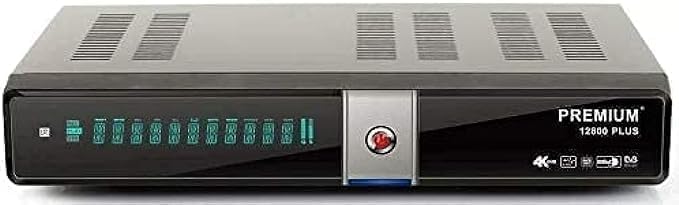
Figure 3.1: Premium 12800 4K Satellite Receiver and its retail packaging.

그림 3.2: 앞면과 측면 view of the receiver, highlighting various ports and indicators.
전면 패널
- 전원 표시기: Shows the device's power status.
- 표시하다: Channel number or time display.
- USB 포트: USB 장치를 연결하는 데 사용됩니다.
후면 패널
- LNB 입력: 위성 안테나에 연결됩니다.
- HDMI 출력: Connects to your TV for video and audio.
- 이더넷 포트 : 유선 네트워크 연결용.
- USB 포트: 추가 USB 장치의 경우.
- SPDIF/Coaxial: 디지털 오디오 출력.
- 전원 입력: 전원 어댑터에 연결합니다.
4. 설정 가이드
Follow these steps to set up your satellite receiver:
- TV에 연결: Use an HDMI cable (not included) to connect the receiver's HDMI Output port to an HDMI Input port on your television.
- 위성 안테나에 연결하세요: Connect the coaxial cable from your satellite dish LNB to the LNB IN port on the receiver.
- 네트워크에 연결(선택 사항):
- 와이파이: Insert the provided USB WiFi Dongle into one of the receiver's USB ports. You will configure the Wi-Fi connection in the settings menu after powering on.
- 이더넷: Connect an Ethernet cable (not included) from your router to the receiver's Ethernet port.
- 전원 연결: Plug the power adapter into the receiver's Power Input port, then plug the adapter into a wall outlet.
- 전원 켜기: Turn on your television and select the correct HDMI input source. The receiver should power on automatically or can be turned on using the remote control.
- 초기 설정 마법사: Follow the on-screen instructions for initial setup, which typically includes language selection, time zone, and satellite configuration.
5. 사용 설명서
기본 탐색
Use the provided remote control to navigate the receiver's menus and control playback.
- 전원 버튼: 수신기를 켜거나 끄거나 대기 모드로 전환합니다.
- CH+/CH-: 채널을 변경합니다.
- 볼륨+/볼-: 볼륨을 조정합니다.
- 메뉴: 주 메뉴에 액세스합니다.
- 출구: 현재 메뉴나 화면을 종료합니다.
- OK : 선택 사항을 확인합니다.
- 화살표 버튼: 메뉴와 옵션을 탐색합니다.
채널 스캔
After initial setup, you will need to scan for channels.
- 를 누르세요 메뉴 리모컨의 버튼을 누르세요.
- Navigate to "Installation" or "Channel Search" and press OK.
- Select your satellite and choose "Automatic Scan" or "Blind Scan" for a comprehensive search.
- Wait for the scan to complete. This may take several minutes.
- Save the found channels when prompted.
USB 포트 사용
The receiver features two USB ports that support various USB devices, including 2.5" and 3.5" external hard drives. These ports can be used for:
- 미디어 재생 : 동영상, 음악 등을 재생하세요 view photos from a connected USB storage device.
- PVR(개인용 비디오 레코더): Record live TV programs to an external USB hard drive.
- 소프트웨어 업데이트: Update the receiver's firmware via USB.
네트워크 기능
With an internet connection (via Wi-Fi dongle or Ethernet), the receiver can access various online features. The device is designed to support services such as Forever Pro Server and Apollo IBTV Apollo Server, with included access periods of 15 months and 12 months respectively. Refer to the on-screen menu for configuration of these services.
6. 유지관리
청소
To clean the receiver, disconnect it from the power supply. Use a soft, dry cloth to wipe the exterior. Do not use liquid cleaners or abrasive materials.
소프트웨어 업데이트
Periodically check for software updates to ensure optimal performance and access to the latest features. Updates can typically be performed via USB or over the internet (if available). Refer to the system settings menu for update options.
7. 문제 해결
| 문제 | 가능한 원인 / 해결책 |
|---|---|
| 그림이나 소리가 나지 않습니다 |
|
| "신호 없음" 메시지 |
|
| 리모컨이 작동하지 않습니다 |
|
| 네트워크 연결 문제 |
|
8. 사양
| 특징 | 세부 사항 |
|---|---|
| 모델 | 프리미엄 12800 |
| 프로세서 | Ali-2661 New Dual-Core Processor 1GHz (4000 DMIPS) |
| 숫양 | 512MB High Speed Memory |
| 플래시 메모리 | 16MB |
| 비디오 해상도 지원 | Up to 4K (2160 * 3840) at 60fps. Supports 576i/p, 720p, 1080i/p, 1080p, 2160p. |
| 비디오 코덱 | VP9, H.265 (HEVC) with 10-bit depth |
| HDR 지원 | HDR, HLG, WCG |
| 튜너 유형 | DVB-S, DVB-S2, DVB-S2X |
| 채널 스토리지 | Up to 20,000 TV and Radio channels |
| 연결성 | HDMI, Ethernet, Wi-Fi (via USB dongle), 2x USB ports, SPDIF/Coaxial |
| USB 지원 | Supports 2.5" and 3.5" external hard drives, WiFi Dongle 7601 and 5730 |
| 오디오 출력 모드 | Stereo (and potentially others) |
| 지원되는 오디오 형식 | 돌비 디지털, DTS |
| 색상 | 검은색 |
| 품목 무게 | 975그램 |
| 패키지 크기 | 29 x 27.5 x 6cm |
| 제조업체 | Premium Sat |
9. 보증 및 지원
For information regarding warranty coverage and technical support, please refer to the documentation provided with your purchase or contact your retailer. Specific warranty terms may vary by region and seller.


