
Sonew Sonewd871ac4bgi
Sonow Smart Cylinder Door Lock User Manual
Model: Sonewd871ac4bgi
1. 서론
This manual provides comprehensive instructions for the installation, operation, and maintenance of your Sonow Smart Cylinder Door Lock. Please read this manual thoroughly before installation and use to ensure proper function and safety. This smart lock offers multiple unlocking methods including fingerprint, app, password, and traditional key, enhancing security and convenience for your home or office.
2. 안전 정보
- 자물쇠를 직접 분해하거나 수리하려고 하지 마십시오. 자격을 갖춘 전문가에게 서비스를 의뢰하십시오.
- 손상을 방지하기 위해 자물쇠를 물과 직사광선으로부터 멀리하십시오.
- Ensure the correct battery type is used and installed according to polarity.
- Store physical keys in a secure location outside the property.
- 자물쇠에 마모나 손상 흔적이 있는지 정기적으로 점검하십시오.
3. 패키지 내용
패키지에 모든 품목이 들어 있는지 확인하세요.
- 1 x Fingerprint Lock Cylinder
- 1 x USB 충전 케이블
- 2 x 기계식 키
- 1 x 렌치
- 1 x QR Code Tutorial (for app download/setup)
- 내장 리튬 배터리 (300mAh)

4. 사양
| 특징 | 세부 사항 |
|---|---|
| 재료 | Stainless Steel, Brass, Aluminum Alloy |
| 배터리 | 300mAh 리튬 배터리(내장) |
| 지문 용량 | Up to 100 unique fingerprints |
| 잠금 해제 방법 | Fingerprint, Bluetooth APP, Password, Remote Authorization, Mechanical Key |
| 도어 두께 호환성 | 60-110mm (조절 가능) |
| 제품 치수 | 8.27인치 길이 x 3.15인치 너비 |
| 품목 무게 | 1.45파운드 |
5. 설정 및 설치
The Sonow Smart Cylinder Lock is designed for easy installation, typically replacing an existing cylinder without the need for drilling new holes.
5.1. 호환성 확인
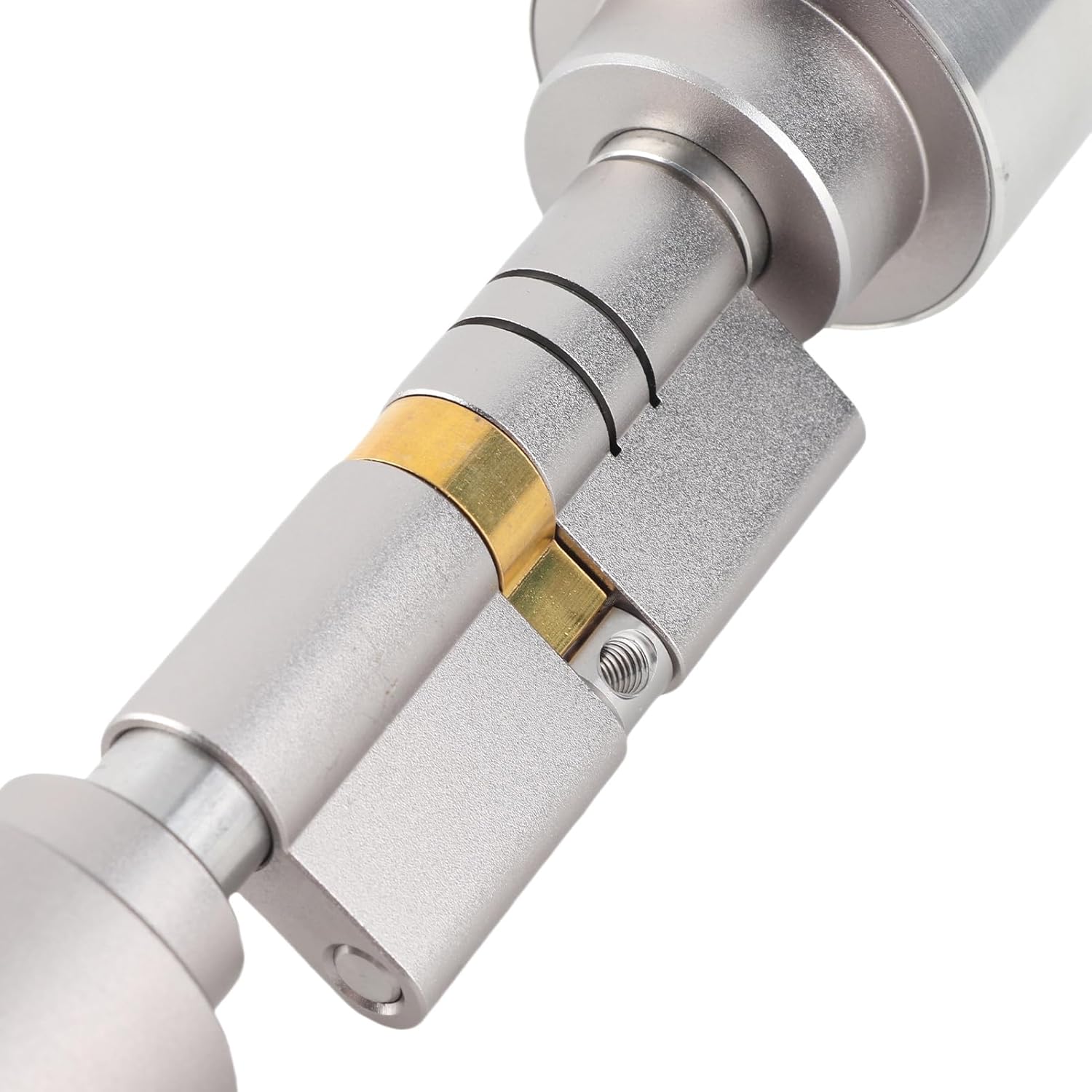
Ensure your door thickness is between 60mm and 110mm. The lock cylinder is adjustable to fit various door thicknesses.

5.2. 설치 단계
- 기존 실린더 제거: Unscrew and remove your current door cylinder.
- Adjust Lock Length: Using the provided wrench, adjust the length of the Sonow Smart Cylinder Lock to match your door's thickness. Refer to Image 5.1 and 5.2 for guidance.
- 새 실린더 삽입: Carefully insert the adjusted smart cylinder into the door.
- 보안 잠금 장치: Fasten the smart cylinder using the screws from your previous lock or the provided hardware, ensuring it is firmly in place.
- 테스트 기능: Before closing the door, test the lock's mechanism with a mechanical key to ensure smooth operation.


6. 사용 설명서
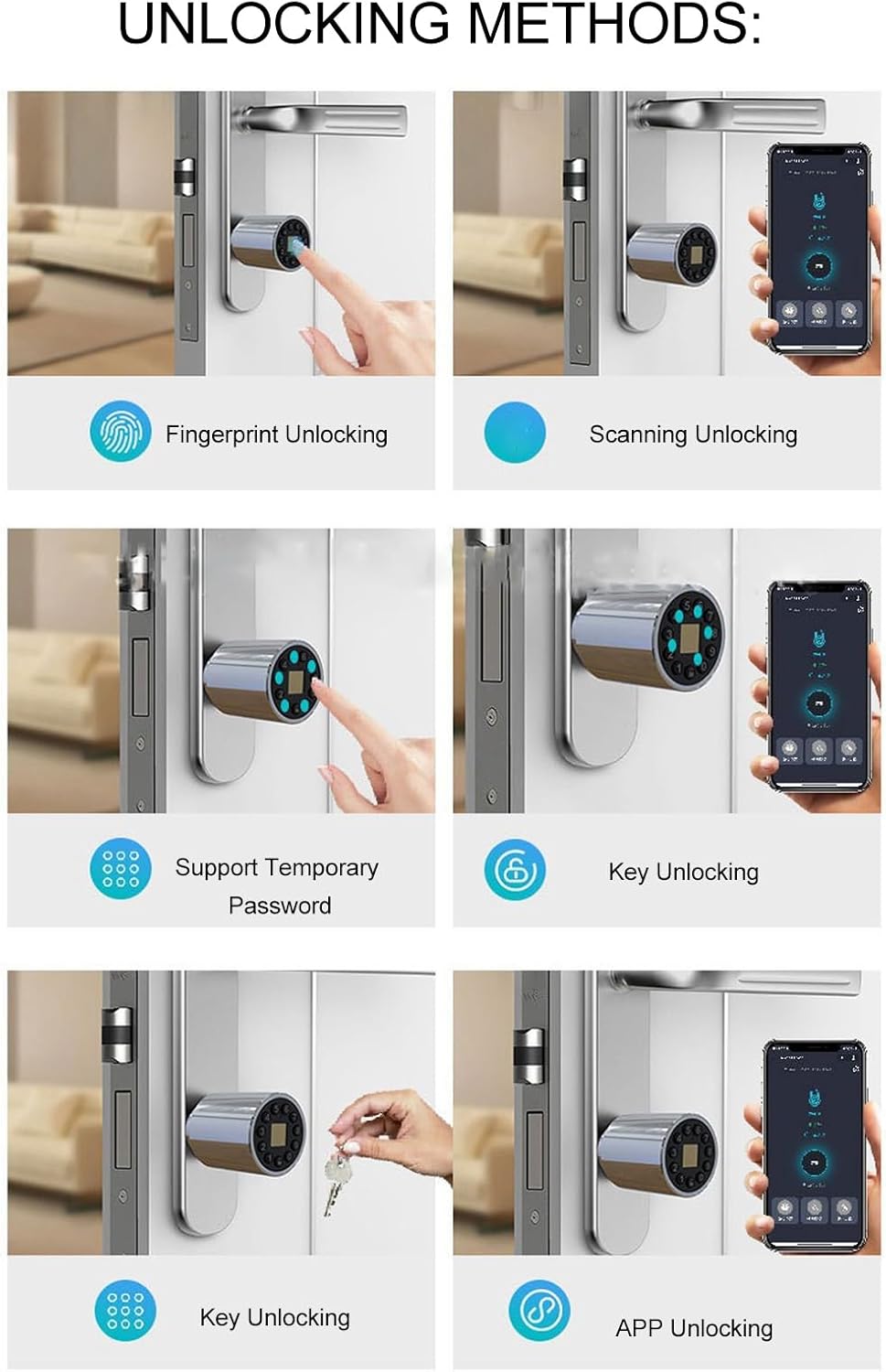
The Sonow Smart Cylinder Lock offers multiple convenient ways to unlock your door.
6.1. 지문 인식 잠금 해제
- 지문 등록: Follow the instructions in the companion mobile application (QR code provided in package) to enroll your fingerprints. Up to 100 fingerprints can be stored.
- 터놓다: Place your enrolled finger firmly on the fingerprint sensor. The lock will unlock in approximately 0.5 seconds upon successful recognition.


6.2. 블루투스 앱 잠금 해제
- 앱 다운로드 : Scan the QR code provided in the package to download the official Sonow smart lock application.
- 페어링 장치: Follow the in-app instructions to pair your smartphone with the smart lock via Bluetooth.
- 터놓다: 앱을 열고 잠금 장치를 선택한 다음 잠금 해제 버튼을 누르세요.
6.3. Password Unlocking
- 비밀번호 설정: Use the mobile app to set permanent or temporary passwords.
- 터놓다: Enter your password on the lock's keypad. For enhanced security, you can enter random numbers before or after your correct code (anti-peep function).
6.4. Remote Authorization
Through the mobile application, you can remotely authorize access by generating temporary passwords or granting app access to guests, even when you are not physically present.
6.5. Mechanical Key Unlocking
In case of battery depletion or electronic malfunction, the lock can always be opened using the provided mechanical keys. Insert the key into the hidden keyhole and turn to unlock.
7. 유지관리
7.1. 배터리 관리
The lock is equipped with a 300mAh lithium battery. It features a low-power design, allowing it to last approximately 180 days with an average of ten unlocks per day. When the battery is low, the lock will provide an alert. Recharge the battery using the provided USB charging cable.
메모: The lock can be charged via a standard USB power source. Ensure the charging port is clean and dry before connecting the cable.
7.2. 청소
Wipe the lock's exterior with a soft, dry cloth. Avoid using abrasive cleaners or solvents, as these can damage the finish or electronic components.
7.3. 펌웨어 업데이트
Periodically check the mobile application for available firmware updates. Keeping the firmware updated ensures optimal performance and security features.
8. 문제 해결
- 잠금이 응답하지 않습니다. Check battery level. If low, recharge using the USB cable. If fully charged, try using the mechanical key.
- 지문이 인식되지 않습니다: Ensure your finger is clean and dry. Try re-enrolling your fingerprint through the app if issues persist.
- 앱 연결 문제: 스마트폰에서 블루투스가 켜져 있는지, 그리고 잠금장치가 가까운 거리에 있는지 확인하세요. 필요한 경우 앱이나 휴대폰을 재시작하세요.
- Lock malfunction: If the lock experiences a malfunction, only the lock core needs to be replaced, not the entire lock body. Contact customer support for assistance.
9. 보증 및 지원
For warranty information, technical support, or service inquiries, please refer to the contact details provided with your purchase documentation or visit the official Sonow web사이트. 보증 청구를 위해 구매 증빙 자료를 보관하세요.
온라인 리소스: For additional support and frequently asked questions, visit the Sonow Store on Amazon.
Ask a question about this manual
Ask about setup, troubleshooting, compatibility, parts, safety, or missing instructions. Manuals+ will review the question and use this page’s manual context to help answer it.