
소개
Thank you for choosing the FORGING MOUNT Triple Monitor Arm. This manual provides detailed instructions for the safe and efficient installation, operation, and maintenance of your monitor arm. Please read this manual thoroughly before installation and keep it for future reference.
This monitor arm is designed to support three monitors simultaneously, ranging from 13 to 27 inches in size, with a maximum load capacity of 8kg per arm. It features a gas spring system for smooth adjustments and supports VESA mounting patterns of 75x75mm and 100x100mm.
안전 정보
- 설치하기 전에 모든 구성품이 있는지, 손상되지 않았는지 확인하십시오. 부품이 누락되었거나 불량인 경우 사용하지 마십시오.
- 본 제품은 실내에서만 사용하도록 설계되었습니다.
- Do not exceed the maximum load capacity of 8kg per arm. Overloading can cause property damage or personal injury.
- Ensure the mounting surface (desk) is strong enough to support the combined weight of the monitor arm and all attached monitors.
- During gas spring adjustment, ensure no body parts (especially the face) are in the path of the arm's movement to prevent injury.
- 설치 및 조정 중에는 어린이가 제품에 접근하지 못하도록 하십시오.
패키지 내용
아래 나열된 모든 구성품이 패키지에 포함되어 있는지 확인하십시오.
- Monitor Arm Assembly (Main Pole, Arms)
- C-Clamp 장착 하드웨어
- 그로밋 장착 하드웨어
- VESA Plate Screws (M4, M5, M6)
- 조정용 육각 렌치
- 케이블 관리 클립
- 사용자 설명서
명세서
| 특징 | 사양 |
|---|---|
| 모델 번호 | FM4533 |
| 모니터 크기 호환성 | 13~27인치 |
| 모니터 수 | 3 |
| 하중 용량(팔당) | 1~8kg (2.2~17.6파운드) |
| VESA 호환성 | 75x75mm, 100x100mm |
| 장착 유형 | C-Clamp 또는 그로밋 |
| 책상 두께(C-Cl)amp) | 10~80mm(0.4~3.1인치) |
| 책상 두께(그로밋) | 10~75mm(0.4~2.9인치) |
| 기울기 범위 | -45° ~ +90° |
| 스위블 범위 | +90° ~ -90° |
| 화면 회전 | +180° to -180° (Portrait/Landscape) |
| 재료 | 알류미늄 |
| 색상 | 검은색 |
설정 및 설치
The FORGING MOUNT Triple Monitor Arm offers two installation methods: C-Clamp and Grommet Mount. Choose the method suitable for your desk.
1. 설치 방법 선택
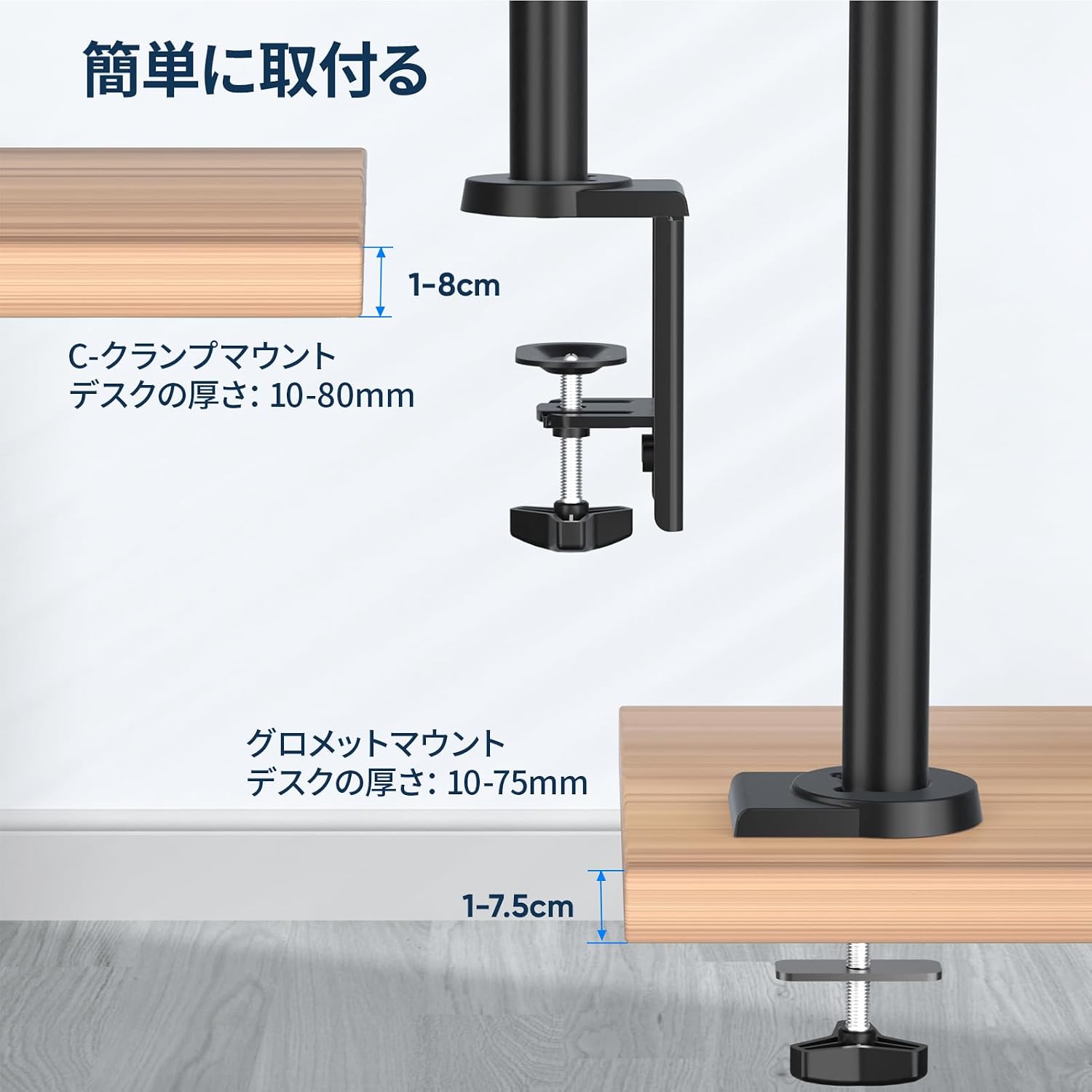
This image illustrates the two available mounting options: C-clamp and grommet. The C-clamp secures the arm to the edge of the desk, while the grommet mount uses an existing hole in the desk.

This image demonstrates the quick and easy installation process, highlighting the modular design that simplifies attaching the VESA plate to the monitor and then to the arm.
C-Clamp 설치:
- C-cl을 부착하세요amp base to the main pole.
- C-cl 확보amp to the edge of your desk. Ensure the desk thickness is between 10-80mm. Tighten firmly.
그로밋 마운트 설치:
- 책상에 케이블 통과용 구멍이 있다면, 그 구멍을 통해 케이블 통과용 받침대를 삽입하십시오.
- Secure the grommet base from underneath the desk. Ensure the desk thickness is between 10-75mm. Tighten firmly.
2. Attach Monitor Arms:
Slide the monitor arms onto the main pole and secure them at your desired height. The arms are designed for durability and flexibility.

This image highlights the robust and flexible construction of the monitor arm, designed for long-lasting performance and ease of movement.
3. Attach Monitors:
- Attach the VESA plates to the back of your monitors using the appropriate screws (M4, M5, or M6).
- Slide the monitors (with VESA plates attached) onto the arms.
- Secure the monitors to the arms using the provided locking mechanism.
작동 지침
The FORGING MOUNT Triple Monitor Arm offers full motion capabilities for optimal view편안함과 생산성을 제공합니다.

This image demonstrates the full motion capabilities of the monitor arm, including 180° swivel, +90°/-85° tilt, and 360° rotation for flexible screen positioning.
Gas Spring Tension Adjustment:
The gas spring system allows for smooth and effortless height adjustment. It is crucial to adjust the tension to match the weight of your monitors. For proper function, each arm requires a minimum monitor weight of 1kg.

This image illustrates how to adjust the gas spring tension. Use the provided hex key to turn the adjustment screw. Turn clockwise to increase tension for heavier monitors (if the arm sags) and counter-clockwise to decrease tension for lighter monitors (if the arm rises too easily).
- After mounting your monitor, if the arm sags, turn the adjustment screw clockwise (towards '+') to increase tension.
- If the arm rises too easily, turn the adjustment screw counter-clockwise (towards '-') to decrease tension.
- Adjust until the arm stays horizontal at any position when moved.
각도 조정:
- 경사: Adjust the monitor vertically from -45° to +90°. Loosen the tilt screw, set the desired angle, and re-tighten.
- 받침: Pivot the monitor horizontally from +90° to -90°.
- 회전: Rotate the screen 360° (+180° to -180°) to switch between landscape and portrait orientations.
Note: The actual range of motion may vary depending on the size of your monitors.
케이블 관리
The monitor arm includes integrated cable management features to keep your workspace tidy and organized.
- Route your monitor cables through the cable clips or channels located along the arms and main pole.
- This helps to reduce clutter and maintain a clean aesthetic on your desk.

This image contrasts a clean, organized desk utilizing the monitor arm's cable management with a cluttered desk, demonstrating the space-saving benefits.
유지
- 모든 나사와 연결부가 단단히 조여져 있고 안전한지 정기적으로 점검하십시오.
- 모니터 암을 부드러운 천으로 닦으세요.amp 천으로 닦으세요. 연마성 세제나 용제는 사용하지 마세요.
- 가스 스프링 메커니즘에 윤활유를 바르지 마십시오.
문제 해결
Monitor Arm Sags or Rises Unexpectedly:
- 해결책: Adjust the gas spring tension as described in the 'Operating Instructions' section. Ensure the monitor weight is within the 1-8kg range per arm.
모니터 수평이 맞지 않습니다.
- 해결책: Check the VESA plate attachment to the monitor and the arm. Ensure all screws are tightened evenly. Minor adjustments can be made using the tilt and swivel functions.
Difficulty Moving Arms:
- 해결책: Ensure the gas spring tension is correctly set for your monitor's weight. If the arms are too stiff, slightly loosen the pivot point screws (do not over-loosen).
보증 및 지원
This FORGING MOUNT product is covered by a 1년 제조사 보증 구매일로부터.
The warranty covers defects in materials and workmanship under normal use. It does not cover damage caused by improper installation, misuse, accidents, or unauthorized modifications.
For warranty claims, technical support, or any questions regarding your product, please contact FORGING MOUNT customer service through your purchase platform. Please have your order number and product model (FM4533) ready when contacting support.

