
1. 서론
This manual provides detailed instructions for the installation, operation, and maintenance of your Backnets Solid Brass Shower Mixer Valve. Please read this manual thoroughly before installation and use to ensure proper function and longevity of the product. Retain this manual for future reference.
2. 제품 오버view
2.1 주요 특징
- 견고한 황동 구조: Manufactured from high-quality brass for durability and corrosion resistance.
- Concealed Design: Provides a clean, minimalist aesthetic in your shower space.
- LED Digital Temperature Display: Hydro-powered display shows real-time water temperature without the need for batteries.
- Three Function Diverter: Allows selection of up to three shower outputs (e.g., rain shower, handheld shower, body jets) individually or simultaneously.
- cUPC 인증: Ensures compliance with safety standards for water temperature control.
- 표준 연결: Features US standard NPT 1/2" threads for inlets and outlets.
2.2개의 구성요소
The Backnets Shower Mixer Valve includes the main valve body, faceplate, control knobs, and buttons. Additional shower components (shower heads, handhelds, body jets) are sold separately.

그림 1: 전면 view of the Backnets Solid Brass Shower Mixer Valve with its matte black finish and digital temperature display.

Figure 2: Illustration highlighting the robust, integrated forging and solid brass construction of the Backnets valve, contrasting it with lower quality sand-cast alternatives.
3. 설정 및 설치
Installation should be performed by a qualified plumber or experienced individual. Ensure all local plumbing codes are followed.
3.1 설치 전 체크리스트
- 모든 구성 요소가 들어 있고 손상되지 않았는지 확인하세요.
- Ensure water supply lines (hot and cold) are accessible and can be shut off.
- Confirm wall cavity dimensions are sufficient for concealed valve installation.
- Gather necessary tools: pipe wrench, sealant tape (Teflon tape), pipe dope, measuring tape, level.
3.2 설치 단계
- 수도 공급을 차단하세요: 설치 구역으로 공급되는 주요 물의 공급을 차단합니다.
- 벽 개구부 준비: Create an appropriate opening in the wall for the concealed valve body.
- Connect Inlets: Connect the hot water supply to the designated 'Hot Inlet' (G 1/2") and the cold water supply to the 'Cold Inlet' (G 1/2") on the valve body. Use sealant tape or pipe dope on all threaded connections to prevent leaks.
- 콘센트를 연결하세요: Connect the three shower outputs (e.g., to rain shower head, handheld shower, body jets) to 'Outlet 1', 'Outlet 2', and 'Outlet 3' as desired. These are also 1/2" NPT connections.
- 보안 밸브: Mount the valve body securely within the wall cavity, ensuring it is level and properly aligned for the faceplate.
- 압력 테스트: After all connections are made, block all outlets and adjust water pressure to 10kg (1MPa) for testing. Carefully check all pipe connections and the interior of the shower valve for any leaks.
- Install Faceplate and Controls: Once leak-free, install the decorative faceplate, control knobs, and buttons.
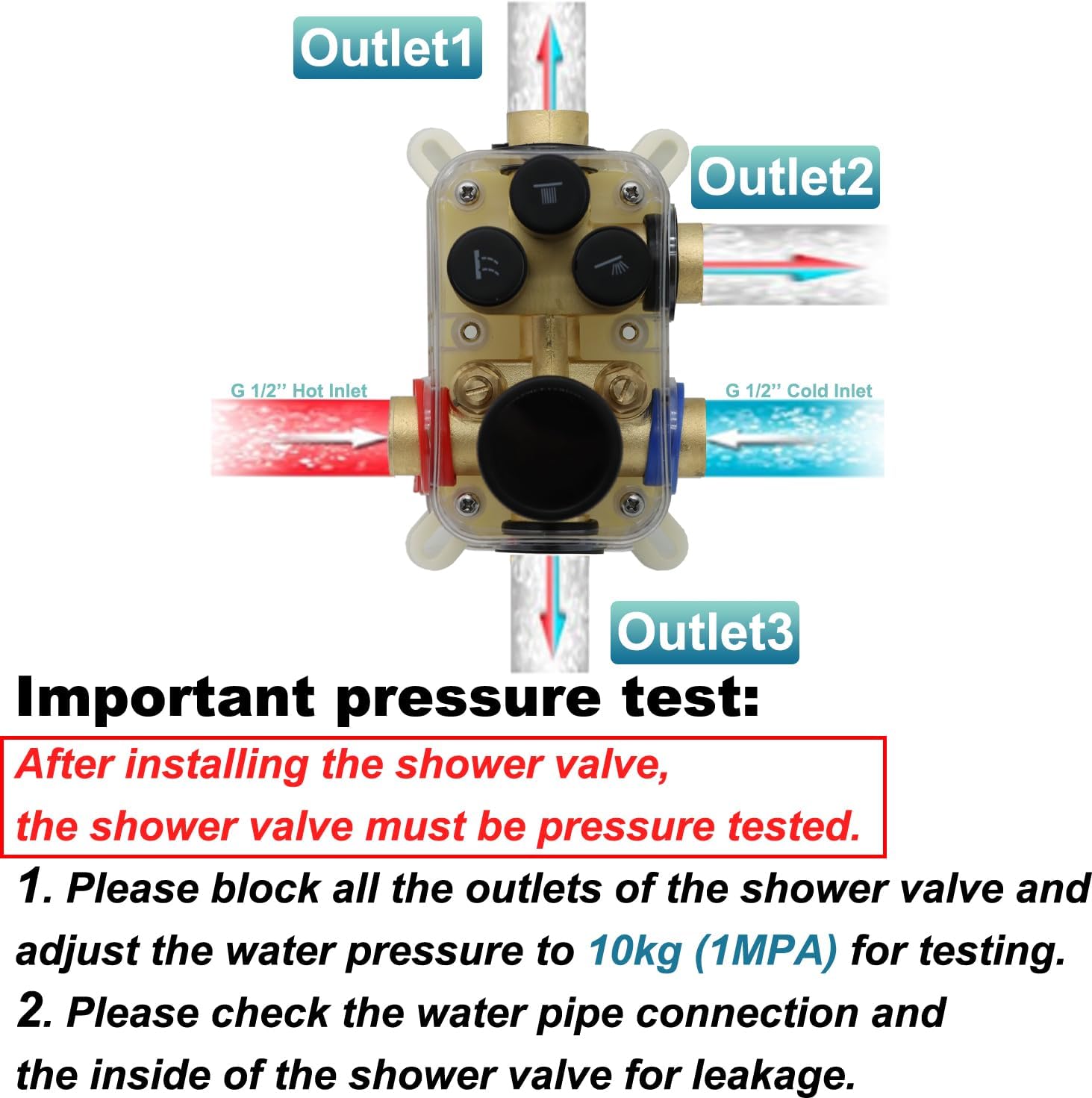
그림 3: 상세 view of the valve's G 1/2" hot and cold inlets and three outlets, along with critical pressure testing instructions.

Figure 4: Product dimensions (9.45 x 3.54 x 2.76 inches) and weight (approximately 31 pounds) for installation planning.
4. 사용 설명서
The Backnets Shower Mixer Valve is designed for intuitive control of water flow and temperature.
4.1 온도 조절
- The large rotary knob controls both water flow and temperature.
- Rotate the knob counter-clockwise towards the red indicator for hotter water.
- Rotate the knob clockwise towards the blue indicator for cooler water.
- The integrated LED digital display will show the current water temperature in Fahrenheit. The display is powered by water flow and requires no batteries.
- For temperatures below 100°F, the indicator light around the knob will typically be blue. For temperatures above 100°F, it will be orange.
4.2 기능 선택
- The three smaller buttons on the faceplate correspond to the three shower outputs (e.g., rain shower head, handheld shower, shower body jet).
- Press a button to activate its corresponding shower function.
- Multiple buttons can be pressed simultaneously to use two or all three functions at once.
- To turn off a function, press its button again.
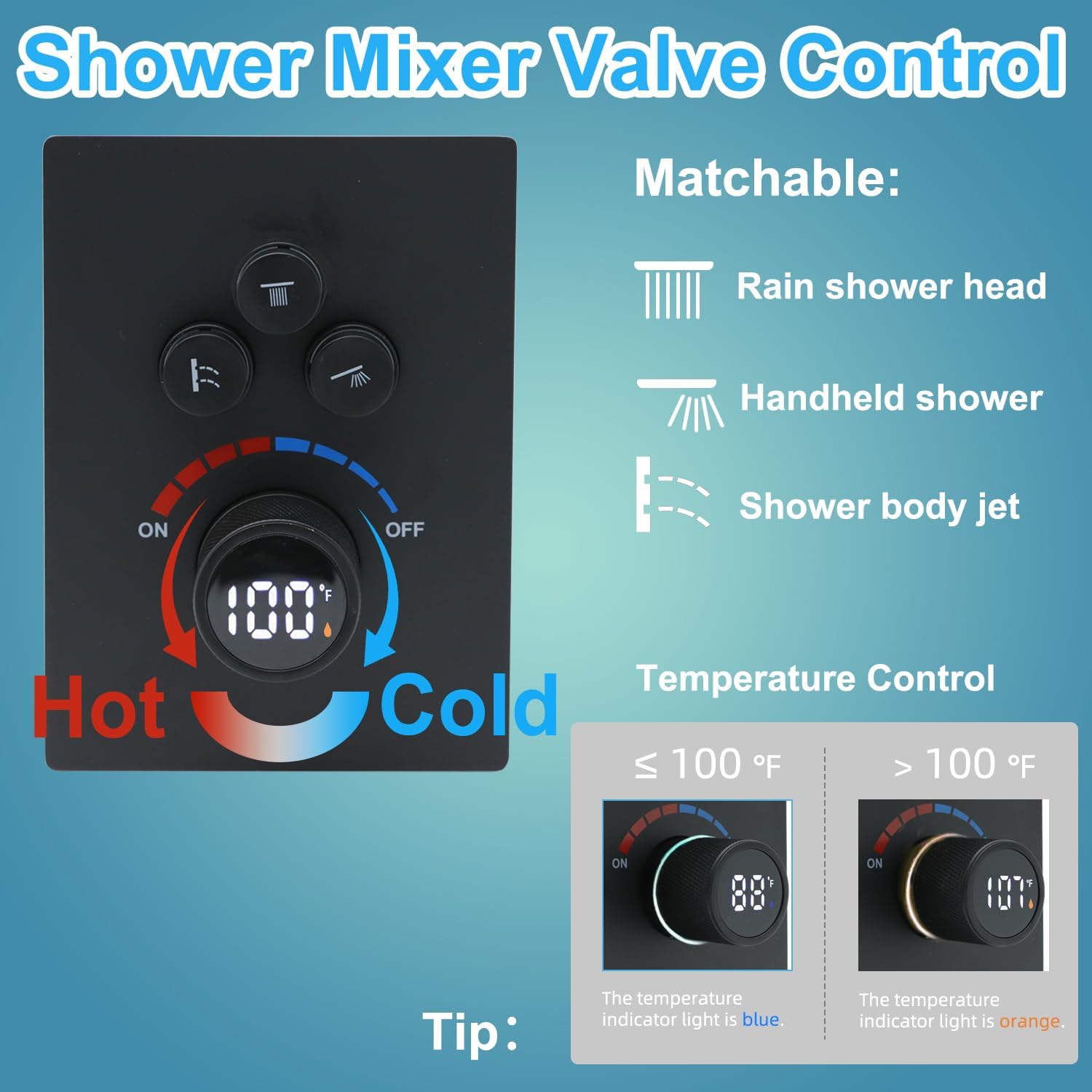
그림 5: 이상view of the control panel, illustrating the temperature control knob and the three buttons for selecting shower functions (rain shower, handheld, body jet).

Figure 6: The hydro-powered digital display indicating water temperature, demonstrating its functionality for both hot and cold water settings.

그림 7: example of the shower system in operation, showing how all three functions (rain shower, handheld, body jets) can be used concurrently.
Video 1: A short demonstration of the 3-function digital display valve, showcasin작동 방식 및 특징.
5. 유지관리
Regular maintenance ensures optimal performance and extends the lifespan of your shower mixer valve.
- 청소: Clean the faceplate and control knobs regularly with a soft cloth and mild soap. Avoid abrasive cleaners, harsh chemicals, or scouring pads, as these can damage the finish.
- 점검: 연결 부위 주변에 누수 흔적이 있는지 정기적으로 점검하십시오. 누수가 발견되면 즉시 조치하여 물 피해를 예방하십시오.
- 미네랄 축적: In areas with hard water, mineral deposits may accumulate. If flow or temperature control is affected, consult a professional plumber for descaling or internal component inspection.
6. 문제 해결
일반적인 문제와 해결 방법은 다음 표를 참조하세요.
| 문제 | 가능한 원인 | 해결책 |
|---|---|---|
| 물 흐름이 없거나 압력이 낮습니다 | Main water supply off; clogged inlet filters; kinked supply lines. | Check main water supply; clean inlet filters; inspect and straighten supply lines. |
| 수온이 일정하지 않음 | Imbalance in hot/cold water pressure; faulty thermostatic cartridge. | Check water pressure balance; contact a plumber for cartridge inspection/replacement. |
| 디지털 디스플레이가 작동하지 않음 | Insufficient water flow to power the display; internal sensor issue. | Ensure adequate water flow; if problem persists, contact support. |
| 밸브 또는 연결부에서의 누출 | Loose connections; damaged seals/O-rings; improper installation. | Tighten connections (do not overtighten); replace damaged seals; re-evaluate installation. |
여기에 나열되지 않은 문제가 발생하거나 제시된 해결 방법으로 문제가 해결되지 않으면 고객 지원팀에 문의하십시오.
7. 사양
- 모델 번호: SXFT-1
- 재료: 황동
- 색상: 매트블랙
- 치수(길이 x 너비 x 높이): 9.45 x 3.54 x 2.76 인치
- 품목 무게: 약 31파운드
- 입구 연결 크기: 0.5 Inches NPT
- 콘센트 연결 크기: 0.5 Inches NPT
- 포트 수 : 5 (2 Inlets, 3 Outlets)
- 인증: CPCPCPCTON ...
- Power Source for Display: Hydroelectric (no batteries required)
8. 보증 및 지원
For warranty information or technical assistance, please contact Backnets customer service through the retailer where the product was purchased or visit the official Backnets website. Please have your model number (SXFT-1) and purchase date available when contacting support.