
1. 서론
This manual provides detailed instructions for the setup, operation, and maintenance of your SEETEC P133 PRO 13.3 Inch Broadcast Monitor. Please read this manual thoroughly before using the product to ensure proper functionality and to prevent damage.
The SEETEC P133 PRO is a high-brightness broadcast monitor designed for professional video production environments, offering advanced features for accurate monitoring and control.
2. 설정
2.1. 언박싱 및 패키지 구성품
Carefully unpack the monitor and verify all contents against the list below:
- 1x SEETEC P133 PRO Monitor
- 3A 전원 어댑터 1개
- 1x Tally Kit
- 1x V-mount Battery Plate (default to mount on device)
- 1x 미니 HDMI 케이블
- 1x HDMI 케이블
- 1x SDI Cable
- 1x 사용자 설명서

Image: All items included in the SEETEC P133 PRO package.
2.2. 물리적 설정
The monitor comes with a pre-mounted V-mount battery plate for portable power solutions. Desktop stand feet are also included for stable placement on flat surfaces.

Image: Rear panel of the monitor highlighting VESA mount points and input/output ports.
2.3. 전원 연결하기
The P133 PRO supports multiple power supply modes:
- DC 12V 입력: Connect the provided 3A Power Adapter to the DC IN port.
- V-마운트 배터리: Attach a compatible V-mount battery to the pre-installed V-mount battery plate.
- XLR 커넥터: An optional Anton Bauer Battery Plate can be used with an XLR power connector.

Image: Power input options for the SEETEC P133 PRO monitor.
2.4. 비디오 연결
The monitor offers extensive input and output options:
- HDMI 입력: 2x HDMI inputs supporting up to 4K at 60Hz.
- HDMI 출력: 1x HDMI output.
- SDI 입력: 2x SDI inputs.
- SDI 출력: 2x SDI outputs.
- DVI 입력: 1x DVI input.
Use the provided HDMI and SDI cables to connect your camera or video source to the monitor. Ensure cables are securely connected.

이미지: 상세 view 모니터의 입력 및 출력 포트.
3. 사용 설명서
3.1. 전원 켜기/끄기
Locate the 'ON/OFF' switch on the front panel of the monitor. Flip the switch to the 'ON' position to power on the device. Flip to 'OFF' to power down.

Image: Front panel of the monitor with control buttons and power switch.
3.2. 메뉴 탐색
Use the physical buttons on the front panel to navigate the monitor's menu system:
- 메뉴: 메인 메뉴로 들어가려면 누르세요.
- 화살표 버튼(< / >): Use to navigate through menu options.
- 출구: Press to exit the current menu or confirm a selection.
- F1-F4: 자주 사용하는 기능에 빠르게 접근할 수 있도록 사용자 지정 가능한 기능 버튼이 있습니다.
Video: An operation guide demonstrating menu navigation and basic functions of the SEETEC P133 PRO monitor.
3.3. 주요 특징
- 일광 Viewable (1000nit): The high brightness display ensures clear visibility even in bright outdoor conditions.
- HDR 모니터링: Provides a wider range of colors and contrast, ensuring accurate representation of your footage.
- Waveform Monitoring: Built-in waveform monitoring assists in achieving accurate exposure levels.
- 3D LUT 지원: Upload up to 32 custom 3D LUTs to preview filming looks directly on set.
- 탈리 라이트: The 3-color TALLY light indicates which signal is live, enhancing team coordination during broadcasts.
- 4K 60Hz HDMI Support: Ensures smoother visuals and maintains high-frame-rate dynamic images from cameras.

Image: The monitor's 1000nit brightness allows for clear viewing in daylight conditions.

Image: Demonstration of custom 3D LUT loading for on-set color grading preview.
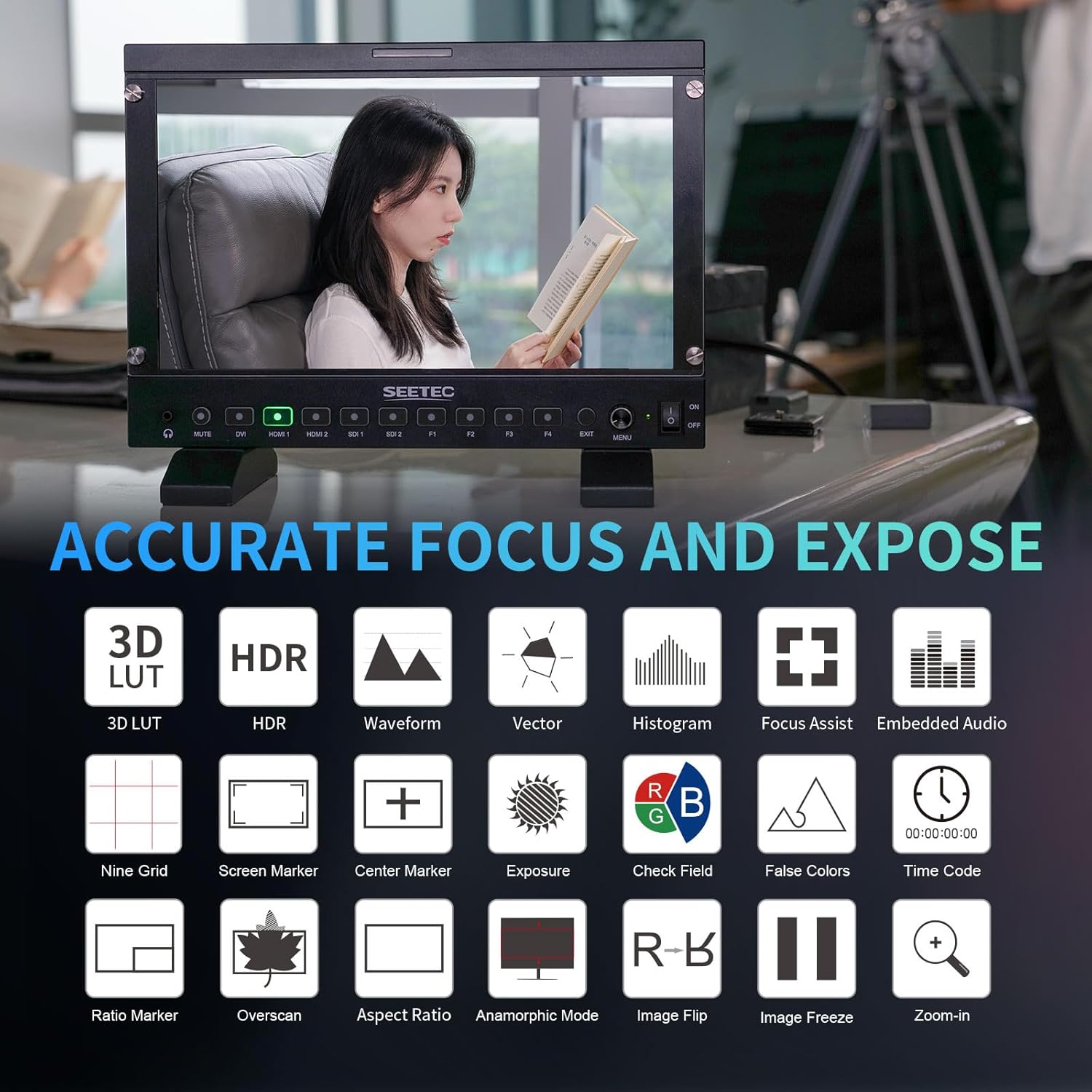
이미지: 이상view of accurate focus and exposure tools available on the monitor.
비디오: 간략하게 살펴보기view of the SEETEC P133 PRO monitor's features, including 1000nit brightness and 3D LUT capabilities.
4. 유지관리
- 청소: 부드럽고 마른 천으로 모니터 화면과 본체를 닦으세요. 잘 지워지지 않는 얼룩은 가볍게 두드려 닦아내세요.amp화면에 안전한 세척액을 천에 묻혀 사용하세요. 강한 화학 약품은 사용하지 마세요.
- 저장: 사용하지 않을 때는 직사광선과 극한의 온도를 피해 서늘하고 건조한 곳에 보관하십시오. 먼지와 물리적 손상을 방지하려면 원래 포장재나 보호 케이스를 사용하십시오.
- 손질: 모니터를 항상 조심스럽게 다루십시오. 떨어뜨리거나 강한 충격을 가하지 마십시오.
5. 문제 해결
- 전원 없음: Ensure the power adapter is securely connected and the power switch is in the 'ON' position. If using a battery, check its charge level.
- 비디오 신호 없음: Verify that the video source (camera, etc.) is powered on and outputting a signal. Check all HDMI/SDI cable connections. Ensure the correct input source is selected on the monitor.
- 이미지 왜곡/저화질: Check the resolution and frame rate settings of your video source to ensure compatibility with the monitor. Try a different cable.
- 버튼이 응답하지 않음: 모니터 전원을 껐다 켜십시오. 문제가 지속되면 고객 지원팀에 문의하십시오.
6. 사양
| 특징 | 설명 |
|---|---|
| 제품 치수 | 13.03 x 9.09 x 1.22 인치 |
| 품목 무게 | 4.55파운드 |
| 제조업체 | SEETEC |
| 품목 모델 번호 | P133 PRO |
| 스탠딩 스크린 디스플레이 크기 | 13.3 인치 |
| 종횡비 | 16시 9분 |
| 해결 | 1920 x 1080(FHD 1080p) |
| 이미지 밝기 | 1000니트 |
| 화면 표면 설명 | 광택있는 |
7. 보증 및 지원
For warranty information and technical support, please refer to the official SEETEC web사이트를 방문하거나 가까운 대리점에 문의하세요. 보증 청구를 위해 구매 증빙 자료로 구매 영수증을 보관하세요.
공식 제품 영상:
-
비디오: 홍보 영상 쇼asing the SEETEC P133 PRO 13.3" 1000nit Broadcast Monitor with 3D LUT features.