
1. 서론
The SKYSHL SS103PVC12 Optical Fiber Power Meter (OPM) is a compact and user-friendly instrument designed for comprehensive testing of fiber optic networks. It facilitates both absolute optical power measurement and relative optical loss measurement. This device is characterized by its robust design, wide power measurement range, high precision, and user self-calibration capabilities, making it a cost-effective solution for fiber optic professionals.
This manual provides detailed instructions for the safe and effective use of your SKYSHL SS103PVC12. Please read it thoroughly before operation and retain it for future reference.
2. 안전 정보
부상 및 기기 손상을 방지하기 위해 다음 안전 수칙을 준수하십시오.
- 레이저 안전 : The Visual Fault Locator (VFL) emits a visible red laser. 레이저 빔을 직접 쳐다보거나 view 광학 기기를 사용하여. Direct exposure can cause severe eye injury.
- 배터리 안전: Use only the specified battery type (3.7V 700mAh lithium battery). Do not disassemble, puncture, or expose the battery to extreme temperatures or fire. Dispose of batteries according to local regulations.
- 환경 조건: Operate the device within specified temperature and humidity ranges. Avoid exposure to water, dust, and corrosive substances.
- 청소: Use a soft, dry cloth for cleaning the device. For optical connectors, use specialized fiber optic cleaning tools.
- 유지: 기기를 직접 열거나 수리하지 마십시오. 모든 정비는 자격을 갖춘 기술자에게 맡기십시오.
3. 패키지 내용
패키지에 모든 품목이 들어 있는지 확인하세요.
- 1 x SKYSHL SS103PVC12 Optical Fiber Power Meter
- 1 x USB-A to Micro USB Charging Cable
- 1 x FC-LC Adapter
- 1 x 사용자 매뉴얼(이 문서)

4. 제품 오버view
The SKYSHL SS103PVC12 is an all-in-one tool for fiber optic network testing. It combines an Optical Power Meter (OPM), a Visual Fault Locator (VFL), an RJ45 cable tester, and an LED flashlight.
4.1 주요 특징
- Multi-Wavelength Calibration: Supports 10 calibrated wavelengths: 850nm, 980nm, 1270nm, 1300nm, 1310nm, 1490nm, 1550nm, 1577nm, 1625nm, and 1650nm, suitable for both single-mode and multi-mode fiber testing.
- 넓은 측정 범위: Measures optical power from -50dBm to +26dBm.
- Integrated VFL: 650nm red laser with a 30km range for identifying fiber breaks and continuity.
- RJ45 Cable Tester: For quick localization and testing of 8P/6P/4P network cables.
- Universal Connector Compatibility: Features a 2.5mm universal connector (compatible with FC/SC/ST) and includes an FC-LC adapter for LC connectors.
- 긴 배터리 수명: Powered by a 3.7V 700mAh lithium battery, providing over 120 hours of typical operation.
- 컴팩트하고 내구성 있는 디자인: Ergonomic, portable, and built with high-strength plastic casing for resilience.
- 2인치 LCD 디스플레이: Clear and easy-to-read interface.
4.2 장치 레이아웃


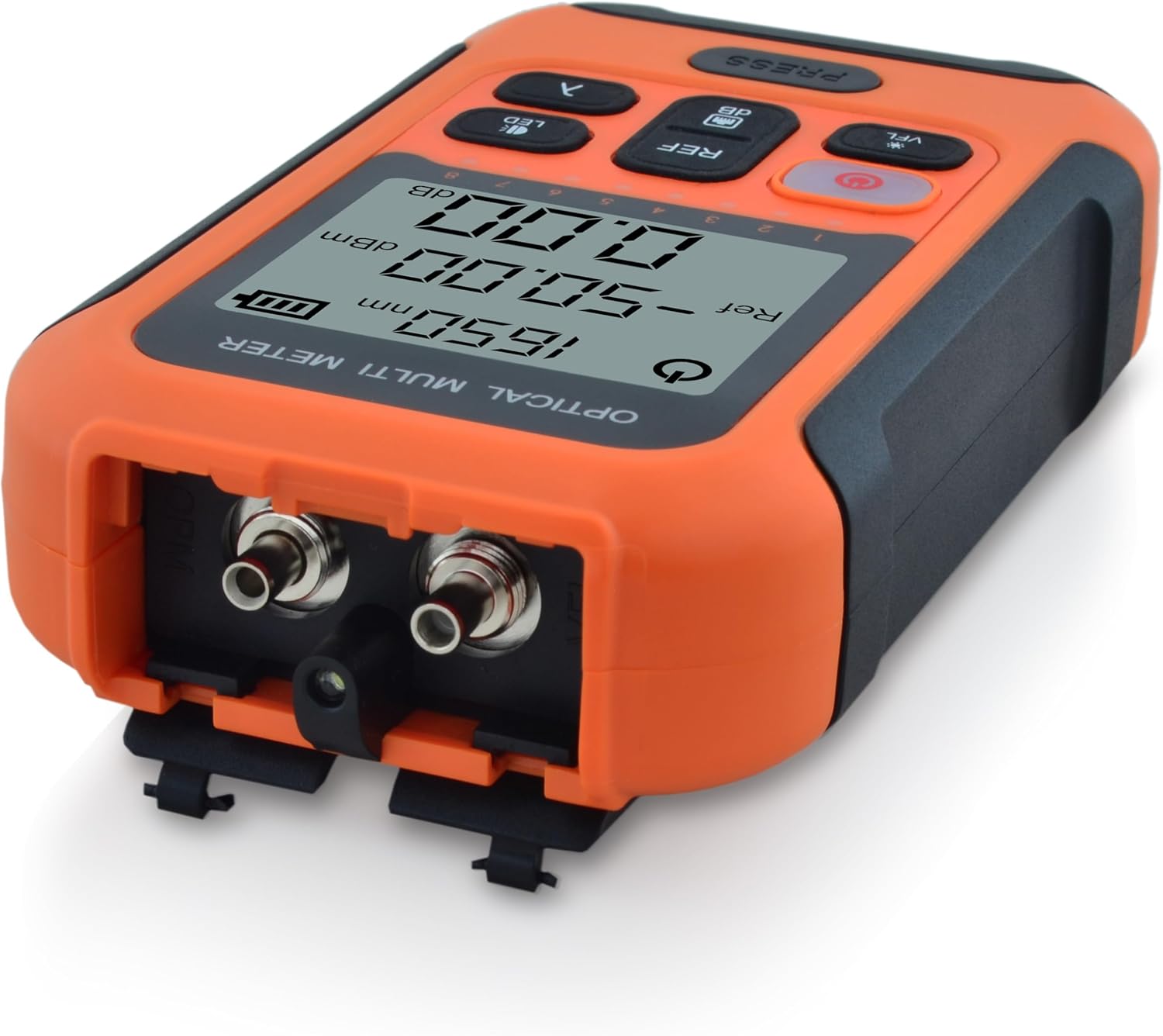
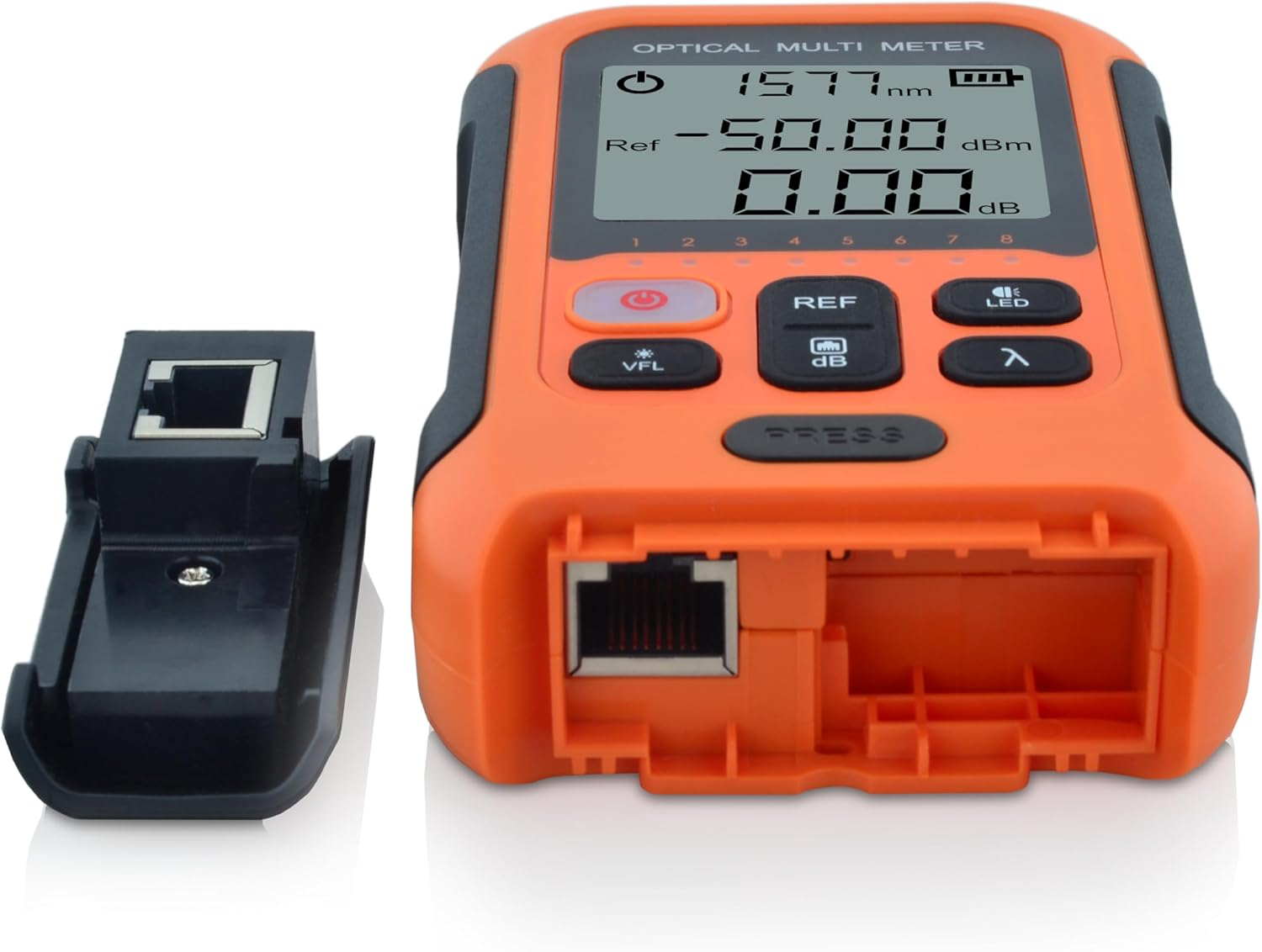
5. 설정
5.1 배터리 충전
The device is powered by a built-in 3.7V 700mAh lithium battery. Before first use, or when the battery indicator on the display shows low charge, connect the device to a USB power source using the provided Micro USB cable. The power button will illuminate red during charging.
5.2 광섬유 케이블 연결
- Ensure the fiber optic connector is clean. Use a fiber optic cleaning tool if necessary.
- For FC, SC, or ST connectors, directly insert them into the 2.5mm universal port on the top of the device.
- For LC connectors, attach the provided FC-LC adapter to the universal port, then insert the LC connector into the adapter.
- Ensure a secure connection to prevent inaccurate readings.
5.3 Connecting RJ45 Cables
- Detach the small RJ45 module from the side of the main unit.
- Connect one end of the RJ45 cable to the port on the main unit.
- Connect the other end of the RJ45 cable to the detached module.
- Proceed to the operating instructions for RJ45 cable testing.
6. 사용 설명서
6.1 전원 켜기/끄기
- 전원을 켜려면 전원 버튼 (red button with power symbol) for approximately 2 seconds.
- 전원을 끄려면 전원 버튼 다시 약 2초 동안.
- The device features an automatic power-off function after 10 minutes of inactivity to conserve battery.
6.2 Optical Power Measurement (OPM)
- 파장을 선택하세요: 를 누르세요 λ (Wavelength) Button to cycle through the available calibrated wavelengths (850nm, 980nm, 1270nm, 1300nm, 1310nm, 1490nm, 1550nm, 1577nm, 1625nm, 1650nm). Select the wavelength corresponding to your fiber optic system.
- 광섬유 연결: Connect the fiber optic cable to the appropriate port as described in Section 5.2.
- Read Absolute Power: The display will show the measured optical power in dBm.
- Set Reference (Relative Measurement):
- With a known good signal connected, press the REF/dB Button to set the current power reading as the reference value (0.00dB).
- When measuring other points in the fiber link, the display will show the relative loss or gain in dB compared to the set reference.
- 를 누르세요 REF/dB Button again to toggle between absolute (dBm) and relative (dB) measurements.
6.3 시각적 결함 탐지기(VFL)
- VFL 활성화: 를 누르세요 VFL Button. The 650nm red laser will emit from the VFL port (located near the fiber optic input ports).
- 결함 식별: Connect the fiber to be tested to the VFL port. Observe the fiber for any visible red light leakage, which indicates breaks, sharp bends, or faulty connectors.
- VFL 비활성화: 를 누르세요 VFL Button again to turn off the laser.
- 주의: Always follow laser safety guidelines (Section 2).
6.4 RJ45 Cable Tester
- Ensure the RJ45 cable is connected to both the main unit and the detached module as described in Section 5.3.
- The device will automatically begin testing the cable continuity. The display will show the status of each wire pair (1-8 for 8P, 1-6 for 6P, 1-4 for 4P).
- A successful test will show all corresponding numbers lighting up sequentially or indicating continuity. Any missing or incorrect sequence indicates a fault (e.g., open, short, cross).
6.5 LED 손전등
- 를 누르세요 LED 버튼 to turn the integrated LED flashlight on or off. This is useful for working in dimly lit environments.
7. 유지관리
- Cleaning Optical Connectors: Regularly clean the fiber optic input ports and any adapters using specialized fiber optic cleaning swabs or pens. Dust and debris are the primary causes of inaccurate measurements.
- 장치 청소: Wipe the exterior of the device with a soft, dry, lint-free cloth. Do not use abrasive cleaners or solvents.
- 배터리 관리 : For optimal battery life, avoid fully discharging the battery frequently. If storing the device for an extended period, charge it to approximately 50% and recharge every few months.
- 저장: Store the device in a cool, dry place, away from direct sunlight and extreme temperatures. Use the protective caps for all ports when not in use.
8. 문제 해결
| 문제 | 가능한 원인 | 해결책 |
|---|---|---|
| 장치의 전원이 켜지지 않습니다. | 배터리가 부족하거나 방전되었습니다. | 제공된 USB 케이블을 사용하여 장치를 충전하십시오. |
| Inaccurate or unstable OPM readings. | Dirty fiber optic connectors or incorrect wavelength setting. | Clean all fiber optic connectors. Ensure the correct wavelength is selected on the device. |
| VFL red light is dim or not visible. | Dirty VFL port or fiber connection. | Clean the VFL port and the fiber end-face. |
| RJ45 cable test fails or shows incorrect pinout. | Faulty RJ45 cable, poor connection, or damaged port. | Ensure the cable is properly seated. Test with a known good cable. Inspect cable for damage. |
| 장치가 정지되거나 응답하지 않습니다. | 일시적인 소프트웨어 오류입니다. | Press and hold the Power Button for 10 seconds to force a restart. |
If the problem persists after attempting these solutions, please contact SKYSHL customer support for assistance.
9. 사양
| 매개변수 | 값 |
|---|---|
| 검출기 유형 | InGaAs |
| Calibrated Wavelengths | 850nm, 980nm, 1270nm, 1300nm, 1310nm, 1490nm, 1550nm, 1577nm, 1625nm, 1650nm |
| 측정 범위 | -50~+26dBm (CW/1Hz/2Hz) |
| VFL Wavelength/Range | 650nm / 30km |
| Power Measurement Uncertainty | ±0.3dB |
| 커넥터 | Universal 2.5mm (FC/SC/ST compatible), FC-LC adapter, RJ45 |
| 자동 전원 끄기 | 10 분 |
| 전원 공급 장치 | 3.7V 700mAh 리튬 배터리 |
| 표시하다 | 2인치 LCD |
| 작동 시간 | >120 hours (typical) |
| 치수(길이 x 너비 x 높이) | 120 x 70 x 27mm(4.72 x 2.76 x 1.06인치) |
| 무게 | 0.13KG(0.29파운드) |
| 제조업체 | 스카이슬 |
| 모델 번호 | SS103PVC12 |
| 색상 | 주황색 |
| 원산지 | 중국 |
10. 보증 및 지원
SKYSHL provides the following warranty for the SS103PVC12 Optical Fiber Power Meter:
- 3년 무상 교체
- 5 Years Free Maintenance
- 평생 보증
For technical support, warranty claims, or any inquiries regarding your device, please contact SKYSHL customer service through the retailer where you purchased the product or visit the official SKYSHL web연락처 정보 사이트.