소개
This manual provides detailed instructions for the ALLDOCUBE iPlay60 mini Pro tablet. Please read this manual carefully before using the device to ensure proper operation and to maximize its performance and lifespan. Keep this manual for future reference.

이미지: 이상view of the ALLDOCUBE iPlay60 mini Pro tablet highlighting its main specifications and features.
제품 특징
- 운영 체제: Android 15 for enhanced efficiency, personalization, convenience, and privacy.
- 표시하다: 8.4-inch FHD+ In-Cell display (1920x1200 resolution) with 10-point multi-touch and 16:10 aspect ratio, ideal for multimedia. Supports Widevine L1 DRM for 1080P streaming on platforms like Amazon Prime Video, Disney+, Hulu, and Netflix.
- 프로세서: Helio G99 (MTK6789) CPU, offering high performance with an AnTuTu score exceeding 400,000, suitable for gaming.
- 메모리 및 스토리지 : 16GB RAM (8GB + 8GB virtual RAM) and 128GB internal storage, expandable up to 512GB via SD card. Features UFS 2.1 for fast data transfer.
- 오디오: Dual speakers positioned at the top and bottom for an immersive stereo sound experience. Supports LDAC for high-resolution audio via Bluetooth.
- 카메라: 5MP front camera and 13MP rear camera with autofocus for high-quality photos and videos. Rear camera includes a flashlight.
- 연결성: 4G LTE communication with dual SIM support (SIM2 shares slot with microSD). Supports 2.4GHz/5GHz Wi-Fi, Bluetooth 5.2, and four major satellite systems (GPS, Beidou, Galileo, Glonass).
- 배터리: Large 6050mAh battery with PD 18W fast charging support for extended use and quick recharges.
- Sensors & Features: Face recognition for quick unlocking, 6-axis gyro (3-axis accelerometer and 3-axis gyro) for precise control in games and navigation, light sensor for automatic brightness adjustment, gravity sensor for auto-rotation, and a powerful vibration motor for enhanced gaming feedback. OTG function supported.
- 설계: 금속 casing with refined dimensions (202.7x126x7.9mm) and a weight of approximately 310g, offering excellent portability.

Image: Key features of the iPlay60 mini Pro, including its Android 15 OS, powerful processor, and various hardware capabilities.
설치 가이드
1. 언박싱 및 초기 검사
- 제품 포장을 조심스럽게 개봉하세요.
- Remove the tablet and all accessories.
- Inspect the tablet for any physical damage. If any damage is found, contact customer support immediately.
- The tablet comes with a simple protective film pre-applied. When removing this film, do so gently to avoid damaging the screen.
2. 태블릿 충전하기
처음 사용하기 전에 태블릿을 완전히 충전하는 것이 좋습니다.
- Connect the included Type-C cable to the tablet's Type-C port.
- Connect the other end of the cable to the included 5V/2A charger.
- 충전기를 전원 콘센트에 꽂으세요.
- For faster charging, a PD 18W charger (not included) can be used.

Image: The tablet's large 6050mAh battery and support for 18W fast charging.
3. SIM 카드 및 SD 카드 삽입
The tablet supports dual SIM cards and expandable storage via an SD card.
- 태블릿 측면에서 SIM/SD 카드 트레이를 찾으세요.
- Use the included SIM ejector tool to open the tray.
- Carefully place your SIM cards (Nano-SIM) and/or microSD card into the designated slots. Note that SIM2 shares a slot with the microSD card.
- 트레이를 태블릿에 다시 살짝 밀어 넣어 딸깍 소리가 나면서 제자리에 고정되도록 합니다.

Image: The tablet's 4G LTE and dual SIM capabilities, along with other connectivity options.
4. 전원 켜기 및 초기 설정
- ALLDOCUBE 로고가 나타날 때까지 전원 버튼을 길게 누르세요.
- 화면의 지시에 따라 언어 선택, Wi-Fi 연결, Google 계정 로그인을 포함한 초기 설정을 완료하세요.
- You can set up face recognition during this process or later in the settings.
작동 지침
1. 기본 탐색
- 터치 제스처: 탭하여 선택하고, 스와이프하여 스크롤하고, 핀치하여 확대/축소합니다.
- 홈 화면: 위젯과 앱 바로가기를 사용하여 사용자 정의하세요.
- 알림: 화면 상단에서 아래로 살짝 밀어 알림과 빠른 설정에 접근하세요.
2. 얼굴 인식
Unlock your tablet quickly and securely using face recognition.
- 이동하다 설정 > 보안 및 개인정보 보호 > 얼굴 인식 잠금 해제.
- 화면의 안내에 따라 얼굴을 등록하세요.
- Once registered, simply face the front camera to unlock the device. This works even with masks or glasses, and in various lighting conditions.

Image: Face recognition in action, along with the tablet's flashlight and various sensors.
3. 디스플레이 및 오디오 설정
- 밝기 조정: The light sensor automatically adjusts screen brightness. You can also manually adjust it from the quick settings panel or 설정 > 디스플레이 > 밝기 수준.
- Reading Mode/Night Mode: To reduce eye strain, switch to reading mode or night mode in 설정 > 디스플레이. If the color tone feels cool, try changing the wallpaper to a warmer color scheme.
- 오디오 출력: The Type-C port serves as both a charging port and an earphone jack. Use Type-C earphones for audio output.
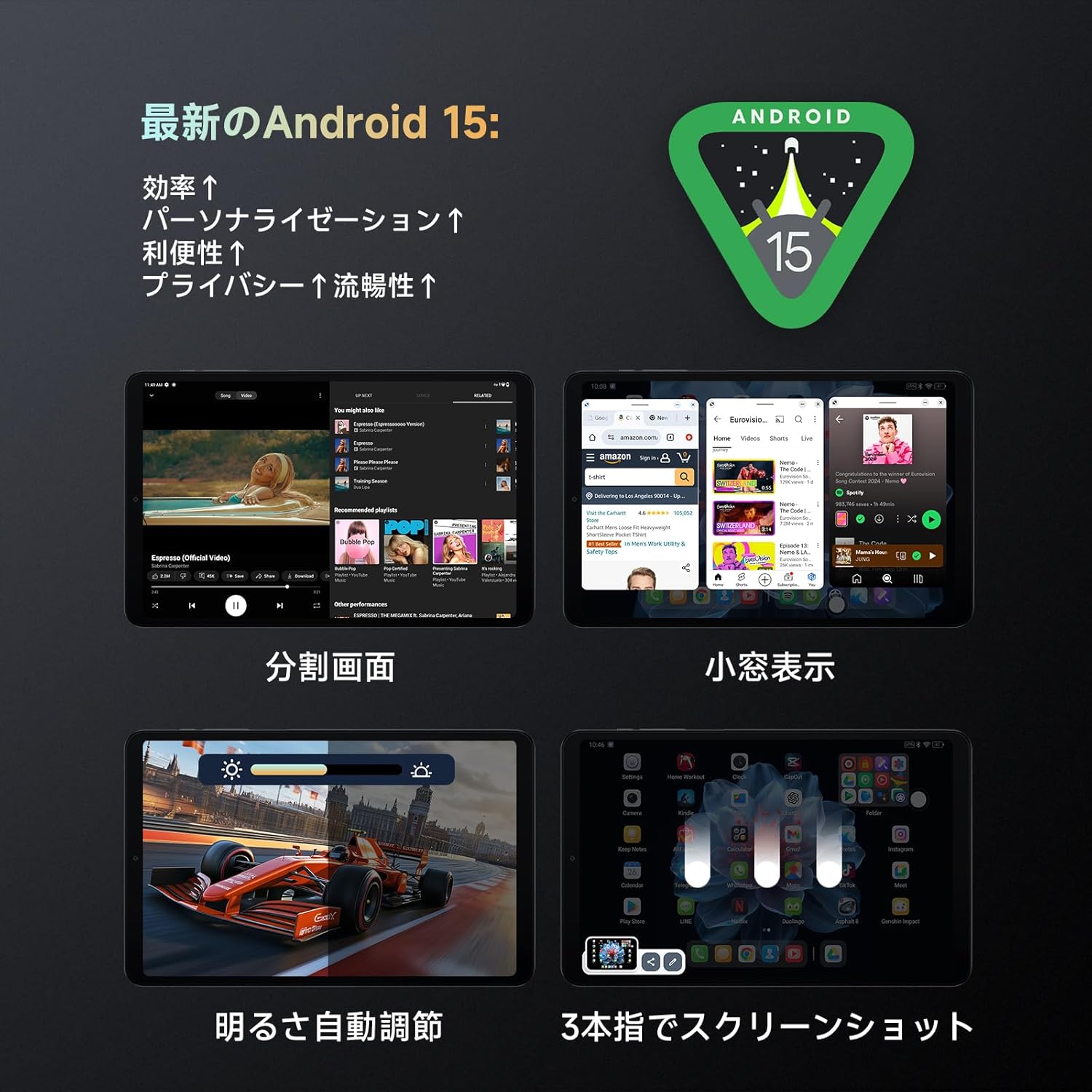
Image: Android 15 features including split-screen multitasking and automatic brightness adjustment.
4. 고급 기능
- 듀라스피드: This feature limits background processing for selected apps to improve performance. Access it in 설정 if you experience performance issues with certain applications, especially games.
- OTG 기능: Connect external devices like USB drives or keyboards using an OTG adapter (not included) to the Type-C port.
- 스크린샷: Use the three-finger swipe gesture to capture a screenshot.

Image: The tablet's 6-axis gyro and motor provide an enhanced gaming experience.
유지
- 청소: 부드럽고 보풀이 없는 천을 사용하여 태블릿 화면과 본체를 닦으세요. 강한 화학 물질이나 연마재는 사용하지 마세요.
- 소프트웨어 업데이트: 최적의 성능과 보안을 위해 시스템 업데이트를 정기적으로 확인하고 설치하세요. 설정 > 시스템 > 시스템 업데이트.
- 스토리지 관리: 불필요한 것을 주기적으로 정리하세요 file저장 공간을 확보하고 성능을 유지하기 위해 앱과 앱을 사용합니다.
- 배터리 관리 : 극한 온도에 노출시키지 마십시오. 배터리를 완전히 방전시키지 마십시오. 장기간 보관할 경우 배터리를 약 50% 정도 충전하십시오.

Image: The tablet's material is easy to clean, ensuring simple maintenance.
문제 해결
| 문제 | 가능한 원인 / 해결책 |
|---|---|
| 태블릿의 전원이 켜지지 않습니다. | Battery might be completely drained. Charge the tablet for at least 30 minutes before attempting to power on again. |
| Slow performance / Apps crashing. |
|
| Wi-Fi에 연결할 수 없습니다. |
|
| Face recognition not working. |
|
| 화면 회전이 작동하지 않습니다. |
|
| Data transfer issues from another tablet. | Direct data transfer from other tablets may cause errors. It is recommended to transfer data via cloud services or a computer. |
명세서
| 특징 | 사양 |
|---|---|
| 상표 | 올도큐브 |
| 모델명 | iPlay60mini pro |
| 운영 체제 | 안드로이드 15 |
| 화면 크기 | 8.4인치 |
| 디스플레이 해상도 | 1920x1200 pixels (FHD+ In-Cell) |
| CPU 브랜드 | MediaTek Helio G99 (MTK6789) |
| CPU 속도 | 2.2, 2.0 GHz |
| 그래픽 카드 | ARM 말리-G57 MC2 |
| 숫양 | 16GB (8GB + 8GB Virtual RAM) |
| 저장 | 128GB (UFS 2.1), expandable up to 512GB via SD card |
| 후방 카메라 | 13MP with autofocus and flashlight |
| 전면 카메라 | 5MP |
| 배터리 용량 | 6050mAh |
| 충전 중 | PD 18W Fast Charging (charger not included, 5V/2A charger included) |
| 연결성 | 4G LTE (듀얼 SIM), Wi-Fi (2.4GHz/5GHz), 블루투스 5.2 |
| 항해 | GPS, Beidou, 갈릴레오, Glonass |
| 센서 | 6-axis Gyro (3-axis accelerometer, 3-axis gyro), Gravity Sensor, Light Sensor, Vibration Motor |
| 치수 | 202.7 x 126 x 7.9mm |
| 무게 | 약 310g |
보증 및 지원
ALLDOCUBE offers a 12-month product warranty. For any issues or inquiries, please contact ALLDOCUBE customer support through the following channels:
- Official LINE: @175lhsbh
- Via Amazon: Go to the product page, click on the store name, then click "Ask a question."
- Via Amazon Account: Go to "Your Orders," select the relevant order, and click "Contact seller."
ALLDOCUBE is committed to providing excellent products and services. Your feedback is valuable for continuous improvement.

Image: ALLDOCUBE brand logo.