
1. 서론
This manual provides detailed instructions for the installation, operation, and maintenance of your Dosilkc UltraHD 4K POE Outdoor Bullet Security Camera (Model DS-T461). This 8MP IP network camera offers advanced surveillance features including human/vehicle detection, color night vision, and two-way audio. Please read this manual thoroughly before use to ensure proper setup and optimal performance.

Figure 1: Application Scenarios for the Dosilkc 4K POE Bullet Camera. The camera is suitable for various indoor and outdoor environments such as garages, warehouses, corridors, and courtyards.
2. 안전 정보
제품 손상을 방지하고 사용자의 안전을 확보하기 위해 다음 안전 예방 조치를 준수하세요.
- Ensure the power supply meets the camera's requirements (PoE).
- 카메라를 분해하거나 개조하지 마십시오. 그렇게 하면 보증이 무효화됩니다.
- Install the camera in a secure location to prevent unauthorized removal.
- Avoid pointing the camera directly at strong light sources for extended periods.
- 카메라를 강한 전자기파 간섭으로부터 멀리 두십시오.
- 제조업체에서 승인한 액세서리만 사용하십시오.
3. 패키지 내용
패키지에 모든 품목이 들어 있는지 확인하세요.
- Dosilkc UltraHD 4K POE Outdoor Bullet Security Camera
- 사용 설명서 (본 문서)
- Install Screw Bag
- Waterproof Cable Cover
4. 제품 오버view
보안 카메라의 구성 요소를 숙지하십시오.

Figure 2: Camera Components and Dimensions. This diagram labels the lens, microphone, IR LEDs, speaker, SD card slot, and mounting bracket, along with the camera's physical dimensions.
- 렌즈: 동영상 foo를 캡처합니다.tage.
- 마이크 : 오디오 입력을 위한 내장 마이크.
- IR LED : Infrared LEDs for night vision in low-light conditions.
- 스피커: Built-in speaker for two-way audio output.
- SD 카드 슬롯: Supports Micro SD cards up to 512GB for local storage.
- 까치발: Adjustable mounting bracket for installation.
5. 설정 및 설치
5.1 물리적 설치
The camera is designed for both indoor and outdoor use with an IP66 weatherproof housing.

Figure 3: IP66 Weatherproof Housing. The camera's robust design ensures protection against various weather conditions including rain, snow, and high temperatures.
- 위치를 선택하세요: Select a suitable location for optimal surveillance coverage. Consider the camera's 105° diagonal field of view.
- 카메라 장착: Use the provided screw bag to securely mount the camera to a wall or ceiling.
- Connect POE Cable: Connect a single Ethernet cable to the camera's POE port. This cable will provide both power and data transmission. Use the waterproof cable cover for outdoor installations to protect the connection.
5.2 초기 구성
The camera supports Plug & Play with Hikvision NVRs and is compatible with other NVRs (e.g., Da-hua) via Open Network Video Interface protocol. It also works with third-party software like Blue Iris and iSpy.

Figure 4: Multiple Storage and Compatibility Options. The camera offers flexible storage solutions including NVRs, FTP, NAS, and local SD card, and integrates with various surveillance software.
- NVR 연결:
- For Hikvision NVRs: Connect the camera directly to the NVR's POE port. The camera should be automatically detected.
- For other NVRs: Refer to your NVR's manual for adding ONVIF-compatible IP cameras.
- 소프트웨어 통합: If using third-party software (e.g., Blue Iris, iSpy), follow their respective guides for adding an ONVIF IP camera.
- 모바일 앱 설정: Download the recommended mobile application (refer to packaging or quick start guide for app name). Follow the in-app instructions to add your camera and access live view 및 설정.
Video 1: Camera Setup Guide
This video demonstrates the basic setup process for the Dosilkc 4K POE Bullet Security Camera, including physical installation and initial connection steps.
6. 운영
6.1 라이브 View 그리고 녹음
라이브 액세스 view through your NVR or mobile application. Recordings can be stored on an NVR, FTP server, NAS server, or a local Micro SD card (up to 512GB, not included).

Figure 5: Superior 4K UHD Image Quality. This image illustrates the enhanced detail provided by the 8MP (3840x2160) resolution compared to lower resolutions.
6.2 야간 투시 모드
The camera features dual-light full-color technology with three smart night vision modes, selectable via the mobile app:
- IR Night Vision Mode: Standard black-and-white infrared vision.
- Full Color Night Vision Mode: Utilizes white light to provide full-color images in darkness.
- 스마트 나이트 비전: Automatically switches between IR and full-color based on detected motion or alarm settings.
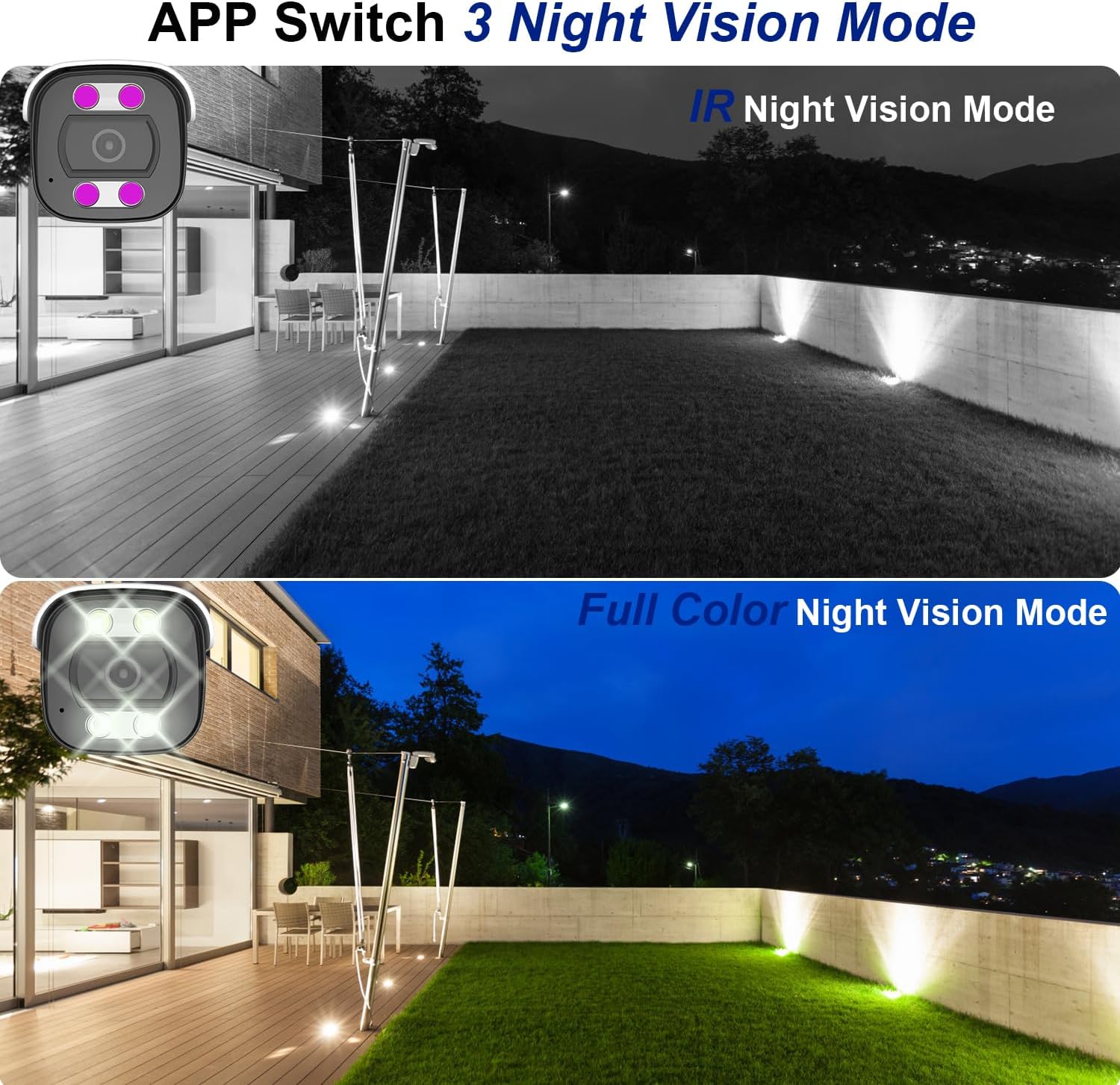
Figure 6: Night Vision Modes. This image demonstrates the difference between traditional IR (black and white) and full-color night vision capabilities.
6.3 Person/Vehicle Detection
The camera is equipped with professional human/vehicle detection functions to reduce false alarms. When a person or vehicle enters the configured detection area, the camera will automatically send real-time video or snapshots to your mobile phone.
- 감지 영역: Configure specific zones within the camera's view 탐지용.
- 감광도: Adjust the detection sensitivity to optimize performance and minimize unwanted alerts.

Figure 7: Smart Human/Vehicle Detection. The camera identifies human presence and sends an immediate alert to a connected mobile device.
Video 2: Smart Detection Features
This video demonstrates the human and vehicle detection capabilities of the camera, showing how it identifies subjects and triggers alerts.
6.4 양방향 오디오
The built-in microphone and speaker allow for two-way communication. You can listen to audio from the camera's location and speak through the camera using the mobile app or NVR interface.

Figure 8: Two-Way Audio Functionality. The camera enables real-time communication, allowing users to speak and listen remotely.
Video 3: Two-Way Audio Demonstration
This video illustrates the two-way audio feature, demonstrating how users can communicate through the camera.
7. 유지관리
정기적인 유지 관리는 카메라의 수명과 최적의 성능을 보장합니다.
- 청소: 카메라 렌즈와 하우징을 부드러운 천으로 살살 닦아주세요.amp 옷감. 강한 화학 물질이나 연마성 세제를 사용하지 마십시오.
- 펌웨어 업데이트: 모바일 앱 또는 제조업체 웹사이트를 통해 주기적으로 펌웨어 업데이트를 확인하십시오. web최신 기능과 보안 패치를 보장하기 위해 사이트를 방문하세요.
- 케이블 검사: Regularly inspect the Ethernet cable and waterproof cover for any signs of wear or damage, especially in outdoor installations.
- 스토리지 관리: SD 카드를 사용하는 경우 주기적으로 다시 설정하세요.view 그리고 기록된 음식을 관리하세요tag카드가 가득 차는 것을 방지합니다.
8. 문제 해결
일반적으로 발생할 수 있는 문제에 대한 해결책은 다음과 같습니다.
| 문제 | 가능한 원인 | 해결책 |
|---|---|---|
| 카메라 전원이 켜지지 않습니다. | No power from PoE switch/NVR; faulty Ethernet cable. | Ensure PoE switch/NVR is powered on. Check Ethernet cable connection and integrity. Try a different PoE port or cable. |
| 비디오 피드가 없습니다. | Network connectivity issue; incorrect NVR/app settings. | Verify network connection. Ensure camera is properly added to NVR/app. Check IP address settings. |
| 야간 시력이 좋지 않음. | IR LEDs obstructed; incorrect night vision mode. | 카메라 시야를 가리는 장애물을 제거하십시오. view. Switch night vision mode in the app (IR, Full Color, Smart). |
| False alarms from detection. | Detection sensitivity too high; detection area too broad. | Adjust detection sensitivity and refine the detection area in the camera settings via the app or NVR. |
| 양방향 오디오가 작동하지 않습니다. | Microphone/speaker disabled; volume too low; network latency. | Check audio settings in the app/NVR. Ensure volume is up. Verify stable network connection. |
Video 4: Advanced Troubleshooting Tips
This video provides additional tips and solutions for common operational issues with the Dosilkc security camera.
9. 사양
| 특징 | 세부 사항 |
|---|---|
| 모델 번호 | DS-T461 |
| 비디오 캡처 해상도 | 4K (3840*2160@20fps) |
| 이미지 센서 | 1/3인치 프로그레시브 스캔 CMOS |
| 렌즈 | 2.8mm |
| Viewing Angle (FoV) | 105도 (대각선) |
| 나이트 비전 범위 | 88피트 (컬러 야간 투시경 사용 가능) |
| 오디오 | Built-in 2-way audio (microphone & speaker) |
| 발각 | 사람/차량 감지 |
| 저장 | Micro SD Card Slot (up to 512GB), NVR, FTP, NAS |
| 압축 | H.265/H.264 |
| 연결성 | 유선(PoE - 이더넷 전원 공급) |
| 내후성 | IP66 방수 |
| 치수(길이 x 너비 x 높이) | 17.98 x 6.99 x 6.99cm (약 7.08 x 2.75 x 2.75인치) |
| 무게 | 481g |
| 장착 유형 | Ceiling Mount, Screw In |
| 호환 장치 | Digital Video Recorder (NVR), Blue Iris, iSpy |
10. 보증 및 지원
For warranty information and technical support, please refer to the official Dosilkc web사이트를 방문하거나 고객 서비스에 직접 문의하세요. 보증 청구를 위해 구매 증빙 자료로 구매 영수증을 보관하세요.
온라인 지원: Visit the Dosilkc official web자주 묻는 질문(FAQ), 소프트웨어 다운로드 및 지원 자료를 제공하는 사이트입니다.
지원팀에 문의: 제품 포장이나 공식 문서를 참조하세요. web고객 서비스 연락처 정보는 사이트에서 확인하세요.