
1. 서론
구매해주셔서 감사합니다asing the ELECTROPRIME K22T Multifunctional Rotatable Clock Night Light Wireless Fast Charger. This device combines a digital clock, an adjustable night light, and a 15W wireless fast charger into one compact unit. This manual provides essential information for safe operation, setup, and maintenance of your new device. Please read it thoroughly before use and retain it for future reference.
2. 안전 정보
- 기기를 물, 습기 또는 극한 온도에 노출시키지 마세요.
- 장치를 떨어뜨리거나 강한 충격을 가하지 마십시오.
- Use only the provided or a certified power adapter (9V/2A recommended) to prevent damage.
- 기기를 직접 분해, 수리 또는 개조하지 마십시오. 도움이 필요하면 자격을 갖춘 서비스 담당자에게 문의하십시오.
- 기기를 어린이와 애완동물의 손이 닿지 않는 곳에 보관하세요.
- 과열을 방지하기 위해 충전 시 적절한 환기를 유지하세요.
- Remove any metal objects or magnetic cards from the charging area before placing a device for wireless charging.
3. 제품 오버view
3.1개의 구성요소
The ELECTROPRIME K22T features a sleek design integrating multiple functions:
- 디지털 시계 디스플레이: LED display for time.
- 무선 충전 패드: 무선 충전 호환 기기를 위한 상단 표면입니다.
- Rotatable Night Light: Adjustable light source for ambient illumination.
- 제어 버튼: Touch-sensitive buttons for operating the clock and light functions.
- USB-C/Type-C Input Port: 전원 연결용.
- Silicone Base: 안정성을 제공하고 미끄러짐을 방지합니다.
3.2 주요 특징
- 15W Wireless Fast Charging: Supports 5W, 7.5W, 10W, and 15W output.
- 다기능 디자인: Combines alarm clock, night light, and wireless charger.
- Rotatable Night Light: Adjustable angle for optimal lighting.
- LED 디스플레이: Clear time display with three levels of brightness adjustment.
- 터치 컨트롤: 다양한 기능을 직관적으로 조작할 수 있습니다.
- 다중 보호 기능: Built-in overcurrent, overtemperature, and short circuit protection for safe charging.
- 따뜻한 흰색 빛: 3500K color temperature for comfortable illumination.
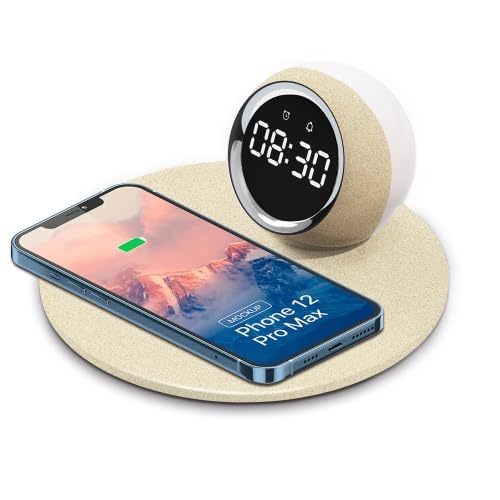
Image 1: The ELECTROPRIME K22T device, showcasing its digital clock, wireless charging pad, and night light.
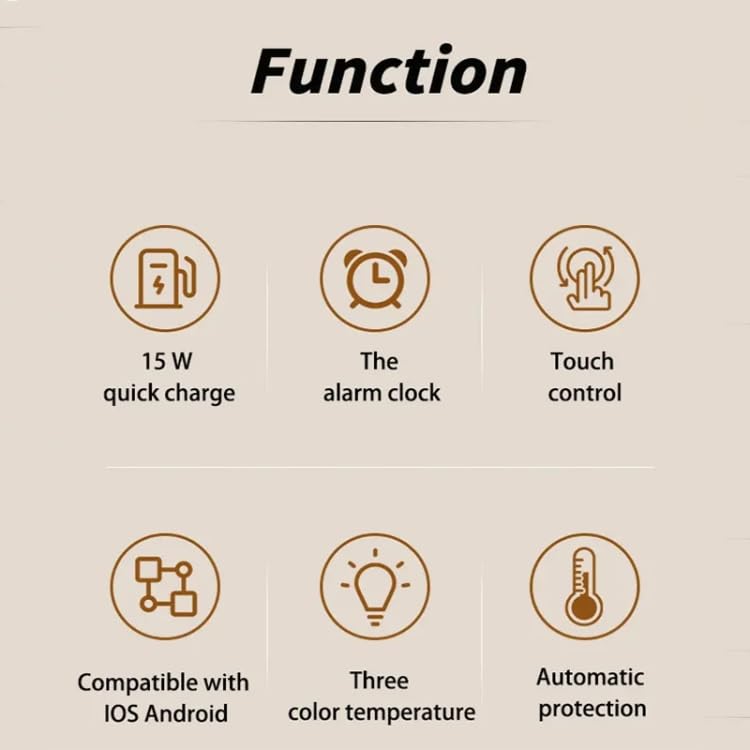
Image 2: Visual representation of the key functions including 15W quick charge, alarm clock, touch control, compatibility, adjustable color temperature, and automatic protection.
4. 설정
- 장치 포장 풀기: Carefully remove the ELECTROPRIME K22T from its packaging.
- 전원 연결: Insert the USB-C connector of the power cable into the input port on the back of the device. Connect the other end of the cable to a compatible power adapter (9V/2A recommended) and plug it into a wall outlet.
- 초기 전원 켜기: The digital clock display will illuminate, indicating the device is powered on and ready for use.
5. 사용 설명서
5.1 시계 설정
The device typically features touch-sensitive buttons for time adjustment. Refer to the icons near the display for specific functions (e.g., 'M' for Mode, '+' for Increase, '-' for Decrease).
- 시간 설정 모드로 들어가기: Press and hold the 'Mode' button (or similar icon) for a few seconds until the hour digits start blinking.
- 시간 조정: Use the '+' and '-' buttons to set the correct hour.
- 조정 분: Press the 'Mode' button again to switch to minute adjustment. Use the '+' and '-' buttons to set the correct minutes.
- 설정 모드 종료: Press the 'Mode' button once more, or wait a few seconds for the display to stop blinking, to save the time.
5.2 야간 조명 사용하기
The night light offers adjustable brightness and a rotatable design.
- 켜기/끄기: Tap the light icon button (or similar) to turn the night light on or off.
- 밝기 조정: With the light on, tap the light icon button repeatedly to cycle through brightness levels: 100% > 50% > 10% > Off.
- 각도 조정: Gently rotate the night light component to direct the illumination as desired.
5.3 무선 충전
The device supports 15W wireless fast charging for compatible smartphones and other devices.
- 놓기: Place your wireless charging compatible device (e.g., smartphone) centrally on the charging pad.
- 충전 표시기: The device's display or a dedicated LED indicator (if present) may show a charging status. Your phone will also indicate that it is charging.
- 최적의 충전: Ensure your device is properly aligned on the charging pad for efficient charging. Remove phone cases thicker than 3mm or those containing metal.
6. 유지관리
- 청소: Disconnect the power before cleaning. Use a soft, dry cloth to wipe the surface of the device. Do not use abrasive cleaners, solvents, or harsh chemicals.
- 저장: 장시간 사용하지 않을 경우, 직사광선을 피해 시원하고 건조한 곳에 보관하세요.
- 장애물을 피하십시오: Keep the charging pad clear of dust and debris to ensure optimal performance.
7. 문제 해결
| 문제 | 가능한 원인 | 해결책 |
|---|---|---|
| 장치의 전원이 켜지지 않습니다. | 전원이 연결되지 않았거나 어댑터에 결함이 있습니다. | Ensure the power cable is securely connected and the adapter is working. Try a different power outlet. |
| Wireless charging is slow or not working. | Misalignment, phone case, or incompatible device. | Reposition the device on the charging pad. Remove thick or metallic phone cases. Ensure your device supports wireless charging. Use a 9V/2A power adapter. |
| 야간 조명이 작동하지 않습니다. | Light is off or device is not powered. | Tap the light button to turn it on. Check if the device is powered on. |
| 시계 화면이 흐릿하거나 꺼져 있습니다. | Brightness setting or power issue. | Adjust the display brightness using the control buttons. Ensure the device is powered on. |
8. 사양
| 매개변수 | 값 |
|---|---|
| 모델명 | 케이22티 |
| 모델 번호 | 미정0604275402 |
| 입력 | 9V/2A |
| 산출 | 9V/1.67A |
| 무선 충전 전원 | 5W / 7.5W / 10W / 15W |
| 가벼운 힘 | 0.5와트 |
| 색온도 | 3500K(웜화이트) |
| 조명 모드 | 100% - 50% - 10% Brightness |
| 충전 인터페이스 | USB-C/타입-C |
| 충전 거리 | 3-8mm |
| Charge Conversion Rate | 75% |
| 재료 | ABS + PP (Acrylonitrile Butadiene Styrene, Polypropylene, Silicone) |
| 제품 크기 | 180 x 180 x 84mm |
| 순중량 | 270g |
9. 보증 및 지원
보증 정보 또는 기술 지원이 필요하시면 구매 시 함께 제공된 설명서를 참조하시거나 판매점에 문의하십시오. 보증 청구를 위해서는 구매 증빙 자료를 보관해 두시기 바랍니다.
Manufacturer Contact Information: ELECTROGADGETSSTORE