
1. 서론
This manual provides comprehensive instructions for the Blackmagic Design Pyxis 6K Cinema Camera, L-Mount. It covers essential information regarding setup, operation, maintenance, and troubleshooting to ensure optimal performance and longevity of your camera. Please read this manual thoroughly before using the camera.
2. 안전 정보
- 카메라를 물이나 과도한 습기에 노출시키지 마세요.
- Avoid operating the camera in extreme temperatures.
- Use only Blackmagic Design approved accessories and power supplies.
- 카메라를 분해하거나 개조하지 마십시오. 모든 정비는 자격을 갖춘 기술자에게 맡기십시오.
- 카메라를 강한 자기장에서 멀리 두세요.
3. 패키지 내용
패키지에 모든 품목이 들어 있는지 확인하세요.
- Blackmagic Design Pyxis 6K Cinema Camera (L-Mount)
- 전원 공급 장치
- 사용 설명서 (본 문서)
- DaVinci Resolve Studio 활성화 키
4. 카메라 오버view
The Blackmagic Design Pyxis 6K Cinema Camera features a 36x24mm full-frame 6K sensor, offering exceptional image quality and flexibility for cinematic content creation. It supports various recording formats including Blackmagic RAW and H.264 proxies, with resolutions up to 6048 x 4032.

그림 4.1: 전면 view of the Blackmagic Design Pyxis 6K Cinema Camera with an L-Mount lens attached. This image highlights the camera's robust body, the lens mount, and the integrated top handle.
Key features include a built-in 4-inch HDR 1500 nit LCD screen for clear monitoring, and support for open gate 3:2, full height 6:5 anamorphic, and Super 35 recording modes. The camera records full resolution up to 36 frames per second (fps) or 120 fps in windowed mode.

그림 4.2: 후면 view of the Blackmagic Design Pyxis 6K Cinema Camera, showcasing the 4-inch HDR LCD touchscreen display, control buttons, and the attached lithium-ion battery pack. The screen displays recording settings and menu options.
The camera utilizes CFexpress for flash memory storage and offers HDMI connectivity for external monitoring. Audio is supported in AAC, MP3, and PCM formats.
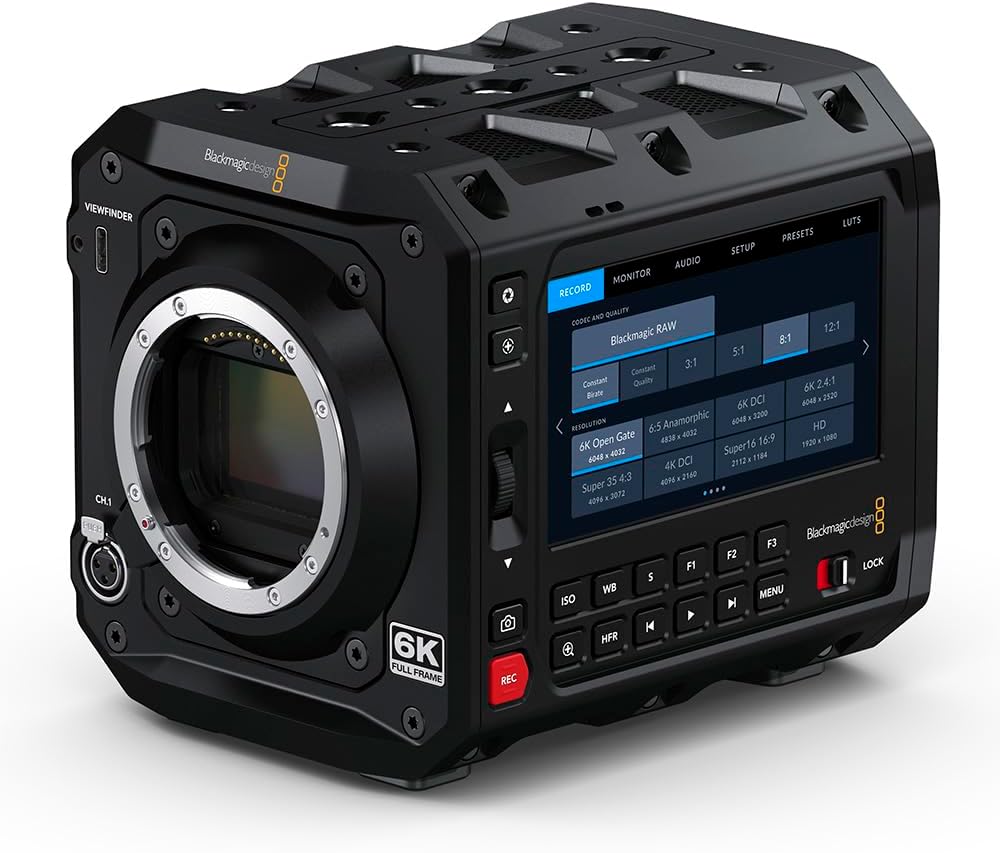
그림 4.3: 전면 view of the Blackmagic Design Pyxis 6K Cinema Camera without a lens, clearly showing the L-Mount for lens attachment and the '6K FULL FRAME' designation. This view highlights the camera's robust construction and lens interface.
5. 설정
5.1. 배터리 설치
- 카메라의 전원이 꺼져 있는지 확인하세요.
- 카메라 뒷면에 있는 배터리함을 찾으세요.
- Insert a compatible lithium-ion battery pack, ensuring it clicks securely into place.
5.2. Lens Attachment (L-Mount)
- Remove the body cap from the camera and the rear cap from your L-Mount lens.
- 렌즈의 흰색 표시와 카메라 렌즈 마운트의 흰색 표시를 일치시키십시오.
- Insert the lens into the mount and rotate it clockwise until it locks into position.
5.3. 미디어 카드 삽입
- Locate the CFexpress card slot.
- Insert a CFexpress card with the label facing the correct direction until it clicks into place.
- 제거하려면 카드를 부드럽게 눌러 빼내십시오.
5.4. 전원 켜기 / 끄기
- 전원을 켜려면 전원 스위치를 'ON' 위치로 밀어주세요.
- 전원을 끄려면 전원 스위치를 'OFF' 위치로 밀어주세요.
5.5. 초기 설정
Upon first power-on, you may be prompted to set the language, date, and time. Follow the on-screen instructions using the touchscreen LCD.
6. 카메라 작동
6.1. 메뉴 탐색
The 4-inch HDR LCD screen is a touchscreen interface. Tap icons and swipe to navigate through menus and adjust settings. Physical buttons are also available for quick access to common functions like ISO, White Balance, and Frame Rate.
6.2. 녹음
- 녹음 형식: The camera supports Blackmagic RAW for maximum quality and H.264 proxies for efficient workflow. Select your desired format in the 'Record' menu.
- 해상도 및 프레임 속도: Adjust resolution (e.g., 6K Open Gate, 6K DCI, Super 35) and frame rate (up to 36 fps at full resolution, 120 fps windowed) via the 'Record' or 'Project' settings.
- 녹음 시작/중지: Press the dedicated 'REC' button on the camera body to start and stop recording.
6.3. 오디오 설정
Access audio input levels, monitoring options, and format settings (AAC, MP3, PCM) through the 'Audio' menu. Ensure external microphones are properly connected to the camera's audio inputs.
6.4. Monitoring and Connectivity
Use the built-in LCD for on-camera monitoring. For external displays, connect an HDMI cable from the camera's HDMI output to your monitor. Adjust display settings in the 'Monitor' menu.
7. 유지관리
7.1. 청소
- 부드럽고 마른 천을 사용하여 카메라 본체를 청소하세요.
- LCD 화면의 경우, 전용 화면 세척액과 극세사 천을 사용하십시오.
- Keep the lens mount free of dust and debris. Use a blower brush for sensor cleaning if necessary, or consult a professional.
7.2. 보관
When not in use, store the camera in a cool, dry place, preferably in a padded camera bag or case to protect it from physical damage and environmental factors.
7.3. 펌웨어 업데이트
블랙매직 디자인을 주기적으로 확인하세요 website for firmware updates. Updates can improve performance, add features, and resolve issues. Follow the instructions provided with the firmware update carefully.
8. 문제 해결
- 카메라 전원이 켜지지 않음: Ensure the battery is fully charged and correctly inserted, or the external power supply is connected.
- LCD 화면에 아무것도 표시되지 않음: Check lens attachment, ensure the lens cap is removed, and verify monitor settings.
- 녹음 문제: Confirm a compatible CFexpress card is inserted and has sufficient free space. Check recording format and resolution settings.
- 오디오 문제: Verify microphone connection, audio input levels, and selected audio format.
- For persistent issues, perform a factory reset (refer to the 'Settings' menu) or contact Blackmagic Design support.
9. 사양
| 특징 | 사양 |
|---|---|
| 제품 치수 | 5.91 x 4.72 x 4.33 인치 |
| 품목 무게 | 4.62파운드 |
| 품목 모델 번호 | CINECAMCPYXA60LFL |
| 포토 센서 기술 | CMOS |
| 비디오 캡처 해상도 | 6K(6048 x 4032), 1080p, 720p |
| 최대 조리개 | 2mm (렌즈에 따라 다름) |
| 플래시 메모리 유형 | CF익스프레스 |
| 비디오 캡처 형식 | Blackmagic RAW, CinemaDNG, ProRes, DNxHR |
| 지원되는 오디오 형식 | AAC, MP3, PCM |
| 화면 크기 | 4 Inches (HDR 1500 nit LCD) |
| 연결 기술 | HDMI |
| 색상 | 검은색 |
| 제조업체 | 블랙매직 디자인 |
10. 보증 및 지원
10.1. 보증 정보
Blackmagic Design products typically come with a limited manufacturer's warranty. Please refer to the warranty card included with your product or visit the official Blackmagic Design web해당 지역의 자세한 보증 약관 및 조건은 해당 사이트에서 확인하세요.
10.2. 기술 지원
For technical assistance, product registration, or to download the latest software and drivers, please visit the official Blackmagic Design support page. You can find comprehensive FAQs, knowledge base articles, and contact information for customer support.
Official Blackmagic Design Store: Blackmagic Design on Amazon