
Elektron Digitakt II
Elektron Digitakt II User Manual
Model: Digitakt II
제품 끝view
The Elektron Digitakt II is a powerful 16-track drum computer and sampler designed for music production and live performance. It offers extensive sound manipulation capabilities, a robust sequencer, and a compact, durable design, making it suitable for both studio and on-the-go creative work.

그림 1: 전면 view of the Elektron Digitakt II, showing the display, knobs, and performance pads.
패키지 내용
상자 안에 모든 품목이 들어 있는지 확인하세요.
- Elektron Digitakt II Unit
- 전원 어댑터
- USB 케이블
초기 설정
Follow these steps to set up your Digitakt II for the first time:
- 전원 연결: Plug the included power adapter into the 12V DC IN port on the rear of the unit and then into a wall outlet.
- 오디오 연결: Connect your audio output cables from the L/R OUT ports to your mixer, audio interface, or headphones. If using external audio sources, connect them to the L/R IN ports.
- USB 연결(선택 사항): For computer integration and use with Elektron's Overbridge software, connect a USB cable from the Digitakt II's USB port to your computer.
- 전원 켜기: Press the Power button on the rear of the unit to turn on the Digitakt II.
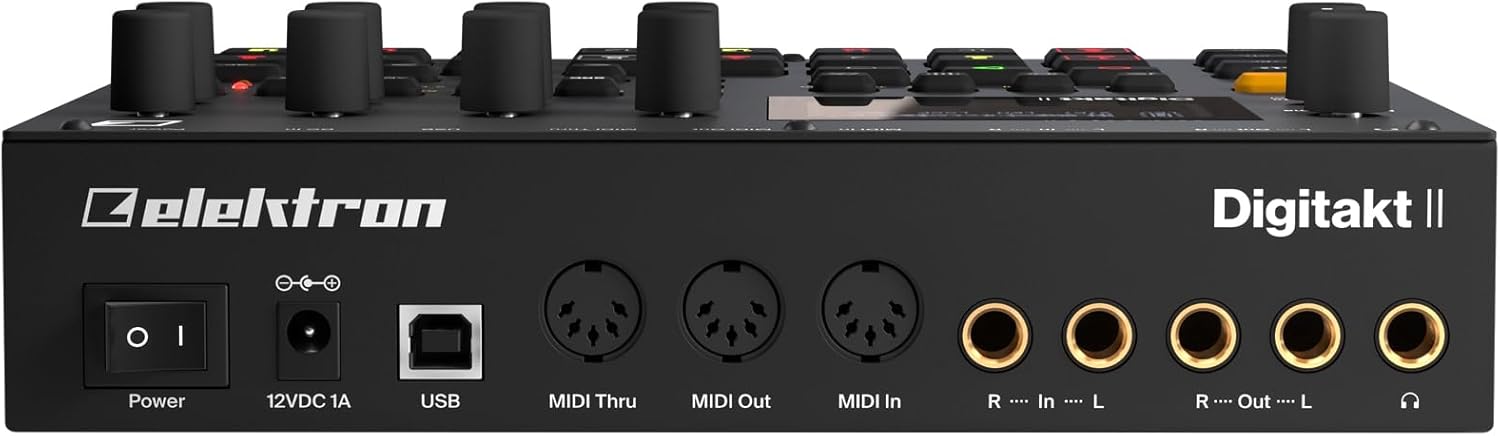
그림 2: 후면 view of the Elektron Digitakt II, showing power, USB, MIDI, and audio connections.
Operating Your Digitakt II
The Digitakt II features an intuitive interface with dedicated buttons and encoders for efficient workflow. Familiarize yourself with the main display and control layout.
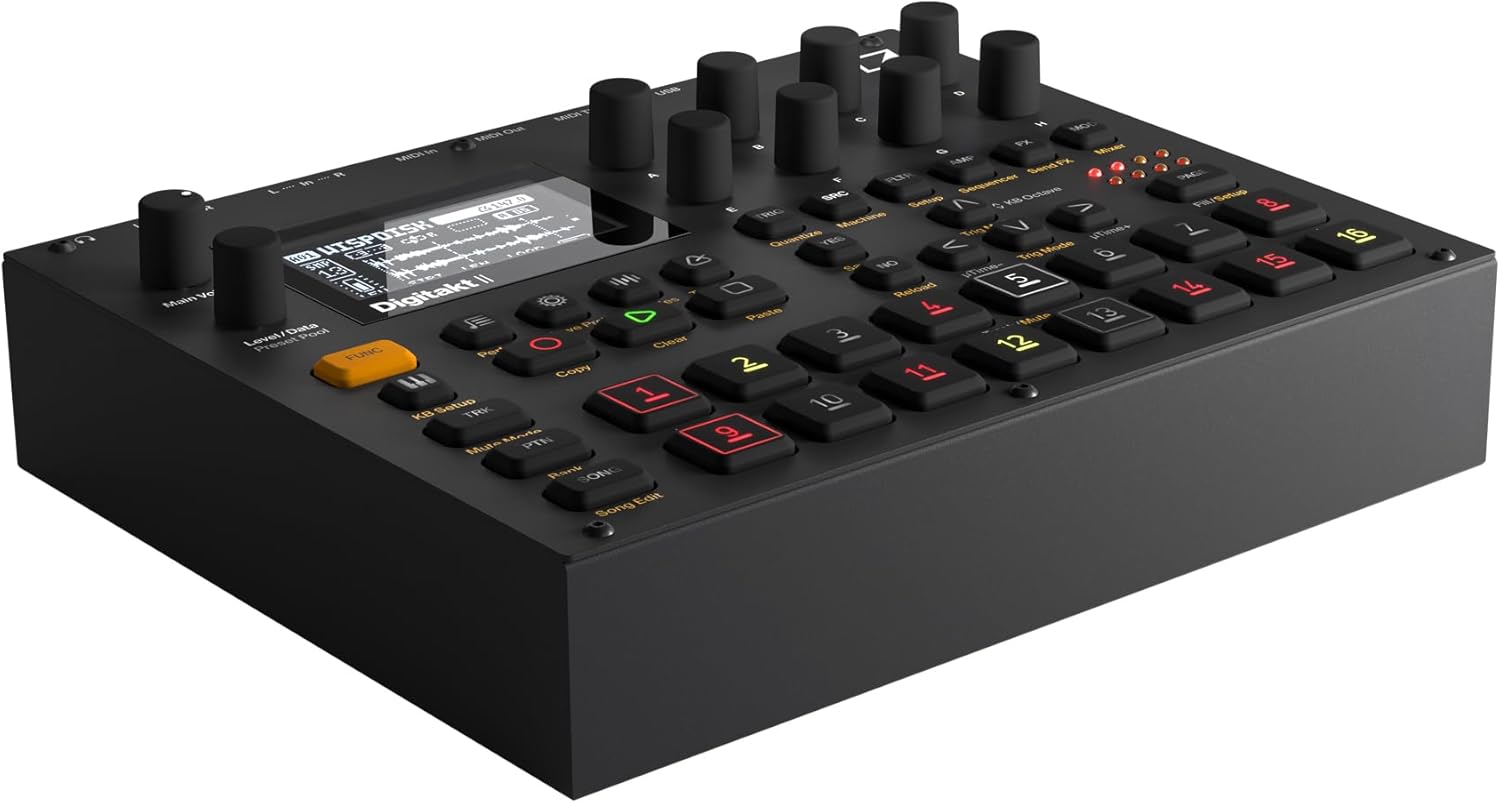
그림 3: 각도 view of the Elektron Digitakt II, highlighting the control surface and display.
주요 특징
- 16 Audio Tracks: Each track supports stereo or mono samples, or MIDI data.
- 128-Step Elektron Sequencer: Program intricate patterns with precise control.
- 3 Assignable LFOs per Track: Modulate various parameters for dynamic sound design.
- Per-Track Effects: Apply Delay, Reverb, Chorus, Bit Reduction, Sample Reduction, and Overdrive to individual tracks.
- Euclidean Sequence Generator: Explore complex rhythmic possibilities.
- Swappable Filters: Utilize a Base-width filter and choose from Multi-mode, Low Pass 4, Comb, EQ, or Legacy LP/HP filters.
- 4 Trig Modes: Enhance sequencing with various trigger behaviors.
- 노래 모드: Create, edit, and play full compositions with ease.
기본 동작
S 로딩중amp레: 'S'를 사용하세요amples' button and the data encoders to browse and load samples into your project. Samples can be imported via USB using Elektron's software.
시퀀싱: Select a track using the numbered pads. Enter notes and parameter locks by holding a trig button and adjusting parameters. The 128-step sequencer allows for detailed pattern creation.
효과: Access the FX section to apply and adjust the built-in effects for each track. Experiment with different effect types and parameters to shape your sound.
Saving Projects: Regularly save your work by pressing the 'Save Proj' button to prevent data loss.
관리 및 유지 보수
To ensure the longevity and optimal performance of your Digitakt II, follow these guidelines:
- 청소: 부드럽고 마른 천으로 제품을 닦으십시오. 연마성 세제나 용제는 사용하지 마십시오.
- 저장: 본 제품은 직사광선과 극한의 온도를 피해 서늘하고 건조한 곳에 보관하세요.
- 손질: Avoid dropping the unit or exposing it to excessive force.
- 통풍: 과열을 방지하려면 장치 주변에 적절한 환기가 이루어지도록 하십시오.
문제 해결
If you encounter issues with your Digitakt II, refer to the table below for common problems and solutions:
| 문제 | 가능한 원인 | 해결책 |
|---|---|---|
| 사운드 출력이 없습니다 | Incorrect audio connections, volume too low, muted tracks. | Check audio cables, increase Main Volume, ensure tracks are not muted in Mute Mode. |
| 장치의 전원이 켜지지 않음 | Power adapter not connected or faulty, power outlet issue. | Verify power adapter connection, try a different power outlet, ensure power button is pressed. |
| USB 연결 문제 | Incorrect USB cable, driver not installed, Overbridge not running. | Use the provided USB cable, install the latest Elektron drivers and Overbridge software from the official web대지. |
| Pads unresponsive | Unit frozen, calibration issue. | Restart the unit. If the problem persists, consult the full manual for calibration procedures. |
기술 사양
| 특징 | 세부 사항 |
|---|---|
| 모델명 | Digitakt II |
| 품목 무게 | 3.3파운드(1.5kg) |
| 제품 크기(L x W x H) | 8.4 x 6.9 x 2.5인치(21.3 x 17.5 x 6.4cm) |
| 본체 소재 | 주조 알루미늄 |
| 색상 | 검은색 |
| 커넥터 유형 | USB, Proprietary Power, MIDI In/Out/Thru, Audio In L/R, Audio Out L/R, Headphones |
| 포함된 구성 요소 | 전원 어댑터 |
보증 및 지원
Elektron products are manufactured to high standards and come with a limited warranty. For detailed warranty information, product registration, and technical support, please visit the official Elektron web해당 사이트를 방문하거나 고객 서비스에 문의하세요. 보증 청구를 위해 구매 증빙 자료를 보관하세요.
온라인 리소스: For the most up-to-date information, firmware updates, and additional resources, please refer to the official Elektron support page.
Ask a question about this manual
Ask about setup, troubleshooting, compatibility, parts, safety, or missing instructions. Manuals+ will review the question and use this page’s manual context to help answer it.