
제품 끝view
The CREWORKS 180 PPD Commercial Dehumidifier is designed for effective humidity control in large spaces, ranging from 600 to 1600 square feet. This unit features a robust design with upgraded components for efficient moisture removal and durability. Key features include automatic defrost, a user-friendly control panel, and portability for flexible placement.

이미지: 앞면 view of the CREWORKS 180 PPD Commercial Dehumidifier, highlighting its compact and robust design.
- Effective Dehumidification: Capable of removing up to 180 PPD (Pints Per Day) at saturation, suitable for areas up to 1600 sq. ft.
- 자동 해동: Prevents frost buildup on coils, ensuring continuous operation and efficiency.
- 내구성 있는 구조: Features upgraded copper coils for enhanced heat dissipation and longevity.
- 사용자 친화적인 컨트롤: An intuitive display panel allows for easy adjustment of humidity levels and timer settings.
- 휴대성 있는 디자인: Equipped with large rear wheels and a convenient handle for easy movement.
설치 지침
Follow these steps to properly set up your CREWORKS 180 PPD Commercial Dehumidifier.
1. 풀기 및 배치
- 제습기를 포장에서 조심스럽게 꺼내세요. 배송 중 손상된 부분이 있는지 확인하세요.
- Place the unit on a level, stable surface in the desired location. Ensure there is at least 12 inches (30 cm) of clear space around all sides for proper airflow.
- Consider the dimensions of the unit for optimal placement.

Image: Diagram showing the dimensions of the dehumidifier (23.11"D x 17.32"W x 34.13"H).

이미지: 전amples of suitable environments for the dehumidifier, including warehouses, garages, basements, and fitness centers.
2. 배수 연결
The unit includes a drain hose for continuous drainage. This eliminates the need for manual emptying of a water tank.
- 본체에서 배수구를 찾으십시오.
- Connect the provided drain hose securely to the drain outlet.
- Route the other end of the hose to a suitable drain point, such as a floor drain, sink, or large container. Ensure the hose is sloped downwards to allow for gravity drainage and is free from kinks or obstructions.

Image: Illustration of the drain hose connection and the overflow alarm feature, which notifies users if drainage is improper.
3. 전원 연결
전원 코드를 접지된 콘센트에 꽂으세요. 볼륨을 확인하세요.tage는 해당 유닛의 요구 사항과 일치합니다.
작동 지침
This section details how to operate your dehumidifier using the control panel.
제어판 이상view
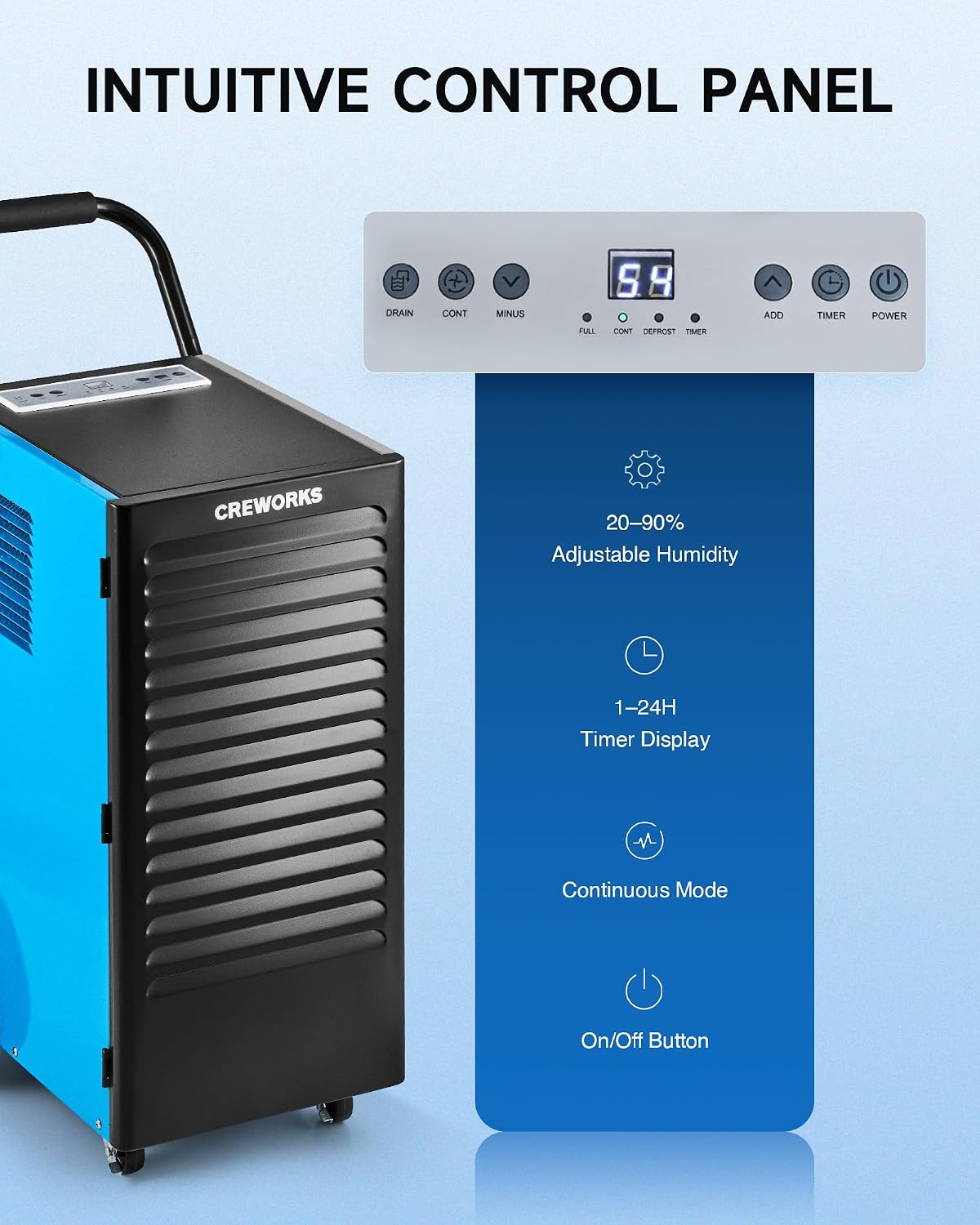
이미지: 클로즈업 view of the dehumidifier's intuitive control panel with various buttons and a digital display.
The control panel features a digital display and several buttons for managing the dehumidifier's functions:
- 전원 버튼: 장치를 켜거나 끕니다.
- ADD / MINUS Buttons: Adjusts the desired humidity level (20-90%) or timer setting (1-24 hours).
- 타이머 버튼: Sets the operational timer.
- CONT (Continuous) Button: Activates or deactivates continuous dehumidification mode.
- 배수 버튼: Activates or deactivates the drain pump (if applicable to the model).
- 디스플레이 표시기: Shows current humidity, timer, and status indicators for FULL, CONT, DEFROST, and TIMER.
기본 동작
- 전원 켜기: 를 누르세요 힘 button to turn on the dehumidifier. The display will show the current room humidity.
- 원하는 습도 설정: 사용하세요 추가하다 or 마이너스 buttons to set your desired humidity level between 20% and 90% Relative Humidity (RH). The unit will operate until the set humidity is reached, then cycle on and off to maintain it.
- 연속 모드: 를 누르세요 계속 button for continuous operation, where the unit will run constantly regardless of the humidity level. This is useful for very damp conditions or for faster drying.
- 타이머 기능: 를 누르세요 시간제 노동자 button to set an auto-on or auto-off time (1-24 hours).
Video: Demonstration of setting the desired humidity level and activating continuous mode on the dehumidifier's control panel.
자동 제상
The dehumidifier is equipped with an automatic defrost function. If frost builds up on the evaporator coils, the compressor will temporarily shut off, and the fan will continue to run to melt the frost. The DEFROST indicator light will illuminate during this cycle. Once defrosted, the unit will resume normal dehumidification.

Image: Illustration showing the automatic defrost function, where the dehumidifier temporarily halts the compressor to prevent frosting.
유지
정기적인 유지관리를 통해 최적의 성능을 보장하고 제습기의 수명을 연장할 수 있습니다.
1. 공기 필터 청소
The dehumidifier is equipped with a washable air filter. A dirty filter can reduce efficiency and airflow.
- 제습기를 끄고 전원 콘센트에서 플러그를 뽑으세요.
- Locate and remove the air filter from the unit. Refer to the product diagram for filter location.
- 필터를 따뜻한 비눗물로 세척하십시오. 깨끗이 헹군 후 완전히 말린 다음 다시 장착하십시오. 식기세척기나 강한 화학 약품은 사용하지 마십시오.
- 건조된 필터를 본체에 다시 삽입하십시오.
추천: Clean the air filter every 2-4 weeks, or more frequently depending on usage and air quality.

Image: Illustration showing the removable and reusable air filter for easy cleaning.
2. 외부 청소
부드러운 천으로 기기 외부를 닦아주세요.amp 천. 연마성 세척제나 용매를 사용하지 마십시오.
3. 보관
If storing the unit for an extended period, ensure it is clean and dry. Coil the power cord and store the unit in a cool, dry place.
문제 해결 가이드
이 가이드를 참조하여 일반적인 문제와 해결 방법을 확인하십시오.
| 문제 | 가능한 원인 | 해결책 |
|---|---|---|
| 제습기가 켜지지 않습니다. | No power, power cord loose, unit not plugged in. | Ensure the unit is properly plugged into a working outlet. Check circuit breaker. |
| 장치는 작동하지만 물을 모으지 못합니다. | Humidity setting too high, room temperature too low, air filter clogged, unit in defrost mode. | Lower the desired humidity setting. Ensure room temperature is above 41°F (5°C). Clean the air filter. Wait for defrost cycle to complete. |
| Unit is freezing up (frost on coils). | Low room temperature, refrigerant issue. | The unit has an automatic defrost function. If freezing persists, ensure room temperature is within operating range. If problem continues, contact support. |
| 물이 새고 있습니다. | Drain hose not connected properly, drain hose kinked or blocked, unit not level. | Check drain hose connection and ensure it is secure. Clear any kinks or blockages in the hose. Ensure the unit is on a level surface. |
| 이 장치는 시끄럽습니다. | 부품이 헐거워짐, 장치가 수평이 아님, 팬이 막힘. | Ensure the unit is on a stable, level surface. Check for any loose components. Inspect fan for obstructions. |
제품 사양
Detailed technical specifications for the CREWORKS 180 PPD Commercial Dehumidifier.
| 특징 | 세부 사항 |
|---|---|
| 상표 | 크레웍스 |
| 모델명 | 180PPD |
| 제습 용량(포화) | 하루 180파인트 |
| 제습 용량(AHAM) | 하루 85파인트 |
| 권장 적용 범위 | 600~1600평방피트 |
| 제품 크기(D x W x H) | 23.11인치 x 17.32인치 x 34.13인치 |
| 기류 용량 | 분당 350 세제곱센티미터 |
| 작동 모드 | 마디 없는 |
| 특별 기능 | Automatic Defrost, Portable, Timer, Wheels, Drain Hose, Display Panel |
| 재료 | 금속 |
| 냉각제 | R32 (Low-Impact) |
보증 및 지원
보증 정보
CREWORKS products typically come with a manufacturer's warranty. Specific warranty terms, including duration and coverage, may vary. Please refer to the warranty card included with your product or contact CREWORKS customer service for detailed information. Keep your purchase receipt as proof of purchase for warranty claims.
메모: 일부 고객 재views indicate a potential for issues after approximately one year of use. Regular maintenance and proper operation as outlined in this manual can help ensure product longevity.
고객 지원
For technical assistance, troubleshooting beyond this guide, or warranty inquiries, please contact CREWORKS customer support. Contact information can typically be found on the manufacturer's official web사이트 또는 제품 포장.
When contacting support, please have your product model number (180PPD) and purchase date available.