
Pryme BT-503-V2
PRYMEBLU® BT-503-V2 Wireless PTT Button and Headset Adapter User Manual
Model: BT-503-V2 | Brand: Pryme
제품 끝view
The PRYMEBLU® BT-503-V2 is a Bluetooth wireless Push-To-Talk (PTT) button and headset adapter designed to enhance communication for two-way radio users. This adapter allows for seamless integration of wireless headsets and other audio accessories with compatible radios, providing increased flexibility and convenience.
It is specifically designed for Motorola (X03) two-pin radios and similar models, including digital radios. The adapter features an easy pairing process and maintains its connection even if the radio is powered off or the adapter is removed.

이미지: 앞면 view of the PRYMEBLU BT-503-V2 adapter, showcasing its compact design and the PRYMEBLU V2 branding.
설정 및 설치
- Prepare Your Radio: Before connecting the PRYMEBLU adapter, always ensure your two-way radio is powered off. This prevents potential damage to both the radio and the adapter.
- 어댑터를 연결하십시오: Insert the two-pin connector of the BT-503-V2 adapter into the accessory port of your compatible Motorola (X03) two-pin radio. Ensure a secure fit.
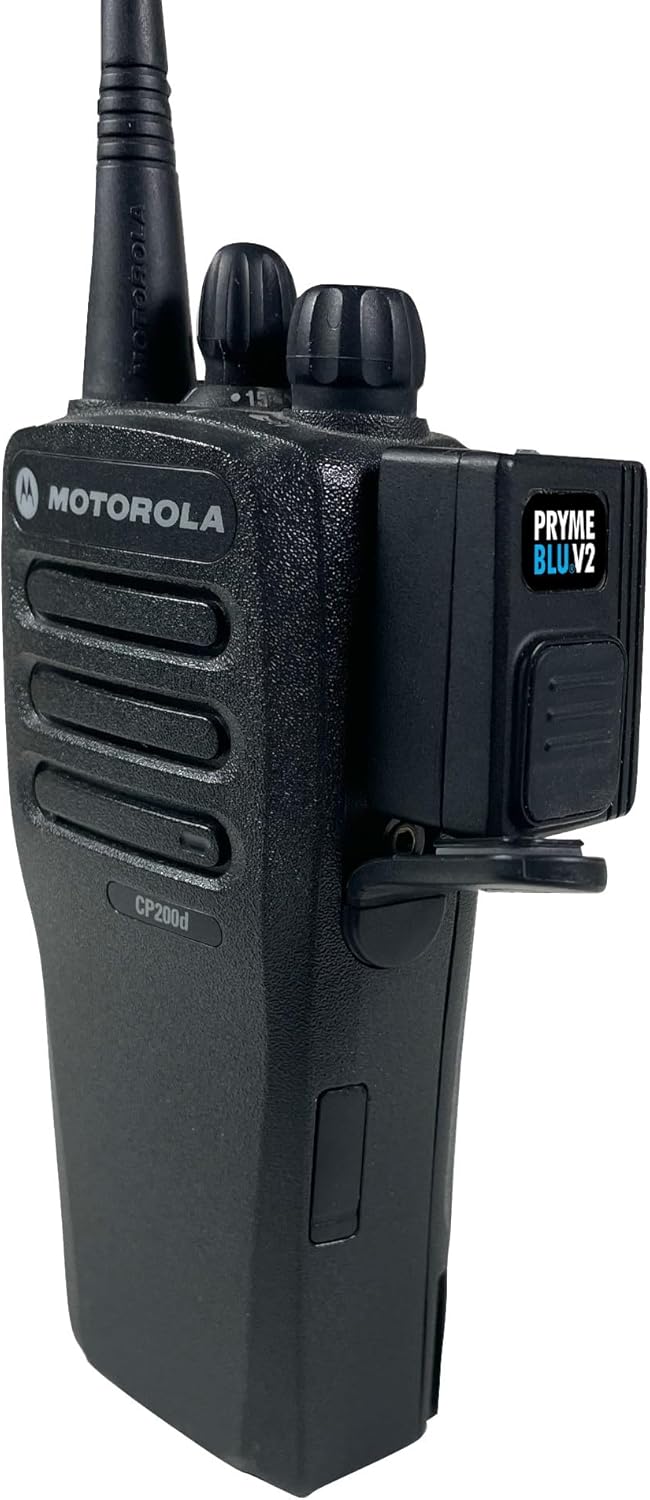
Image: The PRYMEBLU BT-503-V2 adapter securely connected to the side port of a Motorola two-way radio, demonstrating proper installation.
- 전원 켜기: Once the adapter is securely connected, power on your two-way radio. The adapter will automatically power on with the radio.
- Pairing with a Wireless Headset:
- Put your wireless headset or audio accessory into pairing mode (refer to your headset's manual for specific instructions).
- The PRYMEBLU BT-503-V2 adapter will automatically attempt to pair with nearby Bluetooth devices in pairing mode.
- Once paired, the adapter stores the connection, meaning it will automatically reconnect to your headset even if the radio is turned off and on again, or if the adapter is temporarily removed.
- 충전 중: The adapter can be charged via its USB port. Connect a standard USB charging cable to the adapter and a compatible USB power source.

이미지: 상단 view of the PRYMEBLU BT-503-V2 adapter with a USB charging cable inserted, illustrating the charging port location.
Note: This adapter is compatible with most available wireless headsets and other audio accessories. For Kenwood (and many imported radios) that also use two-pin connectors but with different spacing, please use the BT-501-V2 model.
작동 지침
The PRYMEBLU BT-503-V2 offers flexible Push-To-Talk (PTT) options for transmitting audio through your radio.
- Using the On-Adapter PTT Button: Press and hold the large PTT button located on the side of the PRYMEBLU adapter to initiate transmissions. Release the button to stop transmitting.
- Using an Optional PRYME Wireless PTT: For added convenience, you can pair an optional PRYME wireless PTT button with the adapter. This allows for remote activation of transmissions without needing to reach for the adapter or radio. Refer to the specific instructions provided with your PRYME wireless PTT for pairing and operation.
- 오디오 전송: Once paired, all audio from your radio will be routed to your wireless headset, and your voice will be transmitted through the headset's microphone when the PTT is activated.
유지 보수 및 관리
Proper care and maintenance will ensure the longevity and optimal performance of your PRYMEBLU BT-503-V2 adapter.
- 청소: Use a soft, dry cloth to wipe down the adapter. Avoid using harsh chemicals, solvents, or abrasive cleaners, as these can damage the device's surface and internal components.
- 저장: 장시간 사용하지 않을 경우 어댑터를 직사광선과 극한의 온도를 피해 서늘하고 건조한 곳에 보관하세요.
- 방수 기능: The product is described as "Weather Resistant" (Resistente ao tempo). While it can withstand some exposure to elements, it is not fully waterproof. Avoid submerging the device in water or exposing it to heavy rain.
- 손질: Handle the adapter with care. Avoid dropping it or subjecting it to strong impacts, which could damage internal circuitry.
문제 해결
If you encounter issues with your PRYMEBLU BT-503-V2 adapter, refer to the following common troubleshooting steps:
| 문제 | 가능한 원인 / 해결책 |
|---|---|
| 어댑터 전원이 켜지지 않습니다. |
|
| Cannot pair with headset. |
|
| 헤드셋에서 소리가 나지 않습니다. |
|
| 송신할 수 없습니다(PTT가 작동하지 않습니다). |
|
명세서
Key technical specifications for the PRYMEBLU® BT-503-V2 adapter:
- 모델: BT-503-V2
- 호환성: Motorola (X03) two-pin radios and similar models, including digital radios. Compatible with most wireless headsets.
- 연결성: 블루투스 무선
- 특별 기능: Weather Resistant, Lightweight
- 전원: Primarily powered by the radio when connected; features a USB port for charging internal components.
- 제품 크기: Not explicitly stated for the adapter itself, but packaging dimensions are approximately 19.05 x 17.78 x 6.35 cm (7.5 x 7 x 2.5 inches).
- Product Weight (Packaged): Approximately 907 g (2 lbs). Note: This weight refers to the packaged product, likely for the 5-pack. The adapter itself is lightweight.
- 포트 수 : 1 (for radio connection)
- ASIN: B0CZBZR71J
- 한국어: 0638615223134

Image: Product packaging for the PRYMEBLU BT-503-V2 (5-pack), showing product details, compatibility, and manufacturer information. Note the UPC code and web대지.
보증 및 지원
For information regarding product warranty, returns, or technical support, please refer to the official Pryme web사이트를 방문하거나 고객 서비스에 직접 문의하세요.
공식적인 Web대지: www.pryme.com
Pryme Store on Amazon: Visit Pryme Store
The product is available for purchase since March 28, 2024. For specific return policies, please consult the retailer where the product was purchased.
Ask a question about this manual
Ask about setup, troubleshooting, compatibility, parts, safety, or missing instructions. Manuals+ will review the question and use this page’s manual context to help answer it.