
소개
This manual provides essential information for the safe and efficient operation of your DATOUBOSS 2000W 24V Pure Sine Wave Power Inverter. Please read these instructions carefully before installation and use. Keep this manual for future reference.
안전 예방 조치
- 과열을 방지하려면 인버터 주변을 적절하게 환기시키십시오.
- 인버터를 물, 비 또는 과도한 습기에 노출시키지 마십시오.
- Avoid operating the inverter near flammable materials or gases.
- 인버터는 24V DC 전원에만 연결하세요.
- Always disconnect the power source before performing any maintenance or cleaning.
- 인버터 c를 열지 마십시오.asing; 내부에 사용자가 수리할 수 있는 부품이 없습니다.
- 어린이의 손이 닿지 않는 곳에 보관하세요.
제품 끝view
The DATOUBOSS 2000W 24V Pure Sine Wave Power Inverter converts 24V DC battery power to 230V AC household power, suitable for sensitive electronics. It features a continuous output of 2000W and a peak power of 4000W.
주요 특징
- 순수 사인파 출력: Provides clean, stable power suitable for sensitive electronics, reducing noise and energy consumption.
- 종합 보호: Includes protection against reverse connection, short circuit, undervoltag전자, 오버볼tage, overheating, overload, and overcurrent.
- 지능형 냉각 팬: Activates automatically when the load exceeds 40% or internal temperature reaches 45°C, ensuring efficient heat dissipation and quiet operation.
- 내구성 있는 구조: 알루미늄 casing for enhanced heat dissipation.
- 원격 제어 기능: Allows for convenient power management from a distance.
구성 요소 식별

그림 1: 인버터 전면 및 후면 패널 레이아웃
This image illustrates the various ports and controls on the inverter. The front panel includes AC output sockets, USB and Type-C ports, an ON/OFF switch, and an LCD display. The rear panel shows the DC input terminals (positive and negative) and cooling fans.
- AC 출력 소켓: Two EU standard AC 230V outlets for connecting appliances.
- USB 인터페이스: USB 전원 장치 충전용.
- Type-C 인터페이스 : For charging Type-C powered devices.
- 온 / 오프 스위치: 인버터용 주 전원 스위치.
- 원격 스위치 연결: Port for connecting the wired remote control.
- LCD 디스플레이: 출력 볼륨을 표시합니다tage, power, and error codes.
- DC 입력 단자: Red for positive (+), Black for negative (-) connection to the 24V battery.
- 냉각 팬 : Two high-speed fans for thermal management.
- 접지 터미널: 안전 접지를 위해.

Figure 2: Inverter Dimensions and Output Waveform
This image displays the physical dimensions of the inverter (approximately 32.6cm length, 20cm width, 7.9cm height) and a graphical representation of its pure sine wave output, indicating stable and efficient power delivery.

Figure 3: Intelligent Cooling System
This image highlights the inverter's dual high-speed cooling fans and intelligent chip control, which activate based on load and temperature to maintain optimal operating conditions and ensure quiet performance.
설치 지침
Follow these steps to properly set up your DATOUBOSS power inverter.
1. 위치 선택
- 인버터를 직사광선, 열원 및 습기를 피해 건조하고 통풍이 잘 되는 곳에 설치하십시오.
- Ensure there is sufficient space around the inverter for proper airflow, especially around the cooling fans.
- Mount the inverter securely on a stable surface using the integrated mounting brackets.
2. Connecting to a 24V DC Power Source
- 인버터의 전원 스위치가 "OFF" 위치에 있는지 확인하십시오.
- Connect the red battery cable to the positive (+) terminal of your 24V battery bank.
- 빨간색 케이블의 다른 쪽 끝을 인버터의 양극(+) DC 입력 단자에 연결하십시오.
- Connect the black battery cable to the negative (-) terminal of your 24V battery bank.
- 검은색 케이블의 다른 쪽 끝을 인버터의 음극(-) DC 입력 단자에 연결하십시오.
- 연결이 헐거워져 스파크가 발생하는 것을 방지하기 위해 모든 연결부가 단단히 고정되었는지 확인하십시오.
- Connect the ground terminal of the inverter to a proper earth ground.
중요한: Always connect the positive (+) terminals first, then the negative (-) terminals. When disconnecting, disconnect the negative (-) terminals first.
3. Connecting the Remote Control (Optional)
- If using the remote control, plug its cable into the "Remote Switch Connection" port on the inverter.
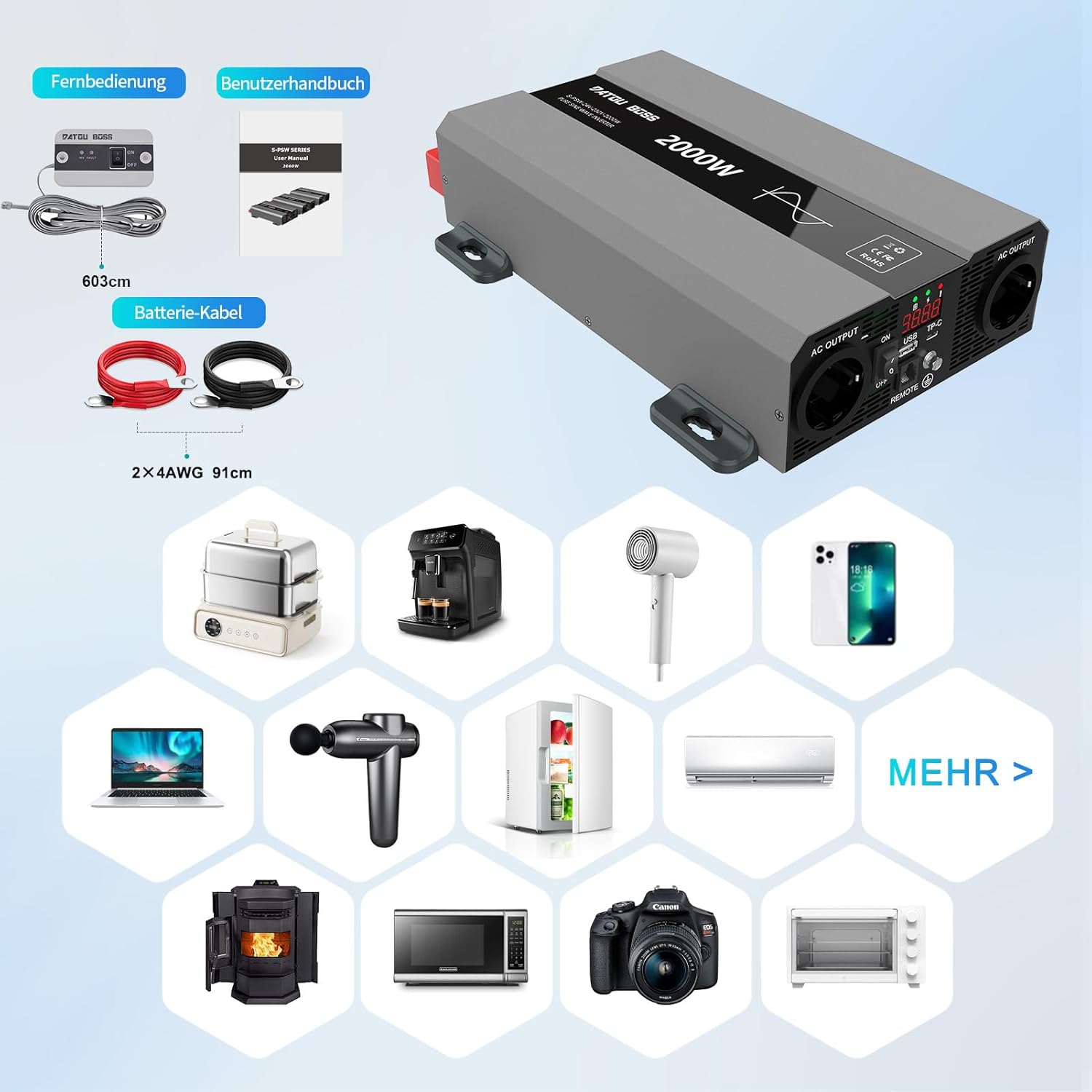
그림 4: 포함된 구성 요소
This image shows the items typically included with the inverter: the inverter unit, battery connection cables (red and black), and a remote control unit with its cable. A user manual is also included.
작동 지침
1. Powering On the Inverter
- After ensuring all DC connections are secure, switch the inverter's ON/OFF switch to the "ON" position.
- The LCD display will illuminate, showing the output voltag전자와 전원.
- The cooling fans may briefly spin up during startup.
2. Connecting AC Appliances
- Plug your 230V AC appliances into the AC output sockets on the inverter.
- 총 와트를 보장tage of all connected appliances does not exceed the inverter's continuous power rating (2000W).
- For inductive loads (e.g., motors, refrigerators), consider their startup surge power, which can be several times their running wattage.
3. Using USB and Type-C Ports
- Connect your USB or Type-C compatible devices to the respective ports for charging.
4. Powering Off the Inverter
- Disconnect all AC appliances from the inverter.
- Switch the inverter's ON/OFF switch to the "OFF" position.

Figure 5: Inverter in an Outdoor Application
This image demonstrates the inverter being used outdoors to power a laptop, highlighting its portability and utility for various scenarios like camping or remote work.
유지
정기적인 유지관리는 인버터의 수명과 최적의 성능을 보장합니다.
청소
- Periodically clean the exterior of the inverter with a soft, dry cloth.
- Ensure the cooling vents and fans are free from dust and debris. Use compressed air if necessary to clear blockages.
- 액체 세척제나 용제를 사용하지 마세요.
연결 검사
- Regularly check all DC and AC connections for tightness and signs of corrosion.
- Loose connections can cause overheating and damage to the inverter or battery.
저장
- When not in use for extended periods, store the inverter in a cool, dry place.
- Ensure the battery connected to the inverter is properly maintained and charged according to its manufacturer's instructions.
문제 해결
This section addresses common issues you might encounter with your inverter. The inverter is equipped with multiple protection functions, and an alarm will sound with an LED flashing to indicate a protection state.

그림 6: 인버터 보호 기능
This diagram illustrates the internal components and various protection mechanisms of the inverter, including reverse polarity, over-temperature, overload, over-voltage, 언더볼륨tage, 단락 보호 기능이 있습니다.
| 문제 | 가능한 원인 | 해결책 |
|---|---|---|
| 출력 볼륨 없음tage / Inverter not turning on |
|
|
| Inverter shuts down with alarm / LED flashing |
|
|
| 출력 부족 / 가전제품이 제대로 작동하지 않음 |
|
|
명세서
| 특징 | 세부 사항 |
|---|---|
| 상표 | 다투보스 |
| 모델 번호 | SAK-2000W24V |
| 연속 전력 | 2000 와트 |
| 피크 파워 | 4000 와트 |
| 입력 Voltage | 24볼트 직류 |
| 출력 볼륨tage | 230 볼트 AC |
| 출력파형 | 순수한 사인 웨이브 |
| 능률 | > 95% |
| 제품 치수 | 32.6L x 20W x 7.9H 센티미터 |
| 색상 | 회색 |
| 추천 용도 | Office, Home, Vehicle (RV, Camp잉) |
| 포함된 구성 요소 | 1 Pure Sine Wave Inverter, 2 Connection Cables, 1 Remote Control, 1 User Manual |
보증 정보
This product is typically covered by a return policy that allows for refund or replacement within 30 days of purchase, as per standard retail terms. For specific warranty details, including duration and coverage, please refer to the documentation provided with your purchase or contact the seller directly.
보증 청구를 위해 구매 증빙 서류를 보관하세요.
고객 지원
If you encounter any issues or have questions regarding the DATOUBOSS 2000W 24V Pure Sine Wave Power Inverter that are not covered in this manual, please contact the seller or manufacturer for assistance.