
SENTRY HPXBTA1000
SENTRY BT Pro Sq Headset User Manual
Model: HPXBTA1000
1. 서론
Welcome to the user manual for your new SENTRY BT Pro Sq Headset with Active Noise Canceling. This manual provides essential information on setting up, operating, maintaining, and troubleshooting your headset to ensure optimal performance and longevity. Please read this manual thoroughly before using the product.
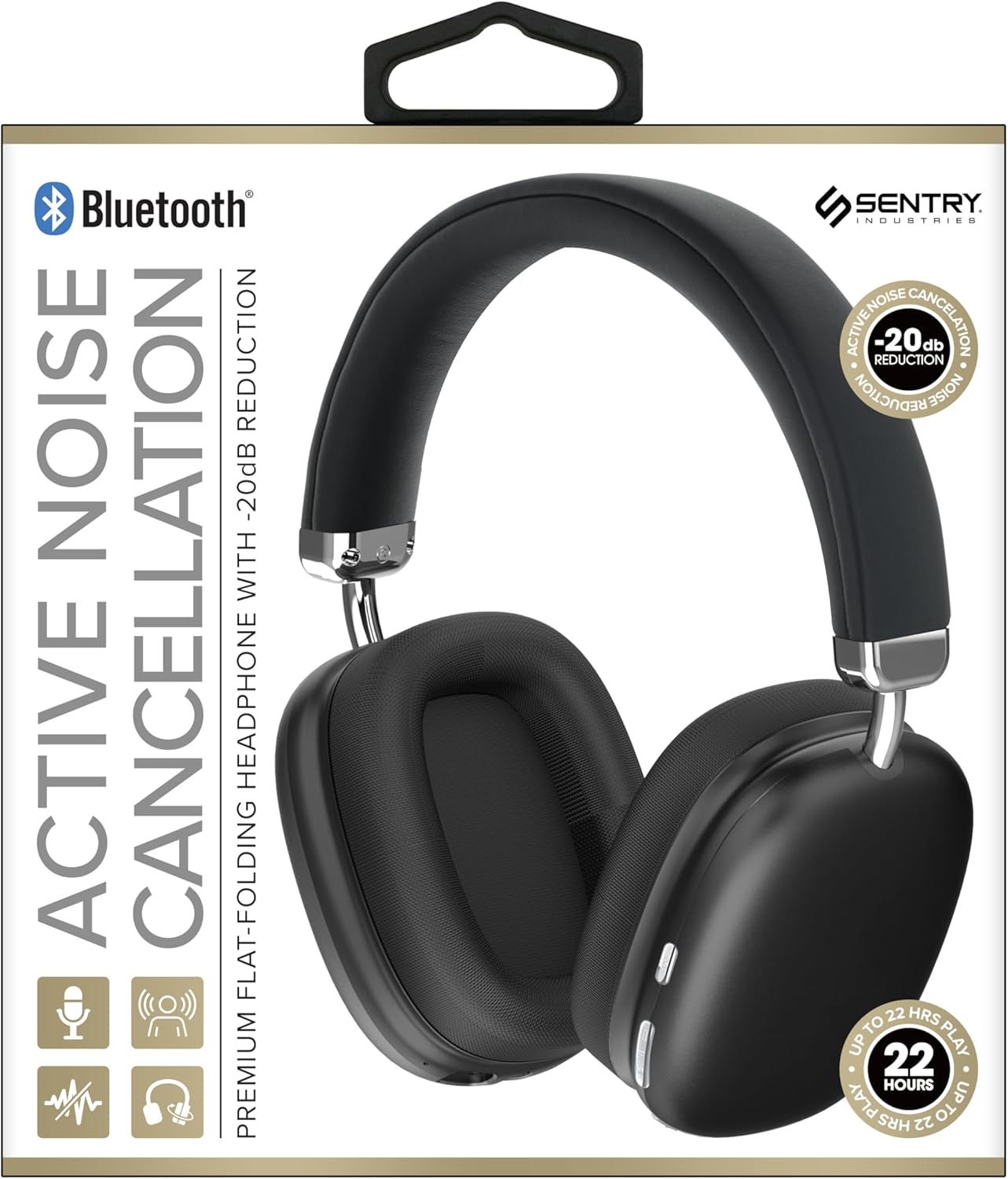
This image displays the SENTRY BT Pro Sq Headset in black, highlighting its over-ear design, adjustable headband, and the control buttons located on the earcups. The packaging indicates features such as Bluetooth connectivity, Active Noise Cancellation with -20dB reduction, and up to 22 hours of play time.
2. 중요한 안전 정보
To ensure safe and proper operation, please observe the following guidelines:
- 헤드셋을 극한의 온도, 습도 또는 부식성 물질에 노출시키지 마세요.
- 헤드셋을 떨어뜨리거나 강한 충격을 주지 마십시오.
- 헤드셋을 직접 분해하거나 수리하려고 하지 마십시오. 보증이 무효화됩니다.
- 헤드셋은 부드럽고 마른 천으로만 닦으십시오. 액체 세척제는 사용하지 마십시오.
- 높은 볼륨으로 장시간 청취하면 청력 손상을 유발할 수 있습니다. 볼륨을 안전한 수준으로 조절하십시오.
- 주변 소리를 듣지 못해 위험할 수 있는 상황(예: 운전, 자전거 타기, 교통량이 많은 곳에서 걷기)에서는 헤드셋을 사용하지 마십시오.
3. 패키지 내용
다음 품목이 패키지에 포함되어 있는지 확인하세요.
- SENTRY BT Pro Sq Headset
- USB 충전 케이블
- 사용자 설명서
4. 제품 오버view
The SENTRY BT Pro Sq Headset features an over-ear design with soft ear pads for comfort and noise isolation. It includes an adjustable folding headband for portability. Key components include:
- 이어컵: House the audio drivers and provide passive noise isolation.
- 머리띠: Adjustable for a comfortable fit, designed to fold for compact storage.
- 제어 버튼: Located on the earcups for power, volume, track control, and Active Noise Cancellation (ANC).
- 마이크로폰: 핸즈프리 통화 기능이 내장되어 있습니다.
- 충전 포트: USB 충전 케이블을 연결합니다.
Refer to the product image in the Introduction section for visual identification of these components.
5. 설정
5.1 헤드셋 충전
- USB 충전 케이블의 작은 쪽 끝을 헤드셋의 충전 포트에 연결하세요.
- USB 충전 케이블의 큰 쪽 끝을 USB 전원 어댑터(포함되지 않음)나 컴퓨터의 USB 포트에 연결합니다.
- The LED indicator on the headset will illuminate to show charging status. It will change color or turn off when fully charged.
- 일반적으로 완전 충전에는 약 2~3시간이 걸립니다.
5.2 블루투스 기기와의 페어링
Before using the headset wirelessly, you must pair it with your Bluetooth-enabled device (smartphone, laptop, tablet, smart speaker, gaming console).
- 헤드셋이 완전히 충전되었는지 확인하세요.
- With the headset powered off, press and hold the Power button for approximately 5-7 seconds until the LED indicator flashes rapidly, indicating pairing mode.
- Bluetooth 장치에서 Bluetooth를 활성화하고 새 장치를 검색하세요.
- Select "SENTRY BT Pro Sq" (or similar name) from the list of available devices.
- Once paired, the LED indicator on the headset will stop flashing and may turn solid blue or off, depending on the model.
- 헤드셋은 전원을 켜면 마지막으로 페어링된 장치에 자동으로 다시 연결을 시도합니다.
6. 사용 설명서
6.1 전원 켜기/끄기
- 전원 켜기: Press and hold the Power button for 2-3 seconds. The LED indicator will light up.
- 전원 끄기 : Press and hold the Power button for 3-4 seconds. The LED indicator will turn off.
6.2 능동형 소음 제거(ANC)
이 헤드셋은 주변 소음을 줄이기 위한 액티브 노이즈 캔슬링 기능을 갖추고 있습니다.
- ANC 활성화: Locate the ANC button (if separate) or press the designated control. The ANC indicator light will turn on.
- ANC 비활성화: ANC 버튼을 다시 누르세요. ANC 표시등이 꺼집니다.
6.3 Media Control (Touch Control)
Control your audio playback directly from the headset:
- 재생/일시 중지: 다기능 버튼을 한 번 누르세요.
- 볼륨 업: 볼륨 높이기 버튼을 누르세요.
- 볼륨 작게 : 볼륨 낮추기 버튼을 누르세요.
- 다음 트랙: 다기능 버튼을 두 번 누르세요.
- 이전 트랙 : 다기능 버튼을 세 번 누르세요.
6.4 통화 관리
Manage phone calls with the built-in microphone:
- 전화 받기: Single tap the multi-function button when a call comes in.
- 통화 종료: 통화 중 다기능 버튼을 한 번 누르세요.
- 전화 거부: 전화가 걸려오면 다기능 버튼을 2초 동안 길게 누르세요.
7. 유지관리 및 관리
- 청소: 부드럽고 마른 천으로 헤드셋을 닦으세요. 연마성 세제, 알코올 또는 화학 용제는 사용하지 마세요.
- 저장: When not in use, store the headset in a cool, dry place, away from direct sunlight and extreme temperatures. Utilize the folding headband feature for compact storage.
- 배터리 관리 : To preserve battery life, charge the headset regularly, even if not used for extended periods. Avoid fully discharging the battery frequently.
- 물을 피하세요: The headset is not waterproof. Keep it away from water and moisture.
8. 문제 해결
헤드셋 사용 중 문제가 발생하면 다음의 일반적인 문제 및 해결 방법을 참조하십시오.
| 문제 | 가능한 해결책 |
|---|---|
| 헤드셋의 전원이 켜지지 않습니다. | Ensure the headset is fully charged. Connect to a power source and allow it to charge for at least 30 minutes before attempting to power on again. |
| Bluetooth 장치와 페어링할 수 없습니다. | Ensure the headset is in pairing mode (LED flashing rapidly). Make sure Bluetooth is enabled on your device and it is within range (10 meters). Try restarting both the headset and your device. |
| 헤드셋에서 소리가 나지 않습니다. | Check the volume level on both the headset and your connected device. Ensure the headset is properly paired and connected. Try playing audio from a different application or device. |
| Active Noise Cancellation (ANC) is not effective. | Ensure ANC is activated. Make sure the earcups are properly sealed around your ears. ANC is most effective against low-frequency, constant noise. |
| 마이크가 작동하지 않습니다. | Ensure the headset is connected and selected as the input device on your computer or smartphone. Check privacy settings on your device that might restrict microphone access. |
9. 사양
| 특징 | 세부 사항 |
|---|---|
| 모델명 | HPXBTA1000 |
| 연결 기술 | 무선(블루투스) |
| 소음 제어 | 능동 소음 제거 |
| 귀 위치 | 귀 위 |
| 폼 팩터 | 귀 위 |
| 제어 유형 | 미디어 컨트롤, 터치 |
| 주파수 범위 | 20Hz ~ 20,000Hz |
| 오디오 드라이버 유형 | 동적 드라이버 |
| 호환 장치 | Smartphones, Laptops, Tablets, Smart Speakers, Gaming Consoles |
| 색상 | 검은색 |
| 품목 무게 | 1.2파운드 |
| 한국어: | 080068501503 |
| 제조업체 | 보초 |
10. 보증 및 지원
SENTRY products are designed and manufactured to the highest quality standards. For information regarding warranty coverage, technical support, or service inquiries, please refer to the warranty card included with your product or visit the official SENTRY web사이트. 보증 청구를 위해 구매 증빙 자료를 보관하세요.
Ask a question about this manual
Ask about setup, troubleshooting, compatibility, parts, safety, or missing instructions. Manuals+ will review the question and use this page’s manual context to help answer it.