
1. 서론
This manual provides detailed instructions for the installation, operation, and maintenance of your DB Drive SPRO2500.4 4-Channel Class AB Amp앰프입니다. 설치 또는 작동 전에 본 설명서를 꼼꼼히 읽어 올바른 사용법을 숙지하고 제품 또는 차량 오디오 시스템의 손상을 방지하십시오. 나중에 참조할 수 있도록 본 설명서를 보관하십시오.
2. 안전 정보
설치 및 작동 중에는 항상 다음 안전 예방 조치를 준수하세요.
- 전기 작업을 시작하기 전에 차량 배터리의 음극 단자를 분리하십시오.
- 배선이 꼬이거나 잘리거나 단락되는 것을 방지하기 위해 모든 배선이 올바르게 배치되고 고정되었는지 확인하십시오.
- 이 설명서에 명시된 대로 전원 및 접지 연결에 적합한 규격의 배선을 사용하세요.
- 설치하다 amp과열을 방지하기 위해 적절한 환기가 가능한 위치에 보관하세요.
- 장착을 피하십시오 amp직사광선, 과도한 열, 습기 또는 먼지에 노출된 곳에 보관하십시오.
- 제품을 열거나 수정하려고 시도하지 마십시오. amp수리 담당자. 모든 서비스는 자격을 갖춘 담당자에게 의뢰하세요.
- Wear eye protection when working with tools and electrical components.
3. 설정 및 설치
3.1 풀기
조심스럽게 amplifier from its packaging. Inspect the unit for any signs of damage. If damage is found, contact your dealer immediately.
3.2 설치 위치
Choose a mounting location that is dry, well-ventilated, and protected from physical damage. Ensure sufficient space around the amp공기 순환용 증폭기. 안전하게 고정하십시오. amp적절한 하드웨어를 사용하여 증폭기를 단단한 표면에 단단히 고정하십시오.
3.3 배선 연결
Proper wiring is crucial for optimal performance and safety. Refer to the diagram below for terminal identification.

영상: Rear panel of the DB Drive SPRO2500.4 amplifier showing power, ground, remote, fuse, and speaker output terminals.
- 전원(BATT+): Connect a 4-gauge power cable directly from the positive (+) terminal of the vehicle's battery. Install an in-line fuse holder (not supplied) within 18 inches (45 cm) of the battery.
- 접지(GND): 4게이지 접지 케이블을 연결하세요. amp앰프의 접지 단자를 차량 섀시의 깨끗하고 도색되지 않은 금속 표면에 연결하십시오. 견고한 전기 연결이 이루어졌는지 확인하십시오.
- 원격(REM): Connect a 18-gauge remote turn-on wire from your head unit's remote output to the amp리파이어의 REM 단자입니다. 이 전선은 amp헤드 유닛으로 라이터를 켜고 끌 수 있습니다.
- Speaker Outputs (CH1-CH4): Connect your speakers to the appropriate output terminals. The SPRO2500.4 supports 4-channel stereo operation or 2-channel bridged operation. Refer to the specifications for minimum impedance requirements.
- 퓨즈 : 그만큼 amplifier is equipped with internal fuses. Do not attempt to replace them.
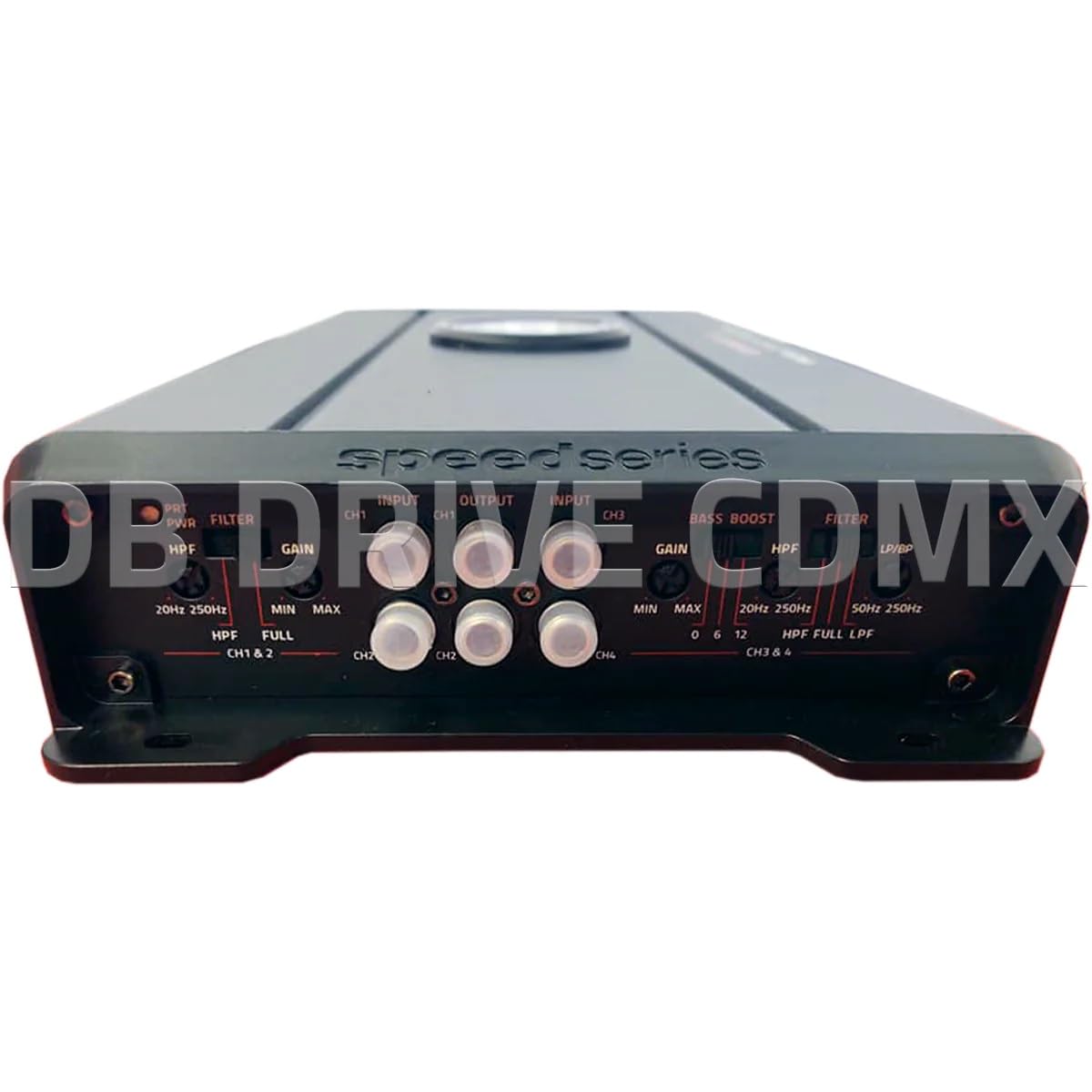
영상: Front panel of the DB Drive SPRO2500.4 amplifier showing input, gain, filter, and bass boost controls.
3.4 제어판 설정
The front panel features controls for fine-tuning the amplifier's audio output:
- Input (CH1/CH2, CH3/CH4): 헤드 유닛의 사전에서 RCA 케이블을 연결하세요.amp 이러한 입력에 대한 출력.
- Gain (CH1&2, CH3&4): 입력 감도를 조정합니다. amp앰프를 헤드 유닛의 출력 레벨에 맞게 조정하십시오. 게인을 최소로 설정한 후 왜곡 없이 원하는 볼륨이 나올 때까지 천천히 높이십시오.
- Filter (HPF/FULL/LPF): Selects the crossover mode for the respective channels.
- HPF(하이패스 필터): Allows frequencies above the set point to pass, blocking lower frequencies. Useful for full-range speakers.
- LPF(저역 통과 필터): Allows frequencies below the set point to pass, blocking higher frequencies. Useful for subwoofers.
- 가득한: Allows all frequencies to pass without filtering.
- HPF/LPF Frequency Controls: Adjusts the cutoff frequency for the selected HPF or LPF.
- 베이스 부스트 : Provides an adjustable bass enhancement at a specific frequency. Use sparingly to avoid distortion.
4. 사용 설명서
Once all connections are made and verified, you can power on your audio system. The amplifier will turn on automatically with your head unit via the remote wire.
- 초기 전원 켜기: 헤드 유닛을 켜세요. amp앰프의 전원 표시등에 불이 들어와야 합니다.
- 오디오 조정: Start with the head unit volume low. Gradually increase the volume and adjust the amplifier's gain controls until the desired sound level is reached without audible distortion.
- Crossover Tuning: Adjust the HPF and LPF settings according to your speaker types and desired sound characteristics. For full-range speakers, use HPF to remove low bass. For subwoofers, use LPF.
- 베이스 부스트 : If desired, slowly increase the bass boost control to enhance low frequencies. Overuse can lead to distortion and potential speaker damage.
5. 유지관리
The DB Drive SPRO2500.4 amp증폭기는 장기간 성능을 보장하기 위해 최소한의 유지 보수만 필요합니다.
- 청소: 주기적으로 닦아주세요 amp부드럽고 마른 천으로 기기 외부를 닦으세요. 강한 화학 물질이나 연마성 세척제는 사용하지 마세요.
- 통풍: 다음을 확인하세요. amp증폭기의 냉각 핀은 적절한 열 방출을 유지하기 위해 먼지와 이물질이 없도록 관리됩니다.
- 연결 확인: 배선 연결부의 조임 상태와 부식 여부를 주기적으로 점검하십시오. 연결이 헐거우면 성능 저하 또는 손상이 발생할 수 있습니다.
6. 문제 해결
문제가 발생하면 amp증폭기 관련 일반적인 문제점 및 해결 방법은 다음과 같습니다.
| 문제 | 가능한 원인 | 해결책 |
|---|---|---|
| 전원 없음 / Amplifier가 켜지지 않습니다 | 퓨즈가 끊어졌거나, 전원/접지/리모컨 전선이 느슨하거나, 리모컨 켜기 신호에 결함이 있습니다. | Check in-line fuse near battery. Verify all power, ground, and remote connections are secure. Test remote wire for 12V when head unit is on. |
| 소리가 출력되지 않음 | RCA cables disconnected, speaker wires disconnected or shorted, gain set too low, head unit volume too low. | Check RCA input connections. Verify speaker wiring for proper polarity and no shorts. Increase gain and head unit volume. |
| 왜곡된 소리 | 게인이 너무 높게 설정되었거나, 크로스오버 설정이 잘못되었거나, 스피커가 손상되었거나, 접지 연결이 불량한 경우입니다. | Reduce gain. Adjust HPF/LPF settings. Inspect speakers for damage. Ensure ground connection is solid. |
| Amp리파이어 과열 | 환기가 불충분하고, 임피던스가 너무 낮으며, 출력이 장시간 높게 유지되는 경우. | 주변에 적절한 공기 흐름을 확보하세요. amplifier. Verify speaker impedance meets specifications. Reduce volume or allow amp냉각시키는 lifier. |
If these steps do not resolve the issue, contact DB Drive customer support or a qualified car audio technician.
7. 사양
The following table details the technical specifications for the DB Drive SPRO2500.4 amp정수기:

영상: Detailed specifications sheet for the DB Drive SPRO2500.4 amp리퍼.
| 특징 | 사양 |
|---|---|
| Ampliifier 클래스 | A/B 클래스 |
| 채널 | 4채널 |
| Output Power (RMS @ 14.4VDC, 2Ω) | 4 x 500W |
| Output Power (RMS @ 14.4VDC, 4Ω) | 4 x 250W |
| Output Power (RMS @ 14.4VDC Bridged) | 2 x 1000W |
| 전원 공급 장치 입력 Voltage | 12.0VDC ~ 14.8VDC |
| THD (100Hz @ 1Ω) | 0.04% |
| Frequency Response (3dB) | 20Hz - 250Hz |
| Damping Factor (1KHz @ 4Ω) | 100 |
| S/N Ratio (as weighted @ 1 Volt) | 99데시벨 |
| 입력 감도 | .20mV - 5.0V RMS |
| 최소 부하 임피던스 | 2Ω |
| 입력 | RCA에서 사전 |
| 크로스오버 필터 기울기 | 12데시벨 |
| Crossover Filter Range in Mono | 24데시벨 |
| Channel 1-2 HPF Range | 20Hz - 250Hz |
| Channel 3-4 HPF Range | 20Hz - 250Hz |
| Channel 3-4 LPF/BPF Range | 50Hz - 250Hz |
| Selectable Bass Boost CH 1-2 or 3-4 | 0 - 6dB - 12dB |
8. 보증 및 지원
DB Drive products are designed and manufactured to the highest quality standards. For specific warranty information, please refer to the warranty card included with your product or contact your authorized DB Drive dealer.
고객 지원:
For technical assistance or support, please contact:
DB Research L.L.P
302 한모어산업단지
Harlingen, TX 78550 USA
전화: 877-787-0101
Local: 956-421-4513